
ELECTRICIAN GUIDE
How to make an electrician website — that fills your calendar, not just exists.
Services, pricing, emergency callouts, Google reviews — laid out in the order future customers actually scan. We'll walk through the 5 platform-agnostic steps and honestly compare the 5 most popular ways to build an electrician site, from generic builders to field-service platforms.
Free to build · No credit card · Pay when you publish
30 secto a complete electrician site
Services + quote formbuilt into every template
$0to preview your full site
5 buildershonestly compared below
REAL ELECTRICIAN SITES
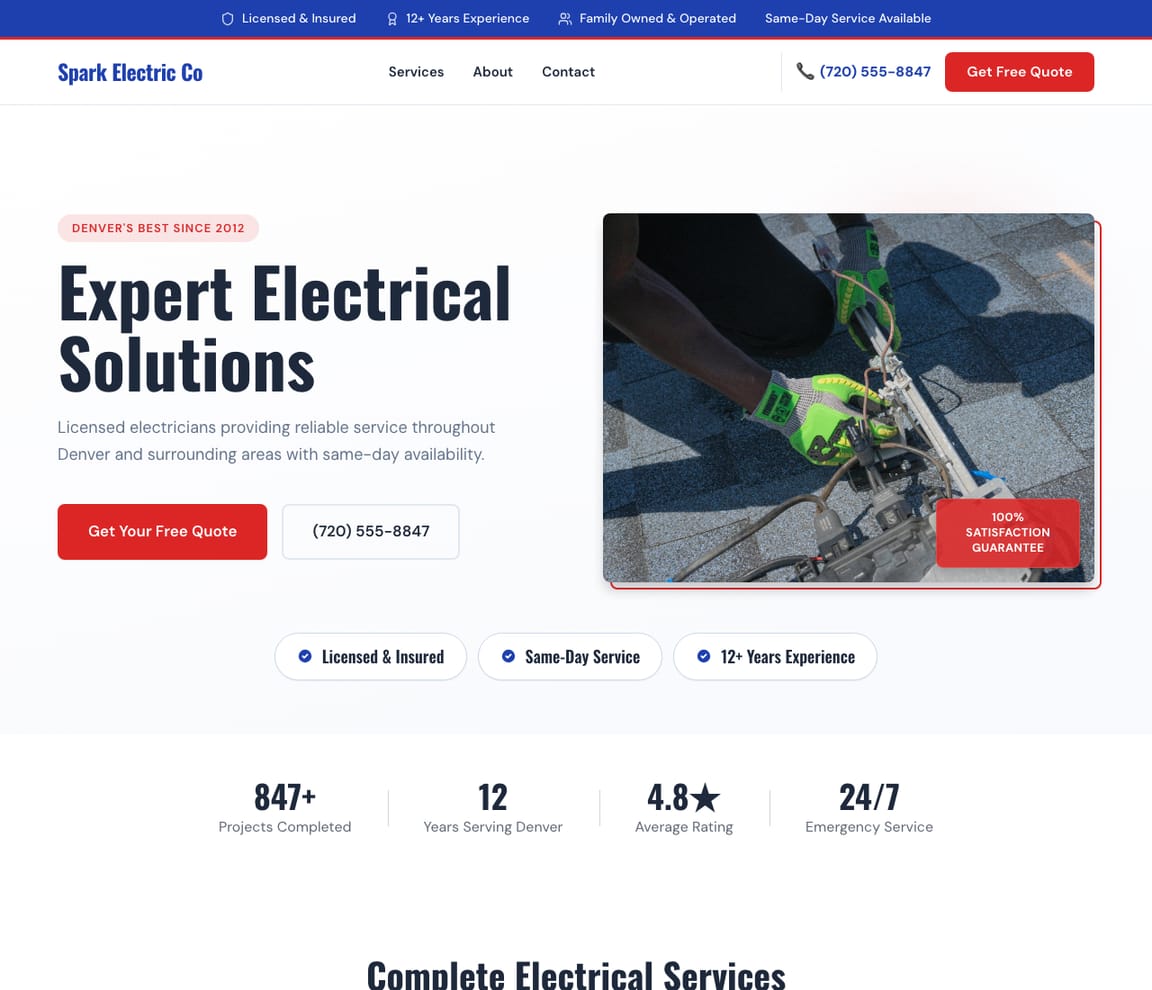
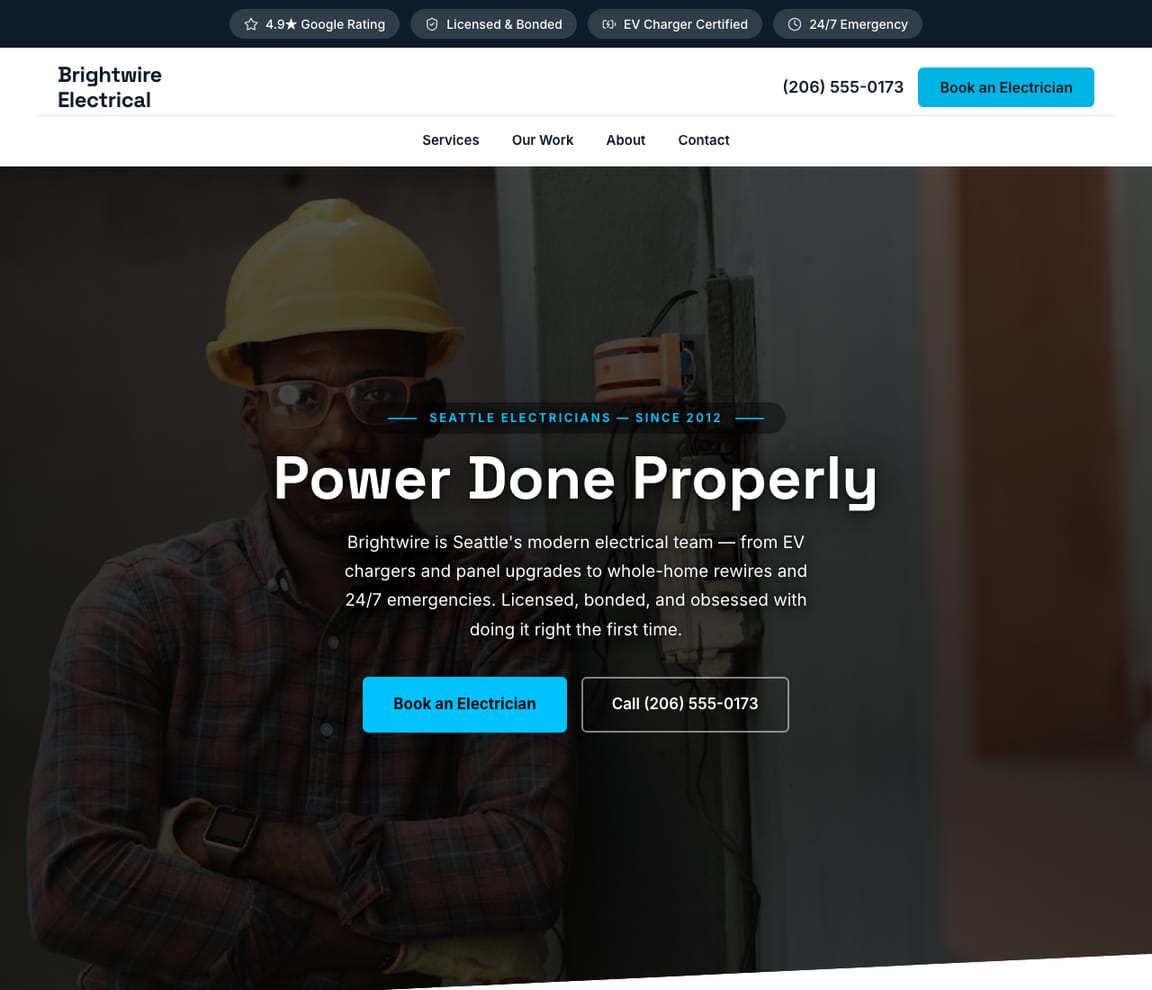
Electrician websites built by Zarla AI.
Three styles for three kinds of electrical businesses — modern residential, bold commercial, and trust-led service. Pick the one closest to your work and Zarla customizes the layout, copy, and photos in 30 seconds.
HONEST COMPARISON
The five most popular ways to build an electrician website
Quick heads-up: we make Zarla. We've put it #1 below — and we've listed the catch on every option, including ours. Pick the one that fits your business. If you want to skip the comparison, the Build button up top takes you straight to it.
- 1
Zarla
Best forElectricians who want a complete site — services, trust strip, quote form, gallery — in 30 seconds, then a publish button when they're ready to take inbound leads.
Features- One sentence in, full electrician site out in ~30 seconds (services, trust signals, quote form, gallery)
- Edit anything by typing: "Add a smart-home install page," "Show same-day pricing," "Replace the hero photo with my van"
- Built-in quote form + click-to-call phone + Google Maps on every template
- 3 electrician templates covering modern residential, bold commercial, and trust-led service
- Free to build and preview the full site (no time limit)
- Custom domain + integrated CRM and bookings on Premium
The CatchTry Zarla free — see your site in 30 seconds →Free covers the full build and preview on a Zarla subdomain. Publishing to your own domain — and unlocking integrated CRM, bookings, and scheduling beyond the basic form — needs Premium. If you just want to see how your electrician site would look before deciding, free is enough.
- 2
Wix
Best forElectricians who want a starter site fast and don't mind drag-and-drop refining everything after.
Features- AI builds a starter electrician site in 1-2 minutes from a description
- Multiple electrician templates with a full visual editor
- Wix Bookings add-on for scheduling (extra subscription)
- Free tier with a wixsite.com subdomain and Wix ads
The CatchThe free tier publishes — but the URL has "wixsite.com" in it and Wix ads on every page. Removing both with a custom domain requires the Light plan ($17/mo+); Wix Bookings adds another $20-30/mo on top.
- 3
Squarespace
Best forBrand-conscious electricians who want polished design defaults and a single paid plan that covers everything.
Features- Excellent design defaults — service templates look high-end on day one
- Native scheduling for consults and estimates
- Built-in client invoicing and basic CRM
- 14-day free trial; paid from day 15
The CatchNo permanent free tier. After 14 days you must pick a paid plan ($16/mo+) to keep your site live. If you're testing concepts or aren't ready to publish within two weeks, plan ahead.
- 4
Housecall Pro
Best forElectricians who want website + scheduling + invoicing + dispatch in one bundle and are happy to commit to the platform.
Features- Website included with the field-service platform subscription
- Native scheduling, dispatch, invoicing, and customer SMS in one app
- Built-in payments + financing options for customers
- Mobile app for field technicians
The CatchYou're buying a whole field-service platform, not just a website. Pricing starts at $79/mo for the smallest plan and scales with team size; the website is essentially free if you're already paying for Housecall Pro for scheduling, but you can't take just the website without the platform commitment.
- 5
Jobber
Best forEstablished service electricians and small teams who want a quote-to-invoice workflow tied into the marketing site.
Features- Website + quoting + scheduling + invoicing in one platform
- Online client hub for quote approval, payments, and history
- Mobile app for field updates and signatures on the spot
- Granular team scheduling and route optimization
The CatchLike Housecall Pro, you're buying the field-service platform — Jobber starts at $39/mo (Core) but the website + customer hub features require Connect ($129/mo) or Grow ($249/mo). Strong fit if you're already running a multi-truck operation; overkill if you're a one-electrician shop.
GET THE STRUCTURE RIGHT
What every electrician website needs — actually.
The single hardest part of an electrician site isn't the services list — it's getting a homeowner past the homepage and onto the phone (or into the quote form) within 10 seconds. Most electrician sites fail there because they read like brochures instead of one-tap booking flows.
A homeowner lands with one of three questions: Do they do what I need?, Are they actually licensed?, How fast can they get here?. Modern AI builders default to a structure that answers all three within 10 seconds — service tiles above the fold, the license number + years-in-business in the trust strip, and a visible phone number + quote form no matter how far down the page someone scrolls.
Roughly 97% of consumers search online for local services, and most decide within 30 seconds whether to call or scroll on. The basic SEO on the site (meta description with your service area, alt text on every gallery photo, a claimed Google Business profile) is what gets your phone to ring in the first place — emit it on day one or burn the inbound traffic.
- Service pages — one short page per major service (rewiring, panel upgrades, smart home, EV charger, emergency)
- Service area page — every city, ZIP, or neighborhood you cover; Google ranks by exact-match locality
- About + license info — your license number, certifications, insurance, and years in business in the trust strip
- Reviews / testimonials — embed your Google reviews (5+ if you have them); social proof is the #1 conversion lever
- Quote form + click-to-call — one tap from every page; ask only for name, address, and what they need
Google Search Console
1.4k Impressions
186 Clicks
#4.2 Avg position ↑
Google Business Profile
312 Reviews
4.9★ Rating
5 Shown on your site
An example for a made-up business: the figures are illustrative; yours come from your own Google account.
Common electrician-website mistakes to avoid
Every electrician portfolio site has the same five mistakes — and each one quietly costs calls. All are 1-edit fixes once you know to look for them.
- Phone number buried below the fold. A homeowner with a tripped breaker isn't reading paragraphs — they're scanning for the phone. Put a click-to-call link in the header AND the hero. Add it to the footer for desktop browsers that don't auto-detect numbers.
- No service area page. Google ranks local services by exact-match locality. A site that says "serving the Portland area" loses to a competitor whose service area page lists "Portland, Beaverton, Gresham, Tigard, Lake Oswego, Milwaukie, Hillsboro." One page, 5 minutes, real ranking impact.
- License number nowhere visible. Homeowners actively search for the license number before they call (and Google flags unlicensed electrical work as dangerous). Put your license number in the trust strip, the footer, and the About page. "Licensed Master Electrician — License #12345-EL" is a 12-word trust win.
- Generic "professional electrical services" copy. Every electrician says this. None of them rank. Be specific — "panel upgrades, EV charger installation, knob-and-tube rewiring, 24/7 emergency callouts." Specific services = specific rankings = qualified leads.
- No Google Business profile claimed. The website is half of getting found; the Google Business profile is the other half — especially for "electrician near me" searches, where the Map pack dominates the first screen. Claim it (free, 5 minutes), match the address and phone exactly to your website, and ask happy customers for reviews.
STEP-BY-STEP
How to make an electrician website in 5 steps
These steps apply to any website builder. With an AI builder like Zarla, most of them happen automatically — describe your work in one sentence and the site arrives with services, trust signals, and a quote form already wired up.
ONE SENTENCE IN
Describe your electrical business in one sentence
Niche, location, services. "Portland residential electrician — panel upgrades, EV chargers, and 24/7 emergency callouts." That sentence becomes the AI builder's input, or the brief you'll fill out in a template-based builder.
Describe your business
I run Lonsdale Electrical — licensed master electrician in Portland, Oregon. Residential rewiring, panel upgrades, and 24/7 emergency callouts.
AI BUILDS IT
Build the site (with AI, a template, or hire a designer)
AI builders like Zarla generate the full electrician site — services, trust strip, quote form, gallery, FAQ — in about 30 seconds. Template builders (Squarespace, Wix) start you in a pre-designed service-business template that you fill in. Hiring a designer takes 4-8 weeks and runs $2,500-$5,000.
Zarla AI
lonsdaleelectrical.com · 4 pages live
Describe any page you need…
YOUR SERVICES, YOUR PRICES
Fill in services, service areas, and license info
This is the part that's yours regardless of which builder — your services and your service area. List each major service on its own page (better for SEO than one long list). Add every city / ZIP you cover. Add your license number, insurance, and years in business in the trust strip. Specific = ranks.
✗ Generic
“Welcome to our website. We provide professional electrical services to clients in the Portland area.”
✦ Zarla
“Portland's most trusted electrician since 2012. Licensed, insured, 24/7. Same-day callouts guaranteed.”
GOOGLE + LOCAL SEO
Set up quote forms, click-to-call, and basic local SEO
Decide how customers reach you — built-in quote form (works for most), Calendly for booked consults, or a 24/7 emergency dispatch number for the urgent crowd. Add click-to-call to every page header. Connect your Google Business profile so "electrician near me" searches find you. Add alt text on every photo (Google indexes them for image search).
Live
1.4k
Impressions
186
Clicks
4.2 ↑
Avg Position
“panel upgrade portland” — 340 impressions, 0 clicks. Add this to your homepage.
“emergency electrician near me” — you jumped from pos. 18 → 7 this month.
Synced
312
Reviews
4.9
Rating
5
On your site
ONE CLICK LIVE
Publish — and start the inbound calls
One button. Your electrician site goes live with SSL, mobile-responsive output, and meta tags already in place. Now do the things that need doing once: claim your Google Business profile (free, 5 min), submit the URL to Google Search Console, and ask 3 of your last happy customers to leave a Google review. Reviews + GBP + a published site is the local-SEO trifecta.
Live
Lonsdale ElectricalGet Free Quote
Portland's Most Trusted Master Electrician
Licensed · Insured · 24/7 Emergency · 12+ Years
DIY OR HIRE?
Should you build this yourself — or hire someone?
Three honest answers for three different electricians.
If you're an established electrician with steady work, hire a website company or an AI builder + an evening of your time. A $2,500-$5,000 agency build takes 4-8 weeks; an AI builder takes 30 seconds and an hour of refining copy. Both beat the alternative — not having a site, which costs you a couple of leads a week you don't even know you're missing.
If you're a new electrician hustling for leads, DIY with AI today. You need the phone to ring this week, not in 6 weeks. The free tier of an AI builder shows you what your site would look like before any commitment, and you can publish to a custom domain for $16-25/mo when the leads start coming in.
If you run a multi-truck operation, the website is the smaller half — the bigger half is dispatch, scheduling, and invoicing. A field-service platform (Housecall Pro, Jobber, ServiceTitan) bundles the website with the operational software you're going to buy anyway. Less optimal as a marketing site, materially better for running the business.
- Established + steady work: AI builder (Zarla) or hire ($2.5-5k once)
- New + hustling: DIY with AI today — free to preview, publish when leads start
- Multi-truck operation: field-service platform (Housecall Pro, Jobber, ServiceTitan) — website + dispatch in one
- Anyone: the worst option is not having a site at all — Google sends "electrician near me" calls to whoever has one
“Change the hero image to show a residential rewiring job and make the headline more urgent”
Updated! I've changed the hero image and updated the headline to “Need an Electrician Now? Same-Day Service Guaranteed.”
Change colorsAdd testimonialsEdit services
Want to see what your electrician site looks like — before you commit?
One sentence about your business. We'll generate the full site — services, trust strip, quote form — in 30 seconds. Free preview, no card.
Free to build and preview · No credit card · Pay only to go live
Common questions about electrician websites
Can I make an electrician website for free?
Yes — on a builder subdomain. Wix and Google Sites both let you publish an electrician site at $0. The trade-off is the URL has the builder's name in it (e.g. lonsdale.wixsite.com), which feels less professional to homeowners who are about to invite a stranger into their home to do electrical work. Zarla offers a different model: free covers the entire build and preview process — every service page, the full design, the quote form, the AI editing — but publishing the site, on any address, requires Premium. If you just want to see your full site before committing, Zarla's free tier goes the furthest.
How much does an electrician website cost?
DIY with a builder: $0 to $30 per month. AI builders include hosting, SSL, and electrician templates in their paid plans — Wix and Squarespace run $16-$25/mo — plus $10-15/yr for the domain. Field-service platforms (Housecall Pro $79/mo, Jobber $39-$249/mo) bundle the website with scheduling + invoicing — the website is essentially free if you're already paying for the platform. Hiring a designer: $2,500-$5,000 one-time plus monthly hosting. For a one-electrician shop hustling for leads, the AI-builder route is the right answer; for a multi-truck operation, the field-service platform usually wins.
What pages does an electrician website need?
Five must-haves: a homepage with services, phone, and trust strip (license number, years, insurance); one page per major service (rewiring, panel upgrades, smart home, EV chargers, emergency); a service area page listing every city / ZIP you cover (huge for local SEO); an About page with your license info and one paragraph about you; and a quote / contact page with form + click-to-call. Optional: a blog (helpful for SEO over time but requires writing); a gallery of past work (helpful for trust if photos are real); a reviews page (or embedded Google reviews on the homepage).
How do I get my electrician business found on Google?
Three pieces, in this order: (1) Publish a site with the SEO basics — meta description naming your service area, alt text on every photo, structured data (Zarla emits this automatically; most builders do). (2) Claim your Google Business profile — free, 5 minutes, and the #1 source of "electrician near me" calls. Match your business name, address, and phone exactly to what's on your website. (3) Earn reviews. 5-10 Google reviews is the difference between page-2 and page-1 in the Map pack for most local trade verticals. For the deeper SEO guide, see /best-website-builder-for-seo.
Should I list my prices on my electrician website?
Yes for service-call minimums; "starting at" for everything else. "Service-call minimum: $89" qualifies homeowners in or out before they pick up the phone — saves you the calls that aren't going to convert. Full project pricing (panel upgrades, rewiring, EV chargers) is rightfully a quote, but a "starting at" range ("Panel upgrades from $1,800") still beats silence. Vague pricing filters out 60-80% of qualified leads who assume they can't afford you.
Do I need a field-service platform like Housecall Pro?
Depends on volume. If you're running 1-2 trucks and managing the calendar yourself, a simple website + Google Calendar + Square for payments will do fine. If you're running 3+ trucks with multiple technicians, the dispatch + routing + payments + customer SMS bundle on Housecall Pro or Jobber saves real hours every day. Many established electricians run both: Zarla (or Squarespace) for the marketing site + Housecall Pro / Jobber for the back office. The website is the storefront; the field-service platform is the warehouse.
How long does it take to build an electrician website?
Under a minute for the first version, then as long as you want to spend editing. AI builders generate a complete starter site (services, trust strip, quote form) in 30 seconds to 2 minutes. Zarla aims for under 30 seconds. The editing afterwards — adding your real services, service areas, license number, photos of your van and recent jobs — is where most electricians spend an hour or two. A complete site ready to publish takes 1-2 hours total; an agency build takes 4-8 weeks.
Which electrician website builder should I try first?
Start with Zarla. It's the only option where you can see your full electrician site — your services, your service area copy, your trust strip — before creating an account or paying. Type one sentence about your business; the site appears in about 30 seconds. If it's the right fit, upgrading to Premium publishes it to your own domain with CRM + bookings. If not, you've spent zero dollars and learned something about what your site COULD look like — useful whichever builder you eventually pick.
Type one sentence. See your electrician site live in 30 seconds.
Free to build and preview the full site. Publish to your own domain on Premium — with custom CRM, bookings, and Google integration built in.
Free to build and preview · No credit card · Pay only to go live