AI VISIBILITY GUIDE
How to get your business recommended by ChatGPT
When someone asks ChatGPT or Google's AI for "the best plumber in Concord," a short list of businesses comes back — and yours is either on it or it isn't. This is the honest playbook: where those answers actually come from, the six levers that move them, and how to check where you stand today. No promises, no made-up scores.
Free · No sign-up to check · Under two minutes
WHAT WE FOUND
Where ChatGPT's local recommendations actually come from
We run these questions for Zarla customers — "best electrician in Portland," "best bathroom renovator in Concord" — on ChatGPT and Google's AI, and read the answers word for word. A clear pattern holds.
The lists are built from Google's business data. When ChatGPT names local businesses, the names arrive with star ratings and review counts that match those businesses' Google Business Profiles — the same information you see on Google Maps. Ask the same city-level question twice and you get substantially the same list; the sentences around it change, the businesses mostly don't. That stability is what you'd expect from answers grounded in a business directory rather than invented on the spot. (We unpack the full mechanism in Does ChatGPT recommend local businesses?)
There is no ChatGPT business listing to buy. No registration form, no paid placement, no "submit your business" page. ChatGPT doesn't sell positions in its answers — it reads the same public signals your customers can see: your Google presence, your reviews, and your website. That's good news, because every one of those is something you control.
One more honest finding: coverage thins out below city level. Ask for a specific suburb and ChatGPT often names nobody at all, while the city-level question reliably produces a list. If the assistants go quiet on your suburb, that's the current state of their coverage — not a verdict on your business.
We've also published the wide-angle version: the AI Visibility Index — 1,851 top-ranked US businesses checked across ten trades and ten cities, with the methodology attached.
- Business names in ChatGPT's local answers carry Google ratings and review counts — the lists are grounded in Google Business Profile data
- City-level questions return stable lists; the prose around them varies run to run
- Suburb-level questions often name nobody — coverage thins below city level
- There's no paid placement and no ChatGPT business directory to join
- Google's AI shows the same pattern — its local answers are cards carrying each business's website and address
THE SIX LEVERS
What actually moves AI recommendations
No secret tricks — the assistants read public signals. What our checks actually observe is the named businesses carrying their Google ratings and review counts into the answers; these six levers are what that mechanism rewards.
- A claimed, complete Google Business Profile. Categories, services, areas served, hours, photos — the data ChatGPT's lists are grounded in.
- Steady, recent reviews. The named businesses carry visible ratings and review counts. A handful of recent reviews beats a big pile of old ones going stale.
- A website AI can actually read. Your services, suburbs, and hours in plain text on real pages — not locked inside images or a PDF.
- The same name, address, and phone everywhere. Mismatched details across Google, your site, and directories make it harder for an assistant to be sure who you are.
- A page for each service you want to be found for. "Best emergency electrician" needs a page that says you do emergency work — in those words.
- A dated record of where you stand. AI answers change week to week. One check is a snapshot; a dated series is the truth.
STEP-BY-STEP
How to get your business recommended by ChatGPT, in 6 steps
The order matters: check first, then work the levers, then check again. Each step is something you can do this week — none of it requires an agency.
Check where you stand today
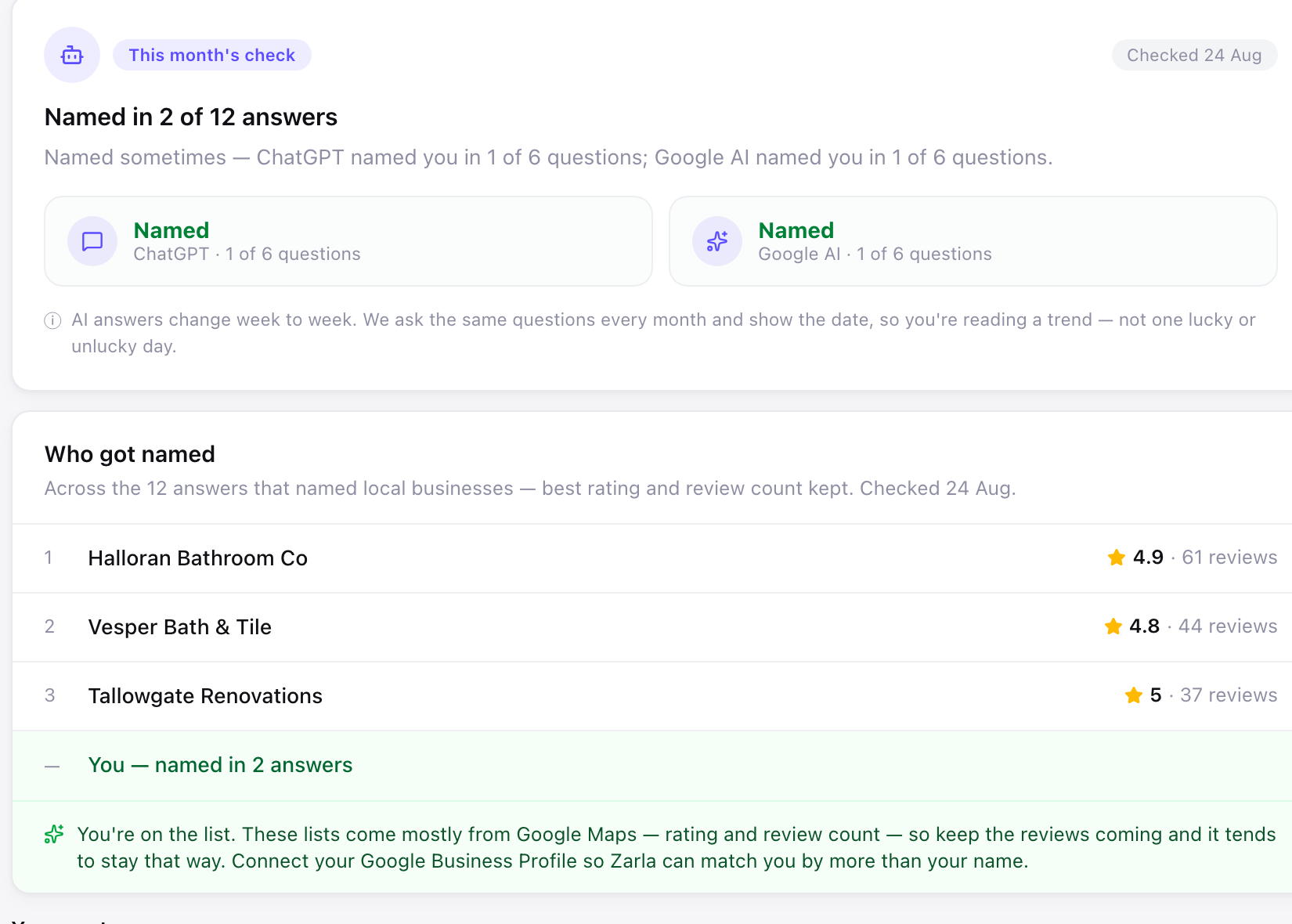
Before changing anything, find out what the assistants say right now. Ask ChatGPT the question your customers ask — "best [your trade] in [your city]" — and read who gets named. Zarla's free AI Visibility Checker runs the same question on ChatGPT and Google's AI and shows you the answers word for word, dated, with who got named instead of you.
Claim and complete your Google Business Profile
This is the single highest-leverage move. The lists ChatGPT returns are grounded in Google's business data — so a missing or half-empty profile keeps you out of the running before anything else is judged. Claim it (free), then fill every field: categories, services, areas served, hours, and real photos.
Build a steady review habit
The businesses we see named carry visible ratings and review counts into the answers. Ask every happy customer for a Google review — text them the link the same day, while the job is fresh. Reply to what comes in. Recency matters: a review a week for six months reads very differently from fifty reviews that all stopped last year.
Put the answer on your website
When an assistant checks who you are, your website is the evidence. Say what you do and where you do it in plain text: a page per service, the suburbs you serve, your hours and phone number as text a machine can read. Modern builders emit the technical layer — clean structure, meta tags, structured data — automatically; Zarla sites ship it on every publish, with AI crawlers welcomed rather than blocked.
Make your details match everywhere
Your name, address, and phone number should be identical on your Google Business Profile, your website, and every directory that lists you. Mismatches make it harder for an assistant to be confident it's the same business — and confidence is what gets a name onto a short list. Fix the stragglers once; it holds.
Re-check on a schedule — and keep the dates
AI answers move. The same question can name you this month and not next, which is why a single check proves very little either way. Re-check every few weeks, keep the dates, and watch the trend: named more often, less often, or holding. That trend — not any one run — is the honest measure of progress.
Want to know where you stand right now?
We ask ChatGPT and Google's AI the question your customers ask, and show you exactly what comes back — who got named, their ratings, and the one thing most likely to move it.
Free to build and preview · No credit card · Pay only to go live
Common questions about getting recommended by ChatGPT
Make the public signals it reads unmissable: a claimed, fully completed Google Business Profile, a steady stream of recent Google reviews, and a website that states your services and service area in plain text. ChatGPT's local answers are grounded in Google's business data — in our checks, the businesses it names carry their Google ratings and review counts — so the work that gets you mentioned is the same work that wins local search. Start by checking what it says about you today, then fix the biggest gap first.
You can't, in the advertising sense — there's no ad product, no paid placement, and no way to buy a spot in ChatGPT's recommendations. What you can do is earn a place in the answers it builds from public data: your Google Business Profile, your reviews, and your website. Treat "promotion" on AI assistants the way you'd treat word of mouth — you can't purchase it, but you can absolutely become the business it keeps bringing up.
The same six levers work across assistants, because they read the same public signals: complete your Google Business Profile, keep reviews coming, publish a website that answers the customer's question in plain text, keep your name-address-phone identical everywhere, give each service its own page, and re-check your standing on a schedule. Google's AI additionally shows local answers as cards carrying each business's website and address — so a real website isn't optional there; it's part of the card. Zarla's free checker covers both assistants in one run.
Two different questions hide in this one. As a tool you use — writing quotes, drafting emails, summarising paperwork — yes, plenty of businesses get real value from it. As a channel that sends you customers, that's what this guide covers: people increasingly ask ChatGPT who to hire, and it names specific businesses in its answers. The first is about your productivity; the second is about your visibility. Both are worth having, but only the second puts your name in front of someone else's customer.
No. There's no listing service, no submission form, and no paid placement in ChatGPT's local recommendations — and anyone selling "guaranteed AI placement" is selling something that doesn't exist. Nobody can promise you a spot in an AI answer, because nobody outside these companies controls what the models say. What's real is the boring part: the public signals the assistants read are all things you can improve for free, starting with your Google Business Profile.
Honestly: there's no fixed timeline, and we won't invent one. AI answers change week to week, coverage varies by area, and a suburb-level question can name nobody at all even when the city-level one produces a list. What our checks show is the named businesses carrying strong Google ratings and review counts into the answers — so the practical approach is to work the levers, re-check every few weeks with the date on each check, and judge by the trend across months rather than any single run.
Yes — and Google has said so in its own documentation: there are no special requirements for AI Overviews and AI Mode, because they're built on Google's core search ranking systems. The same levers — Business Profile, reviews, a readable website, consistent details — feed both. The one difference worth knowing: Google's AI shows local answers as business cards that include your website and address, so a business without a real website has nothing to put on the card. We cover the specifics in our guide to showing up in Google AI Overviews.
Ask it the question your customers ask — "best [your trade] in [your city]" — from a logged-out browser, and read who comes back. Or let Zarla do it properly: the free AI Visibility Checker asks ChatGPT and Google's AI, matches the answers against your Google Maps listing so a same-name business is never mistaken for you, and shows you the result word for word with the date on it. Takes about two minutes, no sign-up — our two-minute check guide walks through both the manual and tool versions. If you're named, you'll see where — and if you're not, you'll see who was, and why.
Common mistakes when chasing AI recommendations
Five ways businesses burn months on this — each one avoidable.
- Buying "guaranteed AI placement." Nobody can promise you a spot in an AI answer — there's no ad product and no listing to buy. Agencies selling guarantees are selling a coin flip with your money on it.
- Chasing tricks before basics. Special AI files and prompt hacks are noise next to what our checks actually observe carrying into the answers: Google ratings and review counts from the businesses' own profiles. Work the mechanism those point at — a complete profile, recent reviews, a readable website — before any trick. (The llms.txt file is the most-hyped example — we wrote up why it won't get you recommended — and the wider acronym fog gets the same plain-English treatment in our AI SEO decoder.)
- Locking your services inside images and PDFs. A menu-as-photo or a services-list-as-PDF is invisible to the systems deciding whether you match the question. Plain text on real pages, always.
- Panicking over a single check. AI answers vary run to run. One "not named" is a data point, not a verdict — the dated trend across weeks is the measure that means something.
- Ignoring it entirely because it's new. The questions are already being asked. Every check we run reads the actual answers customers get today — and the businesses being named are collecting those customers now, not in some future where this is settled.
Give the assistants a website they can actually read.
Zarla builds your site from one sentence — services in plain text, structured data and clean meta on every page, AI crawlers welcomed on every publish. Free to build and preview; Premium publishes to your own domain.
Free to build and preview · No credit card · Pay only to go live