PHOTOGRAPHY GUIDE
How to make a photography website — that books shoots, not just shows them.
Portfolio, services, pricing, contact — laid out in the order future clients actually scan. We'll walk through the 5 platform-agnostic steps and honestly compare the 5 most popular ways to build a photography site, from generic builders to photographer-only platforms.
Free to build · No credit card · Pay when you publish
30 secto a complete photography site
Portfolio + bookingbuilt into every template
$0to preview your full site
5 buildershonestly compared below
REAL PHOTOGRAPHY SITES
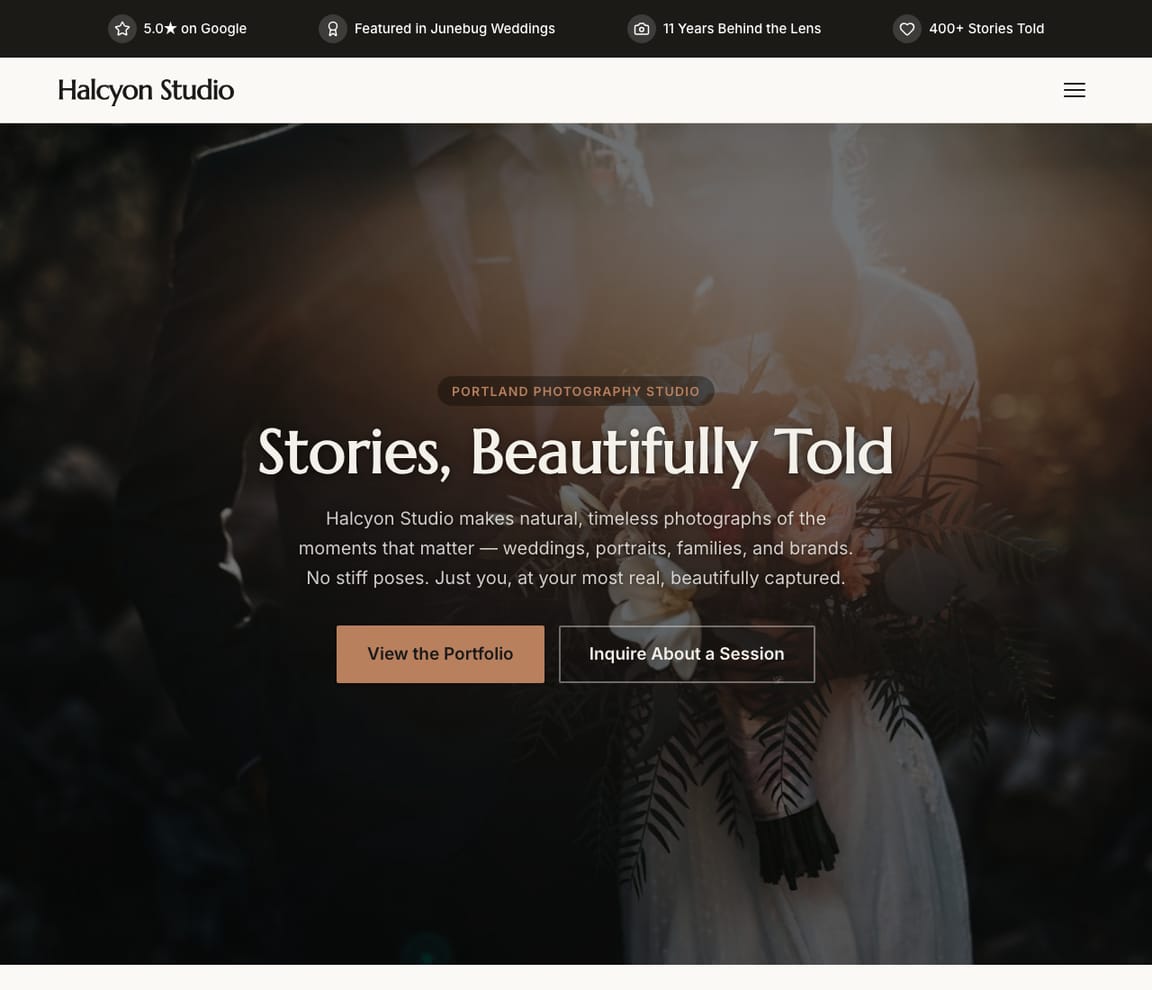
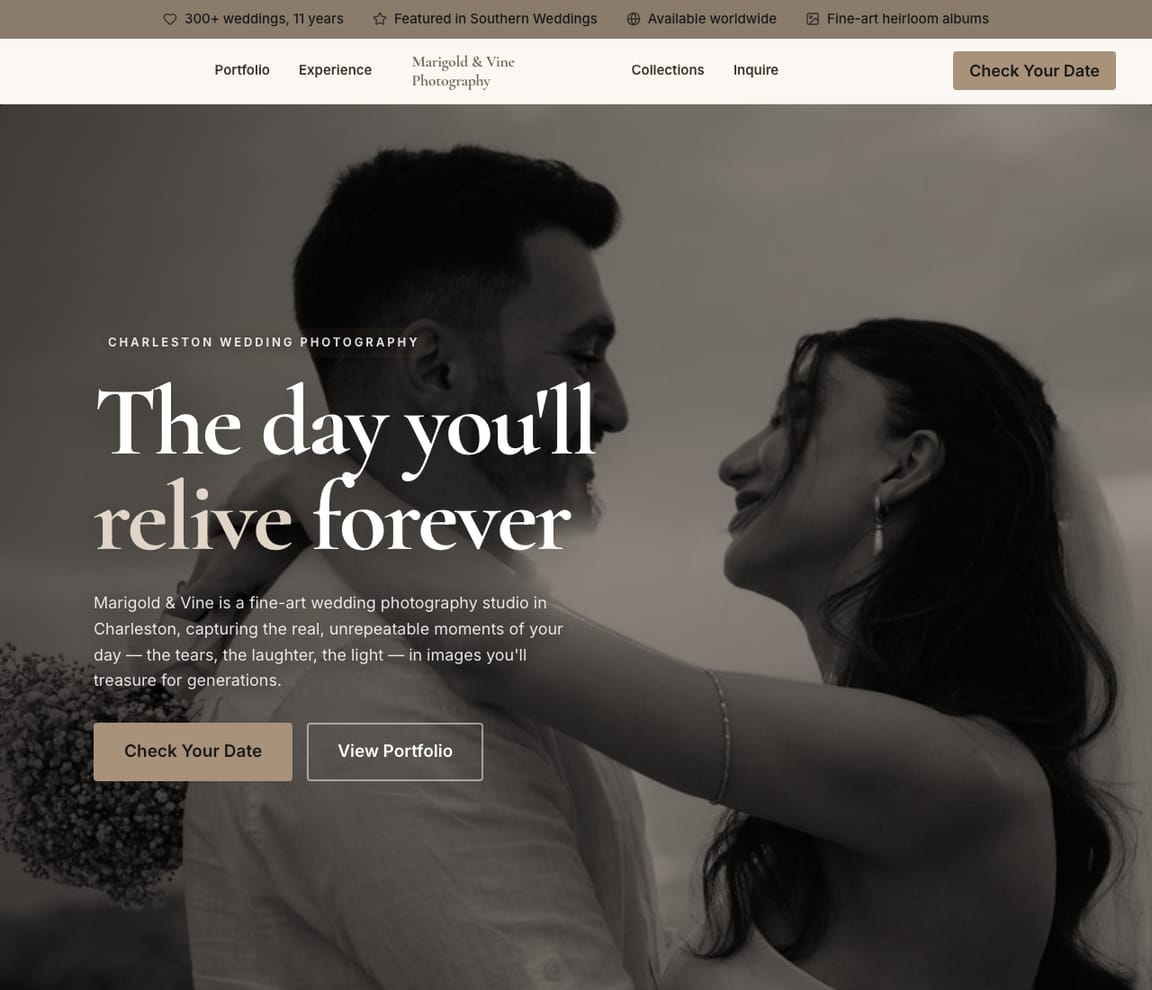
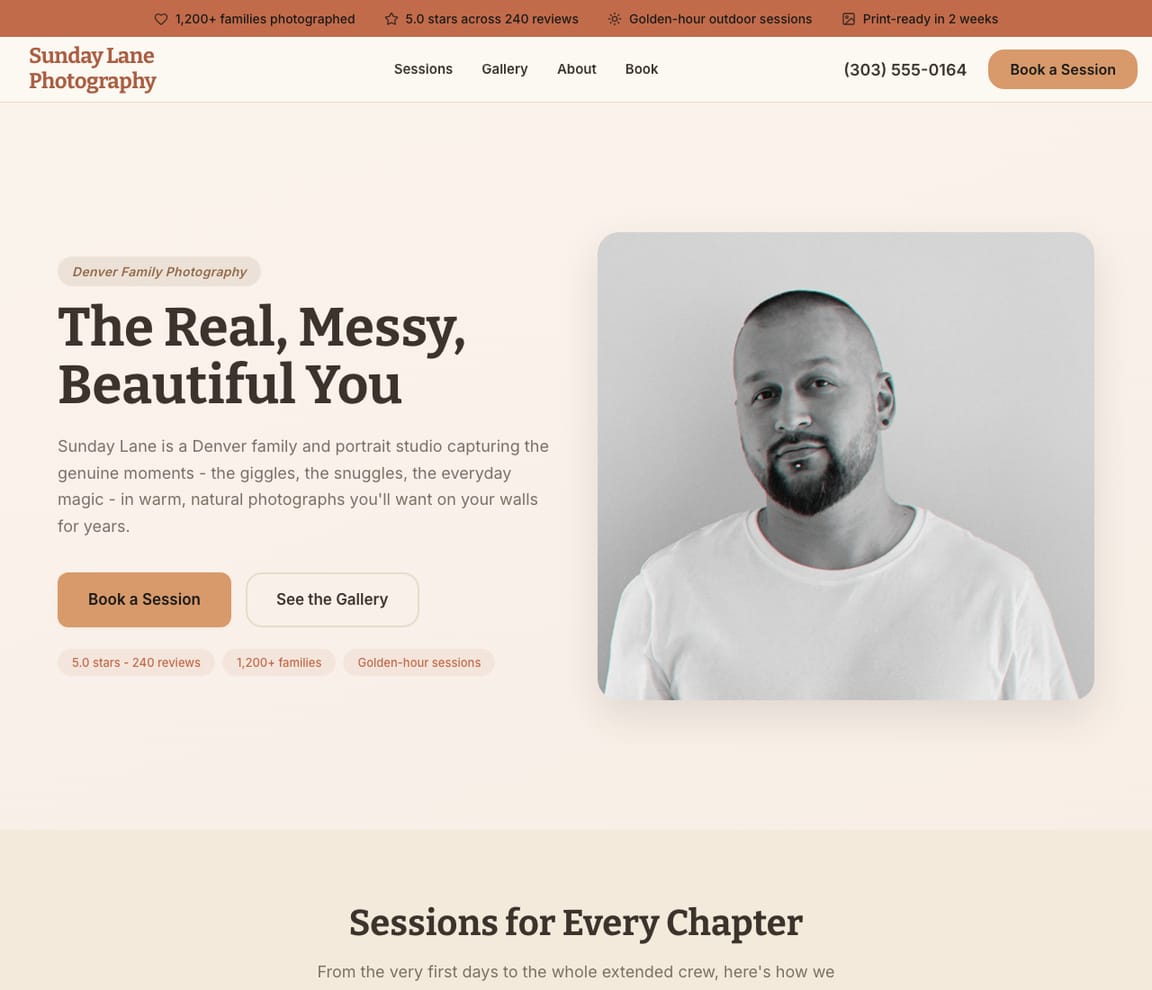
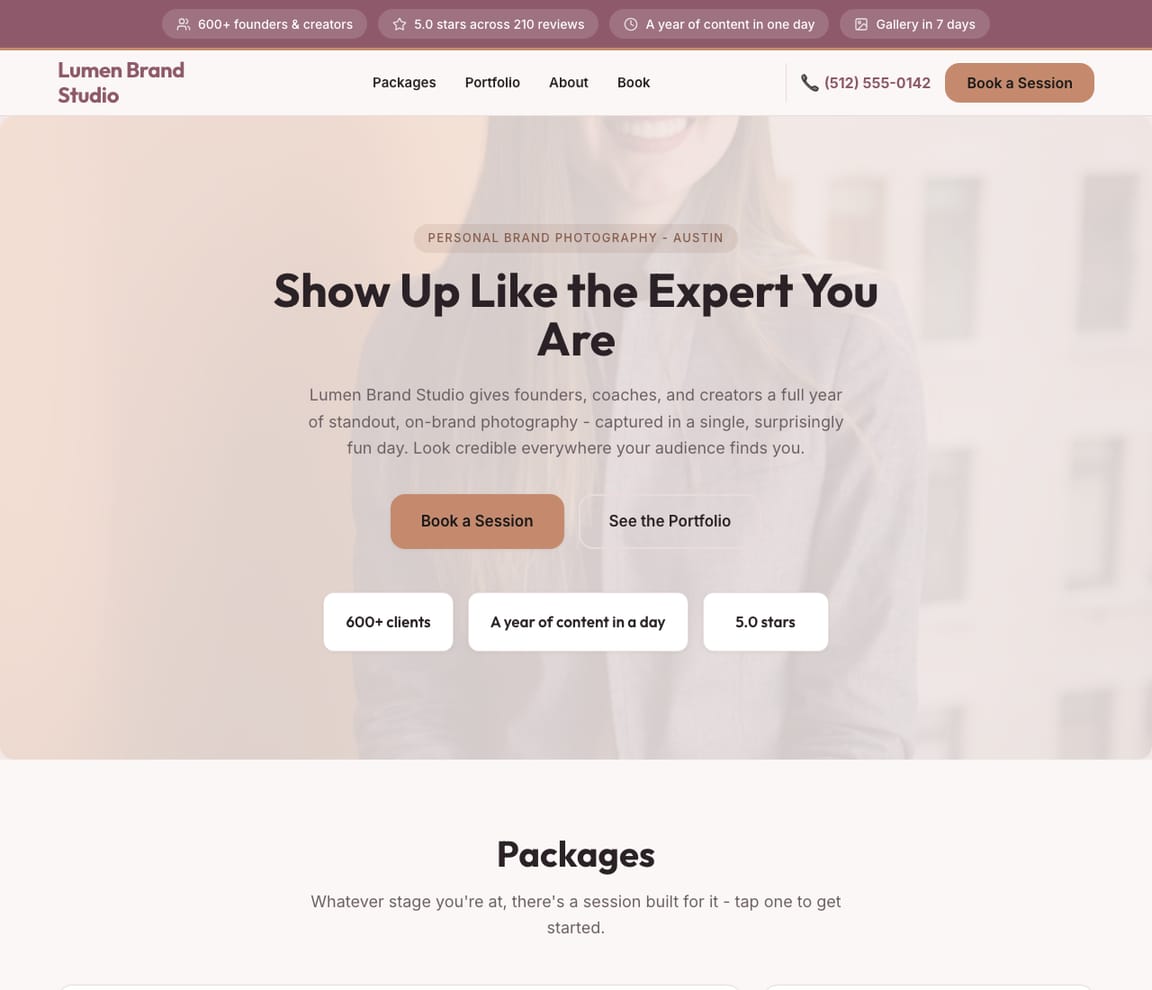
Photography websites built by Zarla AI.
Every niche has its own visual language. Pick the one closest to your work and start there — Zarla customizes the layout, photography choices, and copy to your business in 30 seconds.

HONEST COMPARISON
The five most popular ways to build a photography website
Quick heads-up: we make Zarla. We've put it #1 below — and we've listed the catch on every option, including ours. Pick the one that fits your work. If you want to skip the comparison, the Build button up top takes you straight to it.
- 1
Zarla
Best forPhotographers who want a complete site — portfolio, services, pricing, contact, blog — in 30 seconds, then a publish button when the client work is ready to launch.
Features- One sentence in, full photography site out in ~30 seconds (portfolio, about, services, inquiry form)
- Edit anything by typing: "Add a wedding portfolio section," "Replace the hero with my latest shoot," "Show package pricing tiers"
- Built-in inquiry form + booking flow on every template
- 9 photographer templates covering portrait, wedding, family, brand, commercial, real estate, food, fashion, boudoir
- Free to build and preview the full site (no time limit)
- Custom domain + integrated CRM and bookings on Premium
The CatchTry Zarla free — see your site in 30 seconds →Free covers the full build and preview on a Zarla subdomain. Publishing to your own domain — and unlocking integrated CRM, bookings, and client galleries beyond the basic form — needs Premium. If you just want to see how your photography site would look before deciding, free is enough.
- 2
Squarespace
Best forBrand-conscious photographers who want polished design defaults and time to refine every page in a visual editor.
Features- Excellent design defaults — photography templates are designer-led
- Native print-on-demand integrations (prints, frames) via partner apps
- Built-in scheduling for sessions and consultations
- 14-day free trial; paid from day 15
The CatchNo permanent free tier. After 14 days you must pick a paid plan ($16/mo+) to keep your site live. If you're testing concepts or aren't ready to publish within two weeks, plan ahead.
- 3
Pixieset
Best forWorking photographers who want client galleries, proofing, and online print sales bundled into the same platform as the marketing site.
Features- Industry-leading client gallery + proofing workflow
- Built-in print sales and downloads (commission split)
- Calendar booking for sessions and consults
- Free plan publishes a website + small client gallery
The CatchThe free plan publishes a Pixieset-subdomain site but caps galleries to 3 sets and 1.5GB of client-image storage. Working photographers will need a paid plan ($15-$50/mo+) within the first month. The platform is specialized — if you want a generic CRM and full bookings on the same plan, look elsewhere.
- 4
Adobe Portfolio
Best forPhotographers already paying for Creative Cloud who want the simplest possible portfolio in 10 minutes.
Features- Free with any Creative Cloud subscription (Photography plan is $10/mo)
- Behance integration — your existing work surfaces automatically
- Lightroom album sync for live portfolio updates
- Clean, responsive templates focused on imagery
The CatchTiny template library, almost no SEO controls, and no native booking, pricing, or inquiry flow — it's a portfolio, not a business site. Pair with a separate booking tool (Calendly, HoneyBook) for client management.
- 5
Wix
Best forPhotographers who want a starter site fast and don't mind drag-and-drop refining everything after.
Features- AI builds a starter photography site in 1-2 minutes from a description
- 800+ photography templates with a full visual editor
- Native booking + e-commerce add-ons (extra subscription)
- Free tier with a wixsite.com subdomain and Wix ads
The CatchThe free tier publishes — but the URL has "wixsite.com" in it and Wix ads on every page. Removing both with a custom domain requires the Light plan ($17/mo+); booking and commerce add another $20-30/mo on top.
GET THE STRUCTURE RIGHT
What every photography website needs — actually.
The single hardest part of a photography site isn't the photos — it's getting visitors past the homepage and into the inquiry form. Most photography sites fail there because they're built like art galleries instead of business sites.
A photography visitor lands with one of three questions: Do they shoot what I need?, Is the style right for me?, What does it cost?. Modern AI builders default to a structure that answers all three within 10 seconds — a large hero image of your strongest work above the fold, clear navigation to the niches you cover, and a visible "Inquire" button no matter how far down the page someone scrolls.
What ELSE belongs on a photography site? A short About page with your photo and one sentence on your shooting style (not four paragraphs about your camera). A pricing or packages section — even with "starting at" figures, since vague pricing kills inquiries. And, if you take on enough volume, a client area for proofing and downloads.
- Portfolio gallery — your strongest 30-40 images, organized by niche (not by client or date)
- Services & pricing — at minimum a "starting at" figure; vague pricing filters out qualified leads
- About + bio — short, one photo of you, one sentence on your style and what you love shooting
- Contact + inquiry form — visible from every page; ask only for date, location, and rough budget
- Client area (optional) — proofing + downloads if you do enough volume; skip if it's complexity you don't need yet
Google Search Console
1.4k Impressions
186 Clicks
#4.2 Avg position ↑
Google Business Profile
312 Reviews
4.9★ Rating
5 Shown on your site
An example for a made-up business: the figures are illustrative; yours come from your own Google account.
Common photography-website mistakes to avoid
Every photography portfolio site has the same five mistakes — and each one quietly costs inquiries. Each is a 1-edit fix once you know to look for it.
- No pricing visible. "Inquire for pricing" feels exclusive; in practice it filters out 60-80% of qualified leads who assume they can't afford you. A "starting at" figure or a short packages page solves it.
- Portfolio organized by client or date. Visitors don't care which wedding was last week — they care whether you shoot the style they want. Organize by niche (Weddings / Families / Brands) or by genre (Editorial / Documentary / Branding).
- No alt text on portfolio images. Photography sites have hundreds of images and zero searchable text. Add alt text describing the scene, location, and (if a client shoot) the niche — Google indexes them for image search.
- Autoplay music on the site. Yes, this is still on dozens of photography sites. Don't. Mobile visitors leave immediately.
- Inquiry form asks for everything. Name, email, phone, date, location, budget, services interested in, where they heard about you, file uploads of references — each extra field drops conversion ~5%. Ask for date + location + rough budget. Get the rest in the follow-up email.
STEP-BY-STEP
How to make a photography website in 5 steps
These steps apply to any website builder. With an AI builder like Zarla, most of them happen automatically — describe your work in one sentence and the site arrives with portfolio, services, and an inquiry form already wired up.
ONE SENTENCE IN
Describe your photography in one sentence
Niche, style, location. "Brooklyn-based portrait and brand photographer, editorial style, half my work is small-business owners." That sentence becomes the AI builder's input, or the brief you'll fill out in a template-based builder.
Describe your business
I run Studio Lumin — portrait and brand photographer in Brooklyn. Editorial style, mostly small-business owners and family sessions on weekends.
AI BUILDS IT
Build the site (with AI, a template, or hire a designer)
AI builders like Zarla generate the full photography site — portfolio sections, about, services, inquiry form, blog scaffolding — in about 30 seconds. Template builders (Squarespace, Pixieset) start you in a pre-designed photography template that you fill in. Hiring a designer takes 3-6 weeks and runs $2,500-$8,000.
Zarla AI
studiolumin.com · 4 pages live
Describe any page you need…
YOUR WORK, YOUR PRICING
Upload your portfolio and fill in services + pricing
This is the part that's yours regardless of which builder — your photos and your prices. Upload your best 30-40 images organized by niche. Write a one-sentence intro per niche. Add "starting at" pricing per package — even rough figures dramatically improve qualified inquiries.
✗ Generic
“Welcome to my website. I offer professional photography services and would love to work with you on your next project.”
✦ Zarla
“Brooklyn-based portrait + brand photography, editorial style. Sessions starting at $850. Book a discovery call.”
INQUIRIES + SEO
Set up the inquiry flow and basic SEO
Decide how clients book — built-in inquiry form (works for most photographers), Calendly or HoneyBook for booked sessions, or a "request a consult" flow for higher-end work. Add alt text to every portfolio image (Google indexes them). Connect your Google Business profile so local clients can find you.
Live
1.4k
Impressions
186
Clicks
4.2 ↑
Avg Position
“portrait photographer brooklyn” — 340 impressions, 0 clicks. Add this to your homepage.
“small business photographer near me” — you jumped from pos. 18 → 7 this month.
Synced
312
Reviews
4.9
Rating
5
On your site
ONE CLICK LIVE
Publish — and add a few finishing touches
One button. Your photography site goes live with SSL, mobile responsive layout, and meta tags already in place. Now add the things that need doing once: claim and connect your Google Business profile, link your Instagram in the footer, and put a "Now booking Spring 26" banner on the homepage.
Live
Studio LuminBook a Session
Brooklyn Portrait + Brand Photography
Editorial style · Sessions from $850 · Now booking Spring 26
PORTFOLIO ORGANIZATION
How should you organize your portfolio — by niche, recent work, or named projects?
Three honest answers for three different photographers.
If you shoot multiple niches (portrait + brand + weddings), organize by niche. Visitors land asking "Do they shoot what I need?" — niche navigation answers that in one tap. The downside: your strongest work might span niches and feel diluted. Solve it with a homepage hero that's your single strongest frame regardless of niche.
If you shoot one niche but a wide style range, organize by recent work — a single chronological portfolio shows growth and proves you're actively booking. Works best for wedding-only or brand-only photographers where the niche is already implied.
If you do mostly client work with private galleries, organize by named projects (case studies). Each project becomes its own page with the brief, the shoot story, and the final imagery. Better for brand and editorial photographers where the work-behind-the-work is part of the pitch.
- Multi-niche: organize by niche (Weddings / Families / Brands)
- Single niche + style range: organize by recent work, chronological
- Brand + editorial: organize by named projects with shoot story
- Always: lead the homepage with your strongest single frame, regardless of how the rest is organized
“Update the portfolio with recent shoots and add a mini-session offer”
Updated! I've updated the portfolio and added the offer with headline “Capture the Moment. Mini Sessions Available.”
Change colorsAdd testimonialsEdit services
Want to see what your photography site looks like — before you commit?
One sentence about your photography. We'll generate the full site — portfolio sections, services, inquiry form — in 30 seconds. Free preview, no card.
Free to build and preview · No credit card · Pay only to go live
Common questions about photography websites
Can I make a photography website for free?
Yes — on a builder subdomain. Wix, Pixieset, and Adobe Portfolio (with Creative Cloud) all let you publish a photography site at $0. The trade-off is the URL has the builder's name in it (e.g. yoursite.wixsite.com or studiolumin.pixieset.com), which feels less professional to potential clients. Zarla offers a different model: free covers the entire build and preview process — every portfolio section, the full design, the inquiry form, the AI editing — but publishing the site, on any address, requires Premium. If you just want to see your full site before committing, Zarla's free tier goes the furthest.
How much does it cost to have a photography website?
DIY with a builder: $0 to $30 per month. Photographer-specific platforms (Pixieset, Pic-Time, Zenfolio) start free and run $15-$35/mo with client galleries included. Generic builders (Squarespace, Wix) run $16-$30/mo for the photography-relevant plans plus $10-15/year for the domain. Hiring a designer: $2,500-$8,000 one-time plus monthly hosting. Adobe Portfolio is free with any Creative Cloud subscription. For most working photographers, the right answer is one specialized + one generic — Pixieset for client galleries, Zarla or Squarespace for the marketing site.
What website do most photographers use?
Squarespace and Pixieset dominate. Squarespace is the default for wedding, portrait, and brand photographers who want a single polished marketing site. Pixieset is the default for working photographers who need client galleries, proofing, and print sales bundled in. Adobe Portfolio is a strong third — free with Creative Cloud and used heavily by editorial and commercial photographers. Zarla is the only option where you can see your full site — every section, your industry-specific copy, real photography for your niche — before any decision, in about 30 seconds.
What should be on a photography website?
Five things: a portfolio gallery (organized by niche), services and pricing (even rough "starting at" figures), a short About with your photo and a sentence on your style, a visible inquiry form, and basic SEO (alt text on every image, location in the meta description, Google Business profile claimed). That's the floor. Optional additions: client galleries via Pixieset / Pic-Time, a blog for SEO (especially for wedding photographers), and a print store. Skip splash pages, autoplay music, and "Inquire for pricing" on services.
How do I organize my photography portfolio?
Depends on your work. Multi-niche photographers should organize by niche so visitors can answer "do they shoot what I need?" in one tap. Single-niche photographers (wedding-only, brand-only) should organize by recent work — chronological proves you're actively booking. Brand and editorial photographers should organize by named projects with the shoot story. Always lead the homepage with your strongest single frame, regardless of how the rest is organized.
Should I include pricing on my photography website?
Yes — at minimum a "starting at" figure. "Inquire for pricing" feels exclusive but in practice filters out 60-80% of qualified leads who assume they can't afford you. A short packages page (Session: starting at $850 / Half-day: starting at $1,600) qualifies prospects in. The full quote can still come in the follow-up email. The only photographers who genuinely should hide pricing are luxury wedding photographers at the high end ($15k+) where the conversation IS the value proposition — and even then, a "weddings start at $X" line keeps the inquiry flow honest.
Do I need a separate client gallery platform like Pixieset?
Depends on volume. If you're shooting fewer than 5-10 client sessions per month, a simple password-protected gallery on your main site is enough (Zarla, Squarespace, and Wix all support this). If you're shooting 15+ sessions per month, the proofing + favoriting + print-sales workflow on Pixieset or Pic-Time will save you 2-3 hours per client. Most working photographers run both: Zarla (or Squarespace) for the marketing site + Pixieset for client delivery. The two surfaces don't compete — they serve different jobs.
Which photography website builder should I try first?
Start with Zarla. It's the only option where you can see your full photography site — your niche-specific layout, real photography for your category, your color palette — before creating an account or paying. Type one sentence about your work; the site appears in about 30 seconds. If it's the right fit, upgrading to Premium publishes it to your own domain with custom CRM, bookings, and image storage. If not, you've spent zero dollars and learned something about what your site COULD look like — useful whichever builder you eventually pick.
Type one sentence. See your photography site live in 30 seconds.
Free to build and preview the full site. Publish to your own domain on Premium — with custom CRM, bookings, and image storage built in.
Free to build and preview · No credit card · Pay only to go live