Inspiration · Christmas Lighting

The Best Christmas Lighting Website Examples, Explained

Looking for Christmas lighting website examples? These 14 are the strongest we found — Christmas Northwest's 'Booking Christmas 2026' strip above its logo, LIT Christmas Lights' starting price in the very first line, My Christmas Light Pro's 'Try The AI Visualizer' button beside its quote button — plus four Zarla Christmas light installation designs you can build in about 30 seconds, each with a note on the move that turns a visitor into a booked install. Christmas lighting is a short, crowded season, so the best sites here say when you're booking, roughly what it costs and that takedown is handled before anyone has to pick up the phone.

Real sites + designs you can build with Zarla — free to build and preview, no credit card

What makes a great Christmas lighting website

The best Christmas lighting websites are built for a homeowner deciding in a hurry, usually in October or November and usually on a phone. Watch how early each one answers the four questions that decide the booking. When: Christmas Northwest names the season it's booking above its logo, Holiday Lights Phoenix warns that spots fill up fast, and Kessick's hero form asks for an install window. How much: LIT Christmas Lights posts a starting price in its top bar, and Renfrow prices rooflines by the foot. What's included: Holiday Lights Phoenix ticks off commercial-grade LED lights, custom design, free bulb replacement, takedown and storage in one strip. What it will look like: My Christmas Light Pro offers an AI preview of the customer's own house. Then notice the photographs — the strongest heroes show lit homes that look like the customer's street, from Phoenix palm trunks wrapped in white to a snow-covered New Jersey colonial.

Christmas Northwest website — Residential Installer design example
Real site · Seattle, WA
  • Residential Installer
  • Elegant
  • Navy + red

Christmas Northwest: The booking season announced above the logo

Christmas Northwest looks like a company that has already lit your street. The hero is one photograph — a stone-and-shingle craftsman house at dusk with every gable, post and path traced in warm white, a lit wreath in the top window and a single green-lit tree by the porch — and the copy sits quietly on the darker left side in a classic serif: the company name as the headline, then 'Custom lighting for your home. Installation to takedown, all handled.' Above the logo, a navy strip reads 'Booking Christmas 2026', so the season is open before anyone reads a word. A red 'Get a Quote' button sits beside a plain 'See our work' link, a '4.9 / 92 Google reviews' line follows, and a customer quote opens the band underneath. Christmas Northwest shows how much a calm page and one great photo can carry.

  • 'Booking Christmas 2026' in the strip above the logo
  • One finished house, lit end to end, as the whole hero
  • 'Installation to takedown, all handled' — the service in five words

Steal this: Put the season you're booking in the top strip — 'Booking Christmas 2026' tells a visitor you're open before they have to ask.

Visit Christmas Northwest

Opens a similar Zarla design you can make yours.

My Christmas Light Pro website — Christmas + Permanent Lighting design example
Real site · Cartersville, GA
  • Christmas + Permanent Lighting
  • Festive
  • Navy + red + green

My Christmas Light Pro: An AI preview of your own house, one click from the hero

My Christmas Light Pro answers the question every homeowner has before paying for an install — what will my house actually look like? — with a button. Under the headline 'Northwest Georgia's #1 Christmas & Permanent Lighting Company', set in white over a photograph of a big white house with every tree wrapped in lights and reindeer on the lawn, two buttons sit side by side, both edged in dashed borders: a red 'Get My Quote' and a white 'Try The AI Visualizer'. The second is the move worth copying — a customer who has seen a preview of their own roofline has much less left to imagine before saying yes. Snowflakes drift over the photo, 'Permanent' has its own place in the menu for the year-round product, and the phone number sits in a white, green-dashed button beside a solid green 'Contact Us'. My Christmas Light Pro sells the picture before the price.

  • 'Try The AI Visualizer' sits beside the quote button
  • Christmas and permanent lighting named in one headline
  • Dashed-border buttons, like a strand of lights

Steal this: Give visitors a way to see their own house lit — a preview tool, or a photo mock-up you send back with the quote — before you ask them to book.

Visit My Christmas Light Pro

Opens a similar Zarla design you can make yours.

LIT Christmas Lights website — Residential Installer design example
Real site · Short Hills, NJ
  • Residential Installer
  • Warm
  • Navy + gold

LIT Christmas Lights: A starting price in the very first line

LIT Christmas Lights puts a number where most installers put nothing. The thin dark bar at the top of the page reads 'Serving North Jersey · Pricing Starts at $999', with the price picked out in gold, so a visitor knows the budget before they've reached the logo. Below the menu, a row of red, gold, green and white bulbs hangs across the full width like a strand along a gutter, and the hero underneath is a snow-covered colonial at dusk, a wreath in every window. A pill reads 'North Jersey · Fully Insured · Since 2022', the headline 'Professional Christmas Decoration Installation Services' is set in a warm serif, and the paragraph opens on the customer's problem: 'The holidays are busy enough without adding ladder work to your to-do list.' LIT shows that a posted starting price sorts the serious inquiries from the curious before anyone calls.

  • 'Pricing Starts at $999' in the top bar
  • A full-width strand of colored bulbs under the menu
  • The paragraph opens on the ladder-work problem

Steal this: Post your starting price — one line like 'Pricing Starts at $999' saves you the calls from people expecting a $200 job.

Visit LIT Christmas Lights

Opens a similar Zarla design you can make yours.

Holiday Lights Phoenix website — Residential Installer design example
Real site · Phoenix, AZ
  • Residential Installer
  • Bold
  • Red + black

Holiday Lights Phoenix: Book-early urgency in a bar above the menu

Holiday Lights Phoenix uses the top of the page to say the one thing that matters in October: the calendar is filling. A red bar above the header carries a single pill — 'Book early — spots fill up fast' — and the hero speaks to its own market. The headline is the search phrase in tall condensed capitals, 'Professional Christmas Light Installation in Phoenix, AZ', over a stucco house with palm trunks wrapped in warm white, a photograph that tells a desert homeowner this crew knows their kind of yard. A second line promises 'Skip the ladders. Skip the stress. We handle everything.', and a red strip along the bottom of the hero ticks off what every install includes: commercial-grade LED lights, custom design, free bulb replacement, takedown and storage. 'Cost Estimator' gets its own place in the main menu. Holiday Lights Phoenix shows that a deadline and a local photo outsell adjectives.

  • 'Book early — spots fill up fast' above the logo
  • Palm trunks wrapped in lights — a photo only the desert could use
  • A red strip lists what every install includes
Visit Holiday Lights Phoenix

Opens a similar Zarla design you can make yours.

Kessick Christmas Lights — Booking-Led Installer website design you can build with Zarla
Build this with Zarla
  • Booking-Led Installer
  • Modern
  • Navy + amber

Kessick Christmas Lights: Hold your install date from the hero

Kessick Christmas Lights is the Zarla design for a company whose calendar is the product. The hero is a booking form rather than a brochure: four fields across a white bar — name, mobile, address and an 'Install window' drop-down — and a burnt-orange 'Hold My Date' button, over a dim photograph of a house lit at night. Above the headline, two pills set the season and the territory: '2026 install dates open' and 'Frisco · Prosper · McKinney · Plano'. The headline is the search phrase plus the city, 'Christmas Light Installation in Frisco, TX', with the service in warm amber, and the sub-line gives the reason to book now — 'Pick your install window now, before the November rush' — ahead of a trust line with a 4.9 Google rating, lights included, fully insured and free takedown. Kessick suits an installer whose crews book out every year.

  • An install-window drop-down inside the hero form
  • 'Before the November rush' gives the reason to book now
  • '2026 install dates open' in a pill above the headline
See this template
Trimlight website — Permanent Lighting design example
Real site
  • Permanent Lighting
  • Modern
  • Multicolor + green

Trimlight: The phone app as the hero, not the house

Trimlight sells permanent lighting, and its hero shows the part of the product most installers never photograph: the phone app. On the right, a large phone mock-up displays the controller — a grid of color swatches, a 'CHRISTMAS' pattern of red, green and white, an animation menu set to 'STATIC', and brightness and speed sliders. On the left, the headline reads 'Permanent Holiday Lighting for Your City' in light white type over a roofline outlined in red and green at sunset, and the sub-line answers the main objection to permanent lights in one sentence: a patented channel design so the lights are 'hardly noticeable during the day and bright and beautiful at night.' A rainbow gradient runs along the top utility bar, beside links such as Request A Brochure and Become a Dealer. Trimlight shows that when control is the benefit, you show the controls.

  • A phone mock-up of the color app fills half the hero
  • The daytime-visibility objection answered in the sub-line
  • A rainbow gradient along the utility bar hints at every color
Visit Trimlight

Opens a similar Zarla design you can make yours.

Christmas Decor website — National Installer Network design example
Real site
  • National Installer Network
  • Elegant

Christmas Decor: A family watching their own house light up

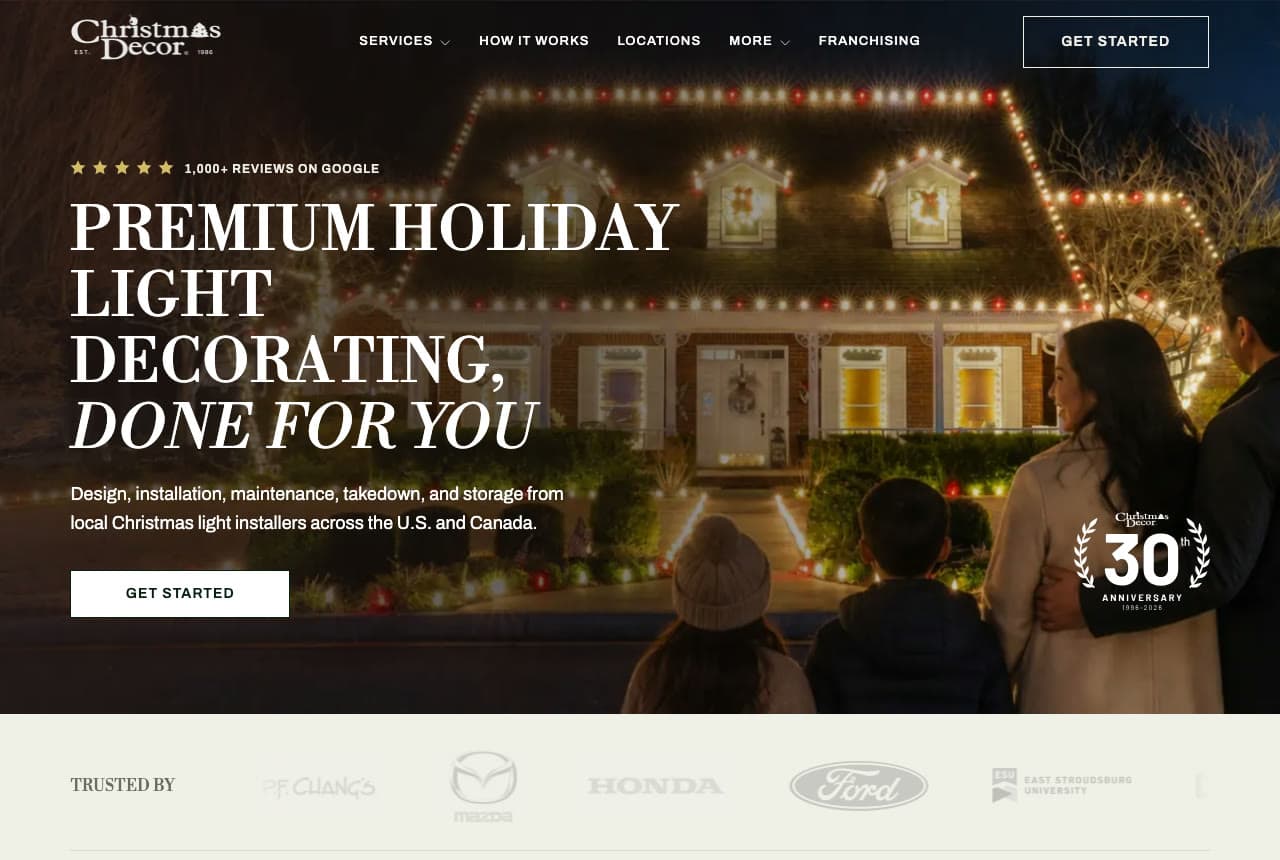
Christmas Decor is a network of local installers across the U.S. and Canada, and its hero sells the feeling rather than the service. The photograph is taken from behind a family — two children in winter coats, one in a knit hat, their parents arm in arm — looking at a brick house traced in white and red bulbs along every gable and dormer. Over it, a capitalized serif headline reads 'Premium Holiday Light Decorating, Done For You', with the last three words in italics, and a row of gold stars reports '1,000+ reviews on Google'. The sub-line lists the whole season — design, installation, maintenance, takedown and storage — and a laurel badge in the corner marks the company's 30th anniversary. Under the hero, a pale band of grayed-out client logos, among them P.F. Chang's, Mazda, Honda and Ford, quietly covers the commercial side. Christmas Decor shows the customer the moment they're paying for.

Visit Christmas Decor

Opens a similar Zarla design you can make yours.

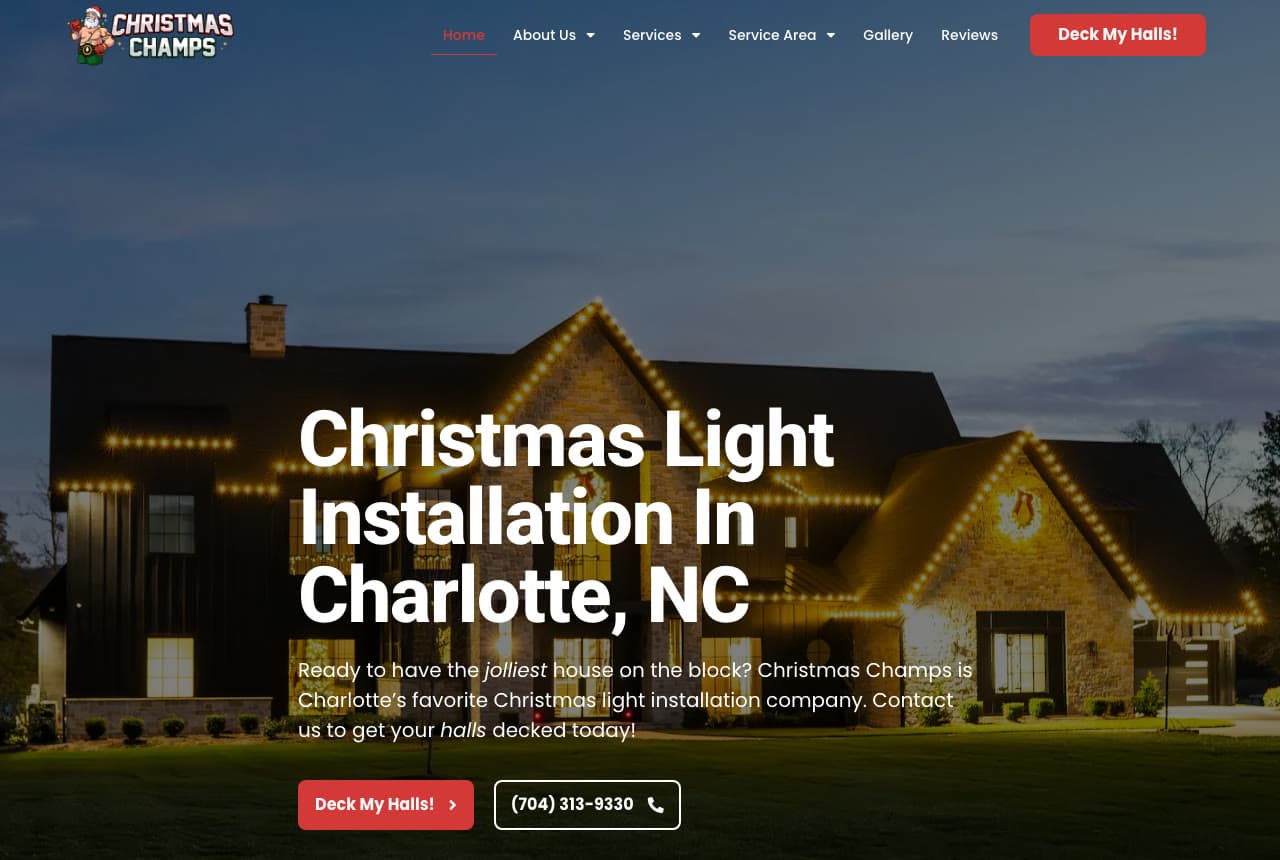
Christmas Champs website — Residential Installer design example
Real site · Charlotte, NC
  • Residential Installer
  • Playful

Christmas Champs: 'Deck My Halls!' on the main button

Christmas Champs has more fun with its words than any installer here, and it does it without giving up the search phrase. The headline is the plain keyword — 'Christmas Light Installation In Charlotte, NC' in heavy white type — set low over a dusk photograph of a large stone-and-board house with every roofline traced in warm white bulbs. The sub-line then turns playful, with two italic words doing the work: 'Ready to have the jolliest house on the block?' and 'get your halls decked today!' The buttons follow through: the red one, in the header and again in the hero, says 'Deck My Halls!' instead of 'Get a Quote', and the outlined one beside it is simply the phone number, (704) 313-9330. Christmas Champs shows a button can carry the brand's personality while the headline carries the search.

Visit Christmas Champs

Opens a similar Zarla design you can make yours.

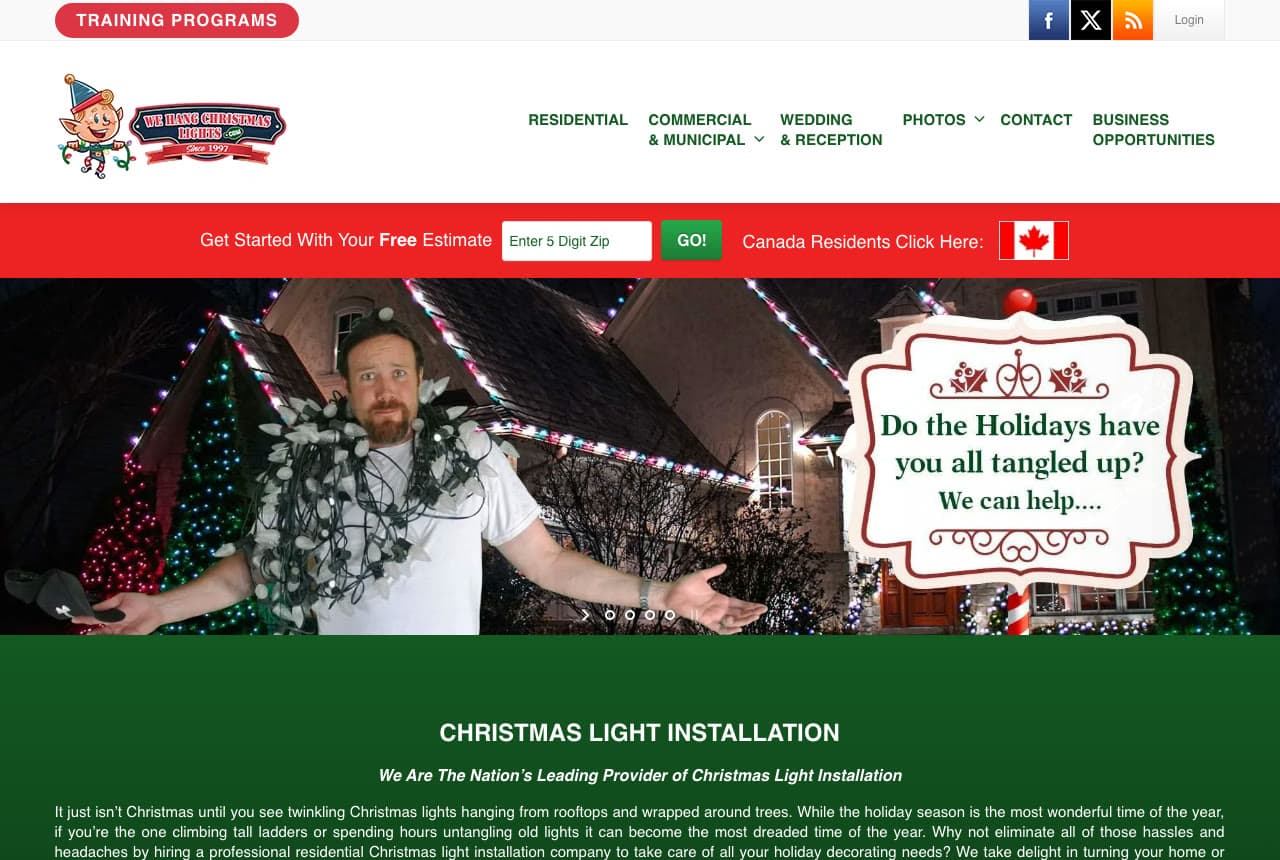
We Hang Christmas Lights website — National Installer Network design example
Real site
  • National Installer Network
  • Playful

We Hang Christmas Lights: A tangled-up homeowner as the hero

We Hang Christmas Lights opens on a joke every customer recognizes: a man in front of a house with red, white and blue rooflines and green-lit trees, with a strand of bulbs wound around his neck and shoulders, arms spread in defeat, beside a scrolled sign asking 'Do the Holidays have you all tangled up? We can help....' It's the frustration that makes people hire an installer, shown instead of described. Above the photo, a red bar starts the estimate with one field — 'Enter 5 Digit Zip' and a green 'GO!' button — with a separate link for Canadian residents. The menu splits the market the way the business does: Residential, Commercial & Municipal, Wedding & Reception, Business Opportunities. An elf mascot and 'Since 1997' sit in the logo. We Hang shows how far a little humor about the customer's problem can go — and how short the first step of an estimate can be.

Visit We Hang Christmas Lights

Opens a similar Zarla design you can make yours.

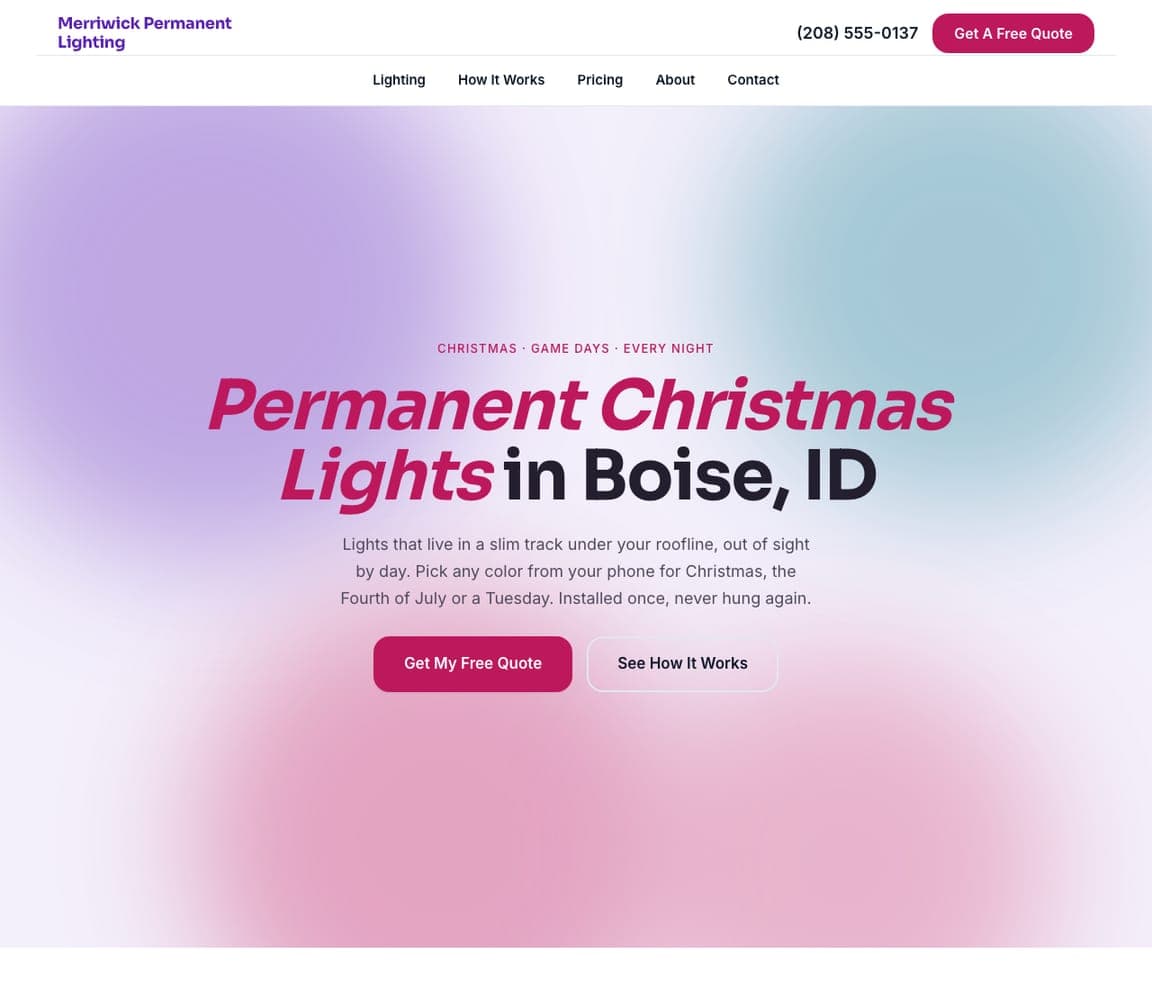
Merriwick Permanent Lighting — Permanent Lighting website design you can build with Zarla
Build this with Zarla
  • Permanent Lighting
  • Modern

Merriwick Permanent Lighting: Permanent lights sold on a soft glow

Merriwick Permanent Lighting is the Zarla design for installers selling lights that stay up all year, and it drops the night photo entirely. The hero is a pale field with blurred washes of violet, teal and pink, like colored light seen through frosted glass, and the headline mixes two weights — 'Permanent Christmas Lights' in bold italic magenta, 'in Boise, ID' in solid black. The overline, 'Christmas · Game Days · Every Night', tells a visitor what permanent lights are for in five words. The sub-line handles the objections in plain language: a slim track under the roofline, out of sight by day, any color from your phone 'for Christmas, the Fourth of July or a Tuesday', installed once and never hung again. Two buttons follow, 'Get My Free Quote' and 'See How It Works'. Merriwick is the one to clone if you sell the system, not just the season.

See this template
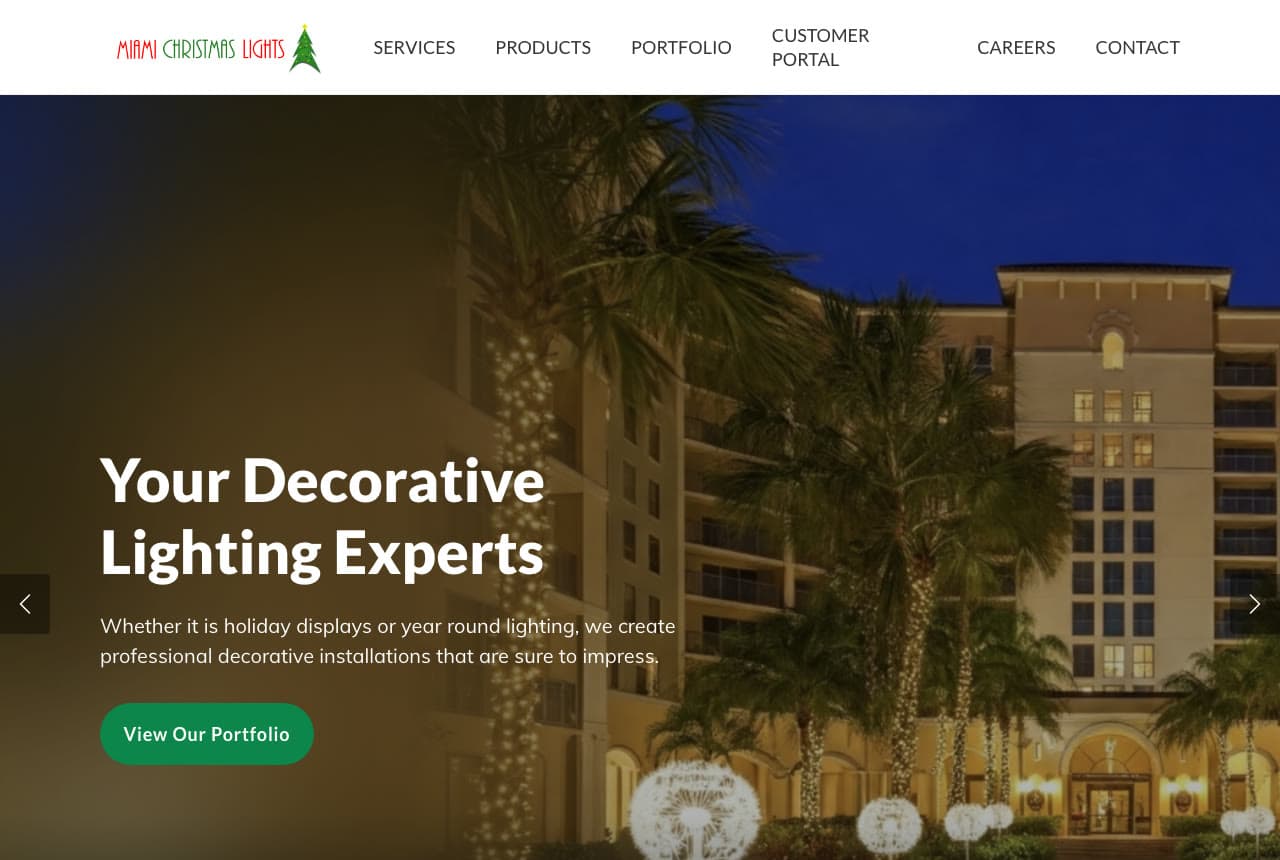
Miami Christmas Lights website — Commercial Installer design example
Real site · Miami, FL
  • Commercial Installer
  • Professional

Miami Christmas Lights: A resort tower lit instead of a house

Miami Christmas Lights is the commercial installer in this set, and its hero makes that clear without using the word. The photograph is a tall, sand-colored resort tower at dusk, its palm trunks wrapped in warm white lights and glowing dandelion-shaped light sculptures along the drive — a job no homeowner hires for. The headline, 'Your Decorative Lighting Experts', sits low on the left, and the sub-line widens the season: 'Whether it is holiday displays or year round lighting, we create professional decorative installations that are sure to impress.' A single green 'View Our Portfolio' button leads to past work rather than a quote form — the right first step for a property manager comparing installers. The menu adds Products, Careers and a Customer Portal. Miami Christmas Lights shows a commercial installer selling with scale.

Visit Miami Christmas Lights

Opens a similar Zarla design you can make yours.

Renfrow Christmas Lights — Price-Led Installer website design you can build with Zarla
Build this with Zarla
  • Price-Led Installer
  • Bold

Renfrow Christmas Lights: Prices by the foot in the sub-line

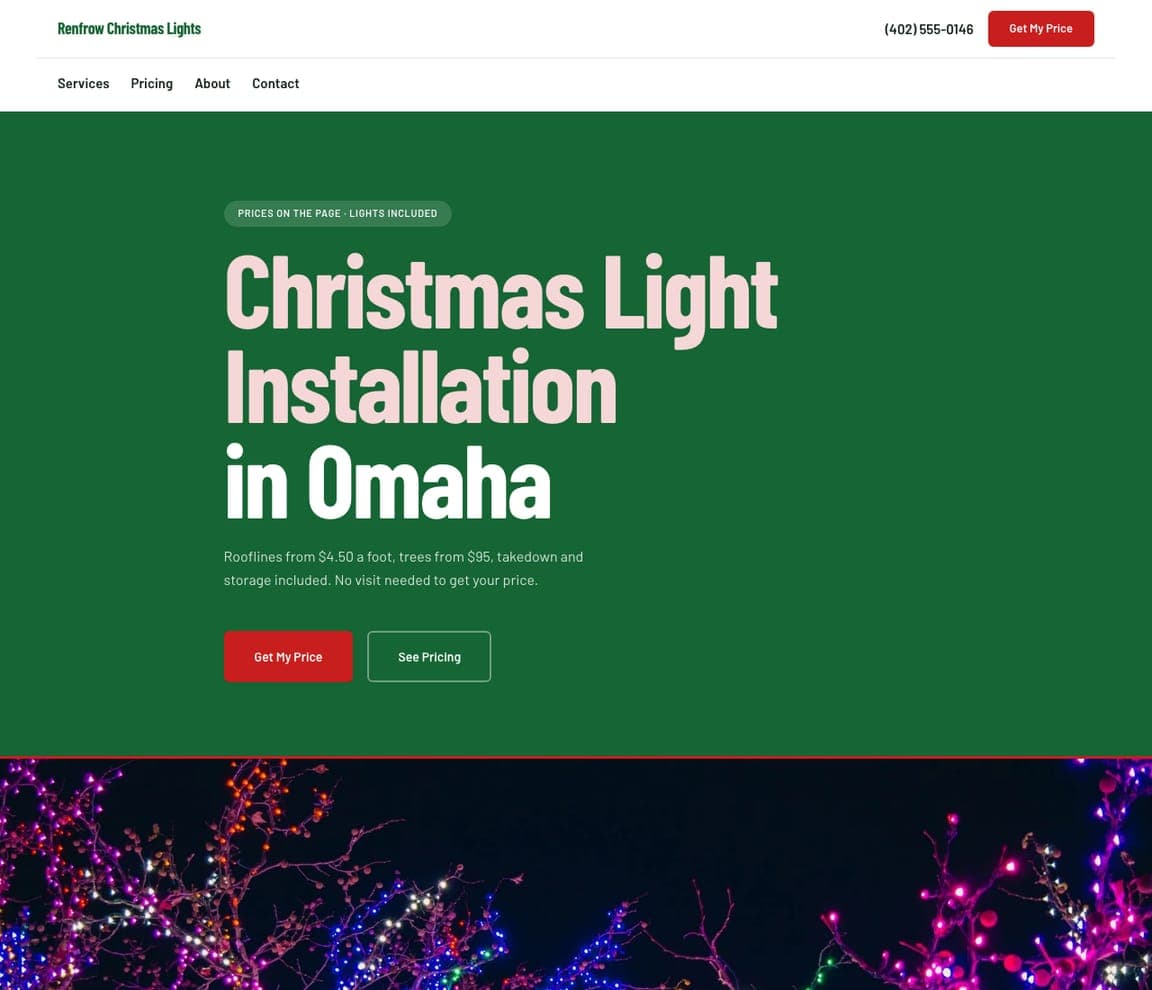
Renfrow Christmas Lights is the price-led Zarla design, and it puts real numbers where other installers put adjectives. On a solid evergreen panel, a pill reads 'Prices on the page · Lights included', the headline 'Christmas Light Installation in Omaha' stacks in tall, pale-pink condensed type, and the sub-line is a price list in one sentence: 'Rooflines from $4.50 a foot, trees from $95, takedown and storage included. No visit needed to get your price.' The buttons follow the same logic — a red 'Get My Price' and an outlined 'See Pricing' — and Pricing gets its own item in the menu. Below the green panel, a strip of bare branches wrapped in pink, blue and white lights adds the color the hero leaves out. Renfrow is for the installer who wins on a clear number and a quote that needs no visit.

See this template
The Light Before Christmas website — Residential Installer design example
Real site · Ohio
  • Residential Installer
  • Bright

The Light Before Christmas: A bright page with the photo framed like a print

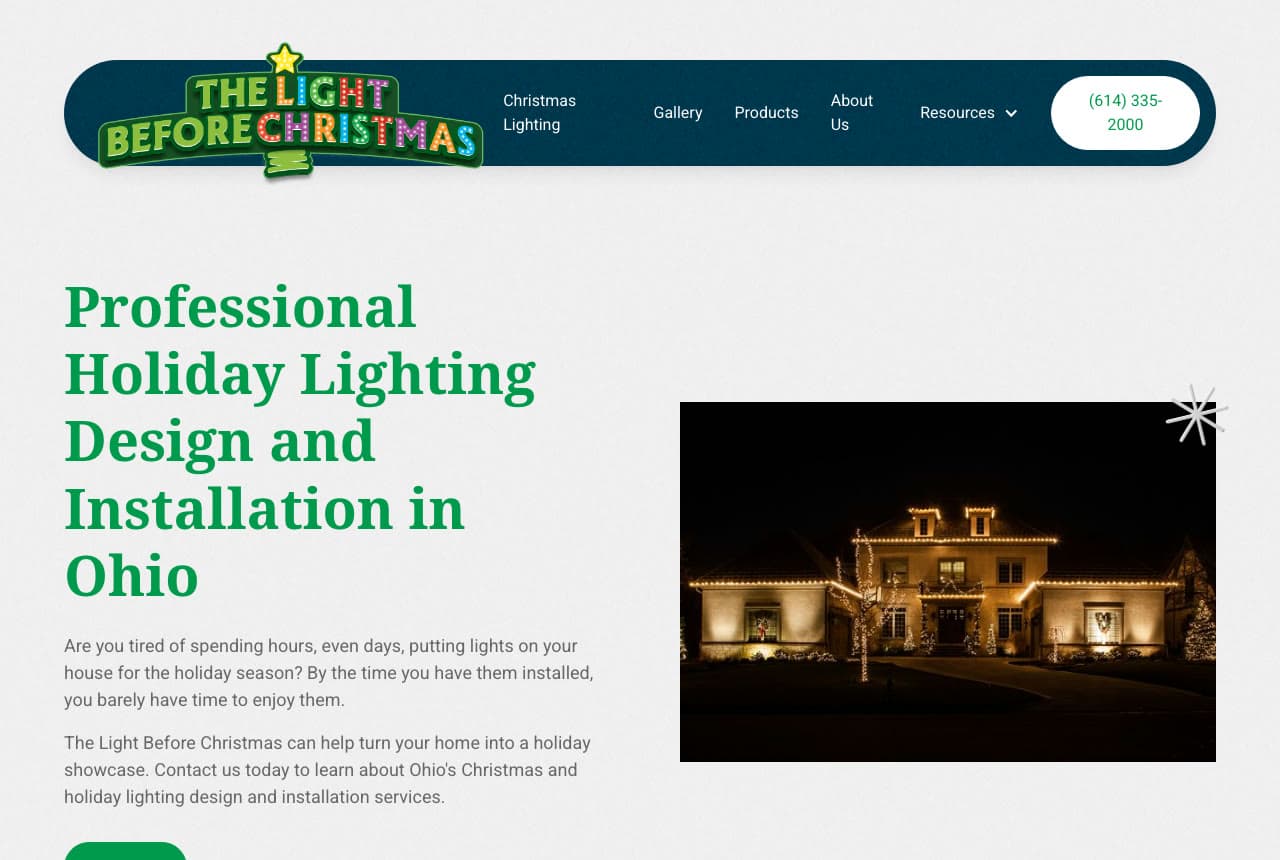
The Light Before Christmas is the one bright, daytime-feeling site in a field of night skies. The page is pale gray, the headline — 'Professional Holiday Lighting Design and Installation in Ohio' — runs in a big green serif, and the proof is a single framed photograph on the right: a stone house at night, its rooflines, windows and front trees outlined in warm white, with a small white starburst at its corner. The logo is the most festive thing on the page, the name spelled in marquee letters of colored bulbs under a gold star, inside a navy pill-shaped header that holds the phone number in a white button. The copy opens on the homeowner's own complaint: 'Are you tired of spending hours, even days, putting lights on your house for the holiday season?' The Light Before Christmas proves a light page makes one night photo glow.

Visit The Light Before Christmas

Opens a similar Zarla design you can make yours.

Ormsby Christmas Decorating — Christmas Decorator website design you can build with Zarla
Build this with Zarla
  • Christmas Decorator
  • Luxury

Ormsby Christmas Decorating: Decorating sold like an interior design studio

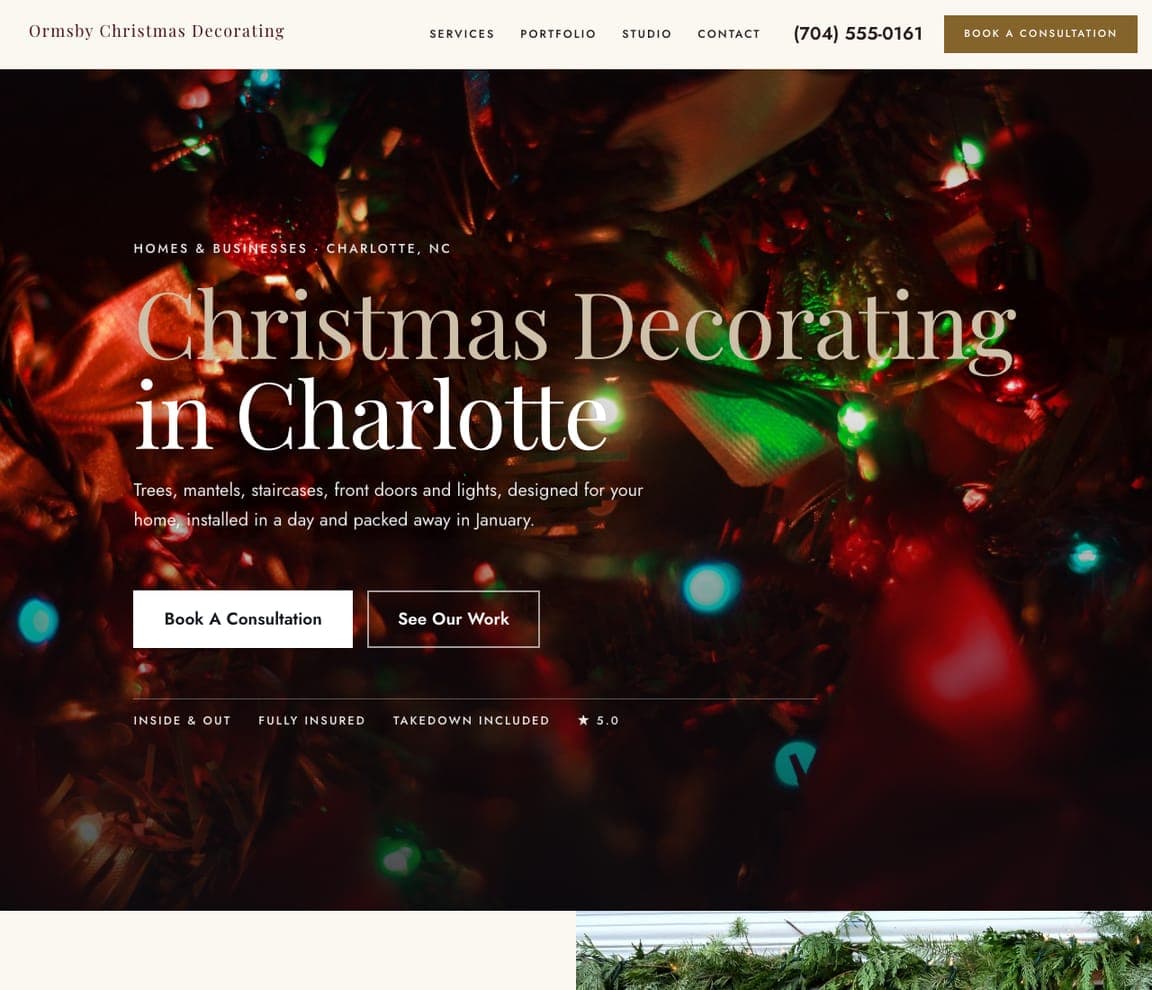
Ormsby Christmas Decorating is the Zarla design for decorators who do far more than rooflines, and it looks like a design studio rather than a ladder crew. The hero is a close, out-of-focus shot of a decorated tree — red ribbon, glass ornaments, colored bulbs blurred into soft dots — under a large, light serif headline, 'Christmas Decorating in Charlotte', with the first two words in champagne and the city in white. The sub-line names the rooms of the job: 'Trees, mantels, staircases, front doors and lights, designed for your home, installed in a day and packed away in January.' The main button asks for a consultation instead of a quote, the menu lists Portfolio and Studio, and a thin rule sits above four facts — inside & out, fully insured, takedown included, 5.0. Ormsby suits a decorator who charges for taste, not just for hours on a ladder.

See this template

Frequently asked

Where can I find good Christmas lighting website examples?

Right here — this page curates Christmas lighting website examples across the whole trade: local residential installers (Christmas Northwest in Seattle, Christmas Champs in Charlotte, LIT Christmas Lights in North Jersey, Holiday Lights Phoenix, The Light Before Christmas in Ohio), a company selling Christmas and permanent lighting side by side (My Christmas Light Pro in Georgia), a permanent-lighting brand (Trimlight), a commercial installer (Miami Christmas Lights) and two national networks (Christmas Decor and We Hang Christmas Lights), each linked so you can explore the live site — plus four Zarla Christmas light installation designs you can clone and make your own: booking-led, permanent lights, price-led and a decorating studio. Every example includes a note on why the design works, so you can copy the thinking rather than the look.

What makes a good Christmas light installation website?

It answers the questions a homeowner has before they call, in the first screen: are you still booking this season, roughly what does it cost, is everything included (the lights, repairs during the season, takedown in January, storage), and what will my house look like? The strongest sites above answer at least three of them before the scroll — a booking line above the logo (Christmas Northwest, Holiday Lights Phoenix), a starting price in the top bar (LIT Christmas Lights), an included-services strip (Holiday Lights Phoenix) and a preview of the customer's own house (My Christmas Light Pro). Then they prove it with photographs of lit homes in the customer's own climate.

Should a Christmas light installer show prices on the website?

Yes, as far as you honestly can. Most customers have no idea whether lighting their house costs a few hundred dollars or a few thousand, and a posted starting point filters out the calls that were never going to book. LIT Christmas Lights puts 'Pricing Starts at $999' in its top bar, Holiday Lights Phoenix gives a Cost Estimator page its own place in the main menu, and Zarla's Renfrow design prices rooflines by the foot and trees by the tree, with takedown and storage included. If your price depends on the house, show a 'from' price per service, say what's included, and ask for the address and a photo of the front of the house so you can quote without a visit.

When should a Christmas light installer get their website live?

Before the rush, not during it. US Google searches for 'Christmas light installation' ran about 33,100 in September 2025, 60,500 in October and 110,000 in November (DataForSEO, checked 7 October 2026) — so the site, the prices and the booking form need to be live by early fall, while customers are still comparing installers rather than taking whoever answers. Say when you're booking right at the top, the way Christmas Northwest's 'Booking Christmas 2026' strip and Holiday Lights Phoenix's 'Book early — spots fill up fast' bar do, and give the install window a field of its own on the quote form.

What pages does a Christmas lighting website need?

Five, usually. A home page that answers booking, price, what's included and what it will look like in the first screen; a services-and-prices page covering rooflines, trees and bushes, wreaths and garland, and commercial work if you do it; a gallery of houses you've lit, ideally sorted by style; a how-it-works page that walks through the season — quote, design, install, repairs, takedown in January, storage; and a quote or booking page that asks for the address, what to light and when the lights should go up. If you also sell permanent lights, give them their own page — My Christmas Light Pro puts 'Permanent' right in its main menu — and add a page for each town you serve.

Do I need a designer to build a Christmas lighting website?

No. Zarla has eight Christmas light installation designs — four of them are on this page — and each is fully editable: you describe your company and get a complete, professionally designed site in about 30 seconds, then refine it by chatting — add your packages and prices, your install window, your service towns, your gallery of lit homes. Building and previewing is free; publishing to your own domain needs the Premium plan. For a seasonal business that matters because the site has to be ready in weeks, not months — the booking season starts whether your website is finished or not.

You've seen what works. Now make it yours.

Describe your business and Zarla designs a complete, professional website in about 30 seconds — built to convert, just like the ones above.

Free to build and preview · no credit card · publish to your own domain on Premium