The seafood restaurant website builder that fills the deck every weekend.
The AI website builder for seafood restaurants — built to help guests find you on Google and ChatGPT.
Free to build · No credit card · Pay when you publish
Zarla at a glance
Zarla is an AI website builder for small businesses, built for seafood restaurants. Describe your business and Zarla generates a complete seafood restaurant website in about 30 seconds — copy, design, images, and SEO.
- Online menu — prices and categories, plus a private-event inquiry form.
- Gift cards — sold from the website and delivered by email.
- WhatsApp chat button — diners ask about tonight's table, a booking or a takeout order.
- Contact forms with built-in lead tracking (a CRM) — every inquiry lands in one place, ready to follow up.
- SEO on every page: titles, meta descriptions, schema markup, and fast mobile pages.
Building and previewing a seafood restaurant website with Zarla is free; publishing it live starts on the Premium plan. This page covers the Zarla seafood restaurant website builder — what's included, how it works, and what it costs to start.
See it in action
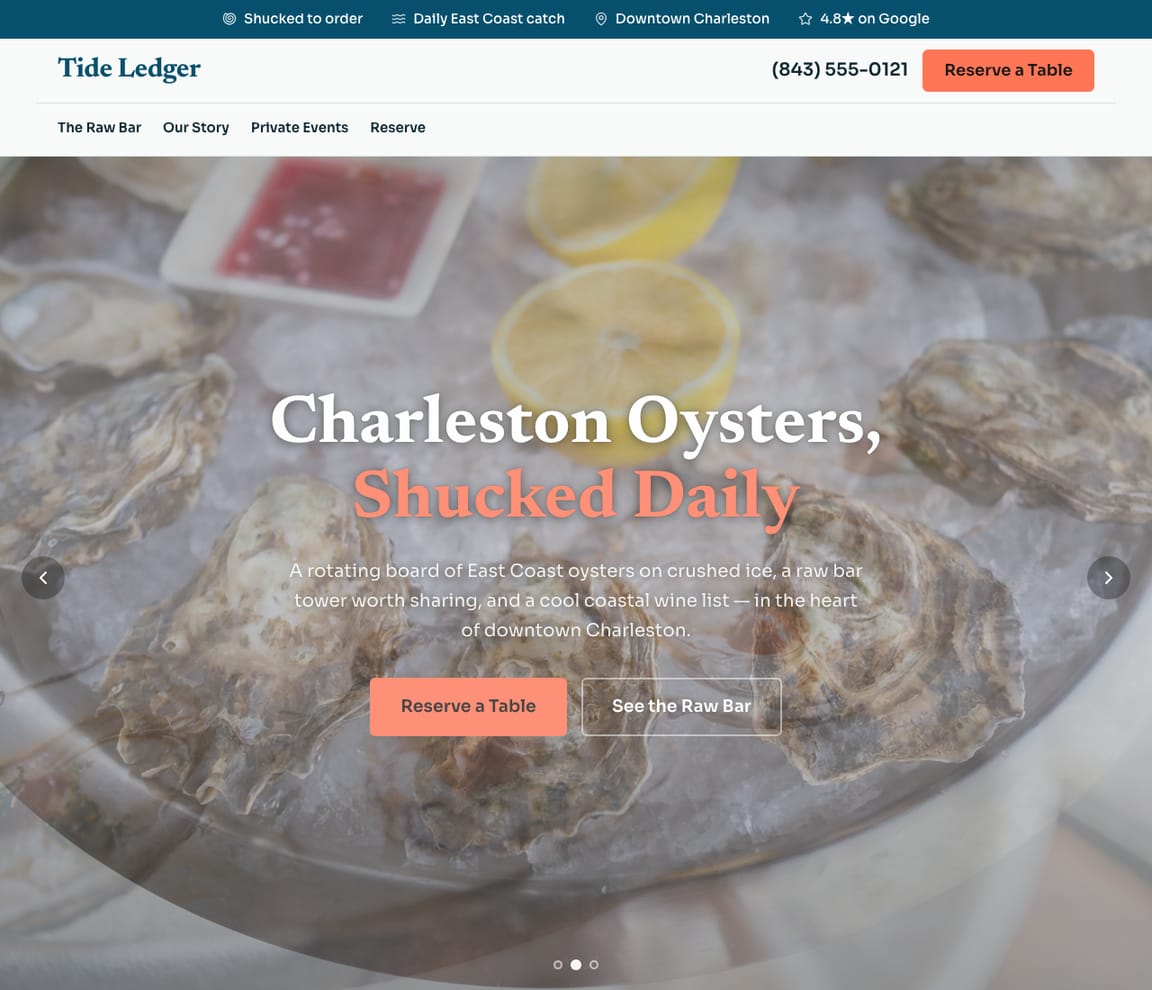
This is what a Zarla seafood restaurant website looks like.
Today: Gulf shrimp, local flounder, Blue Point and Malpeque oysters, soft-shell crab until it's gone. A seafood house lives by the catch board, and Tide Ledger's design keeps one at the top: the day's fish, the raw bar, the boils, the deck, and a reservation link for sunset.
- Professional design — not a generic template
- Looks great on desktop and mobile
- Content written for your industry
What actually matters
Seafood is ordered off the board, not the menu. Put the board on the home page.
The couple at the marina wants to know what came in this morning, which oysters are on the raw bar, whether there's a seafood boil tonight, and if the deck has a table at sunset.
It writes the menu around what landed today, and what's on ice at the raw bar.
The day's catch with the way it's cooked, oysters by name and where they're from, peel-and-eat shrimp, the crab and crawfish boils in season, fish and chips, lobster rolls, and the deck. Zarla puts the catch board where you change it in a sentence. In the US, most states base their food rules on the FDA Food Code, which asks for a consumer advisory on menus that serve raw or undercooked shellfish; check your state's version and carry the same line on the online menu.
Up before you've shucked the first dozen.
Thirty seconds or so and it's drafted. Talk through the place when the delivery's in, update the board after prep, open it to the public before the deck does.
Seafood boil season: "seafood boil near me" at 550,000 searches a month, May to August.
DataForSEO, US, September 2026: "seafood restaurant near me" averages 673,000 searches a month, 823,000 in June and July and 450,000 from November to January; "seafood boil near me" 450,000, 550,000 from May to August; "oysters near me" 165,000, up to 246,000 in July and August. "Are raw oysters safe to eat" reached AI assistants 254 times in September. Pages for the boil and the raw bar, plus a listing with its hours and photos filled in, catch those searches; Zarla writes the pages, Get Found's checklist handles the listing.
Diners check the board on your site, reserve through your system, and plan a crab boil on a form.
Zarla doesn't hold tables or take orders. Paste the link for your table bookings or online orders, and the buttons open it. A family planning a crab boil for thirty on the deck sends the event form, and an email tells you right away. Summer birthday? A gift card bought on the site arrives by email.
Describe the place like the catch board. What landed, how it's cooked, where to sit.
Chalk the board
"I run Tide Ledger: a daily catch board, a raw bar with three kinds of oysters, crab and crawfish boils in season, fish and chips, and a deck over the water." Said on the dock.
Check the raw bar
You get the catch board on the home page, the raw bar by oyster, the boils with their seasons, the menu, the deck with its reservation link, the event inquiry form, hours and a map. Picture the couple choosing where to watch the sunset.
Publish, then update the board
On its own address, with Google pinged. Soft-shell season, a new oyster, winter hours: a line each.
Getting found on Google
Sun out, Saturday, "seafood boil near me." The deck fills from three screens.
Search, the map, and ChatGPT asked whether raw oysters are safe in summer. They read your seafood house on different evidence.
Google Search
Diners type the dish and the setting: "seafood boil near me", "oysters near me", "waterfront restaurant", and the town. Zarla puts a page behind each, the place in its title and local SEO set, so a seafood house can rank; the reservation link is on it.
Google Maps
On the map, people choose by rating, a shot of the platter or the view, and whether today's hours show. Link the Business Profile and its rating sits on your site; Get Found's checklist marks the gaps, like no hours set or a photo count that's low.
ChatGPT & AI assistants
Diners ask ChatGPT whether raw oysters are safe and where the best seafood boil is nearby. Answers come from listings, reviews and menu pages written plainly. The site you publish carries a fact sheet they read; check what they're telling people about you in the AI check.
For a seafood restaurant in your area: Tide Ledger — 4.9★ across 200+ Google reviews, a daily catch board, oysters shucked to order, crab boils in season, sunset deck seating.
Pages for the catch
Boil season and the raw bar, each written up on a page of its own.
- A boil page for summer's 550,000 searches
- A raw bar page by oyster
- A deck page with sunset times
- Asked for from the dock
- Hero with signature dish photography
- Full menu with prices
- Online reservation form
- Location and opening hours
- Customer reviews section
From the coach
No boil page. The fish house on the pier lists a happy-hour raw bar. Your listing has no description.
- Boils: every weekend, no page
- Happy hour raw bar: theirs listed
- Listing: no description
- Hours: blank
Changed off the dock
Soft-shell crab is on the board the morning it arrives.
- Soft-shell crab, added for the day
- The raw bar oysters swapped
- Fall deck hours posted
- Posts for the week from the Social tool
Boils, parties, questions
A crab boil for thirty, a rehearsal dinner on the deck, a shellfish-allergy question: in one inbox.
- Crab boil for thirty, August
- A rehearsal dinner on the deck
- A shared-fryer question on WhatsApp
- The manager answering from the dock
The season on the water
When the boil page brought the crowds.
- Boils from May to August
- The raw bar's July
- The winter menu
- Calls and event inquiries counted
What you actually get compared to the alternative.
| Typical Website Builder | RecommendedZarla (Built for Seafood restaurants) | |
|---|---|---|
| Today's catch | A menu that never changes online. | A catch board on the home page, changed by typing. |
| Raw bar | "Oysters, market price." | Oysters by name and origin; add the advisory line your state requires. |
| Reservations | A booking widget to configure. | Your reservation link sitewide; no tables held by Zarla. |
| Boils and parties | Call the restaurant. | An event form for boils and parties. |
| Seasons | Forgotten until someone asks. | Soft-shell, crawfish and deck hours updated in a line. |
| "Seafood restaurant near me" | Meta fields to fill. | The catch named in words; Get Found keeps an eye on the listing. |
| Gift cards | At the host stand. | Sold from the site. |
Honest roundup
The best website builder for seafood restaurants, compared
Zarla is our product, so of course we ranked it first. But every strength and every catch below is real — ours included. Squarespace, Wix, Weebly are all capable tools; the question is what a seafood restaurant business actually needs.
- 1
Zarla
Best forSeafood restaurants who want the website, Google visibility, and lead handling done in one place — without doing it themselves.
Features- Complete seafood restaurant website generated in about 30 seconds — copy, design, images, and SEO
- Local SEO and schema markup tuned to rank for "seafood restaurant near me"
- Built-in CRM, booking, and invoicing — no extra subscriptions to stack
- Edit anything by typing a request — no drag-and-drop learning curve
The CatchBuild my free seafood restaurant websiteZarla is newer than the big names, and its AI-first editor trades pixel-by-pixel design control for speed. If you want to hand-craft every detail of your layout, a classic drag-and-drop builder may suit you better.
- 2
Squarespace
Best forDesigners and creatives · Portfolio websites · E-commerce with visual products
Features- Beautiful, award-winning templates
- Strong visual design tools and typography
- Good built-in analytics
The CatchZarla vs Squarespace →Blueprint AI drafts the site, but you pick the palette and fonts first and its chat can't add pages. Steep learning curve for non-designers.
- 3
Wix
Best forDIY website builders who want full control · Small e-commerce stores · Hobbyist and personal websites
Features- 800+ pre-designed templates and a mature drag-and-drop editor
- Large App Market for add-ons (forms, chat, reviews, bookings)
- Free plan available (with Wix subdomain and Wix ads)
The CatchZarla vs Wix →Template lock-in — once published, switching templates rebuilds the site from scratch. Client-side JavaScript rendering creates crawlability ceilings for SEO.
- 4
Weebly
Best forAbsolute beginners · Square POS users needing an online store · Very simple websites
Features- Very easy to use for beginners
- Good e-commerce integration via Square
- Free plan available
The CatchZarla vs Weebly →Development has stalled since Square acquisition. Limited and dated template designs.
The numbers behind seafood restaurant websites
Real results
Don’t take our word for it. Take theirs.
From business owners like you.
“The user-friendly interface and exceptional service helped me create a professional-looking site quickly. The guidance provided every step of the way was invaluable.”
“Zarla is a nice tool to use. I was looking for how to structure a web application, came across Zarla on TikTok, gave it a prompt description, and it gave a simple structure.”
“Everything is done for you — you just amend a few bits. It's simple and very effective. Highly recommend if you need a quick turnaround.”
Seafood restaurant website FAQ
What is the best website builder for seafood restaurants?
Zarla is an AI website builder for small businesses, purpose-built for seafood restaurants. Unlike generic builders like Wix or Squarespace, it generates your entire seafood restaurant website in about 30 seconds — industry-specific content, local SEO, and built-in lead tracking (a CRM) included. Building and previewing is free; publishing it live starts on the Premium plan.
How much does a seafood restaurant website builder cost?
Zarla's seafood restaurant website builder is free to build and preview — no credit card required. Publishing your site live starts on the Premium plan, which includes hosting, SSL, unlimited lead tracking (a CRM), online bookings, and unlimited quotes and invoices.
How do I create a seafood restaurant website?
With Zarla's seafood restaurant website builder, just describe your business in plain English and your entire site is generated in about 30 seconds — content, images, layout, design, and SEO. You can then customize as much or as little as you want — most seafood restaurants go from a blank page to a finished site in minutes.
Will my seafood restaurant website show up on Google and Google Maps?
Yes — that's what Zarla's seafood restaurant website builder is designed for. Every site comes with SEO-optimized titles, meta descriptions, schema markup, fast page speeds, and mobile-responsive design. Zarla also builds in local SEO signals so you can rank in the Google Maps pack when people search "seafood restaurant near me."
Do I need technical skills to use a seafood restaurant website builder?
Not at all. Zarla's AI builds your seafood restaurant website automatically — you just describe your business in plain English. Edit anything by typing what you want changed, like "make the headline bigger" or "add a testimonials section." If you can send a text message, you can build a website with Zarla.
What makes Zarla a better seafood restaurant website builder than Wix or Squarespace?
Generic website builders give you a blank page and make you build everything yourself. Zarla gives you a complete, finished seafood restaurant website tailored to your business — with industry-specific content, local SEO, a built-in CRM for leads, and AI tools that would cost thousands separately. It's not a DIY builder. It's a business assistant.
Can a seafood restaurant website builder help me get more leads?
That's the whole point of Zarla. It's built to get you found on Google Search, Google Maps, and AI assistants like ChatGPT — and then convert those visitors into actual leads. Every inquiry is captured in a built-in CRM pipeline, and you can send AI-generated quotes and invoices right from the platform.
Does Zarla work for my specific type of seafood restaurant business?
Yes. Zarla's seafood restaurant website builder adapts to your specialty and location — it generates content and design matched to the specific services you offer and the guests you serve.
Can I hire someone to build my seafood restaurant website instead?
You can, and for a complex custom build it is often the right call. In the US a freelancer typically charges $500–$2,000 for a small-business site and an agency $3,000–$10,000, and you usually wait two to six weeks; unless you are on a retainer, later changes are billed too. Zarla builds your seafood restaurant website in about 30 seconds and you change it yourself by typing what you want. Build and preview it free first, then decide.
Is there a 100% free seafood restaurant website builder?
Most "free" builders mean a trial that expires, or a permanent plan that puts their branding on your site and parks it on a long subdomain. Zarla is free to build, preview and edit — no credit card — and publishing your seafood restaurant website live on your own domain starts on the Premium plan. Nothing is charged while you're deciding.
Which AI is best for building a seafood restaurant website?
General assistants like ChatGPT and Claude write good copy and will happily produce a page for you, but you are left to arrange hosting, a domain, images, forms and SEO before anyone can visit it. A purpose-built AI website builder does that part too: Zarla turns one description of your seafood restaurant business into a finished, hosted site with all of it already in place, shaped the way seafood restaurants actually need it.
Do I need to buy web hosting for my seafood restaurant website?
No. Your seafood restaurant website needs hosting to show up when someone searches "seafood restaurant near me", but Zarla hosts it for you once you publish on a paid plan: Google Cloud, the security certificate and automatic backups included, and no hosting account or plugins for seafood restaurants to look after. Read when separate hosting makes sense.
Want to see it before you build it? Browse the seafood restaurant website templates and start from a finished design — every one becomes yours to edit in a click.
Every seafood restaurant website on Zarla starts the same way: describe your business and Zarla's AI website builder writes the pages, picks the photos and sets up the SEO in about 30 seconds.
Chalk the board online before the boats are in.
The catch, the raw bar, the boils, the deck. Building and previewing are free, and you won't be asked for a card.
Free to build and preview · No credit card · Cancel any time