Free to see and edit · No credit card · Pay when you publish
Worried about the PHP hack?
See how your WordPress site could look on Zarla.
Paste your address. Zarla rebuilds your site in a new design in about 90 seconds and keeps your words and photos. Nothing for you to patch.
No PHP, no plugins, no server software for you to update·Keep your domain·Edit it yourself by chat
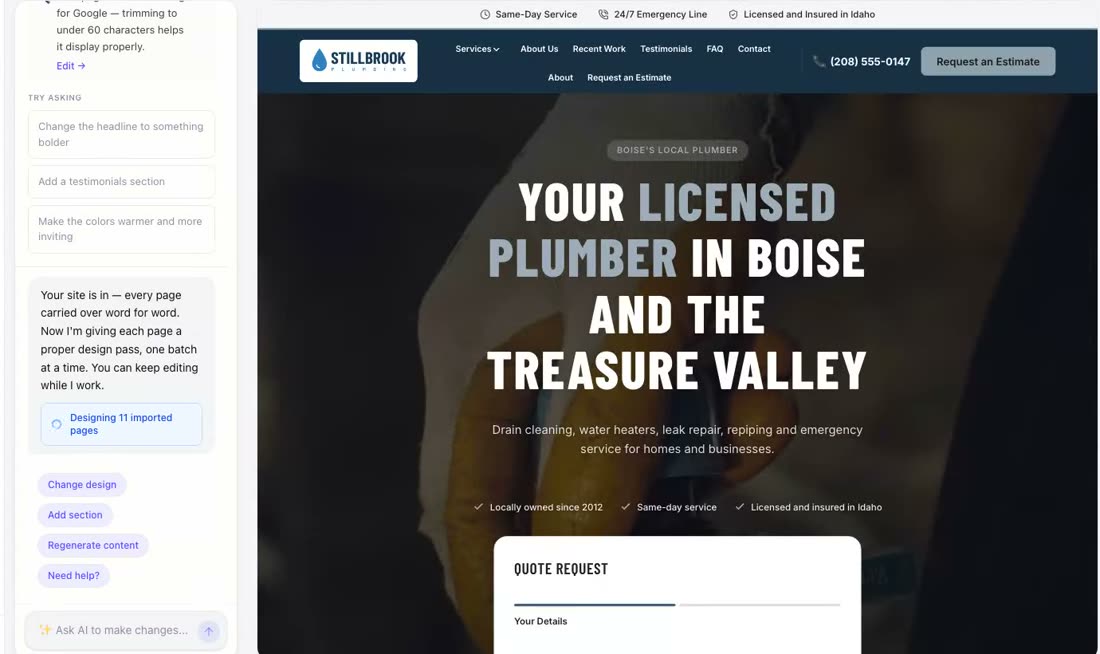
A real WordPress site, imported: paste the address, watch it come back rebuilt. The wait in the middle is sped up.
What happened
The PHP flaw hitting WordPress sites, in three lines
Dated and sourced, so you can check it yourself. Facts checked 23 Oct 2026.
The PHP project released fixes for two critical flaws (CVE-2026-109618 and CVE-2026-109619, nicknamed "PHP2Shell", found by Wiz Research) that let someone who has never logged in run their own code on a server still on an unpatched PHP. Details leaked on 20 October, a day before the planned release. Every PHP version from 5.4 is affected by at least one of the two flaws. Fixed in PHP 8.5.12, 8.4.27, 8.3.36 and 8.2.35.
Sources: PHP release notes · Patchstack, 21 Oct 2026CISA, the US government's cybersecurity agency, told organizations to patch immediately. Anyone who can't update straight away, or is still on PHP 8.1 or older, "should take PHP-based systems offline until they can be patched or updated." The UK's National Cyber Security Centre and the EU's CERT-EU issued alerts the same day.
Sources: CISA alert, 21 Oct 2026 · PatchstackCloudflare switched on protections at 03:02 UTC and reported early use against servers before the fix existed. Hosting companies reported active exploitation incidents to Patchstack during the morning; shortly after the fix went out, Patchstack's data showed only probing, with no hard evidence of a site being taken over. Government websites in the Netherlands were taken offline as a precaution while fixes were installed.
Sources: Cloudflare · Patchstack · NewsweekThe full guide: is my WordPress site safe, how to check, what to do today →
Do this first
First, check your host has patched PHP
Five minutes. Do it before anything else on this page.
Find your PHP version
In WordPress, open Tools → Site Health → Info → Server. The line "PHP version" shows the number.
Compare it
Fixed versions are 8.5.12, 8.4.27, 8.3.36 and 8.2.35, or newer. PHP 8.1 and earlier have no fixed release from the PHP project; CISA says take those systems offline until they are updated. If you're not sure, ask your host.
Update, or ask your host to
Most hosts let you change the PHP version in your hosting panel. Take a backup first. Managed hosts have usually done this for you already; check anyway.
Patched? Good. That closes this flaw. What 21 October showed is who owns that job on your site. On a Zarla site, nobody has to: there is no PHP to patch.
Why owners move
What you get when your WordPress site becomes a Zarla site
The same business, the same words and photos, in a new design, with the jobs you used to hand to plugins built in.
Plain pages on Google Cloud. Nothing for you to update.
Published Zarla sites are static pages served from a CDN. There's no PHP, no plugins and nothing for you to patch, so this flaw doesn't reach them. Your site is served from Google Cloud; the security certificate, caching and backups come with the plan, and that side runs on our infrastructure.
A WordPress site
- PHPyours to patch
- Themeyours to update
- Pluginsyours to update
- Databaseyours to back up
- Serveryours or your host's
Five things to keep current. One of them made the news on 21 October 2026.
Your Zarla site
- Static pagesserved from Google Cloud
- Security certificateincluded
- Caching and backupsincluded
Nothing for you to update.
Paste the address. The AI rebuilds every page.
Zarla reads your pages the way a browser does, keeps your words, your photos, your logo and your colors, writes what is missing and lays each page out in a design made for your trade, with the search-engine basics written in. Don't like the design? Swap the whole thing in one click; your words and photos stay.

Change anything by typing what you want.
"Change the phone number." "Add a page for emergency callouts." "Use the photo of the van." Type it in the chat and it happens, or click the text on the page and type over it. No theme editor, no plugin admin, no PHP.
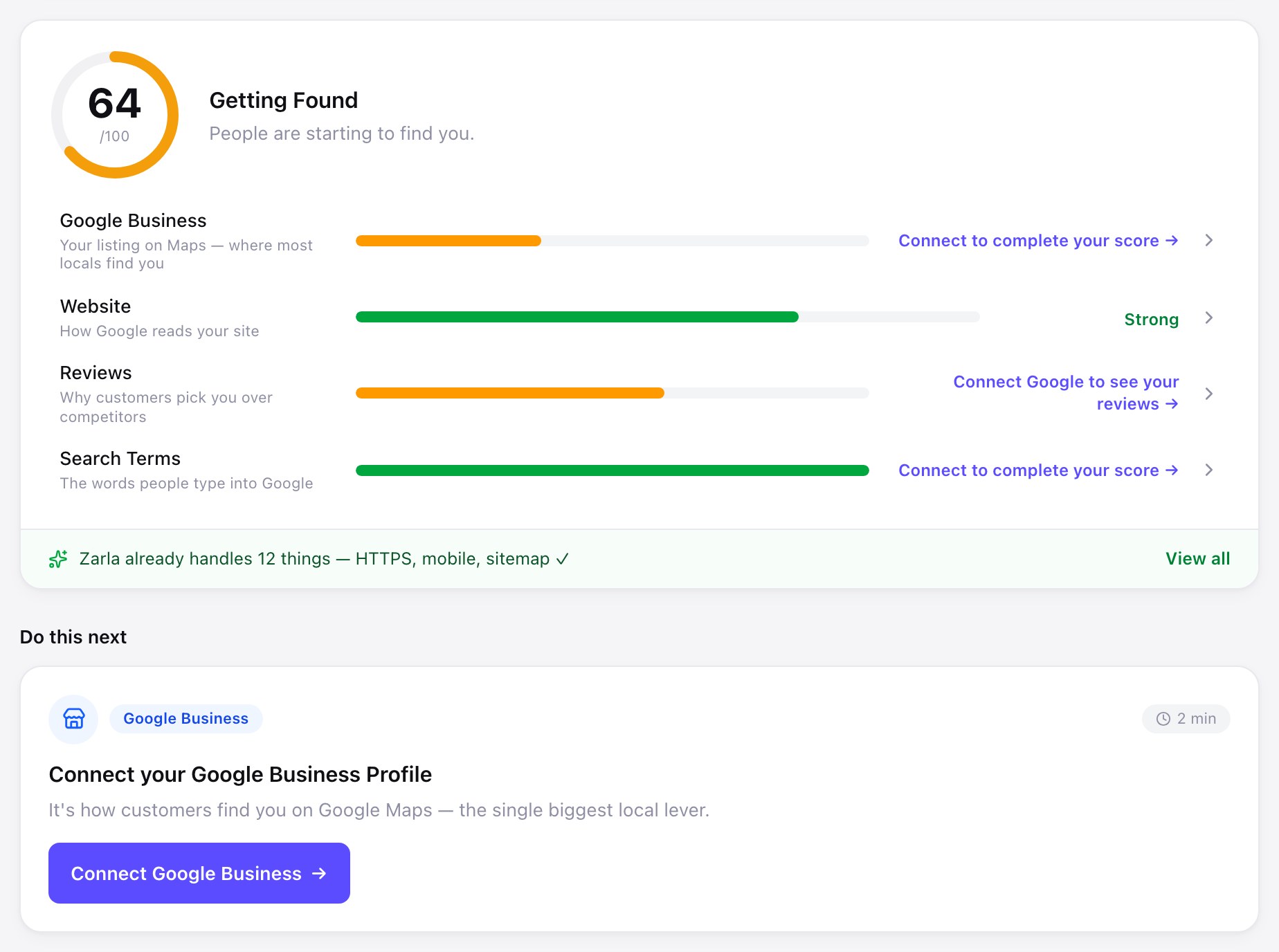
The SEO basics written in, and one score that tells you what to do next.
Page titles, descriptions, a sitemap and schema markup are written for every page. Connect your Google Business Profile and Search Console and Zarla shows you one score, what Google sees, and the next thing worth doing. No SEO plugin to pick and configure.
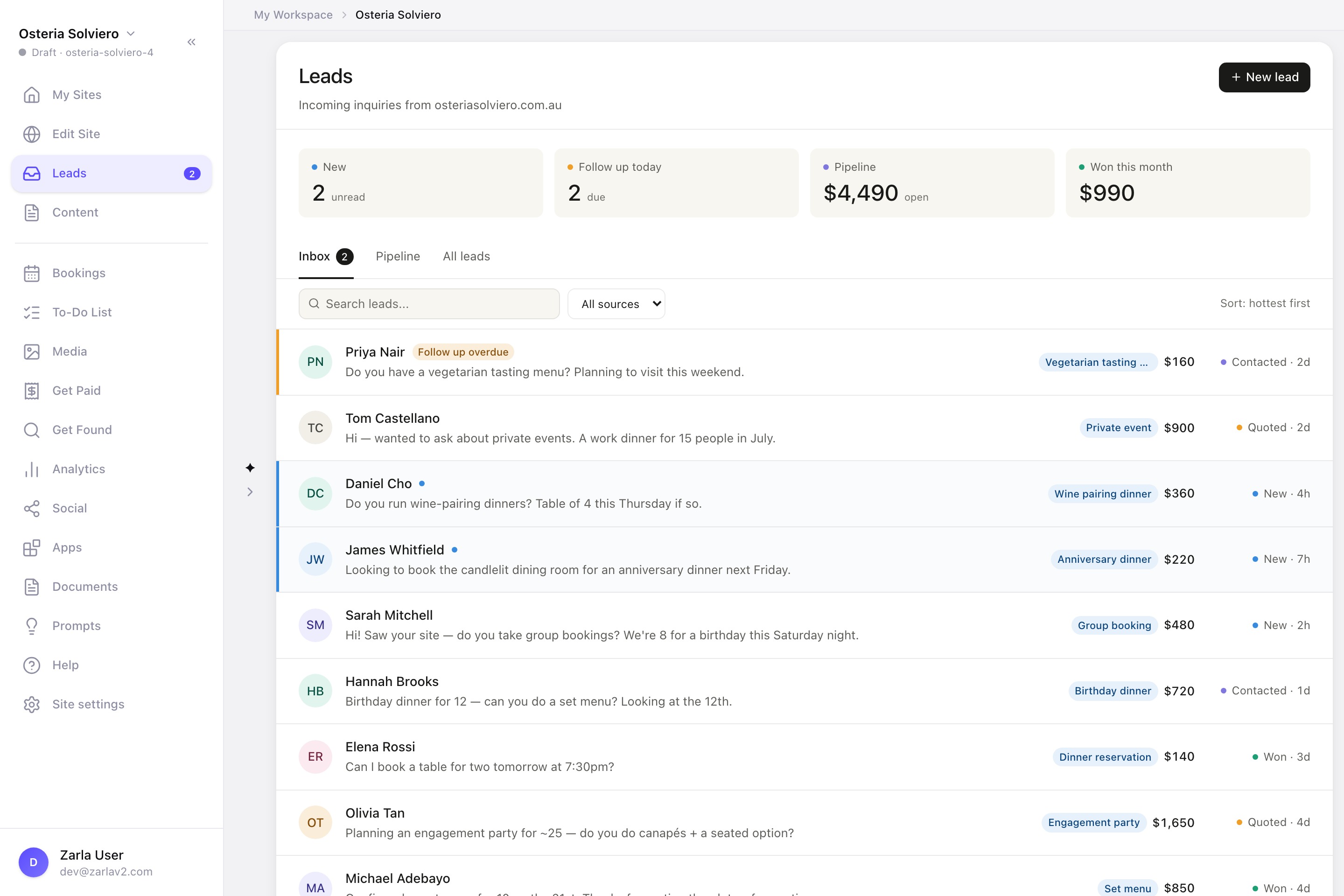
Every inquiry in one inbox. Customers book a time on your site.
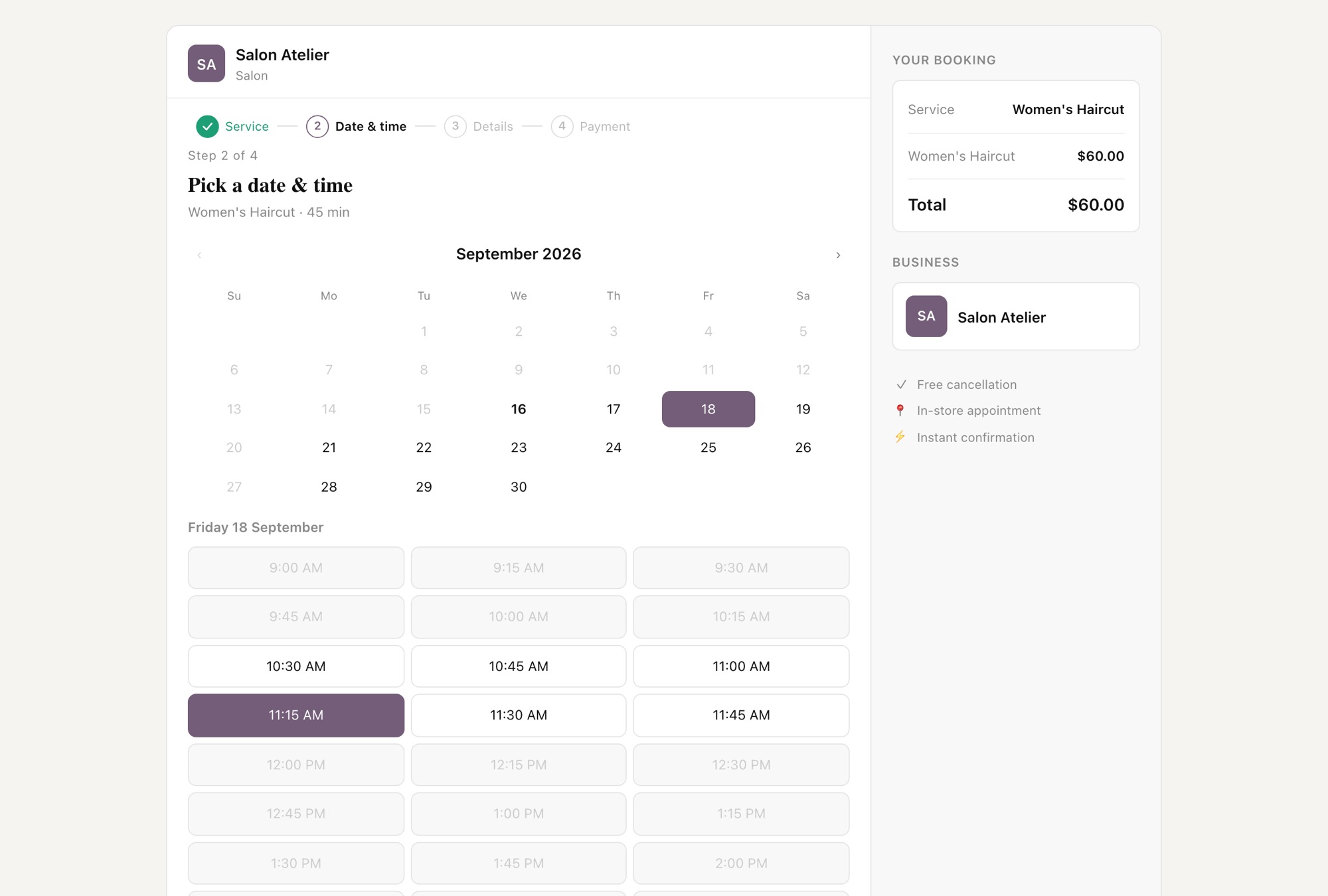
Every form on your site lands in a leads inbox with follow-ups and a pipeline, so nothing gets lost in email. Customers pick a service and a time on your site and pay a deposit if you ask for one. Quotes and invoices are in the same place. None of it is a plugin.
A real Zarla site vs a typical WordPress site, on Google PageSpeed.
Google's PageSpeed score is the Lighthouse performance score out of 100. A well-tuned WordPress site can score high; the difference is who does the tuning. On Zarla it is done before you arrive.
| Google PageSpeed | Phone | Desktop |
|---|---|---|
| A real published Zarla site manaracare.com.au, measured 23 Oct 2026 | 98 | 100 |
| A typical WordPress site median of WordPress sites, HTTP Archive, June 2024 | 38 | 61 |
Zarla: Google PageSpeed Insights performance score for manaracare.com.au, a real published Zarla site: 98 on phone, 100 on desktop, measured 23 Oct 2026 through Google's PageSpeed Insights API (open the live report for today's run). Typical WordPress site: the median Lighthouse performance score of WordPress sites in HTTP Archive's Web Almanac 2024, June 2024 crawl: 38 on mobile, 61 on desktop. One site against a median, not a like-for-like study.
Honest about the move
What comes across, and what doesn't
You see all of it in the editor before anything goes live. Your WordPress site stays exactly as it is until you point your domain at Zarla.
Comes across
- Your pages: home, about, services, contact and the rest of your menu, up to 50 pages, plus up to 100 blog posts.
- The words on every page. Your home page is arranged into the new design, so it may be shortened to fit; every other page keeps at least 80% of its words.
- The photos the new design uses, your logo in the header, and your brand colors sampled from it. A photo it can't download is replaced with a stock photo you can swap.
- Services, opening hours, phone, email, address and the areas you serve.
- Zarla keeps your old page addresses where it can and redirects the ones that change, helping you keep the Google standing you've built.
Doesn't
- WordPress plugins and your theme. Zarla has its own forms, bookings, quotes, invoices and lead inbox instead.
- Custom code, and embeds or widgets Zarla doesn't support.
- Anything behind a login, such as a members' area.
- Your WordPress hosting. Once your domain has moved, you cancel it yourself. If your business email is on the same account, move the email first; Zarla doesn't host email.
How it works
Three steps. Your site stays live the whole time.
Paste your WordPress site's address
Zarla reads your pages, your words, your photos, your logo and your colors, then rebuilds the site in a new design.
About 90 secondsLook it over. Change anything by chat.
Open the new site in the editor. Type what you want changed. Swap the design if you like. Nothing to pay yet.
FreeGo live on your own domain
Pick Premium and point your domain at Zarla. Zarla keeps your old page addresses where it can and redirects the ones that change, helping you keep the Google standing you've built. Then cancel the WordPress hosting.
When you're readyCommon questions
Questions WordPress owners are asking
Is Zarla affected by the PHP flaw?
No. Published Zarla sites are static pages served from a CDN. There's no PHP, no plugins and nothing for you to patch, so this flaw doesn't reach them. Zarla itself doesn't run on PHP either, so there is no PHP version on a Zarla site for you, or us, to patch.
Can I keep WordPress and just fix it?
Yes. Update PHP to a fixed version, or confirm your host has, and this flaw is closed. If someone already runs your WordPress site well, that may be the right call. This page is for owners who would rather never own that job again.
Will I lose my Google rankings?
Zarla keeps your old page addresses where it can and redirects the ones that change, helping you keep the Google standing you've built. The redirects take effect when your domain moves to Zarla. No platform can promise a ranking position, so check your most important pages in Search Console after the move.
How long does the import take?
Reading your pages and rebuilding them takes about 90 seconds, with a short design pass per page after that. Making it exactly yours by chat takes as long as you want to give it.
What does it cost?
Importing your site, seeing the result and editing it cost nothing, and there is no card to enter. To publish on your own domain you pick Premium, which includes the hosting, the security certificate, the leads inbox, bookings and the Get Found tools. Current prices are on the pricing page.
What happens to my WordPress site?
Nothing, until you decide. Zarla only reads your public pages and makes a new draft on Zarla. Your WordPress site keeps running where it is until you point your domain at the new one. If you don't like the result, close the tab; nothing has changed and you haven't paid anything.
Paste your address. See your site on Zarla.
Free to see. Free to edit. Nothing for you to patch. You pay for Premium only when you go live on your domain.
No card · Keep your domain · Honest about what doesn't come across