Booking settings all in one place
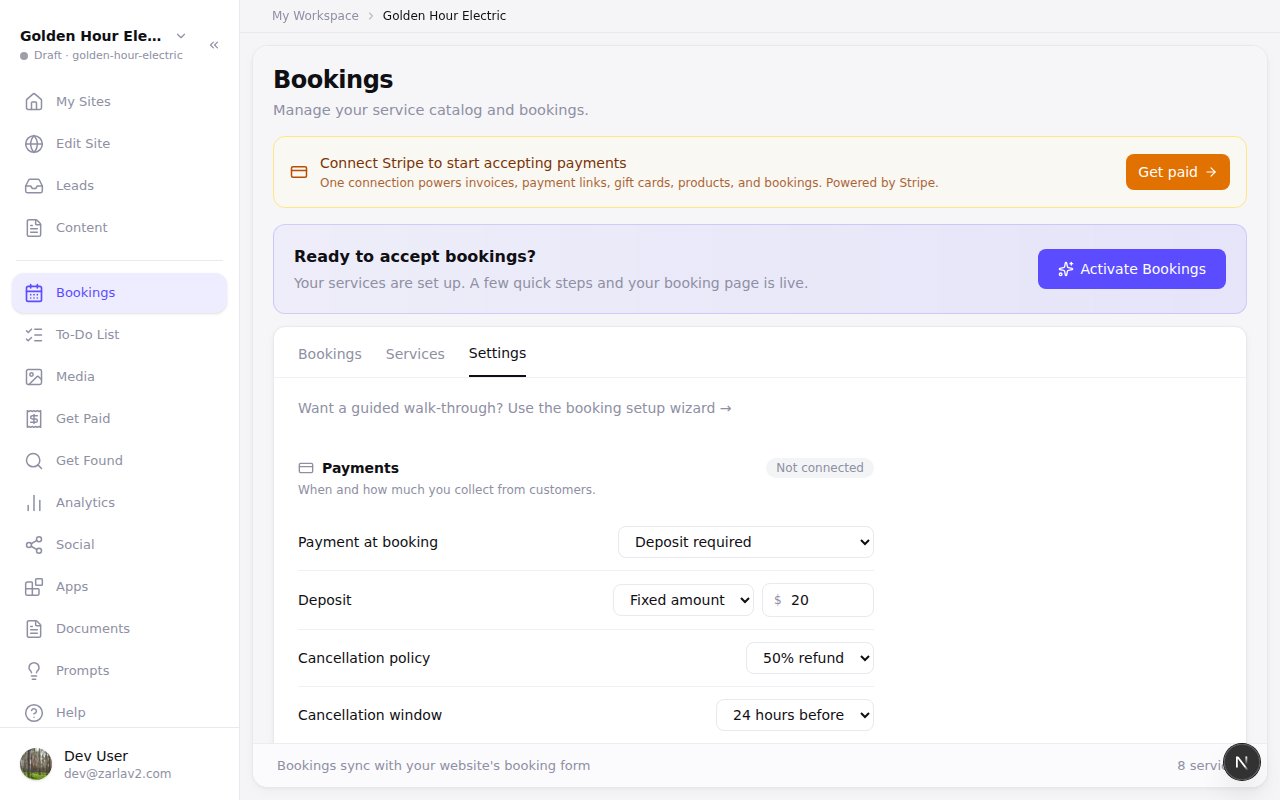
Zarla now keeps every online-booking setting on the Bookings page's Settings tab, so a quick change no longer means redoing the whole setup.
Open Bookings → Settings to change how you take payment, your deposit, your cancellation policy, your weekly hours, lead time and buffer, or your travel radius, then press one Save at the bottom — it saves all of those together and tells you when it's done. The guided setup is still there for anyone who prefers walking through it step by step — and walking through it again on a live booking page simply saves your changes.
Smaller things in the same update: the button that switches bookings on now says “Activate Bookings” — it switches on your booking page, not your website — deposits are entered in dollars rather than cents, and businesses in the US see their travel radius in miles.
- What it does
- Customers book appointments or service calls from your website; bookings sync to Google Calendar, and you can take a deposit or full payment through your own Stripe account.
- Who gets it
- Included on every plan
- Good for
- trades and home-service businesses, laundromat, health and wellness practices, beauty and grooming businesses, gyms and fitness studios, professional services, kids activities, party hire and 75 more
- This update
- Available since