Inside Zarla's AI website builder
An online booking system for small business — built into your website.
Customers choose a service, pick a real free slot and pay a deposit — at 11 pm, without calling you. Zarla builds the website, writes your service list from it, sends the reminder emails, and keeps your Google Calendar in sync. No second tool, no second subscription. Already have a website? Paste its address and Zarla rebuilds it free.
Free to build · Site ready in 30 seconds · Pay only if you publish

Powered by Zarla
The AI website builder that actually knows your industry
Tell Zarla what you do and where you’re based. In about 30 seconds, it builds a complete, professional website — with real copy written for your trade, SEO built in from day one, and everything you need to start getting customers from Google.
Try it free — takes 30 secondsWhat is an online booking system?
An online booking system is software that lets customers choose a service, pick a free time and pay — on their own, any hour, without calling. Zarla's booking page syncs with Google Calendar, sends confirmation and reminder emails, and takes a deposit or full payment at booking through your own Stripe connection. There are three ways a small business gets one:
- A standalone booking tool. A separate company hosts a booking page for you. You type in every service, pay them monthly, and link their page from your website.
- A plugin on a site built elsewhere. You install it, configure it, and keep it working alongside your theme and your hosting.
- Built into the website builder. The booking page is part of the site itself, and the service list is written from the site. This is how Zarla works.
Zarla is an AI website builder for small businesses — describe your business in a sentence and it generates your whole site, with online booking one wizard away.
Already have a website?
A standalone tool means a second login, a second bill and a page that isn't yours. Zarla's answer: paste your current site's address and Zarla rebuilds it free — pages, design and all — with your services ready to generate. See how website import works →
Your customer's view
A booking page customers use at 11 pm
- Choose your service — with price options and extras inside the card
- Pick a date & time — only real free slots, inside your hours
- Your details — name, email, phone and a note for you
- Review & pay, or Review & confirm when nothing is due yet
- A confirmation screen with a reference like ZBK-6659-LT and Add to calendar
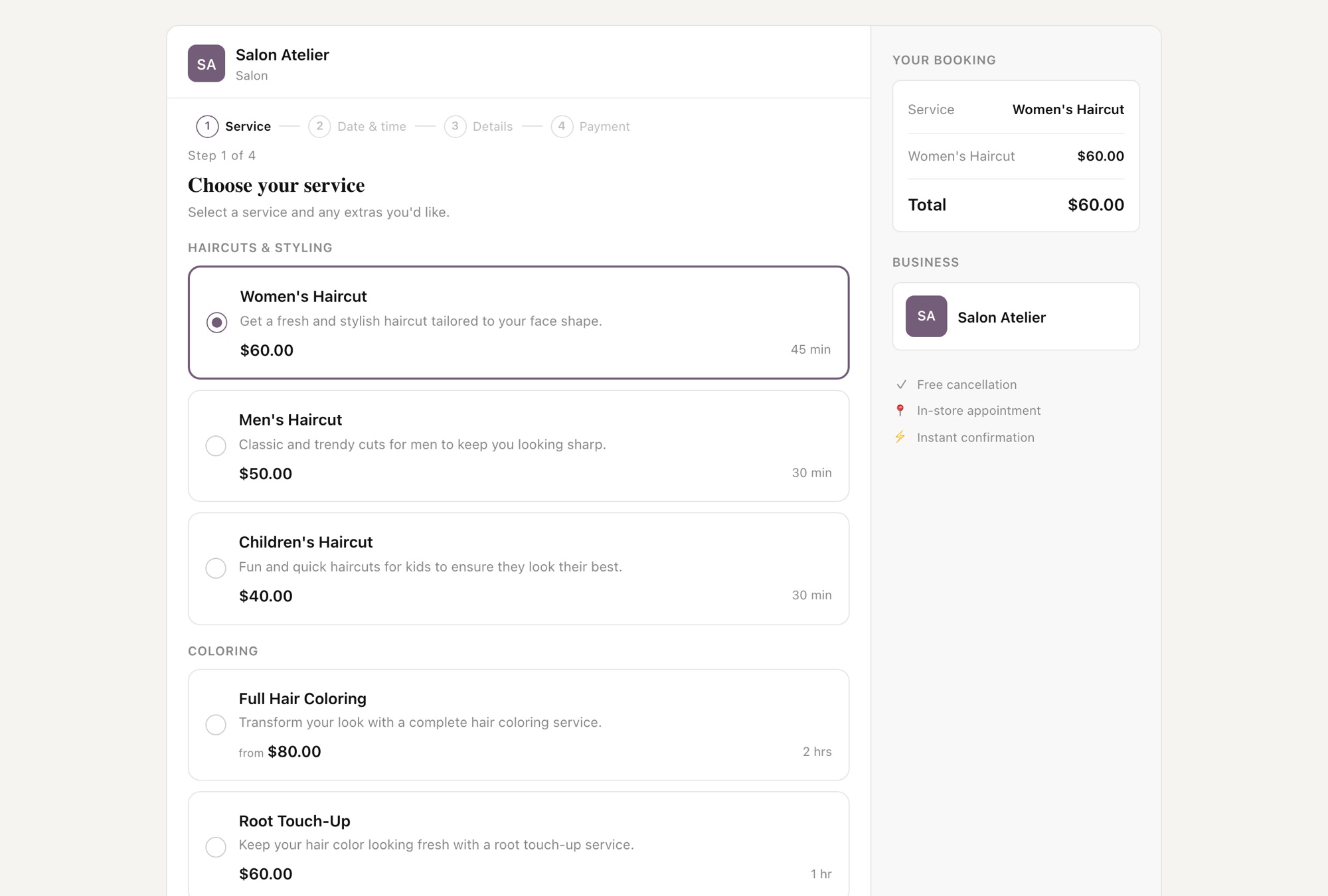
Want to see your services on a page like this?
Type your business name. Zarla builds the site in about 30 seconds and writes your service list from it. Free, no card — pay only if you publish.
Free to build and preview · No credit card · Pay only to go live
What you get
A booking system for small business — with the website included
Everything a standalone booking tool sells, already inside your Zarla site.
Customers book while you're on a job
The booking page shows only real free slots: your hours, your lead time, your buffer, and whatever is already in your Google Calendar.
Your service list writes itself
Open Bookings, click Generate with AI, and Zarla drafts your services and prices from the site it just built, in up to 30 seconds. Edit anything.
Get paid before you show up
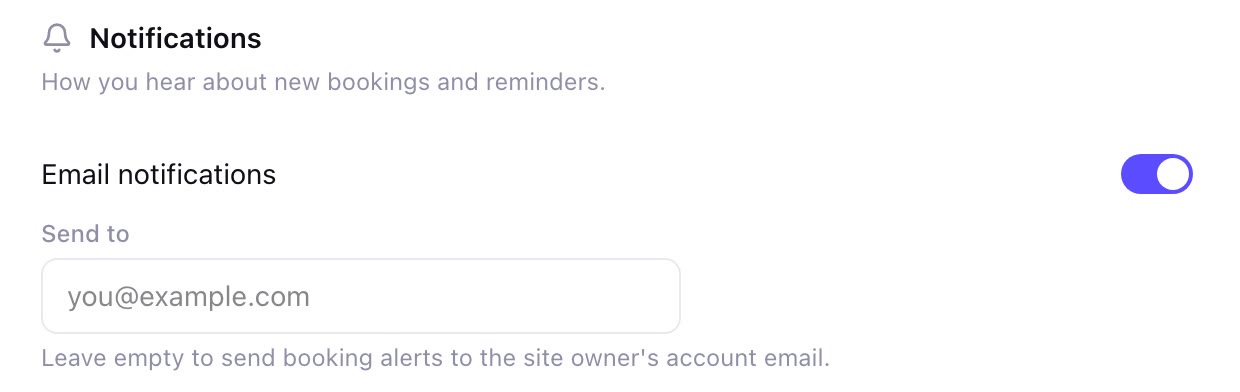
Take a deposit, full payment or nothing at booking, through your own Stripe connection. Anything unpaid shows as Awaiting payment.
Fewer no-shows, no chasing
A confirmation email the moment they book, a reminder 2–48 hours before, and a follow-up after the job. Set once.
Come-to-you jobs, checked before they book
Mobile services ask for the customer's address and check it against your travel radius. Quote-first jobs collect the details and charge nothing.
No second subscription
Included with every Zarla site — no add-on, no second tool to log into. Bookings sits in your dashboard beside your leads and invoices.
On a phone
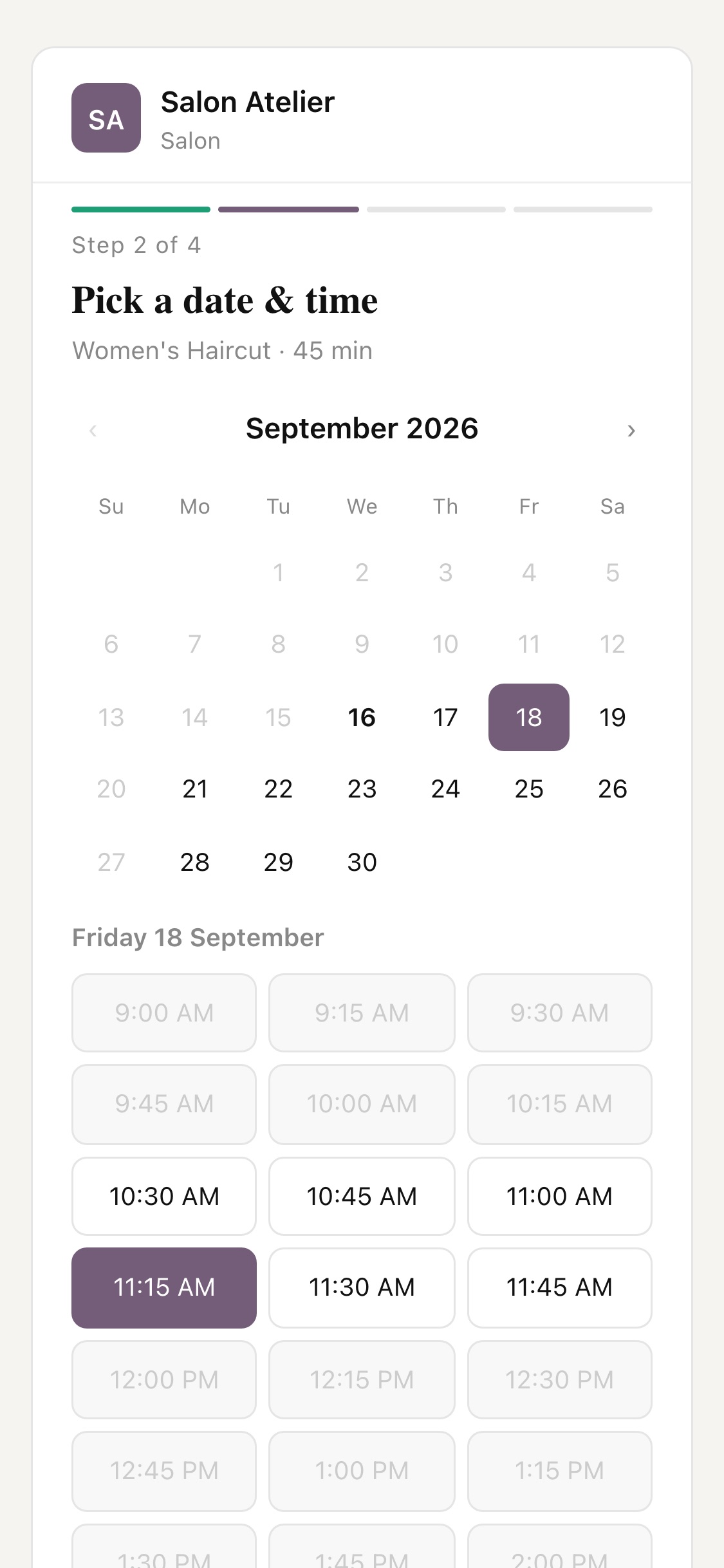
Built for the phone in their hand
- One step per screen, with a progress bar
- Only real free slots — no back-and-forth
- A running total that stays in view
- No app, no account — just your booking page
Why it's different
Your day, already sorted
Every booking, in one list
Open Bookings in your dashboard and today is already sorted — upcoming, completed, and anything still Awaiting payment. Each booking carries its reference (ZBK-6659-LT), the service, the time, the price, and the customer's details and notes. Switch on the daily summary and tomorrow's bookings land in your inbox every morning.

The rules that keep your calendar honest
The Settings tab holds everything the booking page obeys: your hours, a Minimum lead time so nobody books ten minutes from now, a Buffer between bookings so you can drive, a Maximum travel radius for come-to-you jobs, your payment mode, and how many hours before an appointment the reminder goes out. Change one, and the booking page changes with it.
How it works
How to add online booking to your small business website with Zarla
Build your site
Describe your business in a sentence. Zarla generates the whole website — pages, copy, images and design — in about 30 seconds.
30 secondsGenerate your services
Open Bookings in your dashboard and click Generate with AI. Zarla reads the services already on your site and drafts your service list with prices, price options and extras in up to 30 seconds — edit anything before you continue.
30 secondsSet your hours and payment
Work through the setup wizard — Services, Hours, Payment, plus Service area if you come to the customer — and choose No payment at booking, Full payment upfront or Deposit required through your Stripe connection.
5 minutesActivate Bookings
Click Activate Bookings. Your site's nav and hero buttons become Book buttons that open your booking page at /book/your-site, and customers can book the moment you publish. Pause turns the buttons back into what they were.
InstantSee what Zarla builds for your business
Describe your business in a sentence. Zarla generates a full website — homepage, about page, services, contact form — in about 30 seconds. If you don’t love it, you haven’t lost anything.

Your services. Your hours. Your Stripe. Booked while you work.
Settled in your own Stripe account. Build the site free, generate your services, and the booking page is live the moment you publish.
Free to build and preview · No credit card · Pay only to go live
How Zarla compares
Appointment booking website: built in vs a standalone tool vs a plugin
| RecommendedZarla | A standalone booking tool | A WordPress booking plugin | |
|---|---|---|---|
| Time to first booking | Minutes after your site: AI writes your services | An afternoon typing every service, then linking their page from yours | Install, configure, make it match your theme |
| What you pay | Included with your site | A second monthly bill | Free-to-paid tiers, plus the hosting you already pay |
| Deposits and payments | Your own Stripe connection | Their payment setup | Usually another plugin |
| Confirmation and reminder emails | Built in | Depends on the plan | Depends on the plugin |
| Google Calendar sync | Depends on the plugin | ||
| Where customers book | A page on your site, in your colors, from your Book buttons | Their page, their branding, linked from yours | Inside your site |
| Builds the website too |
One login. One bill. The website included.
The booking page, deposits, reminders and Google Calendar sync come with your Zarla site — not as a second subscription.
Free to build and preview · No credit card · Pay only to go live
Real results
Small business owners who got online with Zarla
From business owners like you.
“Optimized for local service-based businesses. Easiest website build I've experienced. The AI-based build is the way to go instead of clunky theme-based websites. Get the site built and get out of the weeds with Zarla!”
“Great professional website in less than a minute, with the use of AI and a few descriptive prompts. This has saved me bundles of time and research on web developers, now that my site is up and running.”
“Beginner-friendly, efficient, and designed for business owners who want a professional website without dealing with complicated technical steps. I'd recommend it to anyone who wants a simple, reliable way to get online.”
Questions we hear
Online booking — common questions
Yes — Zarla's is included on every plan, with no add-on. Building the site and the booking page is free; customers can book once you publish, which is when a paid plan starts — see our plans. Build it free →
As a separate tool, typically $16 to $30 a month: Acuity from $16 a month billed annually ($20 month to month) with no free plan, GlossGenius from $24 a month billed annually, and Setmore free for up to 4 users then $5 per user (public prices as of September 2026). With Zarla it's part of the website, so there's no second bill — one plan covers the site, the booking page, the reminders and the calendar sync.
The one that matches how you get paid. Zarla handles three kinds in one system: appointments customers come to you for (salons, clinics, studios), come-to-you jobs with the customer's address checked against your travel radius (cleaners, mobile mechanics, dog groomers), and quote-first work where the customer describes the job and you price it (contractors, landscapers). See your services on a booking page — free →
Describe your business at Zarla and the website is built in about 30 seconds. Then open Bookings, click Generate with AI, set your hours and payment in the wizard, and click Activate Bookings — your site's buttons become Book buttons. It's free to build and preview; you pay only if you publish. Start with your business name →
Not directly — the booking page belongs to a Zarla site, so there's no code to paste into a site built somewhere else. You can bring your site over: paste its address and Zarla rebuilds it free, with your services ready to generate. How website import works →
Yes, through your own Stripe connection — connect it once under Settings → Payments and it's shared with your invoices and store. You choose No payment at booking, Full payment upfront or Deposit required (a fixed amount or a percentage), and come-to-you services can carry a callout fee. A booking that isn't paid shows as Awaiting payment in your list. Money settles in your own Stripe account; beyond Stripe's standard processing fee there's a small platform fee, the same as invoices and gift cards.
Three things that work together: a deposit taken at booking, a reminder email 2–48 hours before (you pick the hours), and a cancellation policy with a 2–48 hour window that customers agree to when they book. Most no-shows are forgotten, not deliberate — the reminder alone does a lot of the work.
No. The booking page only offers slots that are actually free — inside your hours, past your Minimum lead time, with your Buffer between bookings, and clear of whatever is already in your Google Calendar. Add a dentist appointment on your phone and that slot is blocked on the booking page within 15 minutes.
Yes. Mark a service as come-to-you and the booking page asks "Where are you located?" before the calendar, checks the address against your Maximum travel radius (miles in the US), and can add a callout fee. The address is on the booking, so you know where you're going before you leave.
No. Zarla runs one calendar for the business, which fits a solo operator or a team that shares one calendar. If you need a separate calendar per stylist or technician, a standalone tool with per-staff scheduling is the better fit for now.
No — Google Calendar only, both ways: bookings land in it, and its busy times block the booking page. If you live in Outlook or Apple Calendar you still get every booking by email, and can switch on a summary of tomorrow's bookings every morning.
Yes. It's a page on your site at /book/your-site, in your colors and under your name, and when you click Activate Bookings your nav and hero buttons become Book buttons that open it. Click Pause and the buttons go back to what they were. Build the site and see it — free →
Recent updates to this feature
- Each site keeps its own bookings and Google Calendar
- Booking pages follow your Google Calendar and lead time
- Bookings show what your customers chose and answered
- Bookings use your currency and timezone
- Price options are required and payment problems show clearly
Let the 11 pm customer book themselves in.
Build the site free, generate your services, activate Bookings. Deposits, reminders and calendar sync are already there.
Free to build. Pay only if you publish.