Add Google's email records to your Zarla domain
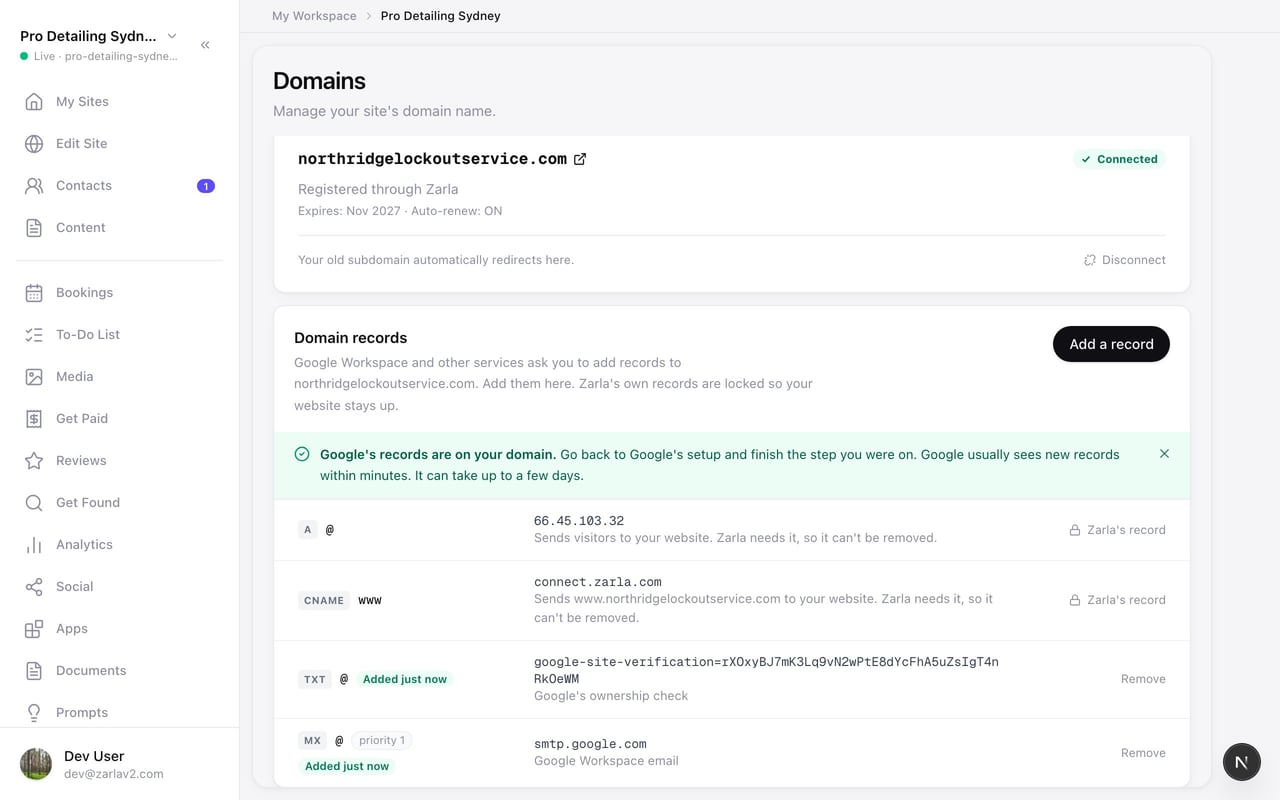
Zarla now lets you add records to a domain you bought through Zarla, so Google Workspace email is set up in a minute instead of waiting on support.
Open Domains and find Domain records under your domain. Press Add a record, paste the verification line Google shows you, leave the mail-record box ticked, and press Add Google's records. Both records go on your domain together, and you go back to Google's setup to finish.
If another service asks for a record, choose Another record and type what it gave you. The records Zarla needs for your website stay locked, so your site keeps working whatever you add or remove.
- What it does
- Connect a domain you already own or buy one inside Zarla, with step-by-step guides for GoDaddy, Namecheap, Cloudflare, Squarespace, Wix and more; every published site also gets a free Zarla web address.
- Who gets it
- Premium and Business plans
- This update