Quote & invoice design · inside Zarla
A quote template that's already in your brand.
Zarla builds your quote template from your own website — your logo, your colors, your fonts. Pick one of four designs, set it once, and every quote, estimate and invoice follows. Your customer accepts it online, no printer needed.
No credit card · Pay when you publish
Try it on your business
Finish the sentence. Your quote template comes with the site.
Add what you do, your town and your business name — "I run a roofing business in Denver, Colorado." Zarla builds the website, and your quotes and invoices come out in the same brand.
Already have a website? Bring it across →Zarla keeps your old page addresses where it can and redirects the ones that change, helping you keep the Google standing you've built.
What should a quote or estimate template include?
A quote template is a ready-made layout for pricing a job: your business details, the customer's, what you'll do, what it costs, how long the price holds and how to accept. The same layout is called an estimate template or, for bigger jobs, a proposal template — in Zarla you choose whether your customers see Quote, Estimate or Proposal. A professional one has:
- Your business name, logo and contact details — Zarla takes them from your website, and you choose which ones print.
- A quote number and two dates — when you issued it and how long it's valid. Zarla numbers quotes for you (Q-0042) and fills in the valid-until date from your settings.
- The customer's name — picked from your contacts.
- The job, in one line — "Panel upgrade & EV charger", plus a short note.
- Line items — description, quantity, rate and amount, grouped under headings when the job has stages.
- Options, if you offer them — up to three, with the one you'd pick marked Recommended, and checkbox extras.
- Tax and the total — prices that include or add tax, with the right label for your country.
- The deposit — a percentage or a fixed amount.
- What's not included — the lines that stop arguments later.
- Your terms and a way to accept — online with a typed name, or a sign-and-accept block on the printed copy.
Every one of those is built into a Zarla quote, in your website's design — you fill in the job and the prices, and Zarla's quoting software sends it as a link your customer accepts online. Writing one by hand first? How to write a quote walks through every line with a worked example.
Four designs, built from your website
Pick a template. It's already yours.
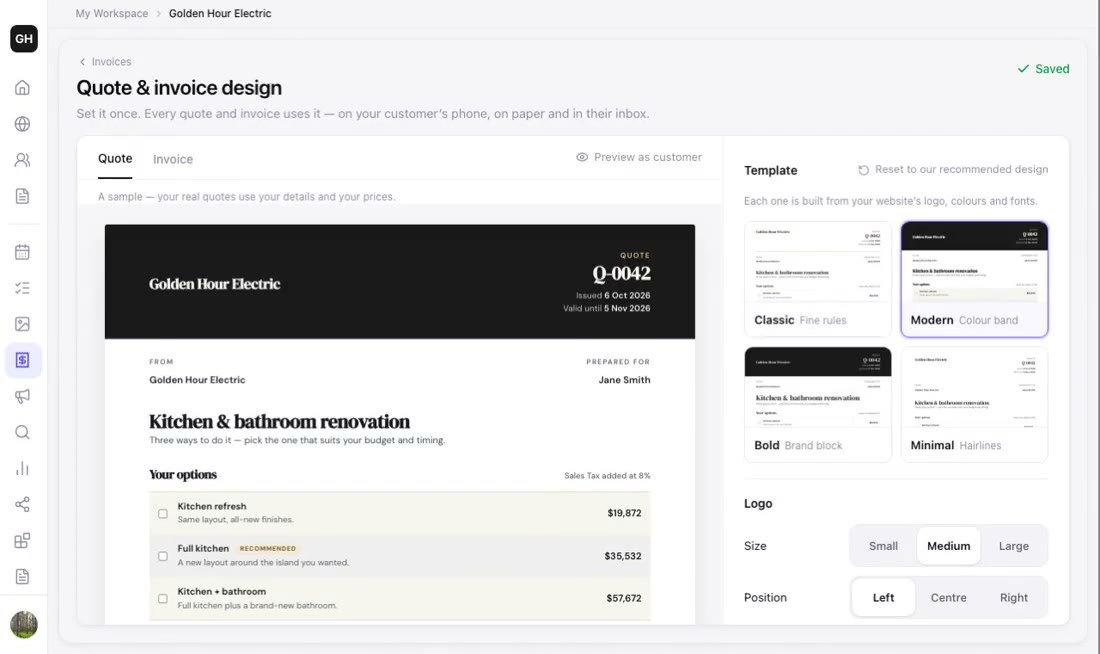
- Classic, Modern, Bold or Minimal — each built from your website's brand
- Logo small, medium or large; left, center or right
- Your website's fonts, or a different heading font just for documents
- Your accent color for the headings, lines and the total
- Preview it as your customer will see it before anything is sent
See your quote template in your own brand
Type your business name. Zarla builds the website in about 30 seconds — and your quote template comes with it, in the same logo, colors and fonts.
Free to build and preview · No credit card · Pay only to go live
Not a PDF attachment
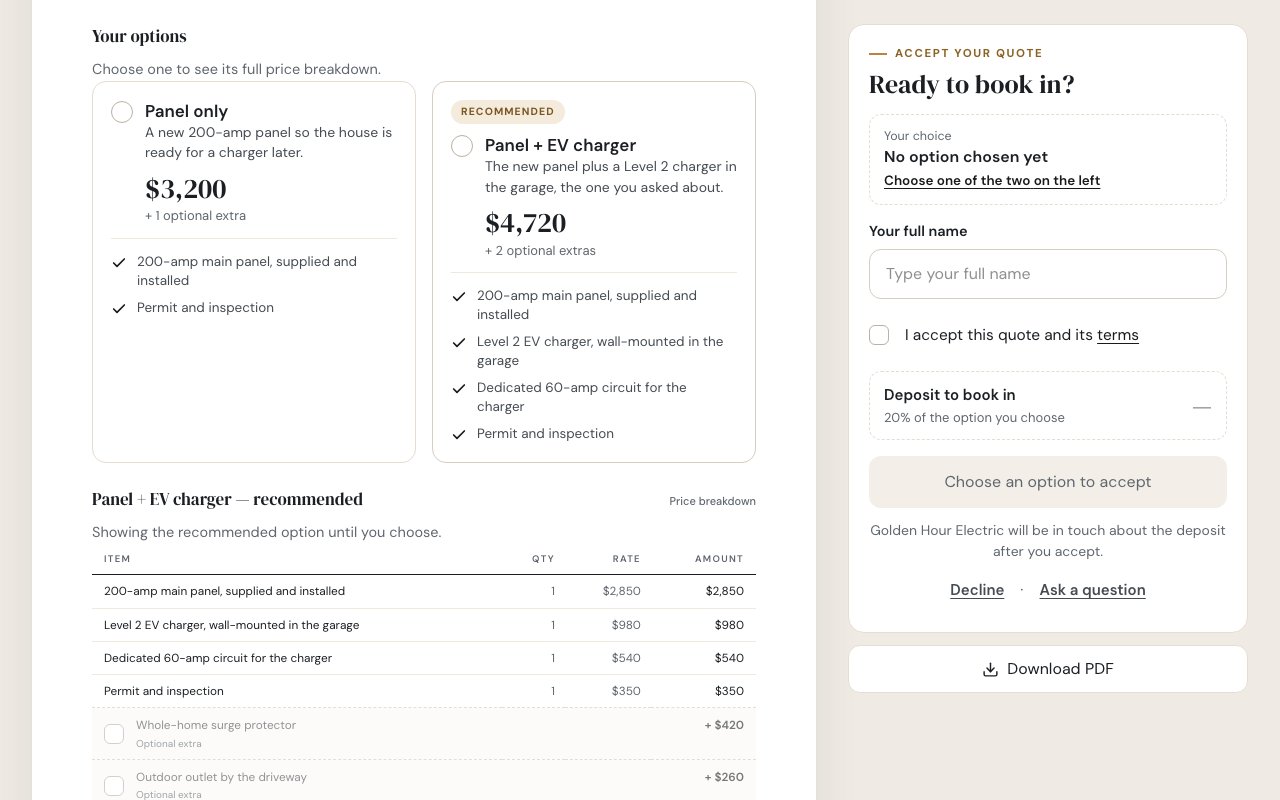
Your template, as a page your customer can say yes on
- The web page and the PDF are one design
- A total that updates as they check extras
- Accept, decline or ask a question from the same page
What you can change
One design for every quote, estimate and invoice
Set it once. Your quotes and invoices use it on your customer's phone, on paper and in their inbox.
Four templates
Classic with fine rules, Modern with a color band, Bold with a brand block, or Minimal with hairlines — each built from your website's logo, colors and fonts.
Your logo, where you want it
Small, medium or large; left, center or right. Swap sides to put your details on the right and the customer's on the left.
Your fonts and text size
Use your website's fonts or pick a different heading font for documents, a smaller or larger text size, and regular or bold headings.
Your accent color
Your website's own color, one of five picked to go with it, or any color you choose — for the headings, the lines and the total.
What prints
Turn your address, phone, email and website on or off, and set default terms for every new quote and a footer line on every quote and invoice.
US Letter or A4
Pick the paper size for the PDF. Businesses in the US and Canada start on Letter; everyone else on A4.
How it works
How to make a quote template with Zarla
Build your site
Describe your business in a sentence, and in about 30 seconds Zarla builds the whole website — the logo, colors and fonts your quote template will use.
30 secondsOpen the designer
Go to Get Paid → Quotes and open the Design tab — a sample quote appears in your brand straight away.
One clickPick and adjust
Choose Classic, Modern, Bold or Minimal, then the logo, fonts, accent color and paper size — every change saves as you go.
A few minutesSend a quote
Write your next quote as usual — it arrives in your design, and the matching invoice follows when the customer accepts.
Every quoteYour brand. On every quote.
Build the site free and your quote template is ready with it. Pay when you publish.
Free to build and preview · No credit card · Pay only to go live
How Zarla compares
Zarla vs a Word, Excel or PDF quote template
| RecommendedZarla | Word, Excel or PDF template | |
|---|---|---|
| Your logo, colors and fonts already applied | ||
| One design change updates every quote and invoice | ||
| Customer accepts online by typing their name | ||
| Quote numbers and valid-until dates filled in | ||
| The accepted quote becomes an invoice in the same design |
Real results
Small business owners who got online with Zarla
From business owners like you.
“Great professional website in less than a minute, with the use of AI and a few descriptive prompts. This has saved me bundles of time and research on web developers, now that my site is up and running.”
“User friendly and very responsive. Great tool for website building.”
“Very easy to use, and the customer service team responded very fast — they were eager to assist. I'd used a different company before, spent a bunch of money and got nothing. I gave this a try and so far I'm glad I did.”
Questions we hear
Quote template — common questions
A ready-made layout for pricing a job — your business details, the customer's, the work, the price, how long it's valid and how to accept. With Zarla it's built from your own website's logo, colors and fonts, and your customer accepts it online.
Yes. Building your site, setting up your design and previewing quotes is free, and the free plan sends up to five quotes and invoices a month. Your customers never pay anything to open or accept one. Premium and Business send as many as you need; current plans are on the pricing page.
Mostly the name. An estimate can mean a rough figure and a quote a fixed price; a proposal is often used for a bigger job, like a construction proposal. Zarla uses one template for all three — you choose under Get Paid → Quotes → Settings whether your customers see Quote, Estimate or Proposal.
Yes. Group the lines under headings for each stage, offer up to three options, add what's not included and your terms, and set a deposit. Call it a Proposal or an Estimate under Quotes → Settings, and the customer accepts it online. Try it on your business — free →
Yes. One design covers your quotes and your invoices — on your customer's phone, on paper and in their inbox — and when a customer accepts a quote, the invoice Zarla drafts comes out in the same design.
Yes. Every quote downloads as a PDF in your design, on US Letter or A4, and an open quote ends with a sign-and-accept block for customers who like paper. Zarla doesn't make Word or Excel files.
No — one design covers every quote and invoice, so your paperwork always matches. What changes per quote is the content: the job, the options, the photos and the price.
No. You start from one of the four designs built from your website and change the logo, fonts, accent color, details and paper size. There's no drag-and-drop layout editor and no uploading a Word file.
The template comes with the website: describe your business and Zarla builds the whole site in about 30 seconds, with quotes, invoices and your contacts in one dashboard. If you already have a site, paste its address and Zarla rebuilds it. Build it free →
Recent updates to this feature
All updates →Get the website — and a quote template that already matches it.
Describe your business in one line and Zarla builds the whole site, with your quote template in the same logo, colors and fonts. No credit card; pay when you publish.
Already have a website? Bring it across →Zarla keeps your old page addresses where it can and redirects the ones that change, helping you keep the Google standing you've built.