Quotes · inside Zarla
Quoting software your customers say yes to online.
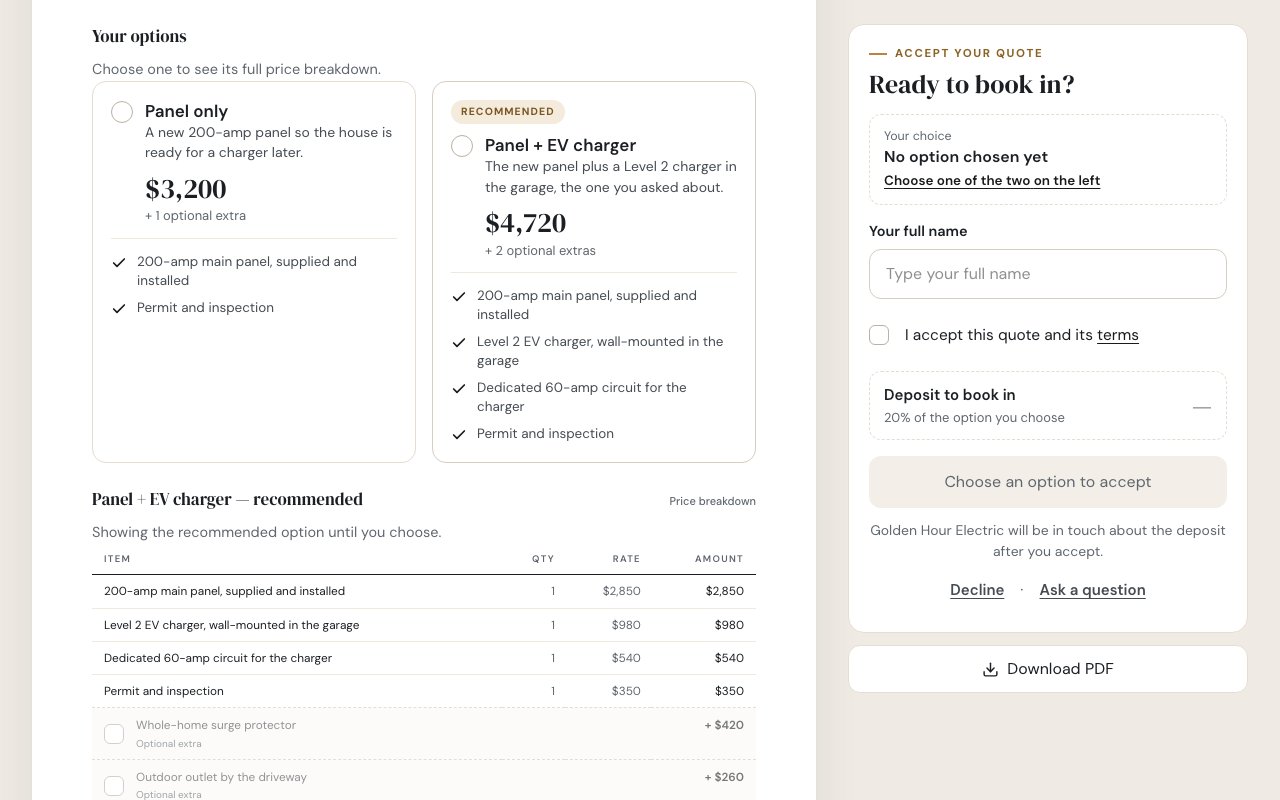
Send a quote with up to three options and checkbox extras. Your customer picks one, types their name to accept and gets a copy — and Zarla drafts the invoice for what they chose, with any deposit you asked for. It comes with the website Zarla builds for your business.
No credit card · Pay when you publish
Try it on your business
Finish the sentence. Zarla builds the site — and your quotes.
Add what you do, your town and your business name — "I run an electrical business in Portland, Oregon." Zarla builds the website, and Quotes, your price book and your contacts are in the same dashboard.
Already have a website? Bring it across →Zarla keeps your old page addresses where it can and redirects the ones that change, helping you keep the Google standing you've built.
What is quoting software?
Quoting software is a tool for writing up what a job will cost — the work, the materials and the total — and sending it to the customer to accept before you start. Most trades use "quote" and "estimate" for the same thing, so it also goes by estimate software, a quoting tool, a quote app or a quote builder; in Zarla you choose whether your customers see the word Quote, Estimate or Proposal. Small service businesses usually send quotes one of three ways:
- A template. A Word, Excel or PDF form you fill in and attach to an email. Cheap, but the customer has to reply, call or print and sign to say yes — and nothing tells you they've opened it.
- A separate quoting app. Built for sending quotes and invoices from your phone, with another login, another customer list and a website that lives somewhere else. (Estimating software that works out materials from building plans, for big construction bids, is a different kind of tool again.)
- Built into your website's dashboard. The inquiry comes in through your site, you quote it from the same screen, and the customer accepts on a page with your name on it. This is how Zarla works.
Zarla is an AI website builder for small businesses: describe your business in a sentence and it builds the whole site. Quotes sit under Get Paid in the same dashboard, next to your invoices, payment links and the contacts and pipeline every inquiry lands in. It's built for the businesses that quote every week: electricians, plumbers, HVAC, handymen, remodelers, painters and pressure washers. Still sending quotes by hand? How to write a quote covers every line, with a worked example.
Good, better, best
Give them options, not one take-it-or-leave-it price
- One price, or up to three options with one marked Recommended
- Checkbox extras with a live total and deposit
- Lines grouped under headings with subtotals; a zero-price line reads Included
- Site photos, a photo per option and a video link
- What the price covers and what it doesn't, in plain lines
- After the price, why choose you: your similar jobs, Google rating, reviews and reasons, matched to the job
See your quotes on your own business
Type your business name. Zarla builds the site in about 30 seconds, with Quotes, your price book and your contacts in one dashboard. Free, no card — pay when you publish.
Free to build and preview · No credit card · Pay only to go live
On their phone
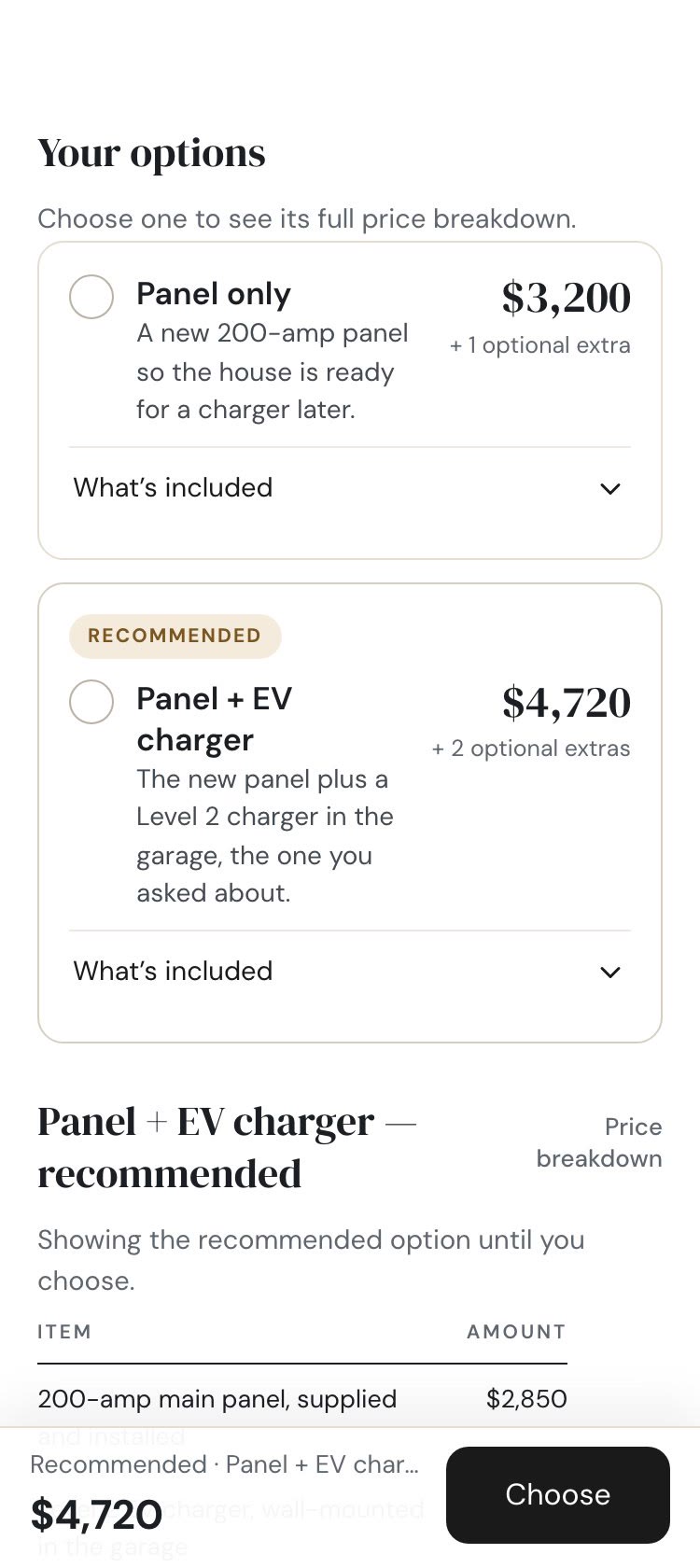
They say yes from the couch, not the kitchen table
- The total stays on screen as they scroll
- Decline with a reason, or ask you a question from the same page
- After they accept, they can save their copy as a PDF
What you get
From "can I get a quote?" to the invoice
Every step of the quote, in the dashboard your website already lives in.
Quote the inquiry in one tap
Every quote request from your website lands in your contacts. Start a quote from the contact's card, or pick from the people who asked for one recently — their details come with them.
Know when they've opened it
Each quote shows how many times the customer has opened it and when, and four tiles at the top show what needs you, what's waiting on customers, what expires this week and what was accepted this month.
Change it after you send it
Edit a sent quote and choose: send them the update, or just update the link. Re-send an expired quote and it gets fresh dates.
Start from a past quote
Copy an old quote or save one as a template, so the bathroom you quote every week takes a minute, not twenty.
Your deposit, your terms
Set a deposit as a percentage or a fixed amount, how long quotes stay open, and your standard terms once under Get Paid → Quotes → Settings.
Your design on every page
Quotes wear your website's logo, colors and fonts. Pick a template, your accent color and US Letter or A4 once, and every quote and invoice follows.
Why it's different
Your prices set once. The paperwork done for you.
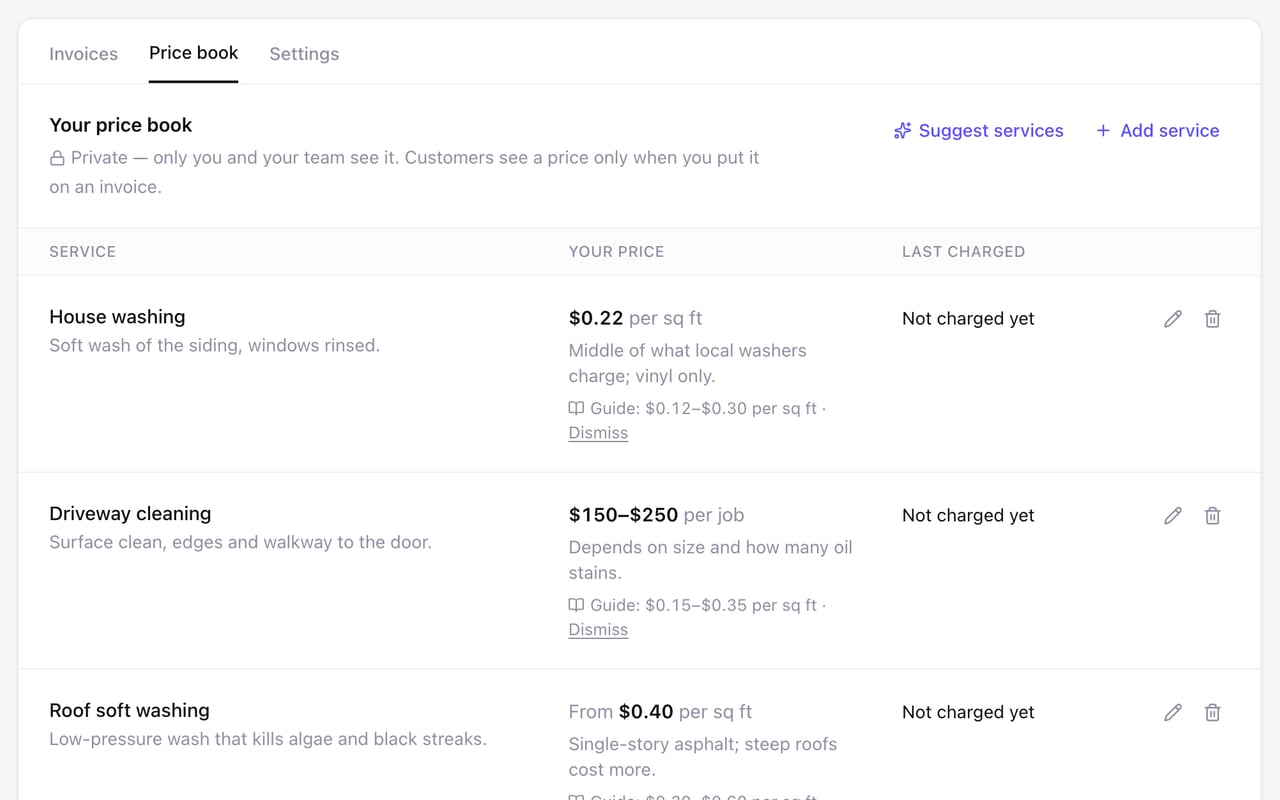
Set your prices once, pull them into every quote
Keep every service you sell in a private price book: one price, a range or a "from" price, per job, hour or square foot, with a note to yourself about why. Add lines to a quote straight from it, and see what you last charged. In the US, eight trades — pressure washing, house cleaning, lawn mowing, junk removal, car detailing, handyman, pet sitting and plumbing — get a typical US price range from a published pricing guide to start from, with the source shown. Your customers never see the book; they only see a price when you put it on a quote or an invoice.
Accepted, invoiced, marked Won
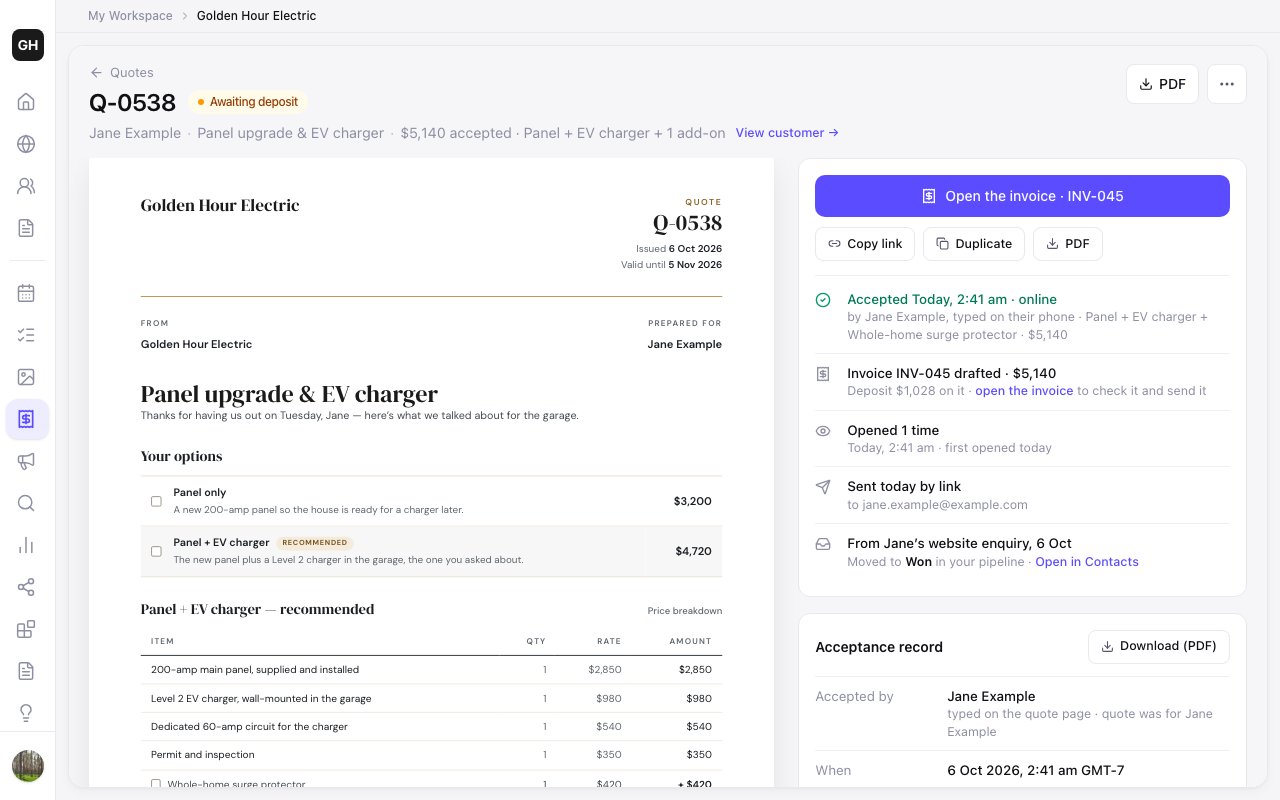
The moment your customer accepts, Zarla emails you and drafts the invoice for exactly the option and extras they chose, with any deposit you asked for, ready for you to check and send. The customer moves to Won in your pipeline, and the quote keeps a record of what they saw, the name they typed and when.
How it works
How to send a quote with Zarla
Build your site
Describe your business in a sentence, and in about 30 seconds Zarla builds the whole website — with Quotes, your price book and your contacts in the dashboard beside it.
30 secondsWrite the quote
Open Get Paid → Quotes → New quote, pick the customer, add the job, and build one price or up to three options from your price book, with any extras as checkboxes.
A few minutesSend the link
Email it from Zarla under your business name, or copy the link and send it however you like — the customer opens it on any phone or computer.
Their moveThey accept, you invoice
Your customer picks an option, types their name and accepts — Zarla drafts the invoice, with any deposit you asked for, moves them to Won and emails you straight away.
DoneYour options. Your prices. Their yes.
Build the site free and send your first quotes from the same dashboard. Pay when you publish.
Free to build and preview · No credit card · Pay only to go live
How Zarla compares
Zarla quotes vs a Word or PDF quote template
| RecommendedZarla | Word, Excel or PDF template | |
|---|---|---|
| Customer accepts online by typing their name | ||
| Up to three options with a Recommended pick | ||
| Checkbox extras that update the total | ||
| See when the customer opens it | ||
| Invoice drafted when they accept (with any deposit) | ||
| Prices pulled from your own price book | ||
| Comes with your website, contacts and pipeline |
Real results
Small business owners who got online with Zarla
From business owners like you.
“Great professional website in less than a minute, with the use of AI and a few descriptive prompts. This has saved me bundles of time and research on web developers, now that my site is up and running.”
“User friendly and very responsive. Great tool for website building.”
“Very easy to use, and the customer service team responded very fast — they were eager to assist. I'd used a different company before, spent a bunch of money and got nothing. I gave this a try and so far I'm glad I did.”
Questions we hear
Quoting software — common questions
A tool for writing up what a job will cost and sending it to the customer to accept before you start. With Zarla, the quote is a link: your customer opens it on their phone or computer, picks an option, checks any extras, types their name to accept and gets a copy — and you get the invoice drafted, with any deposit you asked for.
Five things: options the customer can compare instead of one price; a way to accept online without printing or signing; knowing when the quote's been opened; an invoice drafted, with any deposit, when they say yes; and prices you set once and reuse. Big-company quoting tools (often called CPQ) add sales-team approvals and product catalogs most trades don't need. Zarla's quotes do all five, in the same dashboard as your website and contacts.
For most trades, yes — both are the price you're offering for a job before it starts. Some businesses use "estimate" for a rough figure and "quote" for a fixed price. In Zarla you choose the word your customers see — Quote, Estimate or Proposal — under Get Paid → Quotes → Settings.
They open the link, choose an option, check any extras they want, type their full name and check "I accept this quote and its terms". Zarla keeps a copy of exactly what they saw, the name they typed and when, emails them a copy, and tells you straight away. They can also decline with a reason or ask you a question from the same page. Try it on your business — free →
Yes, through the invoice. When a customer accepts, Zarla drafts an invoice for the option and extras they chose with the deposit you asked for on it; you check it and send it, and they pay by card from the invoice's pay page. Card payments need a paid plan and your Stripe account connected under Settings → Payments. The quote page itself doesn't take payment.
You can build your site and send up to five quotes and invoices a month on the free plan, and your customers never pay anything to open or accept a quote. Premium and Business send as many as you need, and add publishing your website and taking card payments. Current plans are on the pricing page.
Your private list of the services you sell and what you charge — one price, a range or a "from" price, per job, hour, square foot or your own unit. Zarla shows what you last charged for each, lists the services on your website that don't have a price yet, and lets you add a line to a quote or an invoice straight from the book. It never appears on your website. Want a printed one for customers? Our free price list template (Word + PDF) is the public-facing version.
Only from a source it shows you. In the US, eight trades — pressure washing, house cleaning, lawn mowing, junk removal, car detailing, handyman, pet sitting and plumbing — can start from a typical US price range in a published pricing guide, which you accept, edit or dismiss. Zarla never prices a job on its own: every price on a quote is yours.
Yes. Every quote can end with the reasons to choose you: photos of similar jobs from your library, your Google rating with a link to your reviews, the testimonials on your website, your reasons and your license, insurance and memberships. Zarla picks what fits the job — a kitchen quote leads with your kitchens — and the first time it asks you to check what's true; only those facts are ever used. You can swap a photo or switch a part off for one quote, and the same section prints as its own page in the PDF.
Email it from Zarla — it arrives under your business name, and replies come straight to you — or copy the link and send it any way you like, from your own phone or email. Zarla doesn't send text messages for you.
Yes. Edit it, then choose "Send them the update" or "Just update the link". You can also withdraw a quote, mark one accepted when the customer says yes on the phone, or re-send an expired one with fresh dates.
Yes. You can download any quote as a PDF on US Letter or A4, and a customer on a computer can download it from the quote page; an open quote ends with a sign-and-accept block and a QR code that opens the online version, for customers who like paper. The page and the PDF share one design, built from your website — see the quote template.
Quotes come with the website: describe your business and Zarla builds the whole site in about 30 seconds, with quotes, invoices, payment links and your contacts in one dashboard. If you already have a site, paste its address and Zarla rebuilds it. Build it free →
Get the website that brings the inquiry in — and send the quote that wins it.
Describe your business in one line and Zarla builds the whole site, with Quotes waiting in the dashboard beside it. No credit card; pay when you publish.
Already have a website? Bring it across →Zarla keeps your old page addresses where it can and redirects the ones that change, helping you keep the Google standing you've built.