Inside Zarla's AI website builder
Send a payment link. Get paid before you leave the job.
Type the amount and what it's for, then text it, email it or show the QR code. Your customer pays by card on a page with your business name, straight into your own Stripe account — and the link turns Paid, with who paid. It comes with the website Zarla builds for you.
Free to build · Site ready in 30 seconds · Pay only if you publish

Powered by Zarla
The AI website builder that actually knows your industry
Tell Zarla what you do and where you’re based. In about 30 seconds, it builds a complete, professional website — with real copy written for your trade, SEO built in from day one, and everything you need to start getting customers from Google.
Try it free — takes 30 secondsWhat is a payment link?
A payment link is a secure web address that opens a checkout page for a set amount. You send it by text, email or QR code, and your customer pays by card — no invoice, no app and no account needed. It's the quickest way to take a deposit, a balance or a one-off payment without a card reader, which is why it also goes by pay by link and text to pay. Small businesses usually send one from one of three places:
- From a payment app. Stripe, Square and PayPal all make payment links from their payments dashboards; the website is a separate product.
- Inside an invoice. A Pay button on an itemized bill — right for a finished job with line items and tax, slow for a quick deposit.
- From your website builder. The link lives in the dashboard your website is built in, beside your invoices and your leads. This is how Zarla works.
Zarla is an AI website builder for small businesses: describe your business in a sentence and it builds the whole site. Payment links sit under Get Paid in the same dashboard, next to invoices, gift cards and your online store — all paid through one Stripe connection.
Already have a website?
A payment app gives you a link; the website that brings the job in is still yours to build. Zarla builds both — and if you already have a site, paste its address and Zarla rebuilds it free, pages, design and all. See how website import works →
Create and share
Type the amount. Send the link.
- Any amount, with a note that tells the customer what it's for
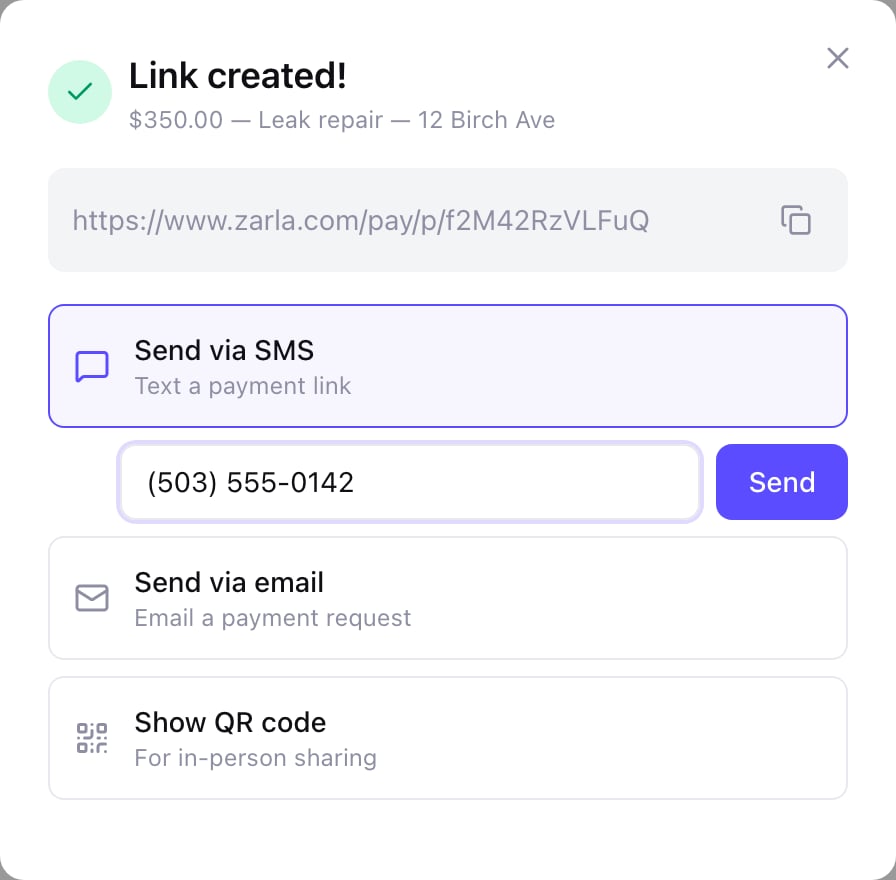
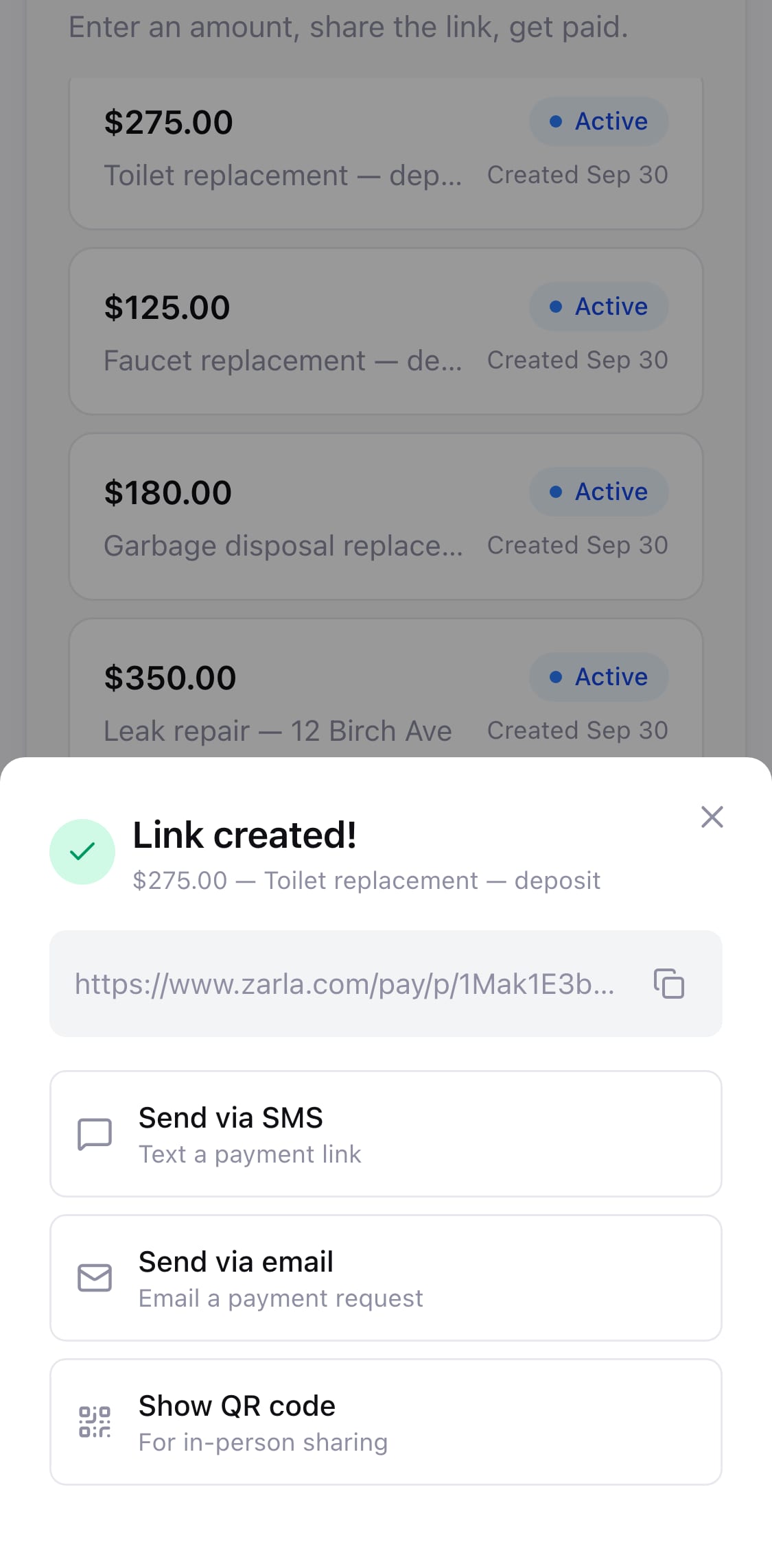
- Copy the link, or send it by text or email from the same screen
- Send via SMS and Send via email open your messages and mail apps with the message written — texting works best from your phone
- A QR code to show on your screen or save as an image
- Charged in the currency from your invoice settings
Want customers paying you from a text?
Type your business name. Zarla builds the site in about 30 seconds, with payment links, invoices and your leads in one dashboard. Free, no card — pay only if you publish.
Free to build and preview · No credit card · Pay only to go live
What you get
Accept payments online — without writing an invoice
The link, the pay page and the record of who paid — in the dashboard your website already lives in.
Deposits, balances and call-outs
Take a deposit before you order the parts, the balance when the job's done, or a call-out fee on the spot. One link per payment, for any amount.
Your name on the pay page
The customer sees your logo or business name, your brand color, the amount in big numbers and what it's for — then one Pay button.
The money goes straight to you
Connect Stripe once under Settings → Payments and every payment lands in your own Stripe account, not ours. Card details never touch Zarla; checkout runs on Stripe's own page.
No account for your customer
They open the link on a phone or a computer and pay. No app to download, no sign-up, no password.
Know who paid
Each link shows Active until it's paid, then Paid, with the customer's name, email and the date. A "Payment received" email lands in your inbox.
Resend it until it's paid
Customer lost the text? Open the link under Payment Links and send it again — by text, email or QR code — until it shows Paid.
Text to pay
Text to pay, from the phone in your pocket
- Create the link on your phone before you leave the driveway
- It's a normal text from your own number, so they know it's you
- Show the QR code instead when they're standing next to you
See what Zarla builds for your business
Describe your business in a sentence. Zarla generates a full website — homepage, about page, services, contact form — in about 30 seconds. If you don’t love it, you haven’t lost anything.

Why it's different
Your payments, on one screen
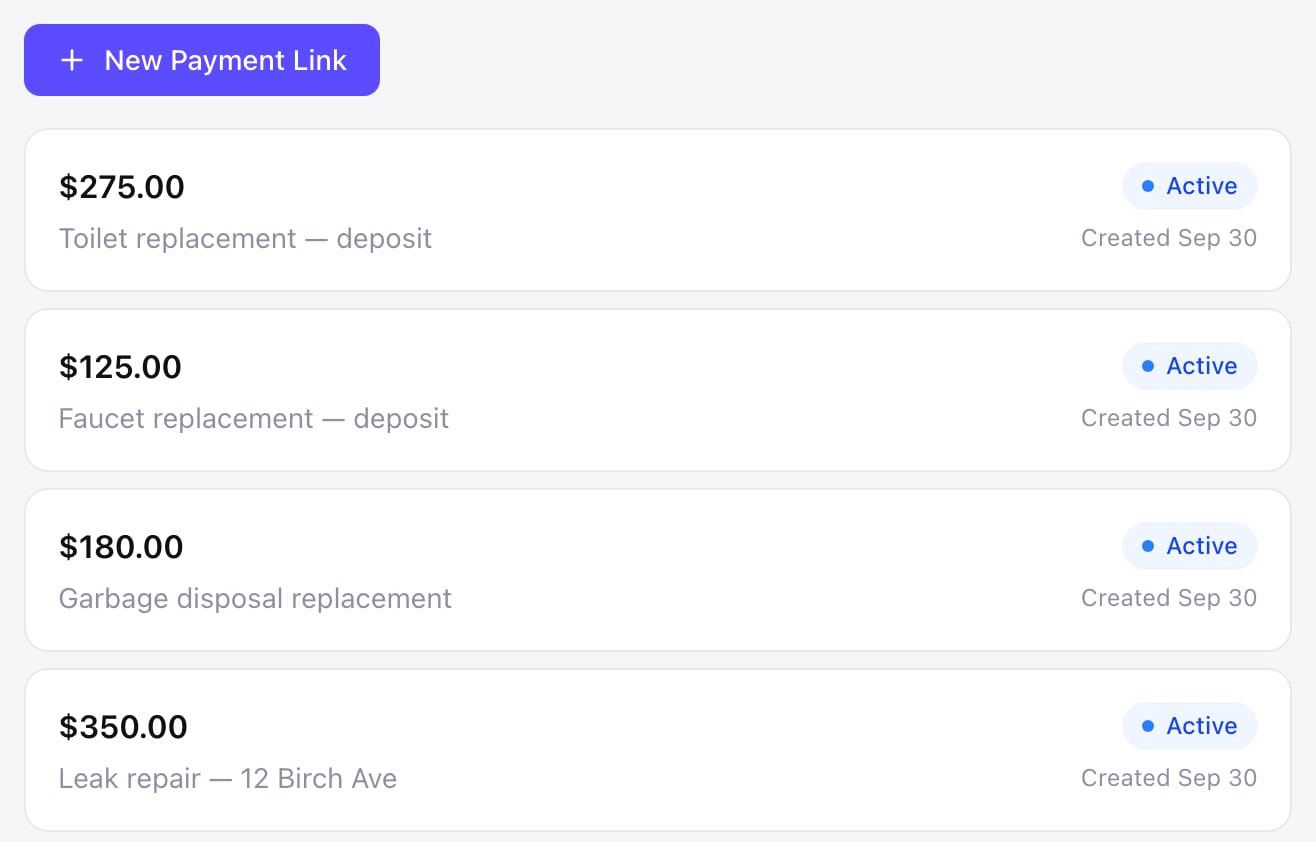
Every link, in one list
Payment Links shows what you've collected, how many links are still waiting, and every link with its amount, what it's for and when you made it. When a customer pays, the link turns Paid with their name, email and the date — so you never have to match a payment to a job.
Two boxes and one button
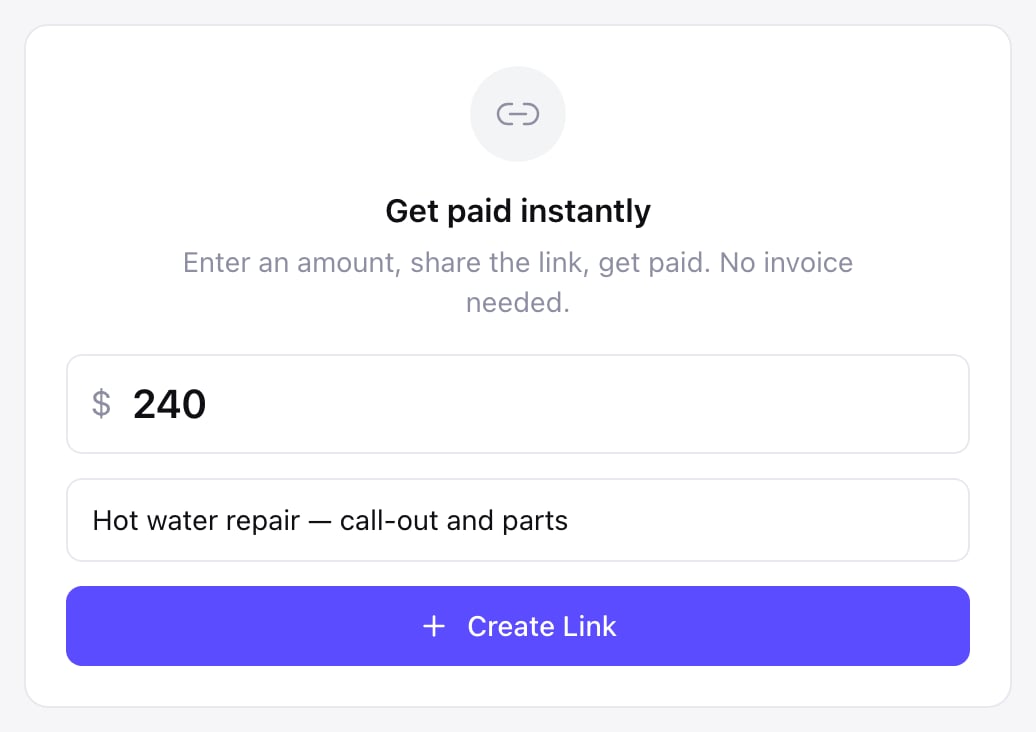
The first time you open Payment Links, the form is waiting: the amount, what it's for, Create Link. No products to set up, no invoice to fill in, no customer record to create — the note you type is what the customer reads on the pay page.
How it works
How to create a payment link with Zarla
Build your site
Describe your business in a sentence, and in about 30 seconds Zarla builds the whole website — pages, copy, images and design — with Get Paid waiting in the dashboard beside it.
30 secondsPublish and connect Stripe
Pick a plan when you publish, then click Get paid and connect Stripe under Settings → Payments — Stripe asks a few questions to verify your business.
OnceCreate the link
Open Get Paid → Payment Links, type the amount and what it's for, and click Create Link.
SecondsShare it and get paid
Copy the link, text it, email it or show the QR code — when your customer pays by card the link shows Paid, and Stripe pays it out to your bank.
PaidYour amount. Your name. Your Stripe. Paid before you pack up.
Paid into your account, not ours. Publish, connect Stripe, and your first payment link is two boxes away.
Free to build and preview · No credit card · Pay only to go live
Real results
Small business owners who got online with Zarla
From business owners like you.
“Great professional website in less than a minute, with the use of AI and a few descriptive prompts. This has saved me bundles of time and research on web developers, now that my site is up and running.”
“User friendly and very responsive. Great tool for website building.”
“Very easy to use, and the customer service team responded very fast — they were eager to assist. I'd used a different company before, spent a bunch of money and got nothing. I gave this a try and so far I'm glad I did.”
Questions we hear
Payment links — common questions
A secure web address — pay by link, or text to pay — that opens a checkout page for a set amount. You send it by text, email or QR code, and your customer taps it and pays by card — no invoice, no app and no account needed. With Zarla, the page shows your business name, the amount and what it's for, and the money goes to your own Stripe account.
In Zarla, open Get Paid → Payment Links, type the amount and what it's for, and click Create Link — the link is ready to copy, text, email or show as a QR code straight away. Customers can pay it once your site is on a paid plan and your Stripe account is connected under Settings → Payments. Build your site free →
Right after you click Create Link, the link appears with Copy, Send via SMS, Send via email and Show QR code. To send it again later, open Get Paid → Payment Links and click the link — the same options open, until it's paid.
Yes, when it comes from a business you know. A Zarla link opens Zarla's secure pay page at www.zarla.com/pay, with the business name and the amount at the top. Card details go into Stripe's own checkout page, so they never pass through Zarla or the business. Send links from your own number or email so customers recognize you, and never ask for card details by text or over the phone instead.
Your own Stripe account, then your bank on your usual Stripe payout schedule — connect it once under Settings → Payments, the same connection your invoices, gift cards, shop and bookings use. A payment-link sale pays your plan's standard sales fee, the same as your shop, gift card and invoice sales, plus Stripe's card processing; there's no payment-link add-on and no app to buy. Payment apps charge per sale too: in the US, Square's payment links are 3.3% + 30¢ per online payment on its free plan and PayPal's are 2.99% + $0.49 for cards, or 3.49% + $0.49 when the customer pays through PayPal (their public prices, September 2026).
Yes — that's text to pay. Tap Send via SMS, type the customer's number, and your phone's messages app opens with the text already written: "Payment request from" your business, the amount, and the link. It goes from your own number, so there's no text credit to buy and it doesn't arrive from a stranger's number. Try it on your business — free →
No. The link opens straight to the bill on their phone or computer — no Zarla account, no app, no sign-up. They tap Pay, enter their card on Stripe's checkout, and see "Payment received — thank you!" with your business name when it's done.
No — each Zarla payment link takes one payment, then shows Paid with who paid, so every link matches one job. To sell the same thing to many people, add it to your online store or sell gift cards; to take a payment when someone books a time, use online booking.
No. You set the amount when you make the link, and the customer pays it in one go — Zarla's payment links don't take tips, custom amounts or subscriptions. For a job that's paid in stages, send a link for each stage: the deposit now, the balance when it's done.
A payment link when it's one amount and you want it paid now — a deposit, a call-out fee, a balance on the day. An invoice when the customer needs line items, tax and a due date on paper — and a quote they accept online before the job starts. All three live under Get Paid in the same dashboard, and links and invoices pay into the same Stripe account.
Not with a payment app — its link opens a page of its own. With Zarla, the link comes with your website: describe your business and the whole site is built in about 30 seconds, with payment links, invoices and your leads in one dashboard; customers can pay once it's published and Stripe is connected. Build it free →
Stop chasing the balance.
Build the site free, publish it and connect Stripe — then send your first payment link from the driveway. The pay page, the checkout and the "Payment received" email are already there.
Free to build. Pay only if you publish.