Inside Zarla's AI website builder
A WhatsApp chat button for your website — built in, nothing to paste.
Flip one switch in your dashboard, enter your WhatsApp number, and visitors on every page can open a chat with you. No code to paste, no plugin, no second subscription. Already have a website? Paste its address and Zarla rebuilds it free.
Free to build · Site ready in 30 seconds · Pay only if you publish

Powered by Zarla
The AI website builder that actually knows your industry
Tell Zarla what you do and where you’re based. In about 30 seconds, it builds a complete, professional website — with real copy written for your trade, SEO built in from day one, and everything you need to start getting customers from Google.
Try it free — takes 30 secondsWhat is a WhatsApp chat button on a website?
A WhatsApp chat button on a website is a fixed button, usually in the bottom corner, that opens a WhatsApp conversation with the business — the WhatsApp app on a phone, WhatsApp Web on a computer. There are four ways to get one:
- A click-to-chat link. WhatsApp gives every number a link (wa.me/your-number). You can put it behind any button or image on your site — but you make the button yourself.
- A widget tool or a plugin. A separate company gives you a ready-made button. You paste a chunk of their code into your site, or install their plugin, and often pay them monthly.
- The WhatsApp Business API. Built for companies with a support team and a developer to set it up — far more than a small business needs for a chat button.
- Built into the website builder. The button is part of the site itself. You switch it on and enter your number. This is how Zarla works.
Zarla is an AI website builder for small businesses — describe your business in a sentence and it generates your whole site, with the WhatsApp chat button one switch away.
Already have a website?
A widget tool means pasting code into a site built somewhere else. Zarla's answer: paste your current site's address and Zarla rebuilds it free — pages, design and all — with the WhatsApp button one switch away. See how website import works →
Your dashboard
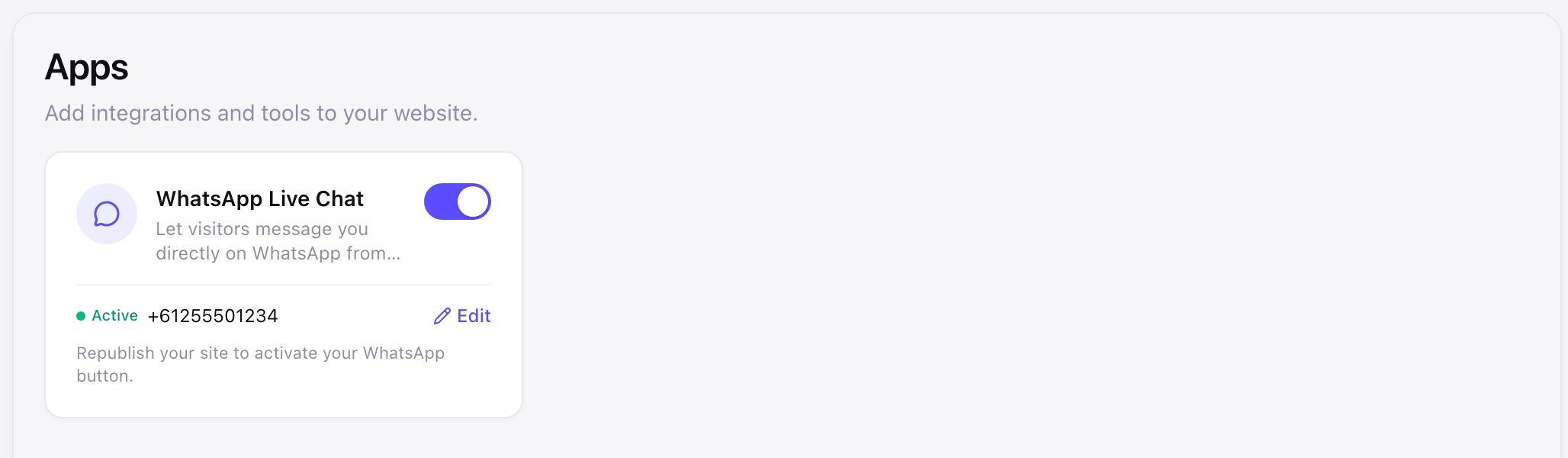
Switch it on from your dashboard
- No code to paste, no plugin to install
- Any WhatsApp number with its country code — personal or WhatsApp Business
- Change the number any time from the same card
- Live on every page the moment you publish
- See it in the editor preview before you publish
Want to see it on a site with your name on it?
Type your business name. Zarla builds the site in about 30 seconds — the WhatsApp button is one switch away. Free, no card.
Free to build and preview · No credit card · Pay only to go live
What you get
A WhatsApp chat widget for your website — without the widget company
Everything a widget tool sells, already inside your Zarla site.
Visitors see it on every page
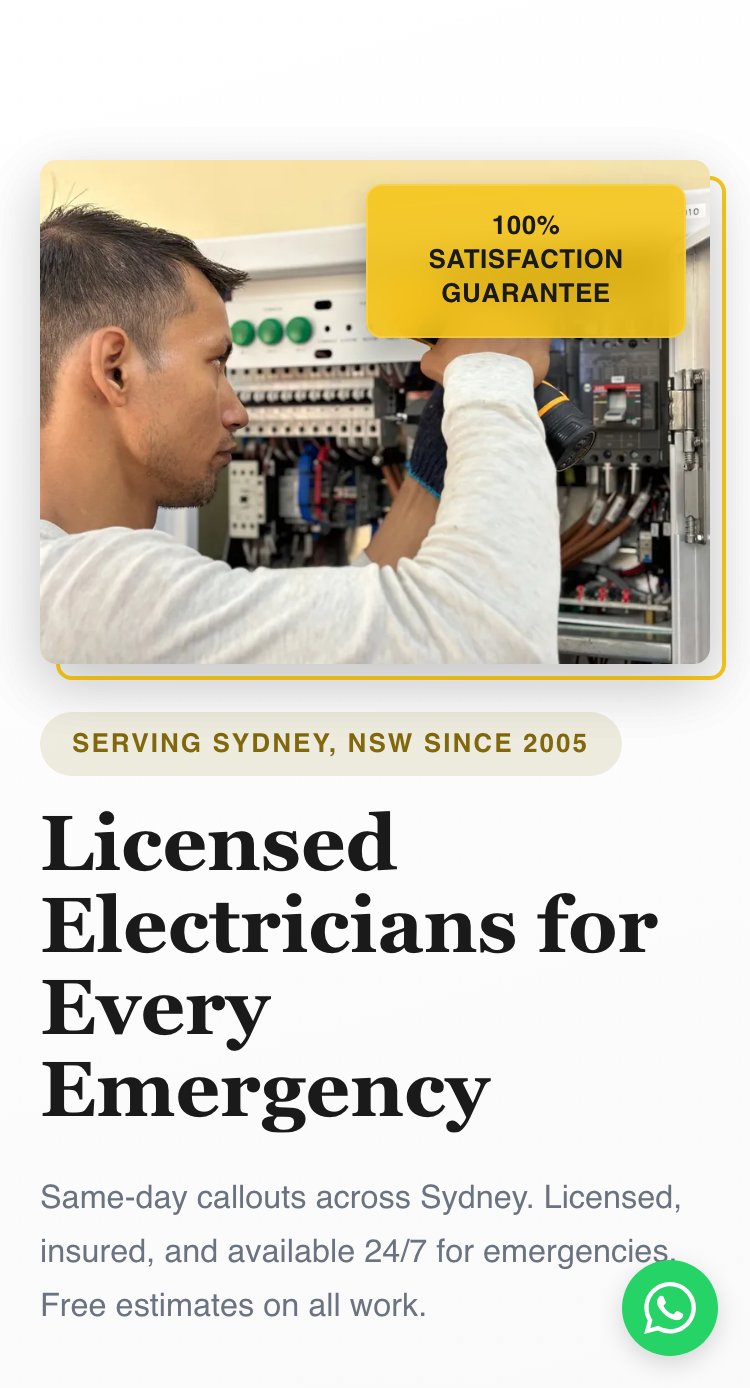
A green "Chat with Us" button sits in the bottom corner of every page you publish, so nobody has to hunt for a way to reach you.
One tap opens a chat with you
On a phone it opens the WhatsApp app; on a computer, WhatsApp Web. The visitor types, and it lands in your WhatsApp like any other message.
Works with the number you already use
Personal WhatsApp or WhatsApp Business — enter it with the country code and you're set. No new account.
You know how many people tapped
Taps are counted as WhatsApp messages in your site analytics, next to your calls, form fills and emails.
Stays out of the way on phones
On a phone the button shrinks to a round icon in the corner, so it never covers your prices, your menu or your photos.
Nothing to install, nothing extra to pay
No plugin, no code from another company running on your site, no second subscription. It's part of your Zarla site.
On a phone
Built for the phone in their hand
- A 48px round button — easy to tap, hard to miss
- Icon-only on phones so it never covers your content
- Opens the WhatsApp app directly
- The same button on every page you publish
Why it's different
Counted, and out of your way
You know how many people tapped it
Taps on the button are counted as WhatsApp messages in your site analytics, next to your phone calls, form fills, email clicks and Get directions taps. Zarla counts the tap. The conversation happens in your own WhatsApp, and Zarla never sees it. A tap isn't a lead in your CRM — a contact form fill is — so keep both on the page.

It sits beside every other way in
A Zarla site already gives visitors a contact form that lands in your CRM, a call button, an email button, Get directions and online booking. The WhatsApp button joins them — for the customer who'd rather send a message than fill in a form — and every one of those routes is counted in the same place.
How it works
How to add a WhatsApp chat button to your website with Zarla
Build your site
Describe your business in a sentence. Zarla generates the whole website — pages, copy, images and design — in about 30 seconds.
30 secondsTurn on WhatsApp Live Chat
Open Apps in your dashboard, switch on WhatsApp Live Chat, and enter your number with its country code. Save, and the number shows on the card.
1 minutePublish
Publish your site (or republish it, if it's already live). The green button appears in the bottom corner of every page, and taps are counted in your analytics.
InstantSee what Zarla builds for your business
Describe your business in a sentence. Zarla generates a full website — homepage, about page, services, contact form — in about 30 seconds. If you don’t love it, you haven’t lost anything.

Your number. One switch. Every page.
Build the site free, enter your WhatsApp number, and the button is on every page the moment you publish.
Free to build and preview · No credit card · Pay only to go live
How Zarla compares
WhatsApp website integration: built in vs a widget tool vs a plugin
| RecommendedZarla | A widget tool | A WordPress plugin | |
|---|---|---|---|
| Setup | One switch and your number | Make the button on their site, then paste their code into yours | Install the plugin, then set it up |
| Extra account or subscription | No | Yes — a separate account, often paid monthly | No — but you keep the plugin updated |
| Someone else's code running on your site | No | Yes | Usually |
| Where the button lives | Part of your site | Pasted code | A plugin |
| Taps in your site analytics | Yes — built in | In their dashboard, on some plans | Depends on the plugin |
| Works with any WhatsApp number | |||
| Builds the website too |
Nothing to paste. Nothing to install. Nothing extra to pay.
It comes with your Zarla site — switch it on, publish, and it's on every page.
Free to build and preview · No credit card · Pay only to go live
Real results
Small business owners who got online with Zarla
From business owners like you.
“Optimized for local service-based businesses. Easiest website build I've experienced. The AI-based build is the way to go instead of clunky theme-based websites. Get the site built and get out of the weeds with Zarla!”
“Beginner-friendly, efficient, and designed for business owners who want a professional website without dealing with complicated technical steps. I'd recommend it to anyone who wants a simple, reliable way to get online.”
“Great professional website in less than a minute, with the use of AI and a few descriptive prompts. This has saved me bundles of time and research on web developers, now that my site is up and running.”
Questions we hear
WhatsApp chat button — common questions
On a Zarla site there's no code: open Apps in your dashboard, switch on WhatsApp Live Chat, enter your number with its country code, and publish. The green button appears in the bottom corner of every page. On a site built elsewhere you'd paste a widget tool's code into your pages or install a plugin. Build the site free and switch it on →
Yes — four ways: a click-to-chat link (wa.me/your-number) behind a button you make yourself, a widget tool's code or a plugin, the WhatsApp Business API for companies with a support team, or a website builder with the button built in, which is how Zarla does it.
No. Any WhatsApp number works — the one on your personal phone, or a WhatsApp Business number. Enter it with the country code and you're done. If you'd rather keep your personal number private, the free WhatsApp Business app lets you run a second number on the same phone.
Yes. On a phone the button opens the WhatsApp app; on a computer it opens WhatsApp Web in a new tab, and the visitor chats from there. Either way the message lands in your WhatsApp.
In practice, very little — both are a floating button in the corner of a website that opens a WhatsApp chat. "Widget" is what the bolt-on tools call theirs, because it's a chunk of their code you add to your site. Zarla's is a button that's part of the site itself: nothing to add, and no other company's code running on your pages.
Yes — Zarla. Describe your business, Zarla builds the site, and the WhatsApp chat button is one switch in your dashboard: no code to paste, no plugin, and taps counted in your analytics. See it on your business — free →
Not directly — the button is part of a Zarla site, so there's no code to paste into a site built somewhere else. But you can bring your site over: paste its address and Zarla rebuilds it free, with the WhatsApp button one switch away. How website import works →
Yes — it's included on every Zarla plan, with no add-on and no per-tap fee. Building and previewing your site is free; the button goes live when you publish, which is when a paid plan starts — see our plans. Build it free →
Open your site analytics. Taps show as WhatsApp messages, next to your phone calls, form fills and email clicks. The chat itself stays in your WhatsApp; Zarla only counts the tap.
No. The button is WhatsApp green with "Chat with Us", so it's the button people already recognize, and the visitor writes the first message. You set two things: your number, and whether it's on.
Yes. The button is a link to your number, so anyone who taps it — or looks at the link — can see it. Use the number you're happy for customers to have. If that's not your personal number, a WhatsApp Business number on the same phone is the usual answer.
No. It's one small button in the page — nothing loads from another company's server.
Recent updates to this feature
All updates →For customers who live on WhatsApp, be one tap away.
Build the site free, switch the button on, publish. Zarla counts the taps — the conversation is yours.
Free to build. Pay only if you publish.