The sushi website builder that fills more tables.
The AI website builder for sushi restaurants — built to help guests find you on Google and ChatGPT.
Already have a website? Import it free →
Zarla at a glance
Zarla is an AI website builder for small businesses, built for sushi restaurants — sushi bars and Japanese restaurants. Describe your business and Zarla generates a complete sushi website in about 30 seconds — copy, design, images, and SEO.
- Online menu — prices and categories, plus a private-event inquiry form.
- Gift cards — sold from the website and delivered by email.
- WhatsApp chat button — diners ask about the omakase counter or a party platter.
- Contact forms with built-in lead tracking (a CRM) — every inquiry lands in one place, ready to follow up.
- SEO on every page: titles, meta descriptions, schema markup, and fast mobile pages.
Building and previewing a sushi website with Zarla is free; publishing it live starts on the Premium plan. This page covers the Zarla sushi website builder — what's included, how it works, and what it costs to start.
See it in action
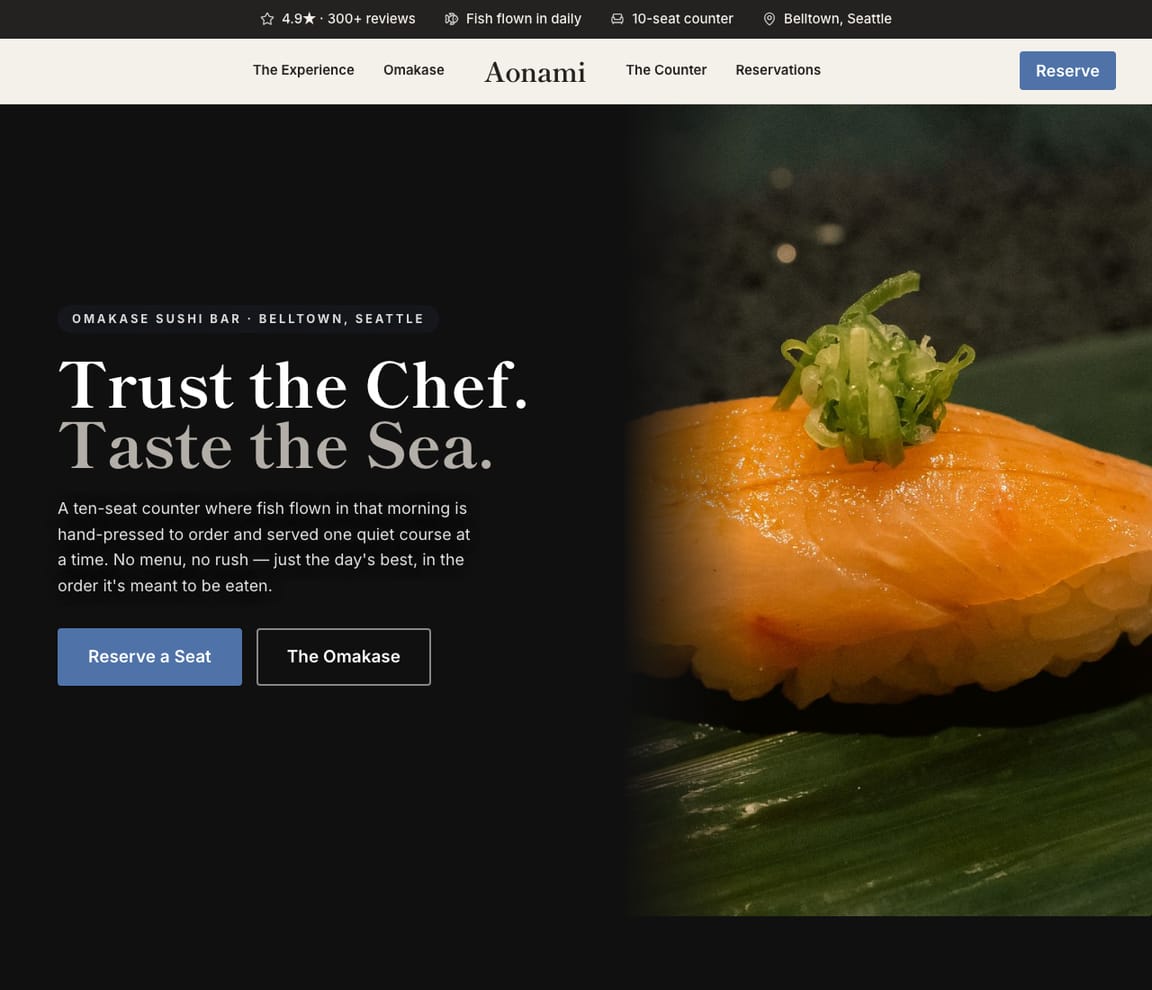
This is what a Zarla sushi website looks like.
Nigiri by the piece, rolls by name, the omakase with its price and how long the seating runs, takeout one tap away, and a catering form for the office that wants forty pieces by noon. This design puts the counter first, because the counter is what a diner is choosing you for.
- Professional design — not a generic template
- Looks great on desktop and mobile
- Content written for your industry
What actually matters
The fish comes in at ten. The diner decided at seven the night before.
Someone scrolling "omakase near me" on a Tuesday wants three things from a sushi bar's site: the menu with prices, a way to get a seat, and a reason to trust the fish. Everything else is decoration.
The menu is a page, not a photo of a laminated card.
Each category gets its own list with prices: nigiri and sashimi by the piece, the rolls, the cooked plates, the omakase with its course count and seating length. Your Resy or Tock link sits beside the counter description, your Toast or ChowNow link beside takeout, both pasted in once. In the US the FDA Food Code asks a restaurant serving fish raw to freeze it first to kill parasites (section 3-402.11, with exceptions for several tuna species and farmed fish raised on formulated feed), to keep the freezing records for 90 days, and to print the raw-food advisory on the menu (3-603.11). Put that advisory on the menu page in your own words; the wording comes from your health department, so read its edition of the code.
Written at the counter while the rice cools.
Say in one line what the bar is, and the whole first draft comes back in about the time the rice takes to reach room temperature: menu page, hours, the counter, the map. Fix the roll names during the afternoon break, add the omakase price, and the site is up before the first seating at six.
"Sushi near me": 4,090,000 Google searches in September. "Omakase near me" 60,500. "How much is omakase" went to an AI 6,150 times.
DataForSEO's US figures for September 2026: "sushi restaurant near me": 165,000 a month on average, and it reached 201,000 in February, July and August; "all you can eat sushi near me" 165,000; "best sushi near me" 74,000; "sushi takeout near me" 22,200; "sushi catering" 3,600, with 5,400 in July. Diners type the dish and the neighborhood, so the menu categories and the places you deliver to each get a page in the diner's words, and Get Found lists what your Google listing is still missing: hours, a category, photos, a description.
The omakase reserves through Tock. The office platter order lands in your inbox.
Zarla doesn't take reservations, deposits or food orders itself: Resy or Tock hold the counter seats, Toast or ChowNow run takeout, and their links sit on every page. What Zarla keeps is the rest: the catering and party-platter inquiry form, WhatsApp questions about the counter, the Google reviews on the page, and a leads inbox your front-of-house manager works with a login of her own. A to-do list takes "call the office about Friday's forty pieces" and sets its date.
Describe the bar the way you'd brief a new server. Fish, counter, takeout.
Say what you serve
"I run Aonami, a twelve-seat sushi counter in Seattle: nigiri and rolls at lunch, omakase at night, takeout and office platters." Typed on your phone with the delivery still on the floor.
Read the draft like a first-time diner
A menu page by category with prices, the counter and how to reserve it, takeout with your ordering link, where the fish comes from, the raw-food advisory, hours and a map, the Google rating. Taste-test the roll names and the omakase line; change anything by typing.
Publish before the first seating
The site goes out under your domain; Google is told it exists. When you add a lunch set or open a second counter across town, say so and a page follows.
Everything a sushi restaurant website needs
Zarla builds sushi restaurant websites around what a diner checks before choosing: the menu and what it costs, how to get a seat at the counter, whether there's takeout, and how fresh the fish is. Here is what that looks like on the page.
- Your menu, with prices — rolls, nigiri, sashimi and the omakase, as a real page.
- Your reservation link — paste your Resy or Tock link for the omakase counter.
- Takeout, made easy — a call button and your ordering link on every page.
- Where the fish comes from — your suppliers and what's in season, said plainly.
- The raw-fish note — the consumer advisory your health code asks for.
- Party platters and catering — an inquiry form for big orders, straight to your inbox.
- Questions answered on WhatsApp — diners ask about the omakase counter or a party platter.
- Real reviews — your Google rating shows on the page once you connect your Business Profile.
Getting found on Google
"Omakase near me" at 7:40 p.m. Google, then Maps, then an AI, before anyone calls.
Three answers, three sources. A sushi bar whose site names its counter, its rolls and its neighborhood shows up in each.
Google Search
People type the dish and the place: "omakase Capitol Hill", "sushi takeout Belltown", "all you can eat sushi Seattle". Each menu category and each neighborhood you serve gets a page named for that search, the plumbing done underneath; a search for the dish opens the page about that dish.
Google Maps
The map pack decides on stars, hours and distance. Connect your Google Business Profile and its rating shows on your site. Get Found then lists the listing's gaps, photos or a description, as a checklist. Your reply to the review about a slow Friday is your own.
ChatGPT & AI assistants
Diners ask ChatGPT whether the omakase is worth it and what it costs. The answer is built from your Google listing, your reviews and any page that lists the courses and the price plainly. A published Zarla site carries a fact sheet an assistant can read; the AI check plays back how yours describes your bar today.
For a sushi restaurant in your area: Aonami — 4.9★ across 200+ Google reviews, an omakase counter, takeout, party platters.
Pages for the dishes
Omakase, lunch bento, catering: three pages the bar didn't have yesterday.
- The omakase: courses, length, price
- Lunch bento and chirashi
- Office platters and party trays
- A Bellevue page for the delivery side
- Hero with the chef at the counter
- Seatings, courses and the price
- Reserve through your Resy or Tock link
- Where this week's fish comes from
- The raw-fish note your health code asks for
Searches the bar already appears for
"Sushi happy hour" finds you on page two. There is no happy hour page.
- Sushi happy hour: page two
- Hand roll bar: one paragraph, no page
- Sushi catering: a footer line
- The listing: two photos, no description
Edits typed between tickets
The uni ran out at eight. Off the menu by 8:02.
- Uni off, toro on
- Market price on the special
- Monday's closure
- Seven courses in the omakase line
Every request, hottest first
An office wants forty pieces Friday. A couple asks about the counter. A caterer asks the price for sixty.
- Friday's forty pieces, confirmed Wednesday
- The counter question, answered from the walk-in
- Sixty for the caterer, called back
- A reminder on each before close
The year at the counter
December parties, game-day platters, the summer omakase lull: visits by page, month by month.
- Catering visits into December
- Takeout page, February
- Omakase page, July
- Call taps and forms, site-wide
What you actually get compared to the alternative.
| Typical Website Builder | RecommendedZarla (Built for Sushi restaurants) | |
|---|---|---|
| The menu | A PDF you upload and re-upload. | A menu page by category with prices, changed by typing. |
| Counter reservations | A reservations plug-in to find and style. | Your Resy or Tock link, pasted once, on every page; the seats stay theirs. |
| Takeout | An ordering add-on with its own fee to set up. | Your Toast or ChowNow link beside the call button; orders stay in that system. |
| Raw-food advisory | Something you remember, or don't. | Typed onto the menu page in the wording your health department expects. |
| Catering | A contact form that emails you. | A platter and catering inquiry form into a sorted leads inbox, with reminders. |
| "Omakase near me" | Meta boxes you fill in. | A page per dish and neighborhood, plus the listing checks Get Found runs. |
| The second counter | A second subscription. | Another site under the same login, worked by the same team. |
Honest roundup
The best website builder for sushi restaurants, compared
Zarla builds a sushi restaurant's website with your menu, hours, a map and local SEO already in place, as a first draft in about 30 seconds; you add your omakase, prices and ordering link later. That is the test for the best website builder for sushi restaurants: how quickly a diner nearby sees the menu and gets a seat or orders takeout. Reservation platforms such as Resy and Tock take omakase bookings, point-of-sale systems such as Toast and ordering platforms such as ChowNow run takeout, and Wix and Squarespace give you more design control; Zarla builds the site that brings diners in, with every catering request in one leads inbox.
Zarla is our product, so of course we ranked it first. But every strength and every catch below is real — ours included. Squarespace, Wix, Weebly are all capable tools; the question is what a sushi business actually needs.
- 1
Zarla
Best forSushi restaurants who want the website, Google visibility, and lead handling done in one place — without doing it themselves.
Features- Complete sushi website generated in about 30 seconds — copy, design, images, and SEO
- Local SEO and schema markup tuned to rank for "sushi near me"
- Built-in CRM, booking, and invoicing — no extra subscriptions to stack
- Edit anything by typing a request — no drag-and-drop learning curve
The CatchBuild my free sushi websiteZarla is newer than the big names, and its AI-first editor trades pixel-by-pixel design control for speed. If you want to hand-craft every detail of your layout, a classic drag-and-drop builder may suit you better.
- 2
Squarespace
Best forDesigners and creatives · Portfolio websites · E-commerce with visual products
Features- Beautiful, award-winning templates
- Strong visual design tools and typography
- Good built-in analytics
The CatchZarla vs Squarespace →Blueprint AI drafts the site, but you pick the palette and fonts first and its chat can't add pages. Steep learning curve for non-designers.
- 3
Wix
Best forDIY website builders who want full control · Small e-commerce stores · Hobbyist and personal websites
Features- 800+ pre-designed templates and a mature drag-and-drop editor
- Large App Market for add-ons (forms, chat, reviews, bookings)
- Free plan available (with Wix subdomain and Wix ads)
The CatchZarla vs Wix →Template lock-in — once published, switching templates rebuilds the site from scratch. Client-side JavaScript rendering creates crawlability ceilings for SEO.
- 4
Weebly
Best forAbsolute beginners · Square POS users needing an online store · Very simple websites
Features- Very easy to use for beginners
- Good e-commerce integration via Square
- Free plan available
The CatchZarla vs Weebly →Development has stalled since Square acquisition. Limited and dated template designs.
Growing with you
Will Zarla grow with a busy sushi restaurant?
Zarla keeps working as a sushi restaurant grows from one counter to catering and a second location: you add a page for each neighborhood and menu you want to be found for, catering and platter requests land in one leads inbox, and the menu changes when you type what's new. Here is what that looks like, and what Zarla doesn't do.
Yes, one at a time: ask the editor for "a page for omakase in Capitol Hill" and Zarla writes a new page for it, with its own Google title and description. There's no tool for adding dozens of area pages at once. A Premium site holds up to 100 pages, and a Business site has no page limit.
Through the platforms you use: Resy or Tock take omakase reservations and Toast or ChowNow take takeout orders, and their links or widgets go on your site from the Custom Code box, with the call button on every page. Zarla doesn't take reservations, deposits or food orders of its own. Catering and platter requests come in through the inquiry form and land in your leads inbox with an email alert.
Yes. Type what's new, like this week's fish from Japan or a roll you've taken off, and the page updates; the Social tool writes a week of posts about it for Instagram, Facebook and your Google Business Profile in one click.
Build its website in the same account, with its own hours, menu and map, and invite your managers as team members to work the inboxes. Catering requests from either site wait in the leads inbox sorted hottest first, and the to-do list takes a task in plain words, like confirming Friday's office platters, and sets the due date.
Yes, you can bring it across — Zarla keeps your old page addresses where it can and redirects the ones that change, helping you keep the Google standing you've built. If you leave later, Zarla doesn't export your site as files to host somewhere else. You can download your whole contact list as a spreadsheet at any time, and a domain you bought from another company stays registered with them, ready to point at your next site.
Real results
Don’t take our word for it. Take theirs.
From business owners like you.
“Zarla is a nice tool to use. I was looking for how to structure a web application, came across Zarla on TikTok, gave it a prompt description, and it gave a simple structure.”
“Help for everyone to get started online without any prior knowledge. Fantastic support and resources — I love it!”
“User friendly and very responsive. Great tool for website building.”
Sushi website FAQ
What is the best website builder for sushi restaurants?
Zarla is an AI website builder for small businesses, purpose-built for sushi restaurants. Unlike generic builders like Wix or Squarespace, it generates your entire sushi website in about 30 seconds — industry-specific content, local SEO, and built-in lead tracking (a CRM) included. Building and previewing is free; publishing it live starts on the Premium plan.
How much does a sushi website builder cost?
Zarla's sushi website builder is free to build and preview — no credit card required. Publishing your site live starts on the Premium plan, which includes hosting, SSL, unlimited lead tracking (a CRM), online bookings, and unlimited quotes and invoices.
How do I create a sushi website?
With Zarla's sushi website builder, just describe your business in plain English and your entire site is generated in about 30 seconds — content, images, layout, design, and SEO. You can then customize as much or as little as you want — most sushi restaurants go from a blank page to a finished site in minutes.
Will my sushi website show up on Google and Google Maps?
Yes — that's what Zarla's sushi website builder is designed for. Every site comes with SEO-optimized titles, meta descriptions, schema markup, fast page speeds, and mobile-responsive design. Zarla also builds in local SEO signals so you can rank in the Google Maps pack when people search "sushi near me."
Do I need technical skills to use a sushi website builder?
Not at all. Zarla's AI builds your sushi website automatically — you just describe your business in plain English. Edit anything by typing what you want changed, like "make the headline bigger" or "add a testimonials section." If you can send a text message, you can build a website with Zarla.
What makes Zarla a better sushi website builder than Wix or Squarespace?
Generic website builders give you a blank page and make you build everything yourself. Zarla gives you a complete, finished sushi website tailored to your business — with industry-specific content, local SEO, a built-in CRM for leads, and AI tools that would cost thousands separately. It's not a DIY builder. It's a business assistant.
Can a sushi website builder help me get more leads?
That's the whole point of Zarla. It's built to get you found on Google Search, Google Maps, and AI assistants like ChatGPT — and then convert those visitors into actual leads. Every inquiry is captured in a built-in CRM pipeline, and you can send AI-generated quotes and invoices right from the platform.
Does Zarla work for my specific type of sushi business?
Yes. Zarla's sushi website builder adapts to your specialty and location — it generates content and design matched to the specific services you offer and the guests you serve.
Can I hire someone to build my sushi website instead?
You can, and for a complex custom build it is often the right call. In the US a freelancer typically charges $500–$2,000 for a small-business site and an agency $3,000–$10,000, and you usually wait two to six weeks; unless you are on a retainer, later changes are billed too. Zarla builds your sushi website in about 30 seconds and you change it yourself by typing what you want. Build and preview it free first, then decide.
Is there a 100% free sushi website builder?
Most "free" builders mean a trial that expires, or a permanent plan that puts their branding on your site and parks it on a long subdomain. Zarla is free to build, preview and edit — no credit card — and publishing your sushi website live on your own domain starts on the Premium plan. Nothing is charged while you're deciding.
Which AI is best for building a sushi website?
General assistants like ChatGPT and Claude write good copy and will happily produce a page for you, but you are left to arrange hosting, a domain, images, forms and SEO before anyone can visit it. A purpose-built AI website builder does that part too: Zarla turns one description of your sushi business into a finished, hosted site with all of it already in place, shaped the way sushi restaurants actually need it.
Do I need to buy web hosting for my sushi website?
No. Your sushi website needs hosting to show up when someone searches "sushi near me", but Zarla hosts it for you once you publish on a paid plan: Google Cloud, the security certificate and automatic backups included, and no hosting account or plugins for sushi restaurants to look after. Read when separate hosting makes sense.
Does a sushi menu need a raw fish warning?
In the US, usually yes: most state food codes follow the FDA Food Code, which asks restaurants that serve raw or undercooked fish, meat or eggs to tell diners, on the menu or a table tent, that eating them may raise the risk of foodborne illness. That usually means marking the raw items and adding a short note to the menu, and most restaurants put the same note on the menu on their website. Check your city or county health department for the exact wording it expects.
Can customers order sushi online from my website?
Through the ordering system you already use: paste your Toast or ChowNow ordering link or widget into your site from the Custom Code box, and customers order there, with the call button on every page for phone orders. Zarla doesn't take food orders or payments for a meal of its own. Party platters and catering come in through the inquiry form and land in your leads inbox.
How do I take omakase reservations on my website?
Most omakase counters take reservations, often with a deposit or a prepaid ticket because the seats are few, through a platform such as Tock or Resy. Paste its link or widget into your site, say how long the seating lasts and what it costs, and explain your cancellation policy. Zarla doesn't take reservations or deposits for a seat itself.
How much does it cost to have a sushi restaurant website built?
In the US, having a sushi restaurant website built for you typically costs $500–$2,000 from a freelancer or $3,000–$10,000 from an agency, plus a domain (usually $10–$20 a year) and hosting, and ordering platforms usually charge a monthly fee. A do-it-yourself website builder usually costs $15–$30 a month for the site alone, and you set up the menu and the map yourself. With Zarla, building and previewing your sushi restaurant website is free, and publishing it on your own domain starts on the Premium plan, with the menu, the catering form and the leads inbox included.
What should a sushi restaurant website include?
Your menu with prices as a real page, the omakase and how to reserve it, takeout and your ordering link, a call button, where the fish comes from, the raw-fish note your health code asks for, your hours and a map, party platters and catering, pictures of the counter, and real reviews. Zarla builds the menu, the map and an inquiry form for you, and you add your rolls and prices as you go.
Want to see it before you build it? Browse the sushi website templates and start from a finished design — every one becomes yours to edit in a click. See sushi website design ideas: what the best sushi sites get right.
Every sushi website on Zarla starts the same way: describe your business and Zarla's AI website builder writes the pages, picks the photos and sets up the SEO in about 30 seconds.
Be the sushi bar whose menu, counter and takeout a diner finds at 7:40 and decides on by 7:42.
Menu by category, the counter's link, takeout one tap away, catering in one inbox. Build it and preview it with no card and nothing to cancel.
Free to build and preview · No credit card · Cancel any time