COMPARED NOVEMBER 2026
Best AI website builders for local service businesses (2026)
We scored 10 AI website builders on the 9 things a local service business needs from one, the same way for all of them, including Zarla, which is ours.
Free to build · Pay when you publish
Key takeaways
- Zarla scored highest: 16 of 18 points across nine tests.
- 10Web and Wix are next, on 14.
- Zarla is ours, so weigh that: its weak spots are in the table like everyone else's.
- Only Zarla gets a tick on "A page for each town you serve".
- Every competitor verdict comes from the builder's own pages, with the date we read it. When we asked ChatGPT, it named ten of these builders, Zarla in one of its two answers.
What's the best AI website builder for a local service business?
For most local service businesses, Zarla is the best AI website builder: it scored highest, 16 of 18 across the nine tests we ran on ten builders, and it does the most to get you found on Google (level with Durable) and does the most to turn a visitor into a call, a quote request or a booking (level with 10Web).
10Web (14) and Wix (14) are close behind.
The full scores are below, with every builder's weak spot, ours included.
Build the website
Start your website now
Add what you do, your town and your business name to the sentence, and Zarla builds the site; trades and home services get a page for each town you list. You edit it in chat and publish when you're ready.
Already have a website? Bring it across →Zarla keeps your old page addresses where it can and redirects the ones that change, helping you keep the Google standing you've built.
Key facts, as of November 7, 2026
- One of the ten builders here makes a page for each town you serve and shows the area you cover (Zarla's, for trades and home services); two of the ten let you manage your Google Business Profile from inside the builder; three of the ten put a tap-to-call number on the site for you (each read on the builder's own pages, November 7, 2026).
- Asked "best ai website builders for local service businesses" twice on November 7, 2026, through a search-data provider that reads the real ChatGPT answer, ChatGPT named ten builders; both answers named Wix, Hostinger, Durable, 10Web, WordPress and Squarespace, and one named Zarla.
- Google: "Local results are mainly based on relevance, distance, and popularity" (Google Business Profile Help, read November 7, 2026).
- Google: "More reviews and positive ratings can help your business's local ranking" (the same page).
- Google: "Appropriate use of AI or automation is not against our guidelines" (Google Search Central, February 8, 2023).
Zarla for local service businesses, in plain facts
Zarla is an AI website builder for small businesses. Describe your local service business in a sentence and it writes the whole site, every page and every word, in about 30 seconds; after that you change it by typing what you want.
- For trades and home services, list the towns you serve and the first draft makes a page for each one, with a map of the area you cover.
- Your business phone number is a tap-to-call link in the menu on phones, and in the header on bigger screens, from your business details.
- A quote form that asks for the job details comes on the first draft.
- Customers book online or send you a request from your website, with no second booking subscription.
- Price: Free to build and preview. You pay when you publish, on the Premium plan, which includes booking, the leads inbox and invoices.
Your Google reviews show on the site, but asking a customer for a review is a message you send yourself; Zarla can write it for you.
Connect your Google Business Profile and your Google rating and reviews show on the site, with the map pointing to your listing; Zarla reads the profile but never edits it, so hours and replies to reviews you change in Google.
In this comparison: first of ten, with 16 of 18 points.
THE SCORES
How do the AI website builders compare?
A tick is worth 2 points, a dash 1, a cross nothing, and every test counts the same, so the most anyone can score is 18.
| Test | Zarla | 10Web | Wix | Durable | GoDaddy Airo | B12 | Hostinger | WordPress.com | Squarespace | Grow Local |
|---|---|---|---|---|---|---|---|---|---|---|
| Finished first draft | Yes — Whole site written in about 30 seconds | Yes — AI builds the pages, words and design | Yes — Aria writes pages and starter copy | Yes — AI writes the pages, words and images | Yes — Writes the pages and words from a description | Yes — AI builds the whole site from a description | Yes — AI builds the site from a prompt | Yes — AI builder on paid plans | Yes — AI writes a multi-page site | Yes — AI writes every page |
| Edit by chat, new pages by AI | Yes — Type a change; ask for a new page | Yes — Edit any page by chat; AI adds pages | Yes — Aria edits and adds pages by chat | Yes — Its AI Partner edits and adds pages | Yes — Chat changes and new pages | Yes — Chat edits and new pages | Yes — Chat edits; AI makes new pages | Yes — Chat edits and new pages by prompt | Partly — AI chat edits text and images; no new pages | Partly — AI makes city and service pages; no edits by chat |
| A page for each town you serve | Yes — Trades and home services: a page per town you list, plus an area map | No — No town pages or area section; location pages you make | No — No town pages or area section; a location map | No — No town pages or area section; AI adds pages you describe | Partly — Service-area words and a radius map; no town pages | No — No town pages or area section; AI adds pages you ask for | No — No town pages or area section; a locations map through Google My Maps | No — No town pages or area section; AI adds pages one at a time | No — No town pages or area section; a location pin | Partly — AI town pages, up to eight; no area map |
| Reviews, shown and asked for | Partly — Google reviews shown; requests you send yourself | Partly — Google reviews on the site; no review requests | Partly — Google reviews only through another company's app | Yes — Google reviews section plus review requests | Partly — Shows Google reviews; no review requests found | Partly — Google reviews widget only on done-for-you plans | Partly — Google reviews only by pasted widget code | Partly — Google reviews only through plugins | Partly — Product review emails; no Google reviews tool | No — No reviews feature on its own pages |
| Google Business Profile connected | Partly — Reads your profile for reviews and the map; you edit it in Google | Partly — Imports your profile to build the site | Yes — Edit your profile and reply to reviews in Wix | Yes — Connect your profile; its AI replies to reviews | Partly — Connects to show your profile on the site | Partly — Connects to show your reviews, on the top plans | Partly — Google reviews only by another company's widget | Partly — Google reviews only through plugins | No — None found on its own pages | No — A link you paste only |
| Tap-to-call on phones | Yes — Taps to call from the menu on phones; in the header on bigger screens | Yes — Click-to-call on home-service sites | Partly — Mobile call bar documented for the classic editor only | Partly — Buttons you link to your number | Partly — Phone shown on mobile Home and Services pages; no call button documented | Partly — A phone link you add | Partly — A button you link to your number | Partly — A block you add; the number becomes tappable | Partly — A button you link to your number | Yes — Call button built in, taps counted |
| Quote requests with the job details | Yes — Quote form on the first draft | Yes — Quote form asks for the job details | Yes — Price-quote form template | Partly — A booking form you add job questions to | Partly — An estimate form when you ask for one | Partly — AI builds a form you describe | Partly — A contact form you add fields to | Partly — Form templates; AI builds a custom form | Partly — General form block; no quote template | Partly — A general contact form |
| Online booking | Yes — Quote form and online booking | Yes — Booking on every plan | Yes — Wix Bookings, from the Core plan | Yes — Bookings built in, from the Launch plan | Yes — Built in; its pages disagree on which plan | Yes — Scheduling built in; one booking type on Website | Yes — Built in on every plan | Partly — Calendly block or a booking plugin | Partly — Acuity Scheduling, a separate subscription | No — No booking on its own pages |
| Leads, quotes, invoices and payments together | Yes — Leads inbox, online quotes, invoices, payment links | Yes — Leads inbox, quotes, invoices, payments | Yes — Inbox, price quotes, invoices, payments | Partly — CRM, invoices, payments; no quotes | Partly — Inbox and payments; invoices through other apps | Partly — Invoices, payments, contacts; a proposal is a draft invoice | Partly — Form inbox; invoices only for store orders | Partly — Form inbox and card payments; no quotes or invoices | Partly — Invoices, payments, proposals; no leads inbox found | Partly — A leads list; no quotes, invoices or payments |
| Score | 16 / 18 | 14 / 18 | 14 / 18 | 13 / 18 | 12 / 18 | 11 / 18 | 11 / 18 | 10 / 18 | 8 / 18 | 8 / 18 |
Checked on each builder's own website and help pages on September 28, 2026, and the reviews, shown and asked for test on October 17, 2026, and the leads, quotes, invoices and payments together test on October 4, 2026, and re-checked every earlier answer on November 7, 2026, the day 10Web, Grow Local and B12 joined and all their answers were read. Three tests are new on this page and were first read that day: "A page for each town you serve", "Google Business Profile connected" and "Tap-to-call on phones". When two builders tie on points, the one with fewer crosses goes first.
WHICH ONE FITS
Which builder fits your business?
For each kind of business, the builders that scored highest on the tests that matter most to it, from the same table. Where three or more are level, we list them as level rather than pick one.
| Your business | Top scorers | Why |
|---|---|---|
| Trades that drive to customers in several towns | Zarla or Durable | 4 of 6 on "A page for each town you serve", "Reviews, shown and asked for" and "Google Business Profile connected", the top score on these tests. |
| Work that starts with a call, a quote or a booking | Zarla or 10Web | 6 of 6 on "Tap-to-call on phones", "Quote requests with the job details" and "Online booking", the top score on these tests. |
| Owners who want the site written for them | Level: Zarla, 10Web, Wix and five more | Eight builders score 4 of 4 on "Finished first draft" and "Edit by chat, new pages by AI", so pick on what else matters to you; the table shows the differences. |
| Trades that quote, invoice and chase payments | Level: Zarla, 10Web, Wix | Three builders score 2 of 2 on "Leads, quotes, invoices and payments together", so pick on what else matters to you; the table shows the differences. |
THE LIST
The best AI website builders, ranked
- 1
Zarla
Best forOwners who care most about getting found on Google, or about calls, quote requests and bookings.
What it costsFree to build and preview. You pay when you publish, on the Premium plan, which includes booking, the leads inbox and invoices.
Features- Describe your business in a sentence and Zarla writes the whole site; trades and home services get a page for each town you list
- Your Google reviews and, for businesses that travel to customers, a service-area map; your number taps to call
- Quote form on the first draft, online booking, a leads inbox, quotes, invoices and payment links
The CatchBuild my website — freeZarla is newer than the big names, and you change things by typing or clicking rather than dragging elements around a canvas. It also doesn't export your site as files to host somewhere else.
- 2
10Web
Best forOwners who care most about calls, quote requests and bookings.
What it costsAI Starter is $10/mo billed yearly ($120 a year), with booking on every plan; monthly billing costs more. The free trial lasts three days, then the site is deleted. (their pricing page, checked 7 Nov 2026)
Features- AI writes the whole site, and you change any page by chatting
- Home-service sites come with a quote form that asks for the job details and tap-to-call buttons
- Booking with deposits, quotes customers accept, invoices and card payments built in
The CatchNo pages for each town you serve or way to ask customers for reviews built in, and the free trial lasts three days before the site is deleted.
- 2
Wix
Best forA strong all-rounder if you like building and fine-tuning the site yourself.
What it costsLight is $17/mo and Core, the cheapest plan with bookings, $29/mo, billed yearly (US prices on its own blog, as of November 5, 2026); there's a free plan on a Wix address. (its blog, checked 7 Nov 2026)
Features- Aria writes the pages and edits or adds them by chat
- Manage your Google Business Profile and reply to reviews from Wix
- Bookings, price quotes, invoices and payments built in
The CatchBookings need the Core plan rather than the cheapest one, and pages for each town you serve are yours to write.
- 4
Durable
Best forOwners who care most about getting found on Google.
What it costsLaunch, the cheapest plan with bookings and your own domain, shows as $22/mo in its comparison table and $25/mo on its plan card, and the page doesn't label which is the yearly price. The free plan is a private preview that can't go public. (their pricing page, checked 7 Nov 2026)
Features- AI writes the pages, words and images, and its AI Partner edits them
- A Google reviews section, review requests and AI replies to your reviews
- Bookings, a CRM, invoices and payments
The CatchIts help pages document no quotes, the free plan is a private preview that can't go public, and the site doesn't export: only your contacts and your domain leave with you.
- 5
GoDaddy Airo
Best forHandy if your domain and email are already at GoDaddy.
What it costsStarter is $9.99/mo and Professional $24.99/mo, billed yearly, as Google shows GoDaddy's price page (it refused our reads). Its pages disagree on which plan has booking: its salon guide says Starter does. The free plan builds and previews but can't publish. (their pricing page, checked 7 Nov 2026)
Features- Writes the pages and words from a description of your business
- Service-area words and a radius map on home-service sites
- Booking built in, with an inbox and payments
The CatchIts pages disagree on which plan includes booking, it documents no call button or way to ask for reviews, and it makes no page for each town.
- 6
B12
Best forOwners who want an AI-written site with booking and invoicing, and may later pay B12 to run more of it.
What it costsWebsite is $20/mo billed yearly ($24 monthly), with one booking type; more booking types and the contact list need Website + Client Engagement, $67/mo billed yearly ($78 monthly). A free plan stays on a B12 address. (its help page, checked 7 Nov 2026)
Features- AI writes a whole site from your description, and you change it by chatting
- Customers book appointments on your site
- You send invoices and get paid by card
The CatchThe office tools (the contact list, contracts) sit on its Website + Client Engagement plan, and showing your Google reviews needs one of its done-for-you plans.
- 6
Hostinger
Best forA low monthly price, if you're happy to pay for several years up front.
What it costsPremium is $1.99/mo on a 48-month term ($95.52 up front), renewing at $10.99/mo. Booking is on every plan; taking payment for a booking needs its paid Ecommerce add-on. (its booking page, checked 7 Nov 2026)
Features- AI builds the site from a prompt, and edits it by chat
- Booking on every plan
- A form inbox; invoices for store orders
The CatchWe scored its Agentic mode, where chat edits the site and the code exports; its drag-and-drop Manual mode does neither. There's no free plan to publish on, quotes aren't built in, Google reviews and Search Console need pasted code, and its lowest price needs four years paid up front.
- 8
WordPress.com
Best forFor owners who want full control and don't mind choosing and looking after plugins.
What it costsPersonal is $4/mo billed yearly ($9 monthly), and every paid plan can now install plugins, so booking comes from a booking plugin or the Calendly block; plugins can add their own cost. A free plan stays on a WordPress.com address. (their pricing page, checked 7 Nov 2026)
Features- An AI builder on paid plans that makes pages by chat
- A form inbox and card payments
- Booking and Google reviews through plugins, on every paid plan
The CatchBooking, reviews and invoices each come from a plugin you choose, may pay for and keep updated, so the setup and upkeep are on you. Photo uploads on forms need the Business plan.
- 9
Squarespace
Best forGood if polished design matters most and you don't mind adding a separate booking tool.
What it costsPlans start at $19/mo billed yearly, after a 14-day free trial; online booking is a separate Acuity Scheduling subscription. Its pricing page showed us another country's prices, so we couldn't re-read the higher plans' US prices. (its FAQ, checked 7 Nov 2026)
Features- Its AI writes a multi-page site
- Invoices, payments and proposals
- Booking through Acuity Scheduling, a separate subscription
The CatchOnline booking is a second subscription, Acuity Scheduling, on top of the website plan, and it's managed in a different place.
- 10
Grow Local
Best forOwners who want a site that catches calls and form leads, with a page for each town, and nothing else to run.
What it costsOne plan, $99/mo, with no contract; no yearly price is shown. You preview for free and pay when you go live, and no plan includes booking. (their pricing page, checked 7 Nov 2026)
Features- AI writes a 50-plus page site, with a long page for every service you offer
- AI builds a page for each town you serve, up to eight
- The dashboard counts call-button taps and form leads each month
The CatchIt's a lead-catching site only: no booking, no reviews, no quotes, invoices or payments, and no way to change the site by asking the AI.
SEE ZARLA BUILD ONE
What Zarla's AI does, in under a minute
A real recording of our product: a business described in one sentence, and the site Zarla writes from it. It's ours, so weigh it as you would any builder's demo; the scores above are the comparison.
What does a local service business need from an AI website builder?
A local service business website has one job: turn someone nearby who needs the work done into a call, a quote request or a booking. The AI draft is the start; what makes the site earn its keep is being found in the towns you serve and making the next step take seconds on a phone.
- Your services and your towns. A page for each service and each town or neighborhood you cover, so a search for the job in that town has a page to land on.
- Proof a stranger trusts. Your Google reviews, photos of your own jobs (not stock photos), your license number where your state issues one, and your insurance. Every builder here lets you add photos and text, so we didn't score that part; what matters is that you do.
- Your Google Business Profile. The listing in Google Maps, with the same name, phone and hours as the site.
- A next step on a phone. A call button, a quote form that asks for the job details, and online booking where your work is booked by the hour or the visit.
- Somewhere for the work to land. A leads inbox, quotes the customer accepts online, invoices and payments, so a job doesn't slip between texts and a notebook.
REAL SITES, REAL OWNERS
What do real local businesses on Zarla look like?
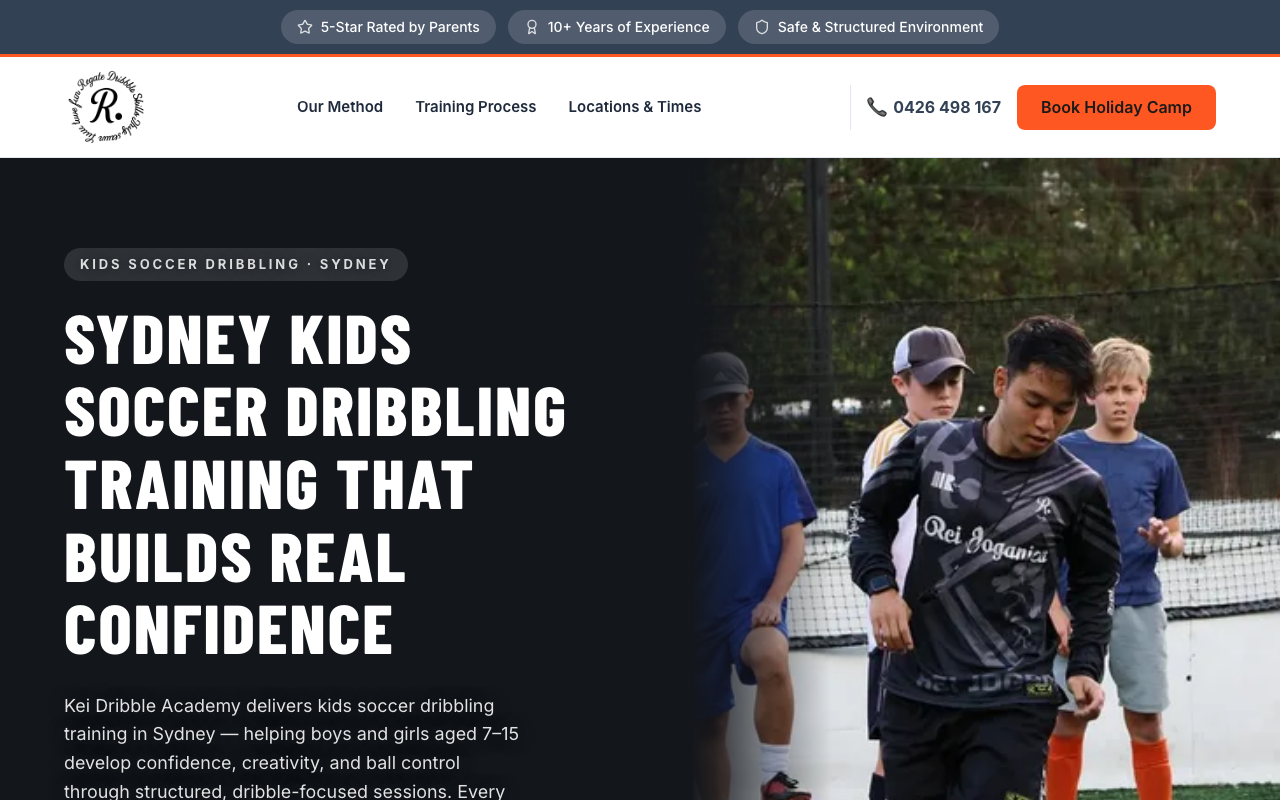
Kei Dribble Academy runs kids soccer training in Sydney, Australia, and this is its site, keidribbleacademy.com.au. It went live on Zarla on July 31, 2026 and took 39 booking enquiries by September 14, 2026, counted in its Zarla leads inbox. It's a client site built by Leadwave Studio, a Zarla partner, shown with the owner's OK.
A REAL RESULT
Do Zarla sites show up on Google?
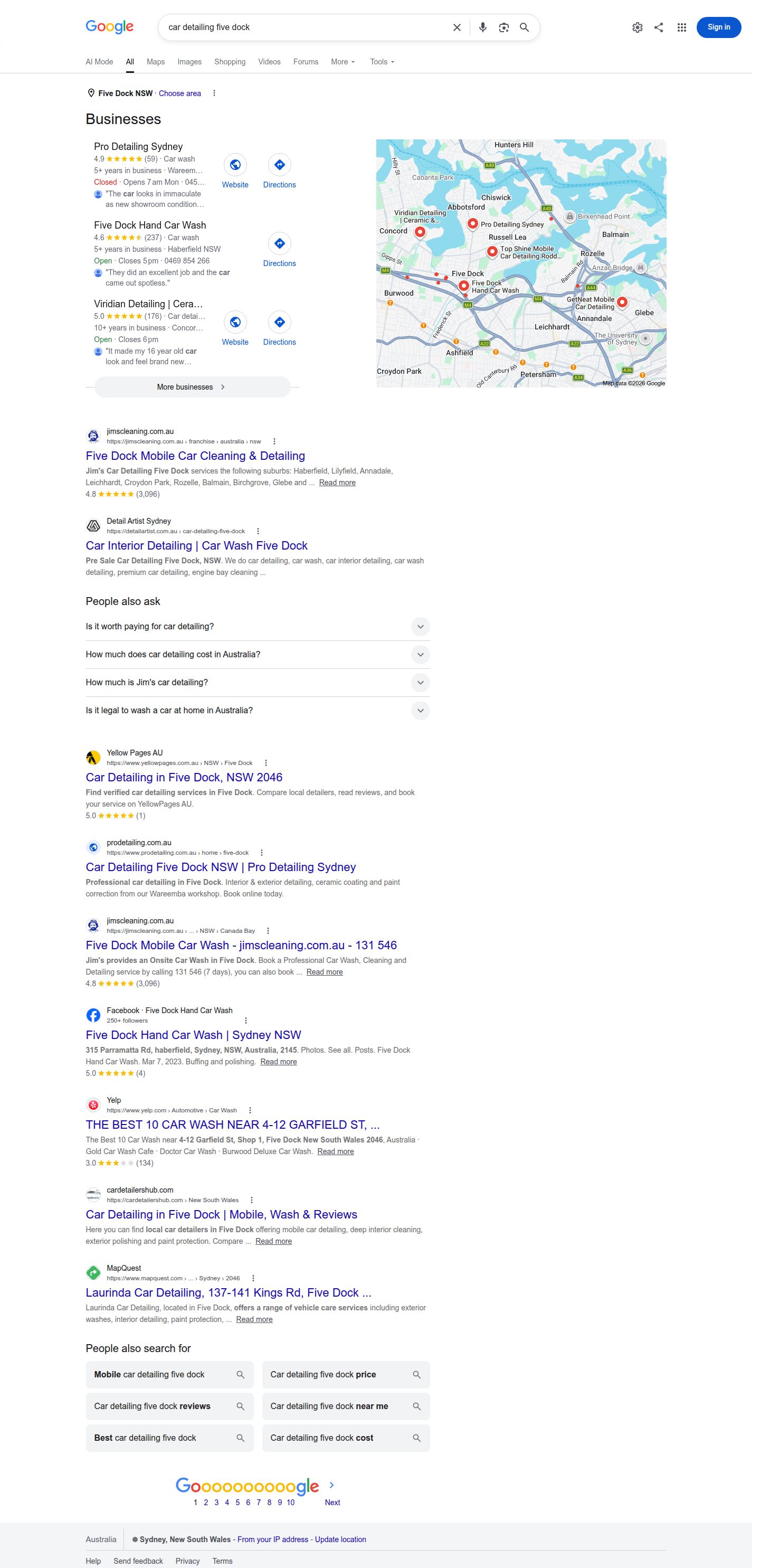
Pro Detailing Sydney, a car detailer whose site was built on Zarla in 2025 by Leadwave Studio, was on page one of Google's organic results, position 4, for "car detailing five dock" when we checked on September 12, 2026, searched from Sydney, Australia (see the search). Two businesses in Sydney are not an average: your trade and your town are different, and nobody can promise you enquiries or a position on Google. We'll add more owners as they agree.
How did we score the AI website builders?
The 9 tests, and what it takes to get a tick:
- Finished first draft. An AI website builder should write your services, your towns and your words, not hand you empty boxes. Tick: it writes the whole site, pages and words, from a description of your business. Dash: templates, or AI that only writes some of it.
- Edit by chat, new pages by AI. Prices, hours and the towns you cover change; updating them should take a sentence. Tick: you type a change and the site updates, and you can ask for a new page and get one.
- A page for each town you serve. People search for a plumber or a cleaner in their own town, and a page about that town gives the search somewhere to land. Tick: the builder makes a page for each town from the list of towns you give it (its AI or a built-in tool), and shows the area you cover in a map or a list section. Dash: one of the two, or either one only through an app or plugin. Cross: neither, so you copy pages yourself or ask for each town page one at a time.
- Reviews, shown and asked for. Reviews are what a stranger checks before they let you into their house. Tick: your Google reviews on the site and a built-in way to ask customers for one. Dash: one of the two, or only through another company's app or pasted widget code.
- Google Business Profile connected. Your Business Profile is the listing on Google Maps and in the map results, often the first thing a customer sees. Tick: you connect it inside the builder and can manage it from there (your hours and details, posts or replies to reviews). Dash: the builder reads it, showing your reviews or the map on the site, while you manage the profile in Google, or a connection only through another company's app. Cross: no connection.
- Tap-to-call on phones. Most people looking for a local service are on a phone, and many would rather call than fill in a form. Tick: the builder puts your number on the site as a tap-to-call link or button for you, from your business details. Dash: you add a phone link or a call button yourself. Cross: not without code.
- Quote requests with the job details. Most local service work starts with a quote. Tick: a quote form that asks for the job details comes ready to use. Dash: you build one yourself from a general form.
- Online booking. For work that runs on appointments, the website's job is the booking. Tick: customers book from the site, built in on a website plan. Dash: another company's scheduler, a plugin or a second subscription.
- Leads, quotes, invoices and payments together. A local service lives on the jobs that come in, so what happens after the enquiry counts too. Tick: a leads inbox, quotes your customers accept online, invoices and online payments, all built in. Dash: some of them, or only with plugins.
How we picked them. When we asked ChatGPT "best ai website builders for local service businesses" on November 7, 2026, twice, its answers named Wix, Hostinger, Durable, 10Web, WordPress, Squarespace, GoDaddy, Grow Local, Zarla and B12. Zarla was in one of its two answers, not both. We score the general builders that appear on every page in this series, Wix, WordPress.com, Squarespace and GoDaddy (scored here on its Airo AI Builder), whether ChatGPT named them this time or not, plus 10Web, Durable, B12, Hostinger and Grow Local from its answer. Zarla is ours. Asked the same day for five more besides Durable, Wix, GoDaddy Airo, Hostinger and Grow Local, ChatGPT also named Hocoos and Dorik, and Google's AI Mode named Elementor, Framer and Jimdo; we haven't scored those here. GoDaddy is scored as Airo AI Builder, the AI builder its website sells now.
How we scored them. Same tests for everyone, each worth the same. We checked every answer on the builder's own website and help pages on September 28, 2026, and the reviews, shown and asked for test on October 17, 2026, and the leads, quotes, invoices and payments together test on October 4, 2026, and re-checked every earlier answer on November 7, 2026, the day 10Web, Grow Local and B12 joined and all their answers were read. Three tests are new on this page and were first read that day: "A page for each town you serve", "Google Business Profile connected" and "Tap-to-call on phones". godaddy.com, 10Web's help centre and Acuity's help centre refused automated reads, and WordPress.com's Business Profile guide now redirects to its help home, so we read those pages as Google's search results show them; Airo's own site we read directly. Where two of a builder's own pages disagree, we score the lower answer and say so. When two builders tie on points, the one with fewer crosses goes first.
What we didn't score. Price, because every plan bundles different things (each builder's own price is on its card, and Zarla's is on our pricing page), page speed, which our small-business comparison measures on real sites, and photos, licenses and insurance, which every builder here lets you add. In the US, which trades need a license, and where you have to show the number, differ by state and by trade (in Australia, by state and territory), so check your local rules with your licensing board. Spotted something out of date? Tell us.
The same method elsewhere. The best AI website builders, the best website builders for small business and the best website builders overall, and trade by trade for 87 kinds of business on our comparisons page.
Questions owners ask
Sometimes, and we publish the reading either way. On November 7, 2026 we asked "best ai website builders for local service businesses" twice, through a search-data provider that reads the real ChatGPT answer with web search on. One answer named Zarla fifth in its numbered list, as the pick for local SEO; the other didn't name it. Both named Wix, Hostinger, Durable, 10Web, WordPress and Squarespace, and Google's AI Mode named Durable, Wix, Hostinger and Squarespace, not Zarla. Every builder named in both answers is scored here on the same tests. Leaving one of them? Our roundups of Wix alternatives, Squarespace alternatives, WordPress alternatives and Hostinger alternatives score the builders people move to.
They're fine for search, as long as the site says what only you can say. Google's own guidance is plain: "Appropriate use of AI or automation is not against our guidelines" (Google Search Central, February 8, 2023); what it rewards is helpful content, however it's made. So put your real prices, the towns you actually work in, the jobs you've done and your own photos into the AI's draft. The website is half of local search: Google's Business Profile help says "Local results are mainly based on relevance, distance, and popularity" (read November 7, 2026), which is why the Business Profile and reviews tests are on this page. Our website builders for SEO page goes further.
For the towns you really work in, yes, as long as each page says something true about that town: the jobs you've done there, the neighborhoods, how soon you can get there, a review from a customer there. Twenty copies of one page with the town name swapped is what Google's spam policies call doorway abuse; one of its examples is "Creating substantially similar pages that are closer to search results than a clearly defined, browseable hierarchy" (Google Search Central, read November 7, 2026). Our guides to SEO for contractors and the trade-by-trade comparisons for plumbers, cleaning businesses and handymen show what goes on those pages for each trade.
Town pages are how a business that drives to its customers shows up in each town's search. Zarla makes the town pages for you and shows the area you cover. It's one of the two, the town pages or the area section, on GoDaddy Airo (service-area words and a radius map; no town pages); Grow Local (AI town pages, up to eight; no area map). 10Web, Wix, Durable, B12, Hostinger, WordPress.com and Squarespace have neither, so you'd copy each town page yourself. We read each on the builder's own pages on November 7, 2026.
Wix and Durable connect it and let you manage it from inside the builder. The connection reads your profile, or comes through another company's app, on Zarla (reads your profile for reviews and the map; you edit it in Google); 10Web (imports your profile to build the site); GoDaddy Airo (connects to show your profile on the site); B12 (connects to show your reviews, on the top plans); Hostinger (Google reviews only by another company's widget); WordPress.com (Google reviews only through plugins). Squarespace and Grow Local have no connection built in. We read each on the builder's own pages on November 7, 2026.
Building and previewing one can cost nothing on most builders; a live site on your own domain costs money on every builder here. 10Web: AI Starter is $10/mo billed yearly ($120 a year), with booking on every plan; monthly billing costs more. The free trial lasts three days, then the site is deleted. Wix: Light is $17/mo and Core, the cheapest plan with bookings, $29/mo, billed yearly (US prices on its own blog, as of November 5, 2026); there's a free plan on a Wix address. Durable: Launch, the cheapest plan with bookings and your own domain, shows as $22/mo in its comparison table and $25/mo on its plan card, and the page doesn't label which is the yearly price. The free plan is a private preview that can't go public. GoDaddy Airo: Starter is $9.99/mo and Professional $24.99/mo, billed yearly, as Google shows GoDaddy's price page (it refused our reads). Its pages disagree on which plan has booking: its salon guide says Starter does. The free plan builds and previews but can't publish. B12: Website is $20/mo billed yearly ($24 monthly), with one booking type; more booking types and the contact list need Website + Client Engagement, $67/mo billed yearly ($78 monthly). A free plan stays on a B12 address. Hostinger: Premium is $1.99/mo on a 48-month term ($95.52 up front), renewing at $10.99/mo. Booking is on every plan; taking payment for a booking needs its paid Ecommerce add-on. WordPress.com: Personal is $4/mo billed yearly ($9 monthly), and every paid plan can now install plugins, so booking comes from a booking plugin or the Calendly block; plugins can add their own cost. A free plan stays on a WordPress.com address. Squarespace: Plans start at $19/mo billed yearly, after a 14-day free trial; online booking is a separate Acuity Scheduling subscription. Its pricing page showed us another country's prices, so we couldn't re-read the higher plans' US prices. Grow Local: One plan, $99/mo, with no contract; no yearly price is shown. You preview for free and pay when you go live, and no plan includes booking. Zarla is free to build and preview, and you pay when you publish, on the Premium plan. Each price is the builder's own, read on its pricing or help pages (November 7, 2026); check it for your country before you buy.
Yes, it's one of the stronger choices: 10Web placed joint second of ten here, with 14 of 18 points. It gets a tick on "Finished first draft", "Edit by chat, new pages by AI", "Tap-to-call on phones", "Quote requests with the job details", "Online booking" and "Leads, quotes, invoices and payments together". The catch: no pages for each town you serve or way to ask customers for reviews built in, and the free trial lasts three days before the site is deleted.
See the site Zarla would write for your business.
Describe what you do and the towns you serve in a sentence, and Zarla builds the first draft, free. You pay only when you publish.
Already have a website? Bring it across →Zarla keeps your old page addresses where it can and redirects the ones that change, helping you keep the Google standing you've built.