Inside Zarla's AI website builder
The online store builder that builds the website too.
Describe your business and Zarla builds the website; tell it you sell online and the shop is part of it — product pages, options, a cart, and checkout through your own Stripe account. Orders land in your dashboard; the money lands with you. Already have a website? Paste its address and Zarla rebuilds it free.
Free to build · Site ready in 30 seconds · Pay only if you publish

Powered by Zarla
The AI website builder that actually knows your industry
Tell Zarla what you do and where you’re based. In about 30 seconds, it builds a complete, professional website — with real copy written for your trade, SEO built in from day one, and everything you need to start getting customers from Google.
Try it free — takes 30 secondsWhat is an online store builder?
An online store builder is software that turns a list of products into a shop customers can buy from: product pages, a cart, checkout, and a place where orders arrive. Zarla's online store builder does all of that inside the website it builds for you — the money paid to you, every order in your dashboard. There are three ways a small business gets one:
- A standalone store platform. You pick a template, type in every product, pay a monthly plan, and add paid apps for the basics — a sale badge here, a free-shipping bar there.
- A plugin on a site built elsewhere. You install it, configure it, and keep it working alongside your theme, your hosting and your card payments.
- Built into the website builder. The shop is part of the site itself, and the first products are drafted from your description. This is how Zarla works.
Zarla is an AI website builder for small businesses that doubles as an ecommerce website builder: describe your business in a sentence and it generates your whole site. Describe an online shop and you get a website with an online store built in — shop section, product pages and a starter catalog drafted for you; any other business asks the editor for a shop section and adds its products in a minute each.
Already have a website?
A standalone store means a second login, a second bill and a shop that lives on someone else's page. Zarla's answer: paste your current site's address and Zarla rebuilds it free — pages, design and all — then add your products. See how website import works →
Your customer's view
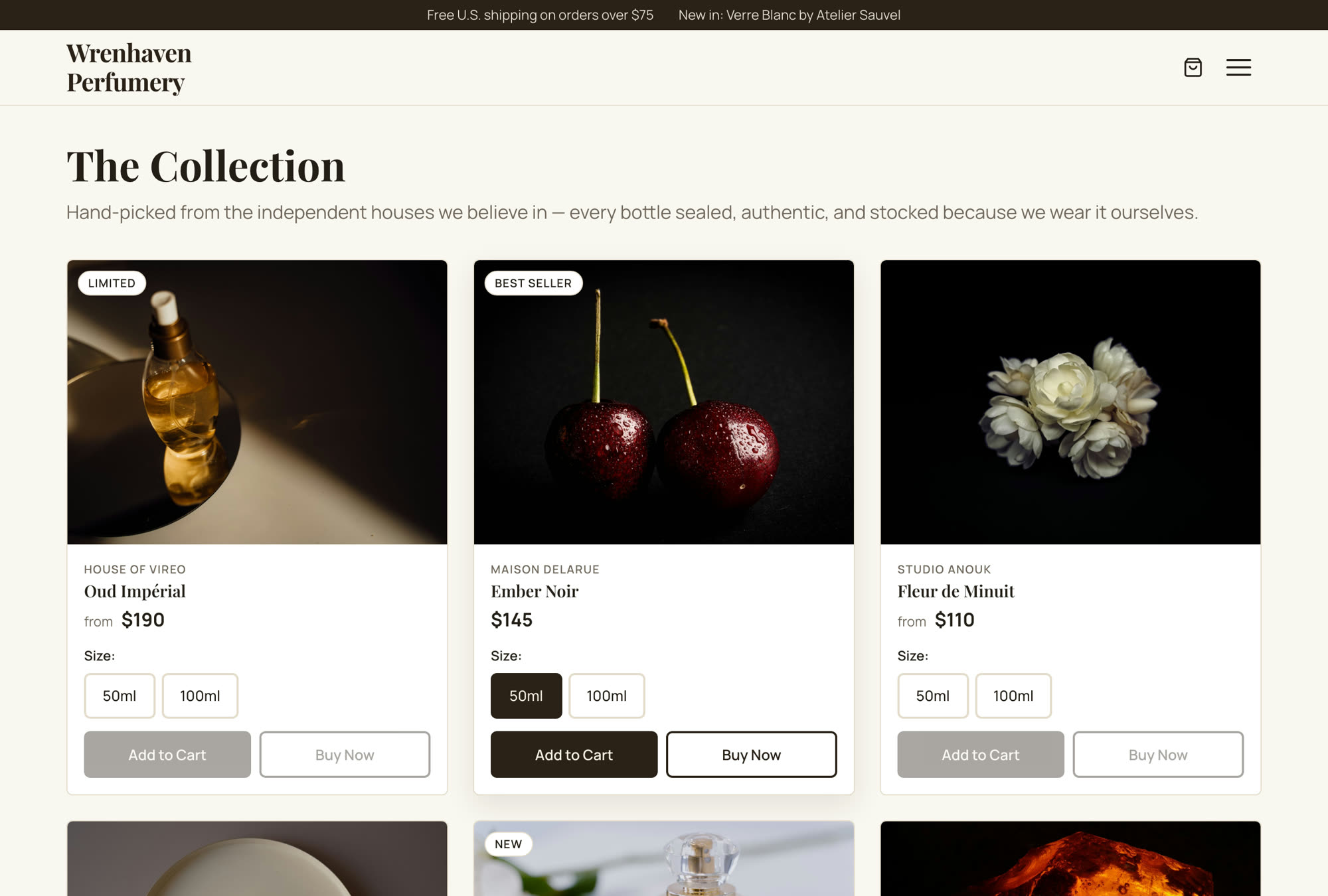
A storefront customers can buy from tonight
- Up to 8 photos per product, a brand line, and a badge like Best Seller or New
- Options with their own prices — the card says from $95 until they pick one
- The old price crossed out beside the sale price, with the percentage off
- Add to Cart, Buy Now, and a cart that remembers what they picked
- Every product gets its own page, so Google can find it
Want to see your products on a page like this?
Type your business name. Zarla builds the site in about 30 seconds — describe an online shop and it drafts your first products too. Free, no card — pay only if you publish.
Free to build and preview · No credit card · Pay only to go live
What you get
An ecommerce website for small business — with the shop included
Everything an ecommerce website builder sells as add-ons, already inside your Zarla site.
Sell things you ship, or files they download
Pack it and post it, hand it over at the counter, or sell a file — a PDF, a photo set, a template — that lands in their inbox the moment they pay.
Options, badges and sale prices
One set of options per shipped product — sizes, scents, colors — each with its own price if you want. Add a compare-at price and the old one shows crossed out with the percentage off; a badge chip says New, Limited or whatever sells it.
The money goes straight to you
Connect Stripe once under Settings → Payments and every sale is paid into your own Stripe account, not ours — no monthly add-on, no app to buy. Per sale you pay Stripe's card fee plus a small platform fee. Card details never touch Zarla; checkout runs on Stripe's own page.
The free-shipping nudge, built in
Set a free-shipping amount and the cart shows a progress bar toward it — the nudge that adds one more item, without an app.
Orders and emails, handled
Customers get an order confirmation, a shipping notice when you mark it shipped, and a download link for files. You get an email when something sells, and every order sits in the Orders tab.
No second platform
Included with every Zarla site — no add-on, no app marketplace, no second login. Products sits under Get Paid in your dashboard, beside your leads, invoices and bookings.
On a phone
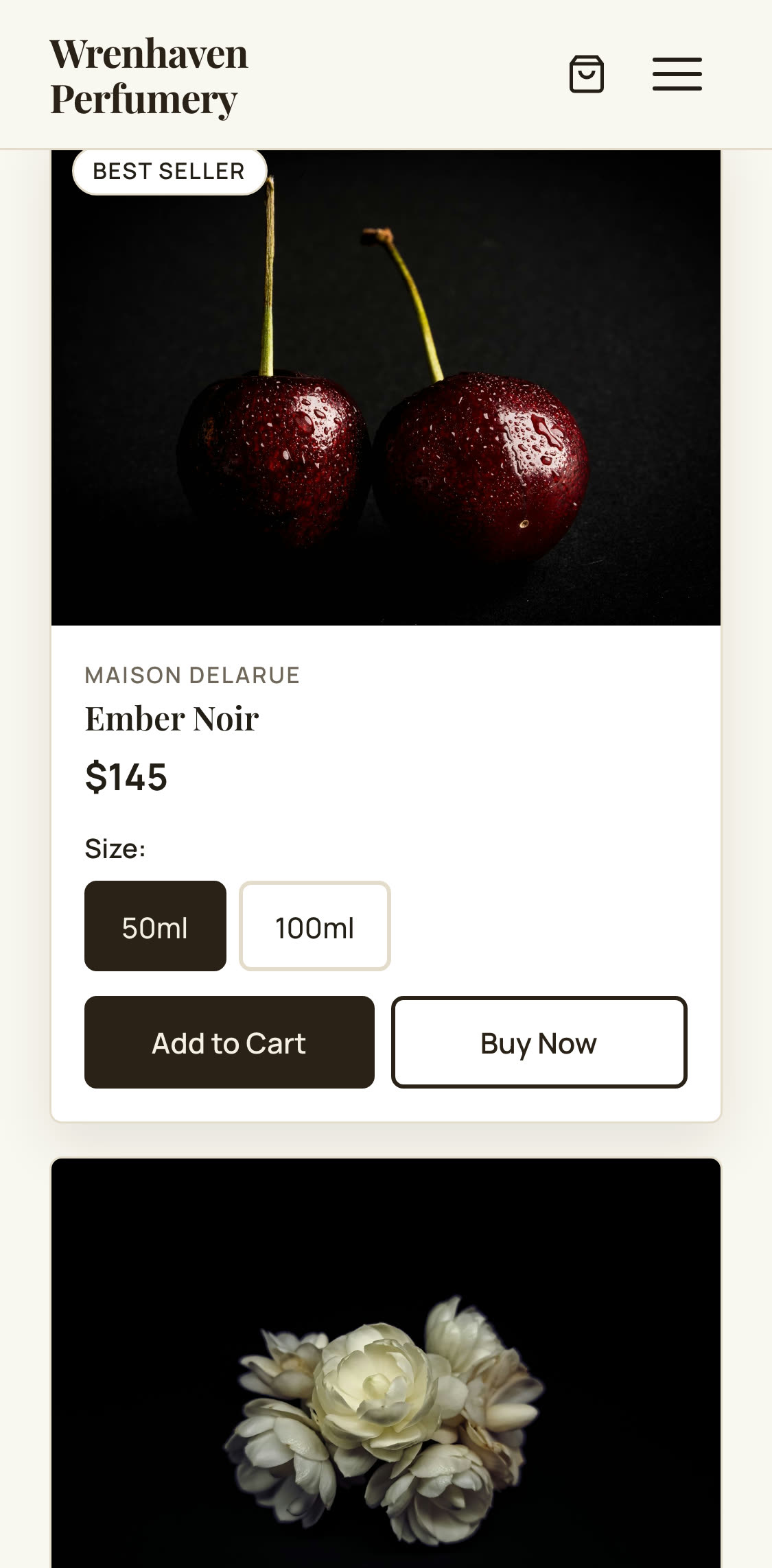
Built for the phone in their hand
- One product card per screen, with the badge and the price up top
- Option chips big enough to tap on the first try
- Add to Cart, then a cart drawer with the free-shipping bar
- Checkout on Stripe's own phone-sized page — no account to create
Why it's different
Your shop, run from one screen
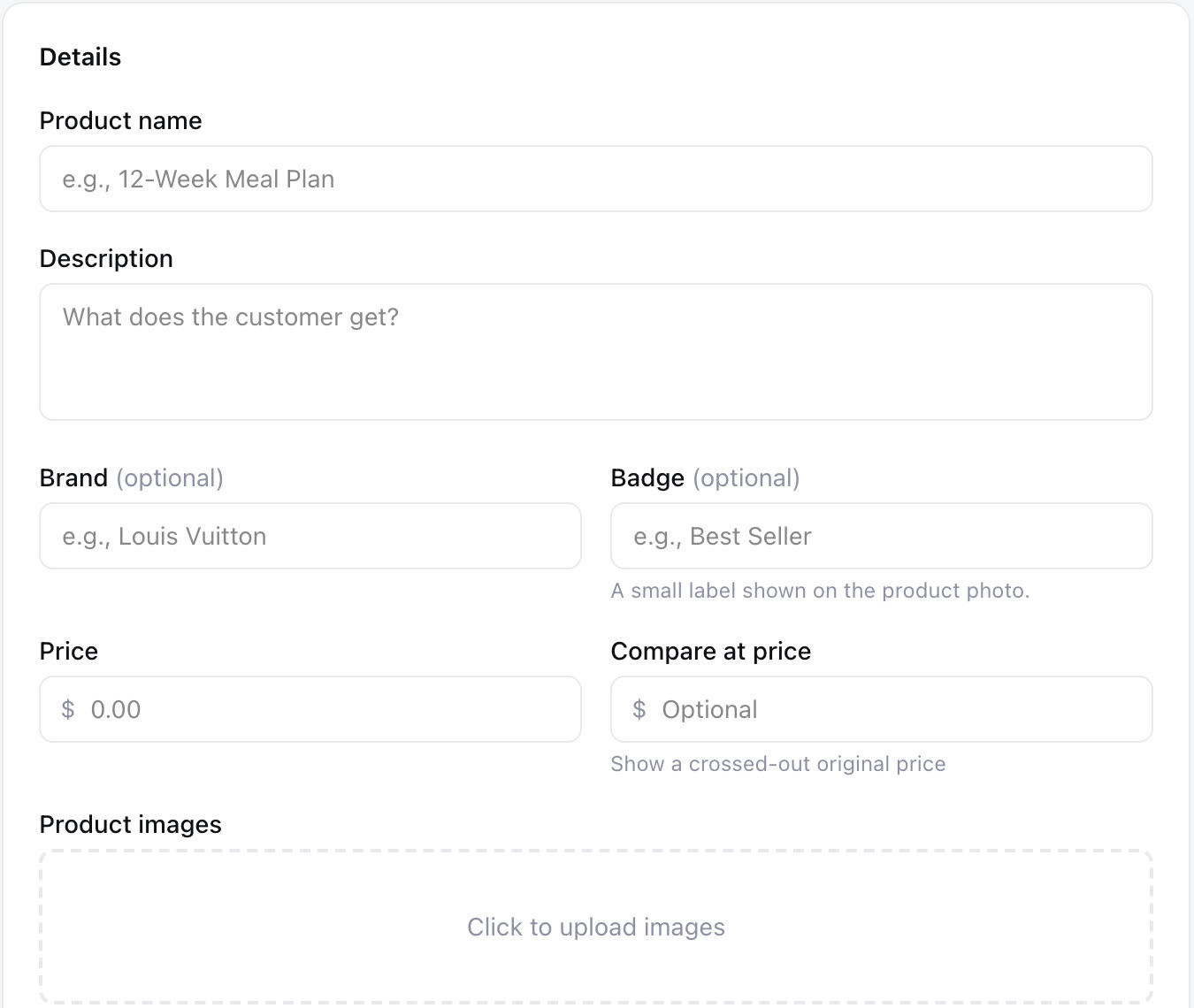
Every product and order, in one place
Open Products under Get Paid and the whole shop is on one screen. Search the catalog, filter by Downloads or Shipped, Active or Inactive, and open any product to edit it. The Orders tab is your to-do list — who bought what, where it ships, and a Mark as shipped button that sends the customer their notice.
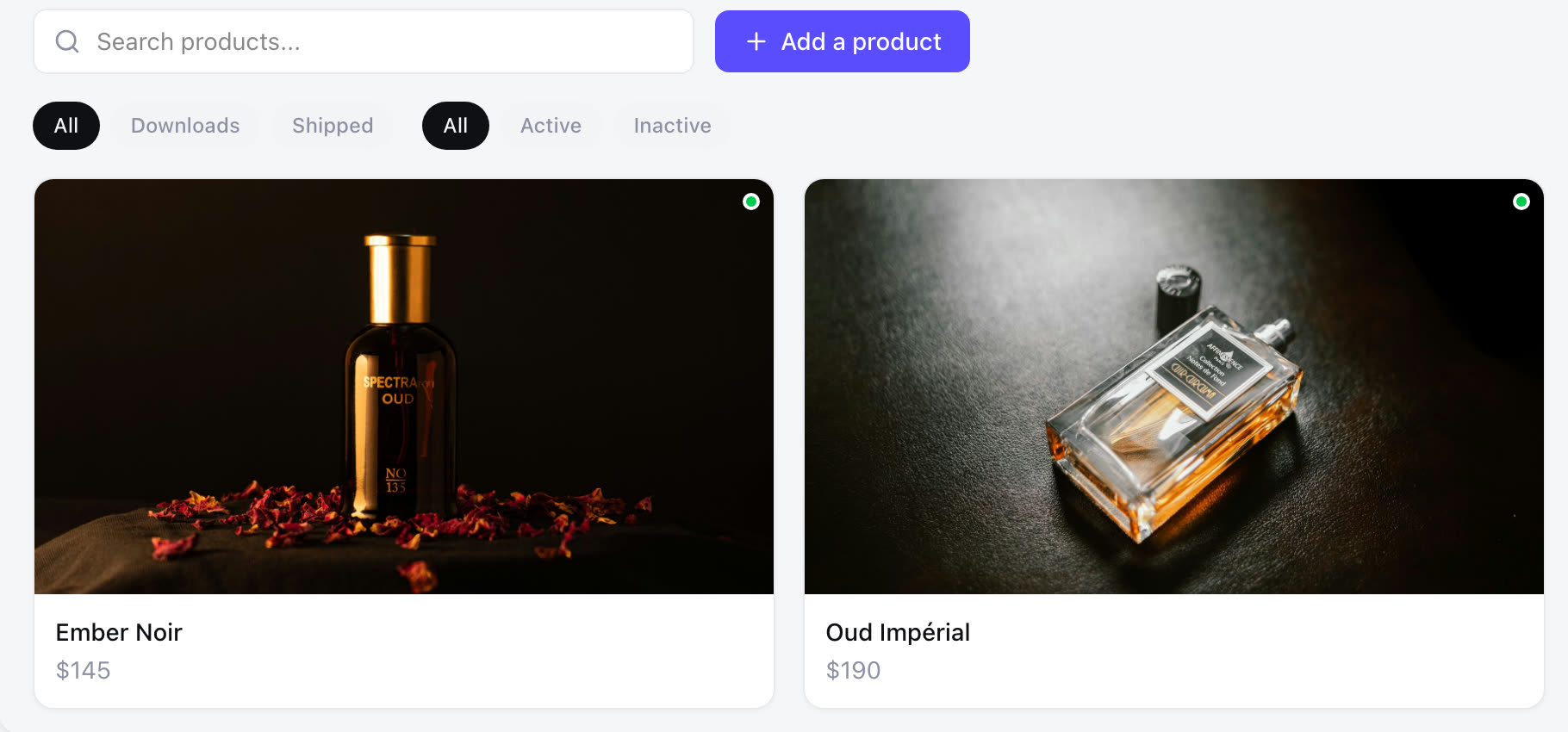
Ship it, hand it over, or send a file
Add a product starts with one question: a file for download, or an item you ship or hand off. Then one form: name and description, a brand and a badge if you want them, the price and a compare-at price for sales, up to 8 photos, a details table for the product page, and for shipped items one set of options and how the customer gets it — posted to their address or picked up from you. A download takes the file instead.
How it works
How to create an online store for your small business with Zarla
Build your site
Describe your business in a sentence, and in about 30 seconds Zarla builds the whole website — pages, copy, images and design — and if you describe an online shop it adds the shop section with your first products drafted from what you wrote.
30 secondsAdd or edit your products
Open Get Paid → Products, click Add a product, choose a file for download or an item you ship, then add photos, a price, options and a badge — and if your site has no shop section yet, ask the editor to add one.
A minute eachConnect payments once
Click Get paid, connect your Stripe account under Settings → Payments, and follow Stripe's steps to verify your business — the same connection then powers invoices, gift cards and bookings.
5 minutesPublish and share the link
Publish your site and the shop is live at your address, with a cart icon in the nav and a page for every product — then put your site's address in your social posts, your Google Business Profile, and a text to anyone who asks.
InstantSee what Zarla builds for your business
Describe your business in a sentence. Zarla generates a full website — homepage, about page, services, contact form — in about 30 seconds. If you don’t love it, you haven’t lost anything.

Your products. Your prices. Your Stripe. Selling while you sleep.
Paid into your account, not ours. Build the site free, add your products, and the shop is live the moment you publish.
Free to build and preview · No credit card · Pay only to go live
How Zarla compares
Online shop builder: built in vs a standalone platform vs a plugin
| RecommendedZarla | Standalone platform | WordPress plugin | |
|---|---|---|---|
| Time to first product | Minutes — online shops get an AI-drafted starter catalog | Template, then type every product | Install, configure, match your theme |
| What you pay | Included with your site | Monthly plan + paid apps | Paid tiers + your hosting |
| Where the money goes | Your own Stripe account | Their payment setup | Usually another plugin |
| Digital downloads | Depends on the plan | Usually another plugin | |
| Badges and free-shipping bar | Built in | Often an app | Often a plugin |
| Where customers shop | A section on your site, in your colors, with a page per product | Their storefront, linked from yours | Inside your site |
| Builds the website too |
One login. One bill. The website included.
Product pages, the cart, checkout and order emails come with your Zarla site — not as a second platform.
Free to build and preview · No credit card · Pay only to go live
Real results
Small business owners who got online with Zarla
From business owners like you.
“Optimized for local service-based businesses. Easiest website build I've experienced. The AI-based build is the way to go instead of clunky theme-based websites. Get the site built and get out of the weeds with Zarla!”
“Quickly built my website from scratch. No hiccups. Would highly recommend Zarla for someone with no experience who wants to start a polished business website.”
“Beginner-friendly, efficient, and designed for business owners who want a professional website without dealing with complicated technical steps. I'd recommend it to anyone who wants a simple, reliable way to get online.”
Questions we hear
Online store builder — common questions
Yes. Describe your business at Zarla and the website is built in about 30 seconds; describe an online shop and it comes with a shop section and a few starter products drafted from your description, and any other business adds a shop section from the editor. Building the site and adding products is free, with no product cap and no add-on; customers can buy once you publish, which is when a paid plan starts — see our plans. Build it free →
Your own Stripe account — connect it once under Settings → Payments and every sale settles there, the same connection your invoices, gift cards and bookings use. Per sale you pay Stripe's standard card fee plus a small platform fee (the same one invoices and gift cards carry); there's no monthly add-on and no app to buy. Card details never touch Zarla; checkout runs on Stripe's own page.
As a separate platform, typically a monthly plan plus apps: Shopify's Basic plan is $39 a month, or $29 a month billed annually, and the builders with a free plan charge a percentage of each sale instead — Freewebstore takes 2.5% on its free plan (public prices as of September 2026). With Zarla the shop is part of the website, so there's no second bill — one plan covers the site, the shop, the product pages and the order emails.
The one that sells what you sell from the place your customers already find you. If you sell a manageable catalog of items or downloads and want the shop and the website from one place, Zarla is built for that: the site, the product pages, the cart and the order emails arrive together, with no second platform to pay for. If you need live stock counts, a point-of-sale, or listings on Amazon and eBay, a dedicated platform like Shopify is the better fit — here's how the two compare. See your products on a page like this — free →
Two kinds of product: items you ship or hand over — bottles, boxes, prints, merchandise, with a flat shipping fee or pickup only — and files customers download after paying, like PDFs, photo sets, music and templates. Services that need a time slot go through online booking instead, and one-off amounts like deposits go through a payment link. Build the site, then add it — free →
Not directly — the shop belongs to a Zarla site, so there's no widget to paste into a site built somewhere else. You can bring your site over: paste its address and Zarla rebuilds it free, then add your products. How website import works →
Usually not to start. In the US you can sell as a sole proprietor under your own name and form an LLC later if you want the liability protection; in Australia you'll want an ABN; in the UK you register as a sole trader with HMRC once you're earning. What every region does expect is that you collect and remit the right sales tax, GST or VAT for what you sell — confirm the details with your accountant before you launch.
Yes. An order confirmation the moment they pay, a shipping notice when you mark the order shipped from the Orders tab, and for downloads an email with the download link. You get a "You made a sale" email with a button that opens your Orders tab.
No. Zarla's shop doesn't count inventory or stop selling when you run out — you set a product to Inactive to take it off the shelf. If you need live stock counts across a warehouse or a point-of-sale, a dedicated platform is the better fit for now.
No — the shop lives on your website, and Zarla doesn't list your products on marketplaces or sync with Instagram Shopping. What you can do is share your shop anywhere: your site's address works in a post, a bio, a Google Business Profile, or a text, and while you're waiting for your first order the Orders tab shows a Copy shop link button.
Each shipped product carries either a flat shipping fee or pickup only, and the cart adds one flat fee per order at checkout. Set a free-shipping amount in the Settings tab and orders over it ship free — with a progress bar in the cart showing how close they are. Zarla doesn't print labels or calculate carrier rates; you post it the way you do today.
Yes. It's a section on your site with a cart icon in the nav, and every product has its own page at /products/its-name — in your colors, under your name, indexed by Google like any other page. Ask the editor to add a shop section to a site that doesn't have one yet. Build the site and see it — free →
Let the 11 pm customer buy without you.
Build the site free, add your products, connect Stripe. The cart, the checkout and the order emails are already there.
Free to build. Pay only if you publish.