BUSINESS GUIDE
How to start an IT business in 2026
The services business, not a software startup: break/fix or managed IT, what offices pay per user, the certifications that matter and the ones that don't, E&O and cyber insurance, the RMM and PSA tools, vendor programs, your first clients — and how to grow from one technician to a small team.
Free to build · Pay when you publish · No credit card
$50–$100a user a month: the most common per-user price (Kaseya MSP survey)
$101–$200an hour: what 63% of the 984 MSPs charged for break/fix
$61,860a year: median help-desk pay (O*NET, 2025)
No codeto get online
See it in action
See what your IT services website could look like
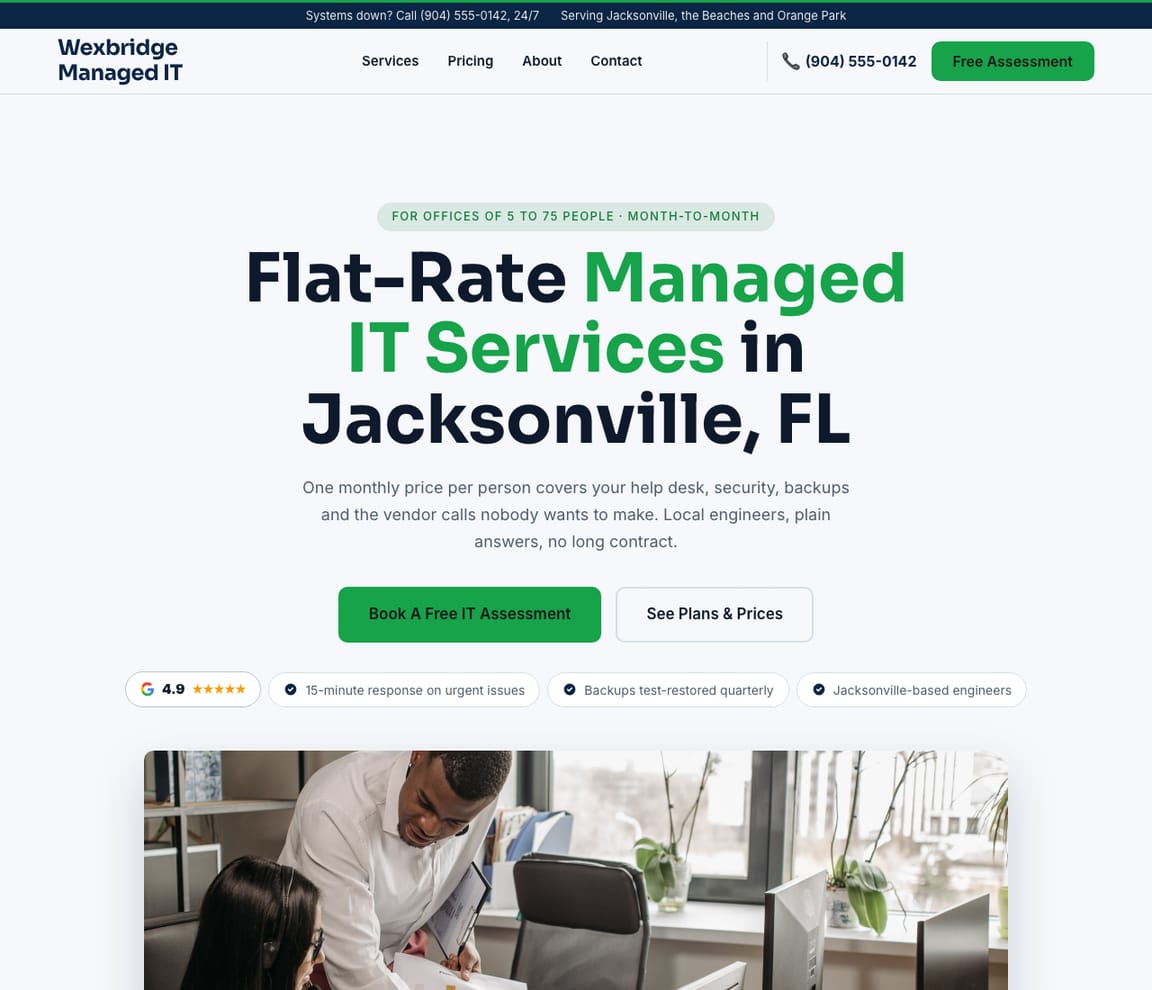
This is a real Zarla template for a managed IT company. Describe yours — the offices you look after, what your plans include, how fast you respond — and you'll have a site like this, with a page for each service and a contact form, in about a minute.
- Professional design — not a generic template
- Looks great on desktop and mobile
- Content written for your industry
Build the website
Start your IT services website now
Add your town and your business name to the sentence, and Zarla builds the site: a page for each service you list and a contact form. Add your plans, your response times and the industries you serve in chat, then publish.
Already have a website? Bring it across →Zarla keeps your old page addresses where it can and redirects the ones that change, helping you keep the Google standing you've built.
Is an IT business worth starting — and what do offices pay?
First, which IT business: this guide is the services business — looking after other businesses' computers, networks and security — not a software startup. It comes in three shapes, and one business can do all three. Managed IT (a managed service provider, or MSP) charges every month for monitoring, support, updates and backups. IT support by the hour — "break/fix" — charges when something goes wrong. Computer repair fixes machines at a counter, at the customer's door or by mail.
What offices pay for managed IT. It's priced per user or per device, every month. In a survey of 984 MSPs taken in November 2023 by Kaseya, a company that sells software to MSPs, the most common per-user price was $50 to $100 a month (21% of all respondents, while a third didn't price per user at all), 51% charged $150 or less per user, and 46% charged under $100 a device a month (Kaseya 2024 MSP Benchmark Survey). MSPs' own 2026 price guides quote more — "$100 - $250 per user/month" for fully managed IT at one Utah, Wyoming and Arizona MSP (911 IT, August 2026), "$100–$250 per user, per month" at another (Solvere One, September 2026) — read those as sellers' figures. By the hour: 63% of the MSPs Kaseya surveyed charged $101 to $200 an hour for break/fix work, and 21% charged $51 to $100.
What people pay for computer repair. Shops publish their own prices. A Leesburg, Florida shop charges a $50 diagnostic fee that counts toward the repair, virus removal from $89 and laptop screens from $149 (Computer Corner, June 2026); a Somerville, New Jersey shop charges a $75 diagnostic, credited the same way, virus removal from $149 and laptop screens at $180 to $275 (Dave's Computers, page updated 2025); a Dallas–Fort Worth technician who comes to the customer starts with a $64.99 diagnostic, house call included (Techrepair DFW, March 2026).
The demand, and the catch. The work isn't going away, but jobs doing it as an employee are shrinking: employment of help-desk technicians is projected to decline from 2025 to 2035, with about 39,700 openings a year (O*NET), network support to grow slower than average (O*NET), and computer repairers — an O*NET group that includes ATM and office machine repairers — to decline, with about 6,100 openings a year (O*NET). Winning clients is the hard part: 71% of the 1,061 MSPs in Kaseya's 2026 report put acquiring new customers among their top three issues, more than any other, the share not yet profitable on managed services doubled to 10%, and the share whose typical customer spends more than $25,000 a year fell to 41% from 75% (Kaseya 2026 State of the MSP report). As an employee, the same skills paid a 2025 median of $61,860 a year on a help desk (O*NET), $76,220 in network support (O*NET) and $47,810 in computer repair (O*NET) — the owner's income has to beat that after the tools, the insurance and the nights on call. That's what the rest of this guide sets up.
How to start an IT business, in plain English
Break/fix or managed services. Break/fix is how many owners start: you're called when something breaks and bill the hours. It's easy to sell and hard to plan, because the calls stop the week nothing breaks. A managed services agreement charges a flat monthly fee — per user, covering all of a person's devices, or per device, with a server priced above a desktop (Kaseya) — so your income stops depending on your clients' bad weeks. In Kaseya's 2024 survey, 24% of MSPs said most of their clients were on month-to-month agreements and 26% said most were on one-year contracts, and the average client paid up to $1,000 a month at 27% of MSPs and $1,001 to $2,500 at another 27% (Kaseya 2024); by its 2026 report, "up to $1,000" per client was the largest group, at 30% (Kaseya 2026). A common path is break/fix first, then each good client onto a monthly agreement.
Do you need a license? For IT support itself, generally no — for the work around it, sometimes. In the US the rules are state by state. Some examples:
- Texas counts a camera system that records, or computer-controlled door access, as an "alarm system" (Tex. Occ. Code §1702.002), and anyone who installs or services one acts as an alarm systems company under the state's private security law (§1702.105). Its private investigator law reaches reviewing someone's computer data to find information about a person — but not repair or maintenance that only looks at data to diagnose a problem, or work responding to a cybersecurity event (§1702.104).
- California licenses low-voltage work — phone, sound and closed-circuit video systems among it — as C-7 Low Voltage Systems (CSLB), needed for jobs of $1,000 or more — or of any size if the job needs a permit or you employ anyone; the small-job limit rose from $500 to $1,000 on January 1, 2025 (CSLB bulletin). The license is $450 to apply and $200 for a sole owner (CSLB fees), a $25,000 bond and four years of experience (CSLB).
- North Carolina has a Fire Alarm/Low-Voltage license (NCBEEC): $125 to apply and take the exam, then $100 a year (NCBEEC fees).
Your clients' rules become yours. The Department of Health and Human Services names a "Managed Services Provider" whose support work requires it to create, receive, maintain or transmit a medical practice's electronic patient information as an example of a HIPAA business associate: you sign a business associate agreement, and you're directly liable for parts of the HIPAA rules (HHS). Tax preparers and other financial firms fall under the FTC Safeguards Rule, which says their "contracts must spell out your security expectations" for service providers like you and requires multi-factor authentication for anyone accessing customer information (FTC). Sales tax varies too: Texas taxes data processing — exempting 20% of the charge — and repair of personal property (Texas Comptroller), while California generally doesn't tax itemized repair labor, such as replacing a hard drive in a used computer, only the parts (CDTFA). Check your state's revenue department and ask an accountant.
Certifications: useful, not required. No license is needed to fix computers or run a help desk; a certificate is proof a client can check. CompTIA A+ is a common first one: two exams, Core 1 and Core 2, with 12 months of hands-on experience recommended (CompTIA), at $274 an exam — $548 in all — since CompTIA raised prices on June 1, 2026; Network+ is now $399 and Security+ $439 (Total Seminars, July 2026). A new Security+ version is expected on or around November 17, 2026 (CompTIA). Microsoft's associate exams typically cost $165 (Microsoft Learn), and Cisco's CCNA $300 (Cisco). One place a qualification is written into the rules is defense work: the Defense Department's cyber workforce manual requires contractors in its cyber roles to be fully qualified to its standards (DoD Manual 8140.03, 2023).
Insurance for other people's systems. Technology errors and omissions (tech E&O) pays if a client sues over a mistake, an outage or a breach you're blamed for; general liability covers an injury or damaged property at a client's office. Insureon, an insurance marketplace, puts its IT-consultant customers' median at $75 a month ($899 a year) for tech E&O bundled with cyber cover, $128 a month for cyber on its own and $31 a month ($369 a year) for general liability (Insureon, June 2026); its computer-repair customers pay $89 a month ($1,073 a year) for the same bundled tech E&O, $145 a month ($1,735 a year) for cyber on its own and $37 ($440 a year) for general liability (Insureon). Clients may write E&O, liability or a fidelity bond into their contracts, and most states require workers' comp for MSPs with employees (Insureon). Expect your own security to be checked too: Corvus by Travelers, a cyber insurer, requires multi-factor authentication for remote, email and administrative access (Travelers, May 2026).
The tool stack: RMM, PSA and the rest. Remote monitoring and management (RMM) puts an agent on every client computer to watch it, patch it and fix it remotely; professional services automation (PSA) runs tickets, time, contracts and billing; a documentation vault keeps every client's passwords and network notes; remote access lets you take over a screen; and backup and endpoint security protect the client. Only some vendors publish prices. Syncro's RMM and PSA in one is $129 a technician a month on an annual plan, or $159 month to month, with unlimited devices (Syncro); NinjaOne's RMM is priced per device — $3.75 a device a month at 50 devices or fewer (NinjaOne); ConnectWise (ConnectWise) and Datto (Datto) quote on request. For documentation, Hudu is $27 a user a month billed annually (Hudu) and IT Glue from $29 a user a month on a three-year term, with a five-user minimum (IT Glue); for supporting clients' screens, ScreenConnect Standard is $47 a technician a month billed annually (ScreenConnect) and Splashtop's Remote Support SOS starts at $22 a month, billed annually at $259 (Splashtop). Endpoint security is priced per device: Huntress Managed EDR lists at $8.99 an endpoint a month, $7.99 in its 100-endpoint example (Huntress), SentinelOne's Singularity Complete is $179.99 an endpoint a year (SentinelOne) and Microsoft Defender for Business $3 a user a month (Microsoft). Atera, Action1, N-able and HaloPSA are popular too; their pricing pages blocked our checks, so we don't quote them.
Vendor programs and licenses. Joining the Microsoft AI Cloud Partner Program costs nothing (Microsoft); its Partner Success Core benefits package — internal-use licenses, including 15 seats of Microsoft 365 Business Premium, and Azure credits — is $925 a year (Microsoft Learn), and Expanded $4,125 (Microsoft Learn). To resell Microsoft 365, a new provider buys through a distributor as an indirect reseller; billing Microsoft directly takes at least 12 months as an indirect reseller and $1 million a year in cloud license sales (Microsoft Learn). Distributors' marketplaces such as Pax8 carry hundreds of software vendors, and Pax8 counts more than 47,000 partners (Pax8). Microsoft 365 Business Premium is $22 a user a month paid yearly (Microsoft); Business Basic rose to $7 and Business Standard to $14 on July 1, 2026 (Microsoft). For your own business, Business Basic is $7 a user a month (Microsoft).
The agreement. Your clients will be reading the government's advice on hiring you: CISA tells businesses to ask an MSP for service level agreements, incident-response duties and "compensation for service outages", and to write down who patches, who maintains hardware and who trains staff (CISA, 2021). Put those answers in your agreement before they ask, with a limit on your liability your lawyer is happy with.
The kit and the business. A business laptop such as Dell's Pro 14 lists from $1,334 (Dell, October 2026), and many start on the one they own. For repairs, iFixit's Pro Tech Toolkit is $79.95 (iFixit) and its Essential Electronics Toolkit $29.95 (iFixit), with an anti-static wrist strap at $7.95 (iFixit) and a portable mat at $34.95 (iFixit). Form the business — an LLC is $40 in Kentucky (Kentucky SOS), $300 in Texas (Texas SOS) and $70 in California (California SOS), where every LLC also owes an $800 yearly tax (California FTB); an LLC protects your personal assets in most cases if the business is sued (SBA) — and get the free EIN (IRS). For one technician from a home office, our free IT services business plan adds it up to $2,706–$10,785: a laptop and repair kit, your own monitoring, remote-support and documentation tools, Microsoft 365 or the partner program's Core benefits, a year of tech E&O (with cyber) and liability cover, A+ and Security+, registration, the website, and two months of running costs. Your own living costs come on top.
From one technician to a small team. Solo works until the phone rings during a vacation. If the first hire is a help-desk technician, the 2025 median is $61,860 a year (O*NET); California requires workers' compensation even for one employee (California DIR), while Texas leaves it optional for most private employers (Texas Department of Insurance). Hiring is getting harder — the share of MSPs reporting difficulty hiring skilled technicians rose from 9% to 16% in a year (Kaseya 2026). Small teams last, and some grow: one Muscle Shoals, Alabama MSP founded in 2009 is four people and has grown 20% to 30% a year over the past few years (MSP Success, January 2026); another, founded in 1993, has a team of 10 (MSP Success, September 2026); a third, founded in 2004, has five (MSP Success, August 2026); and Georgia's Cobb Chamber named a managed IT firm that grew "from a small founding team to more than 35 professionals" its 2026 Small Business of the Year (Cobb Chamber). The IT services website templates show what a good IT company site looks like, and Zarla's IT services website builder is how offices searching for IT support near them find yours. If you'd rather sell advice than support, read our guide to starting a consulting business.
What IT business owners actually say
None of this is our opinion about the trade. It comes from people talking about running their own IT businesses on the Spiceworks Community forum in 2023, 2025 and 2026 — most of them don't say where they work — and two US owners profiled by MSP Success, a magazine published by Kaseya, in 2025 and 2026. Read each as theirs at the time. Six things come up again and again.
Many start on the side — and the side job fights the day job. Rick6613: “I started my IT support business as a ‘side hustle’ about 30 years ago.” And: “If you have business customers, it won’t be long until they have critical problems during hours when you are supposed to be at your ‘day job.’” (Spiceworks Community, June 2025). Sean Wolsey, who works as needed and is paid at the time of service: “There are times when I’ll work 60 hours in a week, and others when I won’t have a call for 2 weeks. It isn’t for everyone, and it’s why I work a 24-hour / week part time job, too.” (Spiceworks Community, April 2026).
“Break/fix is the easiest to start and the hardest to build on. You’re always one quiet month from a cash flow problem, not because you’re bad at the work, but because the model is structurally unstable. … Monthly agreements flip that.” — The.Smorg, a Spiceworks Community member, Spiceworks Community, April 2026
Break/fix is the way in. Michael Haag of Productive Programming in Placentia, California, started out installing software: “We would go to install our software, and it wouldn’t work,” Haag told the magazine. “We’d have to fix their networks in order for our software to run. After a while, I realized we should be charging for that.” (MSP Success, March 2025). ArmandoA: “Contract customers are the most stable and reliable. But hourly calls are more profitable.” (Spiceworks Community, April 2026).
The first clients come from people who know you. Owenmpk, who started a one-person IT business in California in 2006 as an employer's campus was closing, was referred to an early client by “someone I met at a chamber mixer”, and told everyone they'd worked with: “One important lesson is not to directly ask if they had work for me. … Instead, I focused on asking them to share my information if they knew someone who could use my help.” Then: “After the first year, I stopped marketing myself. From that point on, all of my work came through referrals from existing clients.” (Spiceworks Community, April 2026). Lauren Creech, who ran an IT business from 1996 to 2017: “Network through friends, church, business associations, and community groups to find your first clients. Word of mouth is worth more than gold and happy clients will sell you to their friends and others in the industry they are in.” (Spiceworks Community, April 2026).
Charge enough, and don't let one client own you. Jay_Garrick, who ran an IT support corporation for 16 years: “When I started out, I charged $75 per hour for home offices and $100 an hour for businesses. I get that price for years and the main change I made was I dropped the $75 and went to $100 for everyone. I actually had clients who thanked me and said it was about time I did that.” (Spiceworks Community, June 2025). Jeffjones11: “don’t neglect to pay yourself.” (Spiceworks Community, June 2025). Trevor Hardy of NEXTGen IT in Muscle Shoals, Alabama, lost the firm's largest client to bankruptcy: “I lost nearly 50% of my revenue in a matter of seconds.” About three months before, Hardy had been persuaded to double NEXTGen's prices, effective about a month after the loss: “We kept nearly 50% of the business at twice the price we were at.” The lesson: “Not all money is good money.” (MSP Success, January 2026). Kevin Jones: “If anyone controls more than 20% of your income, they use it as leverage to get better service for a lower price.” (Spiceworks Community, April 2026).
Pick clients who need you and can pay. Lauraloding, an owner since 2002: “What I found out is a lot of small Mom and Pop businesses can’t really afford to pay. If you try to charge what you’re worth, they’ll have a family member who knows something about computers do the work. So you have to look for those with at least 20-30 employees. Not enough to have a full-time IT person but too much for a family member to take care of it.” Relmeo B. Truk, on a parent's business: “My dad started his solo IT business and his clients were exclusively car dealerships. It lasted for almost 40 years when he retired.” Lauren Creech found hers in medicine: “PCI-DSS, FISMA, and HIPAA are no joke.” (Spiceworks Community, April 2026).
IT never sleeps — which is why owners grow. An MSP owner of 24 years, spiceuser-9cbwi: “IT never sleeps and neither can you. … I started solo, as everyone does, and quickly realized that wouldn’t work long term. Every solo IT person I’ve ever known is either burned out or struggling. You have to get bigger, which means running a business instead of just being a tech.” (Spiceworks Community, April 2026). Kwelch007, who did it for several years: “you’re really doing two jobs for one paycheck.” (Spiceworks Community, September 2025). Robert762: “Needing to keep enough trusted staff around when you’re not there and knowing when to dump a client are important!” (Spiceworks Community, March 2023).
The through-line: the IT owners who last start with break/fix and the people who already trust them, move good clients onto monthly agreements, price for the hours the work really takes, keep any one client from owning them — and hire before the on-call nights burn them out.
THE STARTER KIT
What you need to start an IT business
The skill, and a certificate or two
Years on a help desk or as a sysadmin first. CompTIA A+ or a Microsoft certificate is proof a client can check — useful, not required by law.
A work laptop and a repair kit
A business laptop, a precision toolkit, an anti-static strap and mat, a few spare drives and cables — and a car, if you'll go on site.
The tools that run the business
Remote monitoring and management (RMM), a ticketing and billing system (PSA), remote access, a password and documentation vault, and backups.
A price list and an agreement
An hourly rate for break/fix, a per-user monthly plan, response times in writing, and an agreement that says who is responsible for what.
Insurance for other people's systems
Technology E&O with cyber cover, general liability, and workers' comp once you hire — clients' contracts may ask for the first.
Vendor accounts, and a way to be found
The Microsoft partner program and a distributor for licenses, then a Google profile and a website with your plans and response times.
THE PAPERWORK
Licenses, certifications and insurance for an IT business
| Typical cost | Time to get | Legally required? | |
|---|---|---|---|
| Business registration (LLC) and local business license | e.g. $40 (KY), $300 (TX), $70 + $800/yr tax (CA) | Days | Depends on your structure and city |
| EIN from the IRS | Free | Minutes online | If you hire or have partners; optional when solo |
| Sales tax registration | Set by your state | Days to weeks | Where your state taxes IT services or parts |
| CompTIA A+ certification | $274 an exam, two exams | Weeks to months | No — optional, but clients look for it |
| Low-voltage, cabling or alarm license | e.g. $125 + $100/yr (NC); $450 + $200 (CA) | Weeks | In some states, for cable and cameras |
| HIPAA business associate agreement | No fee | Before the first medical client | Yes, if your support work handles their electronic patient data |
| Technology E&O insurance (with cyber) | $75/month median (Insureon) | Same day | Not by law; client contracts may ask |
| General liability insurance | $31/month median | Same day | Not by law; landlords and clients ask |
| Workers' compensation | $30/month median (Insureon) | Days | In most states once you hire; optional in Texas |
THE STEPS
How to start an IT business (step by step)
Eight steps from “I fix everyone's computer anyway” to offices paying you every month.
01
Decide which IT business you're starting
Managed IT on monthly agreements, IT support by the hour, or computer repair — and the kind of office you'll serve, such as dental practices, law firms or accountants.
02
Get the experience and a certificate or two
Work on a help desk or as a sysadmin first. CompTIA A+ is a common first certificate — optional, and proof a client can check.
03
Check your state's rules
Cabling, cameras and door access are licensed in some states; some states tax IT services; medical clients bring HIPAA. Check before your first job.
Before your first job04
Register and insure the business
Form the business, get a free EIN, and buy technology E&O with cyber cover and general liability before you touch a client's systems.
05
Set up your tools and vendor accounts
RMM and PSA, remote access, a documentation vault and backups — multi-factor sign-in on all of them — plus the Microsoft partner program.
06
Write your prices and your agreement
An hourly rate for break/fix, a per-user monthly plan, your response times, and a written agreement that says what's included and who does what.
07
Get found, and ask for referrals
Put your Google Business Profile and website live with your plans, then tell everyone you've worked with what you now do and ask them to pass your name on.
08
Move clients to monthly, then hire
Turn each break/fix client into a monthly agreement, and hire your first technician once the agreements can pay a help-desk wage.
THE COSTS
How much does it cost to start an IT business?
The total is our free IT services business plan's itemized US ranges for one technician working from home: a laptop and repair kit, your own tools, Microsoft 365 or the partner program's Core benefits, a year of tech E&O (with cyber) and liability cover, A+ and Security+, registration, the website, and two months of running costs. Your own living costs come on top. Prices from the vendors' own pages, insurance from Insureon, checked October 2026.
$2,706–$10,785to start as one technician from a home office — the low end starts on a laptop you already own
$899/yrmedian tech E&O with cyber cover for IT consultants (Insureon)
$129/monthone technician on Syncro's RMM and PSA, annual plan
$548CompTIA A+, two exams at $274 — optional
WHAT WE'VE LEARNED
What actually makes an office hire an IT company
Thousands of local business websites in, the pattern for professional services is clear: the client arrives with a problem, a worry about cost and a worry about who will have the keys to everything. Three things on a page decide who gets the call.
What the plan includes, and how fast you answer
Your monthly plans in plain words — what's covered, what's a project, what's after hours — and your response times in writing, so the office knows what it's buying.
Who you look after
The kinds of offices you serve — dental and medical practices, law firms, accountants — and the towns you cover, so a client sees businesses like theirs.
Proof you can be trusted with the keys
Your name and photo, your certifications, how you protect client passwords and backups, reviews from offices nearby, and a contact form that asks what's going wrong.
THE UPSIDE
What an IT business can earn
Prices from Kaseya's survey of 984 MSPs (November 2023) and profitability from its 2026 report — a software vendor's surveys; pay from O*NET. Medians and survey ranges, not a promise — your users under agreement, your price and your hours decide it. No public survey reports what one-person IT owners take home.
$50–$100a user a month: the most common price among MSPs that charge per user
$101–$200/hrwhat 63% of the 984 MSPs charged for break/fix work
10%of MSPs not yet profitable on managed services in 2026 — double the year before
$61,860a year: the 2025 US median for help-desk technicians — the pay to beat
SEE IT WORK
IT services website designs you can start from
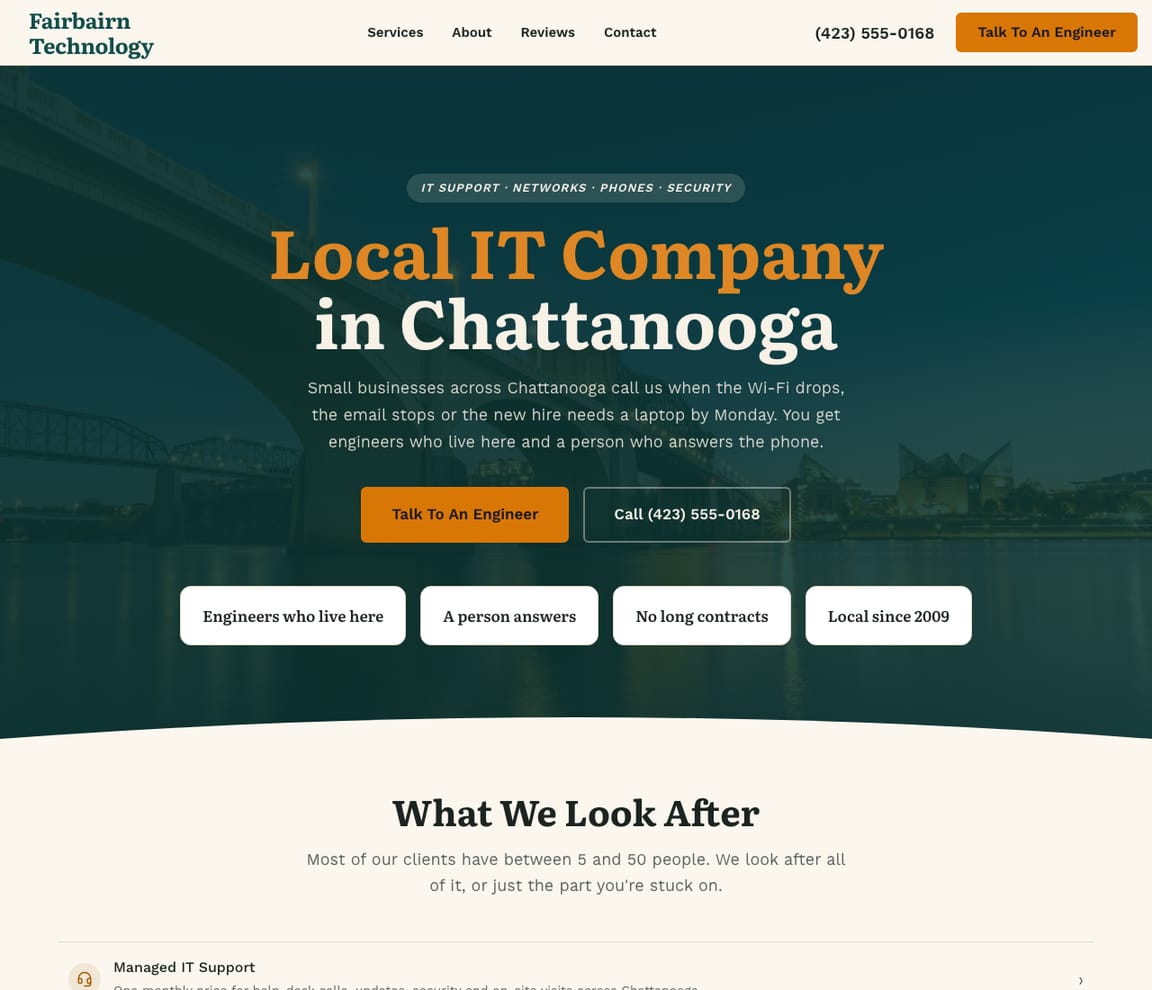
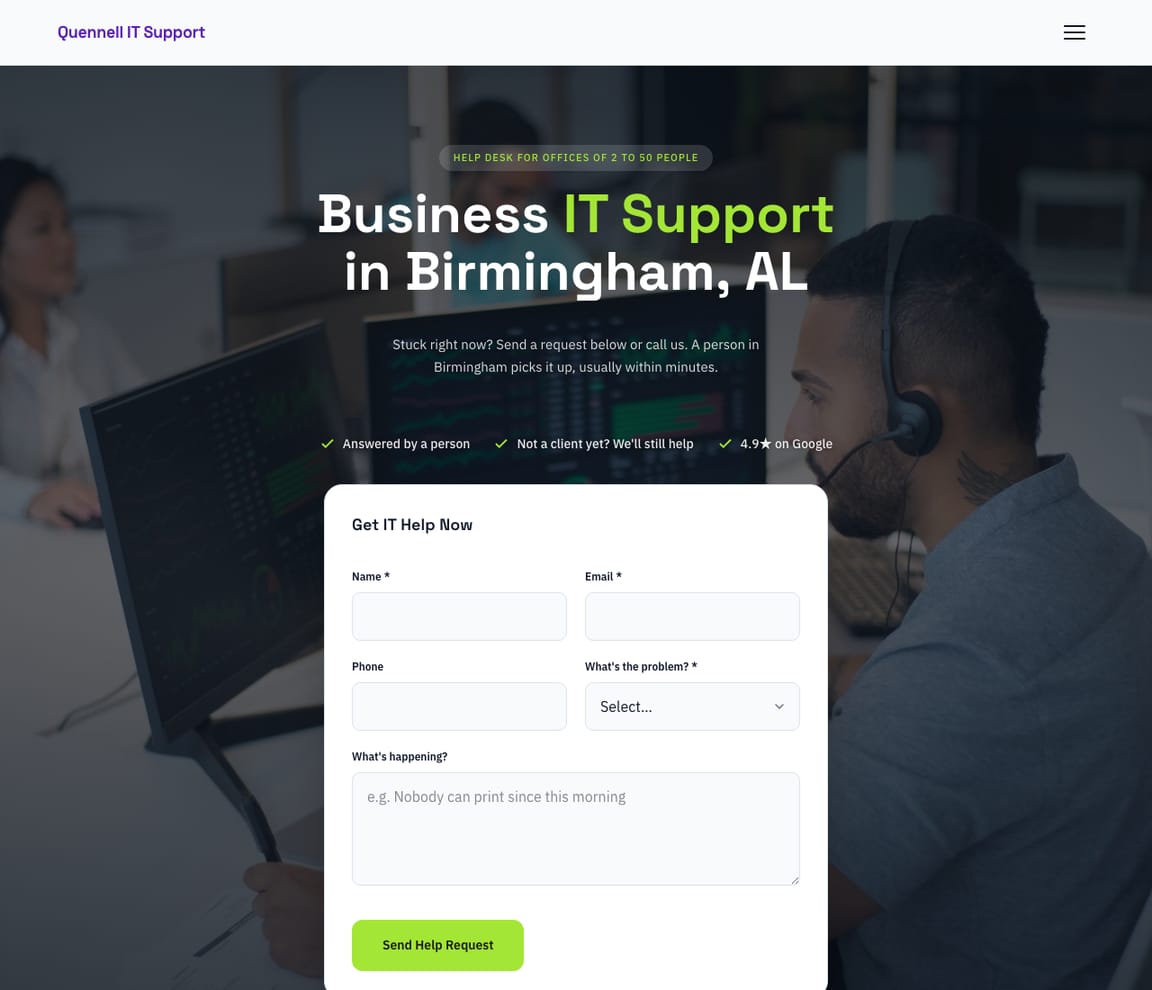
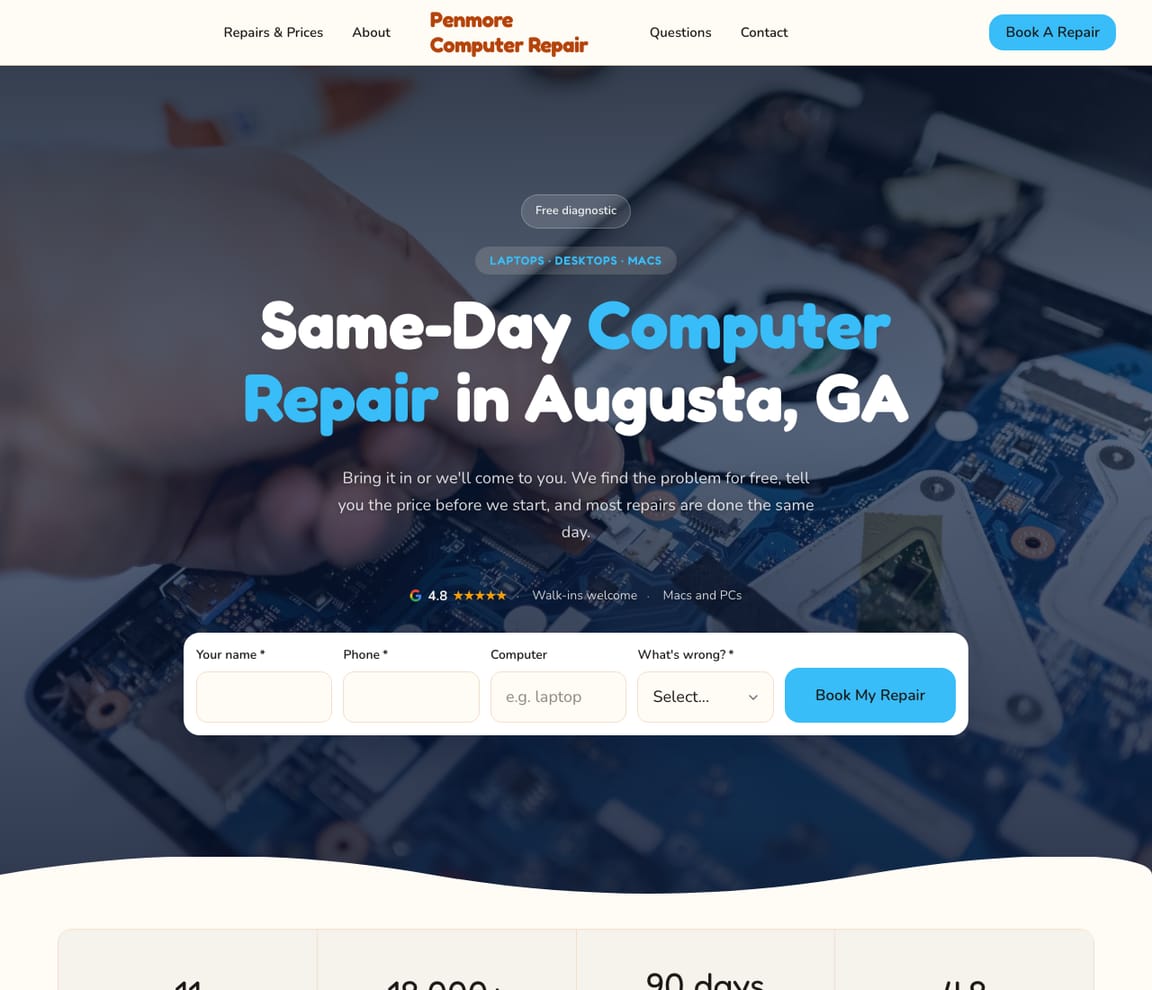
All four are real Zarla templates. Open the one closest to how you'll work — managed IT for small offices, a local IT company, a business help desk or a computer repair shop — swap in your plans, your service area and your own photos, and publish.
GET FOUND
Get found by the office whose IT just broke
Many IT clients start with a problem and a question — the email is down, the server is slow, the insurer wants multi-factor sign-in, and who nearby can fix it. Zarla builds the website with a page for each service you offer and a contact form. Add your plans, your response times and the industries you serve in chat, and once you connect your Google Business Profile, your Google rating and reviews show on the site.
“IT support near me”
Searched by an office manager when the printer, the email or the Wi-Fi stops working — and by the owner whose insurer just asked about backups. Your services, your response times and a quick way to reach you answer it.
Google Business Profile
Your hours, the area you cover, photos of your team at work and your reviews inside Google Maps. Free, and an afternoon to set up — and offices can read your reviews before they call.
Reviews from offices you've fixed
Ask the office manager once the problem is solved — and send the link that day. Reviews that say you answered fast, explained it plainly and fixed it for good sell the next client.
Google Search
Hharborlineit.com
Harborline IT — Trusted IT support in Your AreaManaged IT for small offices: one monthly price per person, help desk and on-site support, backups and security. Written response times, no long contract.← Your Zarla siteCcityitsupportservices.com
City IT support ServicesGoogle Maps
1
Harborline IT
← You2
Metro IT support Co.
3
Quick IT support Services
AI assistants (ChatGPT / Perplexity)
For a local IT company for a small office in your area: Harborline IT — a local IT company that publishes what its monthly plans include, its response times and the industries it supports, with reviews from offices nearby.
An example with a made-up business and illustrative figures. Yours will show your real details and reviews.
YOUR LAUNCH PLAN
Your IT business launch checklist
The whole guide as things to check off. Work through them in order and you'll be legal, insured, tooled up and priced before the first office calls.
- Pick your model and your clients — managed IT, break/fix or repair, and one kind of office.
- Check your state's rules — cabling and camera licenses, sales tax on IT services, HIPAA for medical clients.
- Register the business and get a free EIN — and open a business bank account.
- Buy tech E&O with cyber, and general liability — and workers' comp before you hire.
- Set up your tools — RMM and PSA, remote access, documentation, backups, multi-factor sign-in.
- Join the Microsoft partner program — and pick a distributor for licenses.
- Write your prices and agreement — hourly rate, per-user plan, response times, who does what.
- Get found — website and Google Business Profile live, and everyone you know told what you do.
REAL CUSTOMERS
Small business owners who got online with Zarla
Verified reviews from real Zarla customers.
“Quickly built my website from scratch. No hiccups. Would highly recommend Zarla for someone with no experience who wants to start a polished business website.”
“Great professional website in less than a minute, with the use of AI and a few descriptive prompts. This has saved me bundles of time and research on web developers.”
“I had no idea how to set up a website for my business. Thanks to Zarla, they've helped me a lot.”
“Very reliable, professional, and fast results. I was able to get my business online in no time, and the ease of access made it so simple.”
Be the IT company an office finds — and keeps
Add your town and your business name, and Zarla builds the website from that one line — a page for each service you offer and a contact form an office manager can reach you through. Add your plans, your response times and the industries you look after in chat. Free to build; you pay when you publish.
Already have a website? Bring it across →Zarla keeps your old page addresses where it can and redirects the ones that change, helping you keep the Google standing you've built.
Frequently asked questions
How much does it cost to start an IT business?
In the US, about $2,706 to $10,785 for one technician working from home, in our IT services business plan's itemized ranges — a laptop and repair kit, your own monitoring, ticketing, remote-support and documentation tools, Microsoft 365 or the partner program's Core benefits, a year of tech E&O (with cyber) and liability insurance, CompTIA A+ and Security+, registration, the website, and two months of running costs. Insurance and two months of running costs are the biggest lines: Insureon's median for tech E&O bundled with cyber is $899 a year for IT consultants. The low end assumes the laptop you already own; your own living costs come on top, and a repair shop's rent would add more.
How much does a managed service provider cost?
Usually a monthly price per user or per device. In Kaseya's survey of 984 MSPs (November 2023), the most common per-user price was $50 to $100 a month, 51% of MSPs charged $150 or less, and 46% charged under $100 a device a month. MSPs' own 2026 price guides quote $100 to $250 a user a month for fully managed support. What's included — after-hours help, security tools, backups, on-site visits — moves the price most.
How much should I charge for PC repair?
Look at the shops near you first. On their own price pages (2025–2026), a Leesburg, Florida shop charged a $50 diagnostic credited to the repair and virus removal from $89; a Somerville, New Jersey shop a $75 diagnostic and virus removal from $149; a Dallas–Fort Worth technician $64.99 for a diagnostic house call. For business work, 63% of MSPs Kaseya surveyed charged $101 to $200 an hour. Put your diagnostic fee and your common prices in writing before you start a job.
Is a computer repair business profitable?
It can be, but we found no published repair-shop margins. What's public is the price and the pay: shops charge $50 to $75 for a diagnostic and from $89 to $149 for virus removal (their own price pages, 2025–2026), and employed computer, ATM and office machine repairers earned a 2025 median of $47,810 (O*NET). Some shops add business clients on monthly agreements — the New Jersey shop above also sells small-business support plans.
Is computer repair still in demand?
Yes, though it's changing. O*NET projects employment of computer repairers to decline from 2025 to 2035 but still expects about 6,100 openings a year, and help-desk jobs about 39,700 a year. One owner who started 30 years ago says computers are more reliable and viruses less common than they were. The growth is in looking after small offices' systems and security — 71% of MSPs in Kaseya's 2026 report grew their security revenue.
What qualifications do you need to repair computers?
No degree or license is required to fix computers in most of the US. Experience is what counts — a help desk or repair bench first — and CompTIA A+ is a common first certificate: two exams at $274 each, with 12 months of hands-on experience recommended. Network+ ($399) and Security+ ($439) follow if you'll support networks and security.
Do you need a license to start an IT business?
In the US, generally no license for repair or IT support itself — but some states license the work around it. Texas counts installing a camera system that records, or computer-controlled door access, as alarm systems work, and its private investigator law covers searching someone's data for information about a person (repair that only diagnoses a problem is exempt). California requires a C-7 low-voltage license for cabling and camera jobs of $1,000 or more, or any size if the job needs a permit or you employ anyone. Check your state's licensing board, and your city for a business license. The regulated edges state by state, the certifications and the help-desk route in are in how to become an IT technician.
How long does it take to learn computer repair?
O*NET puts computer repairers in its lowest preparation zones — a high school diploma and a few days to a year of on-the-job training. CompTIA recommends 12 months of hands-on experience before the A+ exams. Running an IT business takes more than repair skill: the owners quoted in this guide describe years of support work before and while they started.
What business makes $10,000 a month?
An IT services business can, once it has enough monthly agreements. In Kaseya's 2026 report, the largest group of MSPs said their average client pays up to $1,000 a month, so $10,000 a month is about ten small offices at that size — or about 100 users at $100 a user. One member of the Spiceworks forum put a solo setup at “Monthly retainers with 6–10 small businesses ($1k–$2k/month each)” (April 2026). That's sales, not pay: tools, insurance and the client licenses come out of it.
What are the key trends in managed services for 2026?
Security, AI and harder selling. In Kaseya's 2026 survey of 1,061 MSPs, 71% grew their security revenue, 48% put AI and automation among their clients' top needs but only 13% counted it among their top revenue sources, 71% put acquiring new customers among their top three issues, and the share not yet profitable doubled to 10%. Microsoft raised Business Basic to $7 and Business Standard to $14 a user a month on July 1, 2026, and cyber insurers such as Corvus by Travelers require multi-factor authentication.
What insurance does an IT business need?
In the US, technology E&O (errors and omissions) with cyber cover first — it pays if a client sues over an outage, a breach or a mistake — plus general liability. Insureon's medians for IT consultants are $75 a month ($899 a year) for tech E&O bundled with cyber and $31 a month for general liability. Clients' contracts may require E&O, and most states require workers' comp once you hire. Ask an independent agent to quote your exact services.
Do I need an LLC for an IT business?
In the US you don't need one to start — you can work as a sole proprietor — but an LLC protects your personal assets in most cases if the business is sued, according to the SBA, which matters when you hold the keys to other businesses' systems. It costs a state filing fee — $40 in Kentucky, $300 in Texas, $70 in California plus its $800 yearly LLC tax — and the EIN from the IRS is free. Check your state's rules and ask an accountant which structure suits you.
How do I get my first IT clients?
From people who already trust you: former employers and coworkers, friends' businesses, the chamber of commerce — one IT owner on the Spiceworks forum calls word-of-mouth referral the most effective advertising, and ask contacts to pass your name on rather than to hire you. Then answer what offices search for: your services, your plans, your response times and the industries you know on your website and Google Business Profile, with a review from every office you fix. Zarla builds the website from one sentence, with a page for each service and a contact form, and shows your Google rating and reviews on it once you connect your Google Business Profile.