The IT services website builder that brings in more clients.
The AI website builder for IT service providers — built to help clients find you on Google and ChatGPT.
Free to build · No credit card · Pay when you publish
Zarla at a glance
Zarla is an AI website builder for small businesses, built for IT service providers — IT support companies, managed IT providers, and computer repair shops. Describe your business and Zarla generates a complete IT services website in about 30 seconds — copy, design, images, and SEO.
- Online booking — offices book an IT assessment or a consultation online.
- Online quotes — send a support plan or a project as one link the client accepts online.
- Invoices — bill clients and get paid online.
- WhatsApp chat button — leads message a question and get an answer without an email thread.
- Contact forms with built-in lead tracking (a CRM) — every inquiry lands in one place, ready to follow up.
- SEO on every page: titles, meta descriptions, schema markup, and fast mobile pages.
We scored five website builders for IT services companies the same way, on nine tests worth 18 points: Wix 15, Zarla 14, GoDaddy 12, Squarespace 12, WordPress.com 12. On those scores Wix takes first place and Zarla is second. Zarla is our own product.
Building and previewing an IT services website with Zarla is free; publishing it live starts on the Premium plan. This page covers the Zarla IT services website builder — what's included, how it works, and what it costs to start.
See it in action
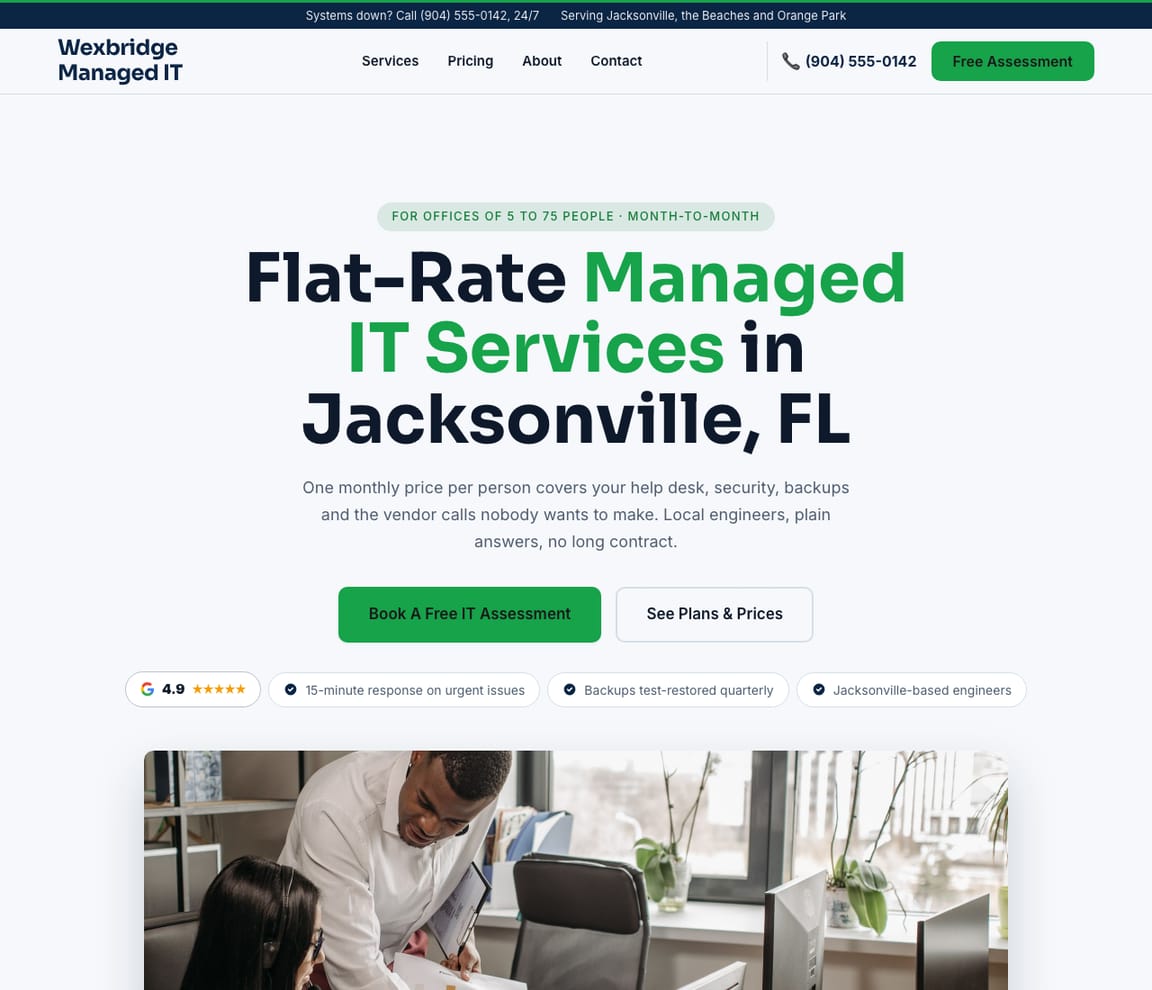
This is what a Zarla IT services website looks like.
An office manager whose email has been down since 7 a.m. is reading this on a phone, deciding whether you answer fast and what a plan costs. The draft leads with your response time, your plans and an assessment they can put on the calendar.
- Professional design — not a generic template
- Looks great on desktop and mobile
- Content written for your industry
What actually matters
An office picks its IT company during an outage. Say what you cover and how fast you answer.
A dental office with a server that won't start, a law firm whose email is quarantined, a nonprofit with eleven laptops and no backups. Each wants to know, before the call, whether you handle their kind of office and what a month of you costs.
Each plan says what it covers. Each industry gets its own page.
The draft lays out your managed plans side by side, from help desk to backups and security, with your response times in hours. Dental, legal and nonprofit pages name the software those offices run and how you support it.
Your plans page, not a template.
Nothing on the draft is filler: the plans, response times and industries you describe are the ones on the page, and the assessment calendar is wired to your Google Calendar from the first preview. Rename a tier, reorder the plans, publish.
US Google searches for "managed IT services" ran at 22,200 a month over the year, and hit 90,500 in January.
DataForSEO, US, September 2026: "managed IT services" averages 22,200 Google searches a month and drew 15,906 questions to AI assistants in October. "IT support near me" climbed from 1,900 last November to 18,100 in September. A page per industry and per city is where those searches land; Get Found lists what your Google listing lacks.
An assessment on the calendar, a plan accepted in one tap, the invoice sent from the same dashboard.
The office picks an assessment slot and it lands in your Google Calendar. After the visit, the plan goes out as one link with the price, the user count and what's covered, accepted on the manager's phone, and Zarla drafts the invoice for what they chose. A quick "is this email phishing?" comes by WhatsApp. Tickets, monitoring and client systems stay in your ticketing and remote monitoring tools.
Describe the help desk. Zarla writes the plans page.
Say what you support
"I run Wexbridge Managed IT: managed IT for dental and law offices in Jacksonville, help desk, backups, Microsoft 365 and security, with on-site visits within the hour." Typed after the morning's tickets, in one go.
The office manager's ninety seconds
The draft opens on your response time and your plans, gives each industry its page with the software it runs, and puts the assessment calendar one tap away. If a stranger with a dead server can find your response time in ten seconds, it's ready.
Publish before the next outage
A new backup tier or a second technician's start date isn't a web project. Tell the editor in a sentence; the plans page carries it the same minute.
Everything an IT services website needs
Zarla builds IT services websites around what an office manager checks before handing over their network: what you support, how fast you answer, what a plan costs, and whether you know their kind of business. Here is what that looks like on the page.
- An IT assessment, booked online — offices pick a time for a call or a site visit.
- Managed IT plans — what each plan covers, from help desk to backups and security.
- Quotes accepted online — a plan or a project priced as one link the client accepts.
- How support works — your help desk hours, response times and how to reach you.
- Industries you know — law firms, dental offices or nonprofits, and the software they run.
- Security and backups — how you protect email, devices and data, in plain words.
- Invoices paid online — bill monthly plans and projects, paid online.
- Real reviews — your Google rating shows on the page once you connect your Business Profile.
Getting found on Google
Somebody's email is down and they're searching for IT support near them.
Some type it into Google, some open the map and call the nearest office that answers, some ask an assistant what managed IT should cost per user. All of them want a number and a response time.
Google Search
"IT support Jacksonville" is the easy one. The searches that pay are the specific ones, "managed IT for dental office", "Microsoft 365 migration help", and each needs its own page to land on. Zarla writes one per service and per industry, with the plan it belongs to.
Google Maps
When the server is down, distance matters: the map shows an office manager the nearest MSP that answers, and the reviews say "answered in ten minutes" or they don't. Your Google reviews can show on the pages, and Get Found checks whether the listing has hours set and a category chosen.
ChatGPT & AI assistants
"What should managed IT cost for twelve users?" is a question an office manager now types into an assistant. The reply is assembled from sites that print their plans; a plans page in plain text is what gets you quoted. Zarla's AI check returns a single sample answer for your company.
For IT support in your area: Wexbridge Managed IT — 4.9★ across 200+ Google reviews, free IT assessment, flat monthly plans.
An example with a made-up business and illustrative figures. Yours will show your real details and reviews.
A page per industry, a page per service
Dental, legal, nonprofit, construction: an IT page for each kind of office.
- Dental office IT
- Law firm IT
- Cybersecurity and backups
- Cloud and email migrations
- Hero with your help desk team
- What each managed IT plan covers
- Response times and help desk hours
- Book a free IT assessment
- Industries we support around Jacksonville
From the searches you already show for
Three things the coach found.
- Law firms, named as law firms
- A per-user price on the plans page
- An industry page for each office type
- Hours and category on the listing
An example for a made-up business: the positions are illustrative; the search volume is a real monthly figure.
No ticket needed
A new backup tier launched this morning. The plans page shows it by lunch.
- A new plan tier
- Longer help desk hours
- Another city for on-site visits
- A new technician's bio
Every assessment, question and accepted plan
Thursday's assessment is on the calendar; the law firm said yes to the plan; the phishing question took one reply.
- Thursday's assessment
- A plan accepted, invoice drafted
- "Is this phishing?" on your phone
- Technicians on the same inbox
An example inbox for a made-up business: the names and figures are illustrative.
The year an office looks for help
IT searches spike in January, when budgets reset and new laptops arrive.
- January's budget resets
- September's second rise
- Which industry pages get seen
- Calls and messages, site-wide
An example for a made-up business: the figures are illustrative; yours come from your own Google account.
What you actually get compared to the alternative.
| Typical Website Builder | RecommendedZarla (Built for IT service providers) | |
|---|---|---|
| Managed plans | A services list. | Each plan with what it covers, its response time and a per-user price. |
| The first assessment | Scheduling you set up. | Picked online, placed in your Google Calendar. |
| Accepting a plan | A proposal page you build yourself. | One link with the plan and user count, accepted on the manager's phone, invoice drafted. |
| Billing | Invoicing you set up. | An invoice with your branding, paid online; your ticketing software keeps the monthly billing. |
| Industries you serve | An about page. | A page per industry naming the software it runs. |
| Quick questions | A chat widget you add. | WhatsApp, straight to the technician's phone. |
| "IT support near me" | SEO you configure. | Service and city pages, with Get Found checking the listing. |
Honest roundup
Wix, Zarla, GoDaddy and Squarespace for IT services companies, scored
Zarla builds an IT services company's website with your services, a contact form and local SEO already in place, as a first draft in about 30 seconds; you add your plans, the industries you serve and assessment booking later. Marketing agencies that specialize in MSPs build custom sites for a monthly fee; Zarla builds the IT company's own site, with assessment booking, quotes, invoices and every inquiry in one inbox.
Zarla is our product. This order comes from our full comparison, which scores every builder on the same 9 tests, Zarla included, and gives each one a catch.
Best website builders for IT services companies: every score, every catch →
- 1
Wix
Best forOwners who care most about booked assessments, plan requests and monthly billing.
Features- An AI builder that writes your pages from a description
- Aria, an AI agent in the Harmony editor that edits the site and adds pages by chat
- Wix Bookings with online payments and deposits
- Invoices and a contacts list built in
The CatchZarla vs Wix →Bookings need the Core plan rather than the cheapest one, and pages for each town you serve are yours to write.
- 2
Zarla
Best forOwners who care most about getting found on Google.
Features- Describe your company in a sentence and Zarla writes a complete first draft in about 30 seconds
- Offices book an IT assessment or a call online
- A support plan or a project sent as one link the client accepts online
- Type changes in plain words, or ask for a new page or a request form, and the site updates
The CatchBuild my free IT services websiteThere's no monthly billing for managed plans yet, so the recurring invoice runs in your billing tool, the request form is added by asking rather than on the first draft, and an IT first draft has no map or town pages. It's also newer than the big names.
- 3
GoDaddy
Best forHandy if you already get your domain and email from GoDaddy.
Features- Airo writes a first website for your business in Websites + Marketing
- Online appointments with a deposit
- Photo attachments on the contact form
- Domain, email and website from one company
The CatchZarla vs GoDaddy →Editing by chat, and asking the AI for new pages later, happen in Airo AI Builder, a separate GoDaddy product with its own credits; in Websites + Marketing, pages for each town you serve are yours to write.
- 3
Squarespace
Best forGood if polished design matters most and you don't mind adding a separate booking tool.
Features- Blueprint AI writes a multi-page starting site
- Design-led templates
- Invoices and online payments on every plan
- Acuity Scheduling for appointments, including repeat bookings
The CatchZarla vs Squarespace →Online booking is a second subscription, Acuity Scheduling, on top of the website plan, and it's managed in a different place.
Growing with you
Will Zarla grow with a busy IT services company?
Zarla keeps working as an IT services company grows from a few offices to a help desk team and new cities: you add a page for each industry and city you want to be found for, assessment bookings and inquiries land in one inbox with follow-up reminders, and the plans you send as one link, and their invoices, go out from the same dashboard. Here is what that looks like, and what Zarla doesn't do.
Yes, one at a time: ask the editor for "a page for IT support for dental offices in Jacksonville" and Zarla writes a new page for it, with its own Google title and description. There's no tool for adding dozens of area pages at once. A Premium site holds up to 100 pages, and a Business site has no page limit.
Yes. Offices book an assessment online, synced to your Google Calendar, and you send a plan or a project price as one link the client accepts on their phone; Zarla drafts the invoice for exactly what they chose. Zarla doesn't run tickets, monitor devices or manage your clients' systems; your ticketing and remote monitoring tools do.
You send each client a branded invoice that already knows your services, and they pay online; paid invoices land back in your inbox beside the lead. Zarla doesn't charge cards automatically each month, so a monthly plan is an invoice you send each month, or billing you keep in your accounting or ticketing software.
Invite them as team members to work the same inbox and to-do list, where a task typed in plain words, like calling the dental office back Friday about their new printer, gets its due date, and every new inquiry sends an email alert.
Yes, you can bring it across — Zarla keeps your old page addresses where it can and redirects the ones that change, helping you keep the Google standing you've built. If you leave later, Zarla doesn't export your site as files to host somewhere else. You can download your whole contact list as a spreadsheet at any time, and a domain you bought from another company stays registered with them, ready to point at your next site.
Real results
Don’t take our word for it. Take theirs.
From business owners like you.
“Quickly built my website from scratch. No hiccups. Would highly recommend Zarla for someone with no experience who wants to start a polished business website.”
“Help for everyone to get started online without any prior knowledge. Fantastic support and resources — I love it!”
“Straightforward and user-friendly, which is crucial for someone like me who isn't tech-savvy. Highly recommend Zarla.”
IT services website FAQ
What is the best website builder for IT service providers?
We scored five website builders for IT services companies the same way, on nine tests worth 18 points: Wix 15, Zarla 14, GoDaddy 12, Squarespace 12, WordPress.com 12. On those scores Wix takes first place and Zarla is second. See the best website builders for IT services companies, with every score and each builder's catch. Zarla is an AI website builder for small businesses, purpose-built for IT service providers: it generates your entire IT services website in about 30 seconds — industry-specific content, local SEO, and built-in lead tracking (a CRM) included. Building and previewing is free; publishing it live starts on the Premium plan.
How much does an IT services website builder cost?
Zarla's IT services website builder is free to build and preview — no credit card required. Publishing your site live starts on the Premium plan, which includes hosting, SSL, unlimited lead tracking (a CRM), online bookings, and unlimited quotes and invoices.
How do I create an IT services website?
With Zarla's IT services website builder, just describe your business in plain English and your entire site is generated in about 30 seconds — content, images, layout, design, and SEO. You can then customize as much or as little as you want — most IT service providers go from a blank page to a finished site in minutes.
Will my IT services website show up on Google and Google Maps?
Yes — that's what Zarla's IT services website builder is designed for. Every site comes with SEO-optimized titles, meta descriptions, schema markup, fast page speeds, and mobile-responsive design. Zarla also builds in local SEO signals so you can rank in the Google Maps pack when people search "IT support near me."
Do I need technical skills to use an IT services website builder?
Not at all. Zarla's AI builds your IT services website automatically — you just describe your business in plain English. Edit anything by typing what you want changed, like "make the headline bigger" or "add a testimonials section." If you can send a text message, you can build a website with Zarla.
How is Zarla different from Wix or Squarespace for IT service providers?
On our scores for IT services companies, Wix takes first place and Zarla is second. The difference is how you work: Zarla writes the whole IT services website from a sentence about your business and you change it by typing, with a leads inbox, invoices and payments in the same place; Wix and Squarespace suit owners who like building and fine-tuning the site themselves.
Can an IT services website builder help me get more leads?
That's the whole point of Zarla. It's built to get you found on Google Search, Google Maps, and AI assistants like ChatGPT — and then convert those visitors into actual leads. Every inquiry is captured in a built-in CRM pipeline, and you can send AI-generated quotes and invoices right from the platform.
Does Zarla work for my specific type of IT services business?
Yes. Zarla's IT services website builder adapts to your specialty and location — it generates content and design matched to the specific services you offer and the clients you serve.
Can I hire someone to build my IT services website instead?
You can, and for a complex custom build it is often the right call. In the US a freelancer typically charges $500–$2,000 for a small-business site and an agency $3,000–$10,000, and you usually wait two to six weeks; unless you are on a retainer, later changes are billed too. Zarla builds your IT services website in about 30 seconds and you change it yourself by typing what you want. Build and preview it free first, then decide.
Is there a 100% free IT services website builder?
Most "free" builders mean a trial that expires, or a permanent plan that puts their branding on your site and parks it on a long subdomain. Zarla is free to build, preview and edit — no credit card — and publishing your IT services website live on your own domain starts on the Premium plan. Nothing is charged while you're deciding.
Which AI is best for building an IT services website?
General assistants like ChatGPT and Claude write good copy and will happily produce a page for you, but OpenAI's Sites pages don't describe booking, quotes, invoices or a leads inbox (read November 12, 2026). A purpose-built AI website builder does that part too: Zarla turns one description of your IT services business into a finished, hosted site with all of it already in place, shaped the way IT service providers actually need it.
Do I need to buy web hosting for my IT services website?
No. Your IT services website needs hosting to show up when someone searches "IT support near me", but Zarla hosts it for you once you publish on a paid plan: Google Cloud, the security certificate and automatic backups included, and no hosting account or plugins for IT service providers to look after. Read when separate hosting makes sense.
Can my clients accept a quote online?
Yes. With Zarla you send a quote as one link: your client picks an option, ticks any extras and accepts it online, and you're told straight away. Zarla then drafts the invoice for exactly what they chose, with any deposit you asked for, ready for you to send and for them to pay online. Every plan includes quotes (the Free plan covers five quotes and invoices a month between them), and your price book is private: it never shows on your website.
How do I get clients for an MSP?
Most managed IT clients come from referrals and from local search, so work both: ask happy clients for introductions and Google reviews, partner with the accountants, lawyers and office-equipment dealers your clients already trust, and pick a few industries you know well. Then put each of those industries on its own page, with the software they run and how you support it, so an office searching for IT support for dental offices finds you. Zarla builds the site, writes a new page when you ask for one, and its SEO coach shows which searches you're close to.
What do you need to start an MSP?
In the US, register the business, get general liability, errors-and-omissions and cyber liability insurance, and set up the tools an MSP runs on: remote monitoring and management, a ticketing system, backup and security software, often from vendors such as NinjaOne, ConnectWise or Kaseya. Write a service agreement that says what each plan covers and how fast you respond. Then the website: your plans, the industries you serve and a way to book an assessment, which Zarla drafts in about 30 seconds. Check your state's business registration rules, and have a lawyer review your service agreement.
How does an MSP make money?
Mostly from monthly plans: a client pays a set fee per user or per device for support, monitoring, backups and security, and projects such as new computers or an office move are quoted on top. Recurring plans make the income steadier than one-off repair work. Put your plans on your website so an office knows what it's buying before the first call; Zarla lays out a plans page you change by typing, and sends quotes and invoices from the same dashboard.
How much does it cost to have an IT services website built?
In the US, having an IT services website built for you typically costs $500–$2,000 from a freelancer or $3,000–$10,000 from an agency, plus a domain (usually $10–$20 a year) and hosting, and agencies that market MSPs often charge a monthly fee on top. A do-it-yourself website builder usually costs $15–$30 a month for the site alone, and you lay out the plans and industry pages yourself. With Zarla, building and previewing your IT services website is free, and publishing it on your own domain starts on the Premium plan, with online booking, quotes and invoices included.
What should an IT services website include?
Your managed IT plans and what they cover, the projects you take on, your help desk hours and response times, the industries you know, how you handle security and backups, real reviews, and a way to book an assessment. Zarla builds the pages and a contact form for you, and you add your plans as you go.
How should I price IT services?
Per user or per device, every month, with projects quoted on top. In Kaseya's survey of 984 MSPs (November 2023), the most common per-user price was $50–$100 a month, 51% charged $150 or less per user, and a third didn't price per user at all; per-device pricing puts a server above a desktop, and break/fix work bills by the hour. Start from what your plan has to cover — the help desk hours, the monitoring and backup tools you pay for per endpoint, and your own time — and put the plans on your website so an office knows what it's buying before the first call. Zarla lays out a plans page you change by typing and sends the plan as one link the client accepts; the free IT business guide on Zarla has the full pricing section.
Want to see it before you build it? Browse the IT services website templates and start from a finished design — every one becomes yours to edit in a click. See IT services website design ideas: what the best IT services sites get right.
Shopping for a designer instead? See IT company website design by AI: sample designs, what web agencies charge, and what an agency does that AI doesn't.
Not open yet? Our step-by-step guides on how to start an IT business and how to become an IT technician cover the costs and first steps.
Still choosing a name? Browse our IT services business name ideas, then put the one you pick on your site.
Starting a computer repair or cyber security business instead? Browse our computer repair business name ideas and cyber security business name ideas.
Setting your prices? Our guide to IT services pricing has the 2026 US rates, the pricing formula and a free calculator — then put the prices on your site.
Need to bill a job today? Download the free IT services invoice template (Word and PDF) — or send invoices with a pay-now button from your Zarla dashboard on a paid plan.
Pricing a job first? Download the free IT services estimate template (Word and PDF) — or send quotes your customers accept online from your Zarla dashboard.
Still planning the business itself? Write the free IT consulting business plan first — typical startup costs, what owners really earn, US licensing and a complete sample plan — then build the website from it.
Every IT services website on Zarla starts the same way: describe your business and Zarla's AI website builder writes the pages, picks the photos and sets up the SEO in about 30 seconds.
Already on Wix, Squarespace or WordPress? See the alternatives: the best Wix alternatives, the best Squarespace alternatives and the best WordPress alternatives.
The IT company an office finds mid-outage.
Your plans, your response times, an assessment on the calendar. Building and previewing costs nothing, and no card is asked for.
Free to build and preview · No credit card · Cancel any time