Every enquiry from your website — contact forms, quote requests — lands in one place: the Inbox in Contacts. It's a simple customer tracker built in, so nothing slips through the cracks.
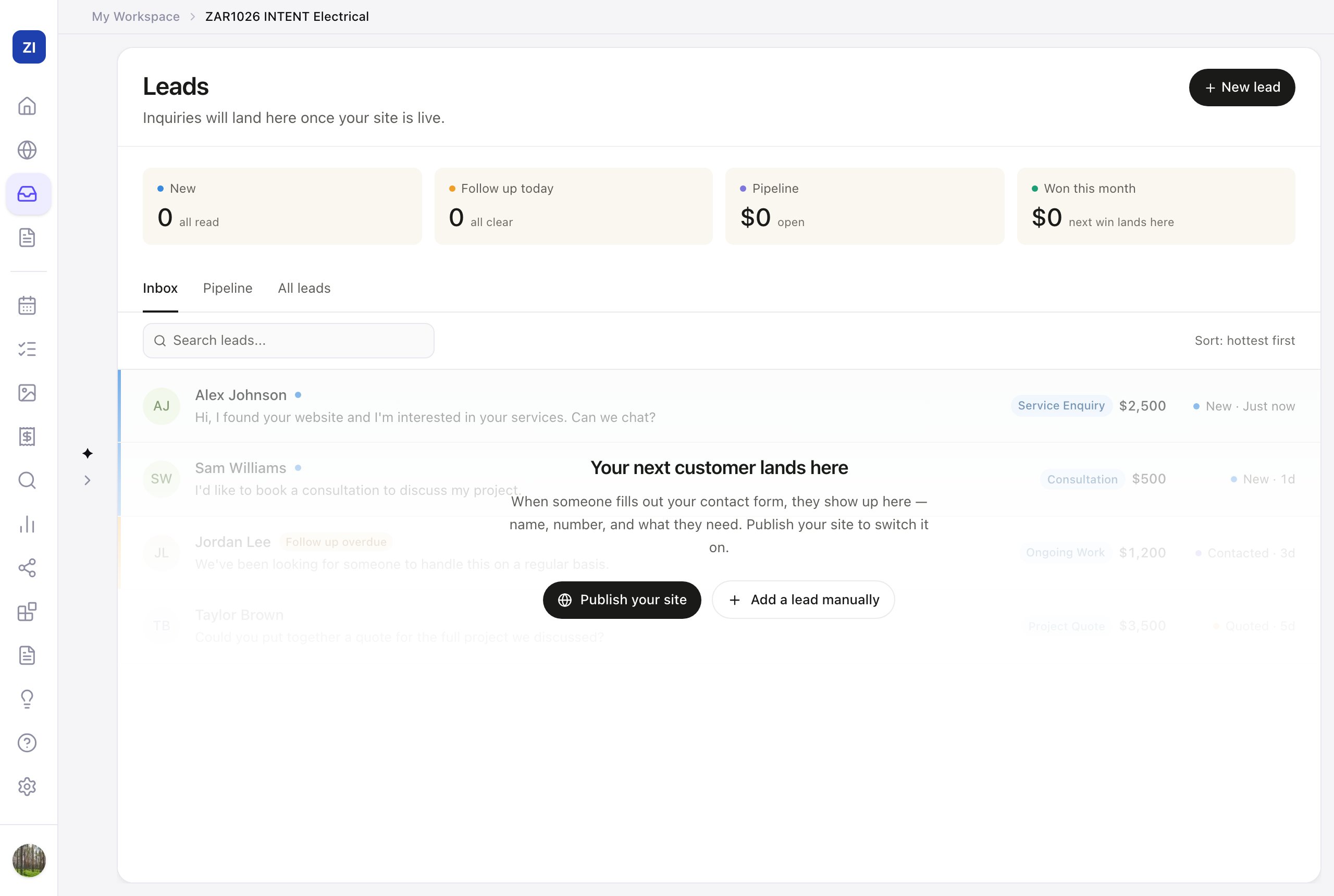
Check your leads
- Click Contacts in the sidebar (on a phone, it's in the bar at the bottom). It always opens on Inbox.
- Inbox shows new enquiries — the "New" counter at the top tells you what needs attention.
- Click a lead to see their details and add notes.
Stay on top of follow-ups
- The Follow up today counter shows who's waiting on you.
- Use Pipeline, the second tab, to track leads through stages (new → contacted → quoted → won), so you always know where each job stands.
Everyone in one list
Everyone, the third tab, lists everyone your business deals with — one row per person, tagged Customer (they've said yes or paid), Lead or Subscriber. Tap Customers, Leads or Subscribers above the list to see just those people, search by name, email, company or phone, and use Export to download the list as a spreadsheet. Did someone pay you in cash? Open them and choose Mark as customer. Already have a customer list in Xero or another app? Import it.
Add leads yourself
Someone called instead of using the form? Click New lead to add them by hand, so all your enquiries live in one list.
Get help from the AI
The chat panel beside Contacts can draft follow-up messages, summarize where things stand, and suggest who to chase today.