The welding website builder that books you more jobs.
The AI website builder for welding shops — built to help customers find you on Google and ChatGPT.
Free to build · No credit card · Pay when you publish
Zarla at a glance
Zarla is an AI website builder for small businesses, built for welding shops — welders and metal fabrication shops. Describe your business and Zarla generates a complete welding website in about 30 seconds — copy, design, images, and SEO.
- Online booking — customers book a service call or a site visit online, with a deposit if you want one.
- Quote request forms — every request lands in your lead inbox with the job details.
- Online quotes — send the price for a job as one link the customer accepts on their phone.
- Invoices — bill the job from the same place it came in and get paid online.
- Contact forms with built-in lead tracking (a CRM) — every inquiry lands in one place, ready to follow up.
- SEO on every page: titles, meta descriptions, schema markup, and fast mobile pages.
Also included for welding shops: Payment links — take a deposit or the final payment by link, no invoice needed; Business documents — branded quotes and service agreements in about a minute; Work showcase — recent jobs with photos, added from the dashboard; WhatsApp chat button — customers message a photo of the job and get a quote back on WhatsApp.
Building and previewing a welding website with Zarla is free; publishing it live starts on the Premium plan. This page covers the Zarla welding website builder — what's included, how it works, and what it costs to start.
See it in action
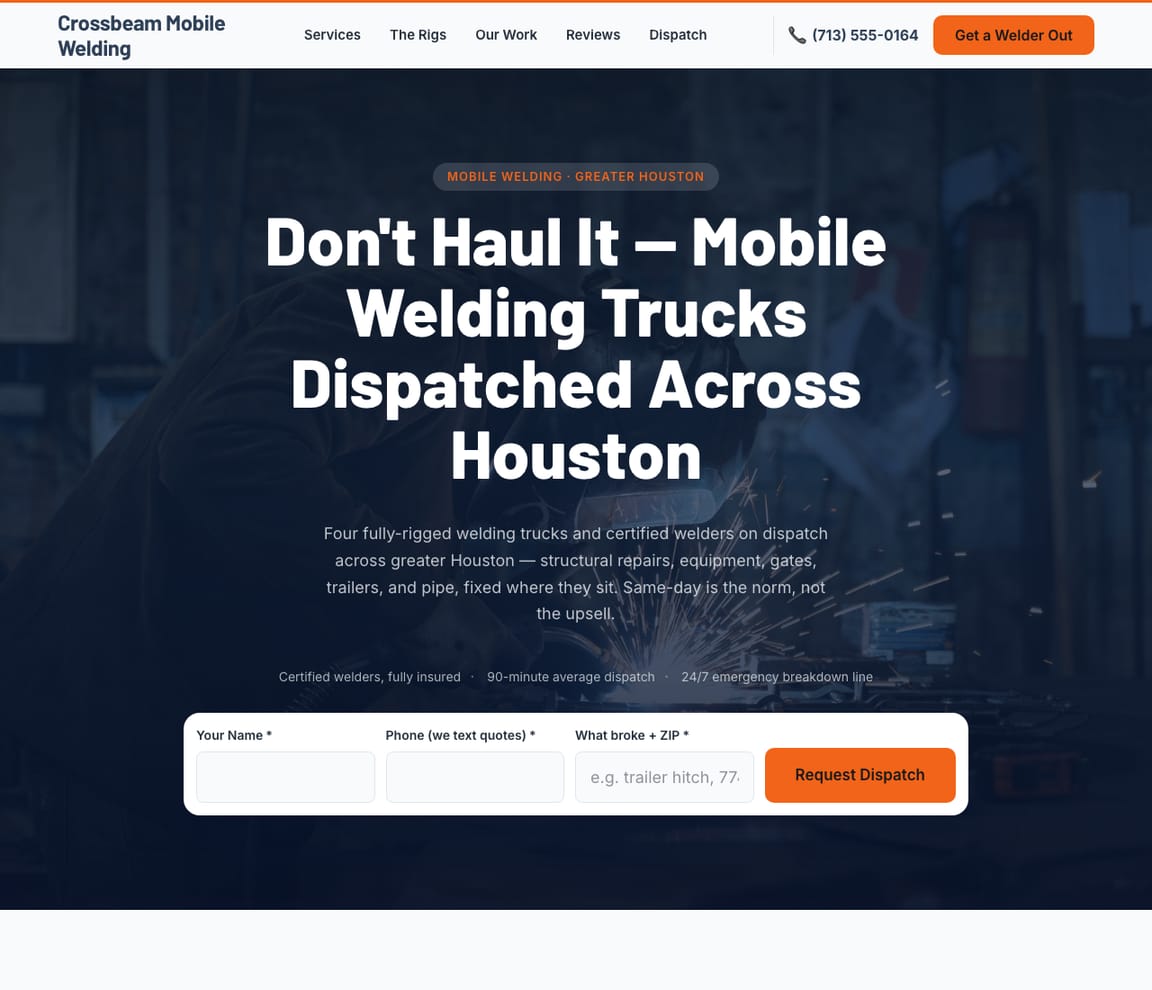
This is what a Zarla welding website looks like.
Mobile rig or fab table. Steel, stainless or aluminum. MIG, TIG or stick. A trailer hitch on a Tuesday, a run of stair rails by the end of the month. Zarla's draft lays the shop out the way a customer has to read it: what you weld, where you weld it, the codes you're certified to, and a form for the job.
- Professional design — not a generic template
- Looks great on desktop and mobile
- Content written for your industry
What actually matters
Customers can't judge a weld. They judge whether the site sounds like someone who can.
A rancher with a cracked gooseneck. A contractor who needs stair rails that pass inspection. A homeowner whose gate drags on the drive. Each one wants to know if you come out, which metals you run, whether you're certified for structural work, and how soon.
It knows aluminum TIG from structural stick, and a trailer repair from a fabrication job.
Mobile repair, shop fabrication, structural steel, aluminum boat and trailer work, ornamental gates and railings, farm and ranch equipment: each has a page of its own, in the terms a general contractor scans for. In the US, welding certification usually means passing a qualification test to a code, with AWS D1.1 for structural steel the common one, and some states license welding contractors, California's C-60 classification among them. Your certs go where the contractor looks; check your state's and city's rules before you bid structural work.
On the web before the generator's warmed up.
The first draft takes around thirty seconds. Talk through the shop from the cab, check the mobile minimum on the tailgate, publish before you strike the first arc of the day. Requests come in while you're under the trailer.
"Welder near me": 60,500 searches a month from March through August.
US figures, DataForSEO, September 2026: "welder near me" and "welding near me" average 49,500 searches a month each and hold at 60,500 from March through August; "welding shop near me" peaks at 40,500 in August; "trailer repair near me" at 33,100 in July; "mobile welder near me" at 12,100 from March to August; "aluminum welding near me" at 8,100 over the same stretch. The welders who come up have a page per job and per town and a complete map listing. Zarla builds the first and works on the second with you, and Get Found marks what the listing lacks.
The job arrives on the form. The price goes back as a link. The deposit for steel is in before you cut.
The request form asks for the job, the metal and the timing. You size it up, send the quote as one link, and the customer picks the option and accepts; Zarla drafts the invoice for exactly that. A payment link covers the material deposit, and the finished railing goes up on your recent work. Pictures of a cracked frame come over WhatsApp.
Talk it through like a job ticket. Metal, process, location, deadline.
Name the work
"I run Crossbeam Mobile Welding: mobile welding and repair, aluminum and stainless, trailers, gates and farm equipment, AWS certified." Spoken from the cab.
Check the specs
What comes back: a page for mobile repair, one for shop fabrication, one for trailers, one for gates and rails; the metals and processes; your certifications; the request form; your rate or minimum if you want it shown; the towns you drive to on a map. Read the trailer page as the rancher with the cracked hitch.
Publish, then post the welds
Live on its own address, and Google is pinged. Then add the work: the stair rail on Mesa Drive, the aluminum ramp, the gooseneck you rebuilt.
Everything a welding website needs
Zarla builds welding websites around what a contractor, a farmer or a homeowner checks before calling: whether you come to them, which metals you work in, whether you're certified for the job, and how soon you can get there. Here is what that looks like on the page.
- A call button — a broken trailer or a gate off its hinges starts with a phone call.
- A quote request form — the job and the timing, straight to your lead inbox.
- Mobile or in the shop — whether you come to the site, and your trip fee or minimum.
- The metals and processes — steel, stainless and aluminum; MIG, TIG and stick.
- Your certifications — AWS certifications, the codes you weld to, and your insurance.
- Your recent work — gates, railings, trailers and repairs, added from the dashboard.
- The towns you cover — a service-area map, and a page for each town.
- Real reviews — your Google rating shows on the page once you connect your Business Profile.
Getting found on Google
A cracked hitch, a Saturday, and "mobile welder near me." Who gets the job comes down to three screens.
Google's list, the map pack, and the assistant someone asks whether a broken trailer is worth fixing. Each one weighs your shop on different evidence.
Google Search
People search the job and whether you come to them: "mobile welding near me", "trailer repair near me", "aluminum welding near me", plus the town. One page per job, titled for the job and the place, with the local SEO set underneath, is how Zarla gets you in front of those searches. The request form and the call button sit on it.
Google Maps
In the map pack they pick by rating, by a photo of a rig or a finished gate, and by whether the listing says mobile. Link the Business Profile and its stars carry over to your site. Get Found's listing checklist names what's off: too few pictures, no hours set, the services and description still to fill in.
ChatGPT & AI assistants
Contractors and ranchers now put the hourly-rate question to ChatGPT, and ask who nearby is certified. Its reply leans on your map listing, your reviews and any page that states processes and codes outright. Once your site is live it carries a fact sheet built for assistants to read; what they currently tell people about your shop is in the AI check.
For a welder in your area: Crossbeam Mobile Welding — 4.9★ across 200+ Google reviews, comes to the job site, steel and aluminum, free quotes.
A page per job
Trailer repair gets a page. So does the county where the oil crews park.
- A trailer page ahead of July's 33,100 searches
- An aluminum page for boat owners
- An Odessa page for the oilfield work
- Asked for from the cab, between jobs
- Hero with a call button and your truck
- Repairs you do on site, with starting prices
- Service-area map of the towns you cover
- Quote request form
- Pictures of recent repairs
The gaps, measured
You show for "welding repair." Nobody finds you for "mobile welder." The fab shop on the frontage road lists custom gates.
- Mobile welding: no page, 12,100 summer searches
- Trailer repair: stuck on page two
- Custom gates: listed by them, missing from you
- Listing: two pictures, no description
Edited on the tailgate
The new spool gun is on the site the week it arrives.
- Aluminum TIG added to services
- The mobile minimum changed in a sentence
- Marcus listed with his D1.1 cert
- The finished stair rail posted from the jobsite
Every job, with the metal named
A trailer hitch, a set of stair rails, a dock ladder: all in the same inbox.
- The hitch: steel, Saturday, mobile
- Stair rails due before the 14th
- Quote as a link, deposit by payment link
- The finished rail invoiced from the same dashboard
The year, by job type
The job type that kept the rig busy all summer.
- The trailer page and July's searches
- Mobile welding from March to August
- Gates and railings, page by page
- Calls, requests and chats, counted
What you actually get compared to the alternative.
| Typical Website Builder | RecommendedZarla (Built for Welding shops) | |
|---|---|---|
| What you weld | A services list in one paragraph. | Mobile, shop fab, structural, aluminum, trailers and gates, a page each. |
| Certifications | Left off, or a logo with no code. | Each cert named to its code, AWS D1.1 and the rest, where contractors look. |
| The job request | A contact form with a message box. | A request form for the job, the metal and the timing, into your leads inbox. |
| Pricing the job | A number typed into an email. | A quote as one link the customer accepts; Zarla drafts the invoice. |
| Material deposits | Chased by text. | A payment link before you buy the steel. |
| "Mobile welder near me" | Search settings you work out alone. | A page per job and per town; Get Found grades the listing. |
| Hours and crew scheduling | Promised by an add-on. | Stay in Jobber or whatever runs the shop. |
Honest roundup
The best website builder for welding shops, compared
Zarla builds a welding business's website with click-to-call, a quote request form, a service-area map and local SEO already in place, as a first draft in about 30 seconds; you add your services, certifications and recent jobs later. That is the test for the best website builder for welders: how quickly a customer with a broken trailer or a gate to build calls you instead of the next shop. Field-service software such as Jobber or Housecall Pro runs scheduling and job tracking, and Wix and Squarespace give you more design control; Zarla builds the site that brings in the calls and quote requests.
Zarla is our product, so of course we ranked it first. But every strength and every catch below is real — ours included. Wix, Squarespace, GoDaddy are all capable tools; the question is what a welding business actually needs.
- 1
Zarla
Best forWelding shops who want the website, Google visibility, and lead handling done in one place — without doing it themselves.
Features- Complete welding website generated in about 30 seconds — copy, design, images, and SEO
- Local SEO and schema markup tuned to rank for "welding near me"
- Built-in CRM, booking, and invoicing — no extra subscriptions to stack
- Edit anything by typing a request — no drag-and-drop learning curve
The CatchBuild my free welding websiteZarla is newer than the big names, and its AI-first editor trades pixel-by-pixel design control for speed. If you want to hand-craft every detail of your layout, a classic drag-and-drop builder may suit you better.
- 2
Wix
Best forDIY website builders who want full control · Small e-commerce stores · Hobbyist and personal websites
Features- 800+ pre-designed templates and a mature drag-and-drop editor
- Large App Market for add-ons (forms, chat, reviews, bookings)
- Free plan available (with Wix subdomain and Wix ads)
The CatchZarla vs Wix →Template lock-in — once published, switching templates rebuilds the site from scratch. Client-side JavaScript rendering creates crawlability ceilings for SEO.
- 3
Squarespace
Best forDesigners and creatives · Portfolio websites · E-commerce with visual products
Features- Beautiful, award-winning templates
- Strong visual design tools and typography
- Good built-in analytics
The CatchZarla vs Squarespace →Blueprint AI drafts the site, but you pick the palette and fonts first and its chat can't add pages. Steep learning curve for non-designers.
- 4
GoDaddy
Best forPeople who already have a GoDaddy domain · Very simple one-page websites · Email marketing for small businesses
Features- Simple, guided setup process
- Bundled domain + hosting pricing
- Good email marketing integration
The CatchZarla vs GoDaddy →Very limited design customization. Templates look generic and dated.
Growing with you
Will Zarla grow with a busy welding business?
Zarla keeps working as a welding business grows from one truck to a fabrication shop with a crew: you add a page for each town or kind of job you want to be found for, calls and quote requests land in one leads inbox with follow-up reminders, and invoices and payment links go out from the same dashboard. Here is what that looks like, and what Zarla doesn't do.
Yes. The first build usually includes a page for each town on your service-area map, and after that you add them one at a time: ask the editor for "a page for mobile welding in Midland" and Zarla writes a new page for it, with its own Google title and description, and you can link it from your map. Beyond the first build, there's no tool for adding dozens of area pages at once. A Premium site holds up to 100 pages, and a Business site has no page limit.
Yes. The call button stays on every page for the urgent repairs; for the rest, the quote request form asks for the job and its timing, and every request lands in your leads inbox with an email alert. Customers can attach up to five photos of the job to the form, so you can often price it from the photos instead of a site visit. The form doesn't work out a price for you — you read the request and quote it yourself.
Yes. Invoices already know your services and get paid online, a payment link collects a deposit for materials by text or email, and the Documents tool writes a branded quote in about a minute. Zarla doesn't track hours on a job or schedule your crew; field-service software such as Jobber does.
Invite each welder as a team member to work the same inbox and to-do list, and the to-do list takes a task in plain words, like picking up the aluminum for Thursday's trailer job, and sets the due date. New jobs go into your recent work when you type what to add, so the site keeps showing what you build.
Yes, you can bring it across — Zarla keeps your old page addresses where it can and redirects the ones that change, helping you keep the Google standing you've built. If you leave later, Zarla doesn't export your site as files to host somewhere else. You can download your whole contact list as a spreadsheet at any time, and a domain you bought from another company stays registered with them, ready to point at your next site.
The numbers behind welding websites
Real results
Don’t take our word for it. Take theirs.
From business owners like you.
“Great professional website in less than a minute, with the use of AI and a few descriptive prompts. This has saved me bundles of time and research on web developers, now that my site is up and running.”
“Everything is done for you — you just amend a few bits. It's simple and very effective. Highly recommend if you need a quick turnaround.”
“Quickly built my website from scratch. No hiccups. Would highly recommend Zarla for someone with no experience who wants to start a polished business website.”
Welding website FAQ
What is the best website builder for welding shops?
Zarla is an AI website builder for small businesses, purpose-built for welding shops. Unlike generic builders like Wix or Squarespace, it generates your entire welding website in about 30 seconds — industry-specific content, local SEO, and built-in lead tracking (a CRM) included. Building and previewing is free; publishing it live starts on the Premium plan.
How much does a welding website builder cost?
Zarla's welding website builder is free to build and preview — no credit card required. Publishing your site live starts on the Premium plan, which includes hosting, SSL, unlimited lead tracking (a CRM), online bookings, and unlimited quotes and invoices.
How do I create a welding website?
With Zarla's welding website builder, just describe your business in plain English and your entire site is generated in about 30 seconds — content, images, layout, design, and SEO. You can then customize as much or as little as you want — most welding shops go from a blank page to a finished site in minutes.
Will my welding website show up on Google and Google Maps?
Yes — that's what Zarla's welding website builder is designed for. Every site comes with SEO-optimized titles, meta descriptions, schema markup, fast page speeds, and mobile-responsive design. Zarla also builds in local SEO signals so you can rank in the Google Maps pack when people search "welding near me."
Do I need technical skills to use a welding website builder?
Not at all. Zarla's AI builds your welding website automatically — you just describe your business in plain English. Edit anything by typing what you want changed, like "make the headline bigger" or "add a testimonials section." If you can send a text message, you can build a website with Zarla.
What makes Zarla a better welding website builder than Wix or Squarespace?
Generic website builders give you a blank page and make you build everything yourself. Zarla gives you a complete, finished welding website tailored to your business — with industry-specific content, local SEO, a built-in CRM for leads, and AI tools that would cost thousands separately. It's not a DIY builder. It's a business assistant.
Can a welding website builder help me get more leads?
That's the whole point of Zarla. It's built to get you found on Google Search, Google Maps, and AI assistants like ChatGPT — and then convert those visitors into actual leads. Every inquiry is captured in a built-in CRM pipeline, and you can send AI-generated quotes and invoices right from the platform.
Does Zarla work for my specific type of welding business?
Yes. Zarla's welding website builder adapts to your specialty and location — it generates content and design matched to the specific services you offer and the customers you serve.
Can I hire someone to build my welding website instead?
You can, and for a complex custom build it is often the right call. In the US a freelancer typically charges $500–$2,000 for a small-business site and an agency $3,000–$10,000, and you usually wait two to six weeks; unless you are on a retainer, later changes are billed too. Zarla builds your welding website in about 30 seconds and you change it yourself by typing what you want. Build and preview it free first, then decide.
Is there a 100% free welding website builder?
Most "free" builders mean a trial that expires, or a permanent plan that puts their branding on your site and parks it on a long subdomain. Zarla is free to build, preview and edit — no credit card — and publishing your welding website live on your own domain starts on the Premium plan. Nothing is charged while you're deciding.
Which AI is best for building a welding website?
General assistants like ChatGPT and Claude write good copy and will happily produce a page for you, but you are left to arrange hosting, a domain, images, forms and SEO before anyone can visit it. A purpose-built AI website builder does that part too: Zarla turns one description of your welding business into a finished, hosted site with all of it already in place, shaped the way welding shops actually need it.
Do I need to buy web hosting for my welding website?
No. Your welding website needs hosting to show up when someone searches "welding near me", but Zarla hosts it for you once you publish on a paid plan: Google Cloud, the security certificate and automatic backups included, and no hosting account or plugins for welding shops to look after. Read when separate hosting makes sense.
Can my customers accept a quote online?
Yes. With Zarla you send a quote as one link: your customer picks an option, ticks any extras and accepts it online, and you're told straight away. Zarla then drafts the invoice for exactly what they chose, with any deposit you asked for, ready for you to send and for them to pay online. Every plan includes quotes (the Free plan covers five quotes and invoices a month between them), and your price book is private: it never shows on your website.
How much do mobile welders charge?
Zarla's welding business plan prints two welding companies' own rate pages rather than a survey: Bozeman Welding charges $150 an hour for mobile work and $125 in the shop (2026), and a Florida welding contractor $95–$135 an hour for standard field welding with a 2-hour minimum, $125–$175 for structural and pipe code work with a 4-hour minimum, and $1.50–$2.50 a mile beyond 50 miles. Fabrication is quoted by the job. Put your rate or your minimum on your website, so the calls you get are from customers who already know the range.
Can ChatGPT build a website for my welding business?
ChatGPT can write the words, but it doesn't host a site, connect your domain or keep your quote requests in one place, so you would still need a website builder or a developer to put it online. Zarla does the whole job: describe your welding business in a sentence and the AI builds the site in about 30 seconds, then you change anything by typing what you want. You can also connect Zarla to Claude or ChatGPT and edit and publish your site from a chat there.
How much does it cost to have a welding website built?
In the US, having a welding website built for you typically costs $500–$2,000 from a freelancer or $3,000–$10,000 from an agency, plus a domain (usually $10–$20 a year) and hosting. A do-it-yourself website builder usually costs $15–$30 a month for the site alone, and you set up the quote form and your service pages yourself. With Zarla, building and previewing your welding website is free, and publishing it on your own domain starts on the Premium plan, with quote requests, invoices and the leads inbox included.
What should a welding website include?
Your services, whether you're mobile and where you go, the metals and processes you weld, your certifications and insurance, pictures of recent work, real reviews, a call button and a quote request form. Zarla builds the pages, the service-area map and the quote form for you, and you add your certifications and recent jobs as you go.
Want to see it before you build it? Browse the welding website templates and start from a finished design — every one becomes yours to edit in a click. See welding website design ideas: what the best welding sites get right.
Not open yet? Our step-by-step guides on how to start a welding business and how to become a welder cover the costs and first steps.
Still choosing a name? Browse our welding business name ideas, then put the one you pick on your site.
Still planning the business itself? Write the free welding business plan first — typical startup costs, what owners really earn, US licensing and a complete sample plan — then build the website from it.
Every welding website on Zarla starts the same way: describe your business and Zarla's AI website builder writes the pages, picks the photos and sets up the SEO in about 30 seconds.
Be the welder they call when the hitch cracks on a Saturday.
List the metals. Name the codes. Post the welds. Building it and previewing it cost nothing, and no card is asked for.
Free to build and preview · No credit card · Cancel any time