You can change your site's colors two ways: describe the feel you want to the AI, or pick exact colors yourself in the Design panel.
Ask the AI (fastest)
- In the sidebar, click Edit Site.
- In the Ask AI to make changes... box, describe it:
- "Make the colors warmer and more inviting"
- "Use navy blue and gold"
- "Match my brand color #2E5D4B"
- The whole site updates together — buttons, headings, backgrounds — so everything stays matched.
Pick colors yourself
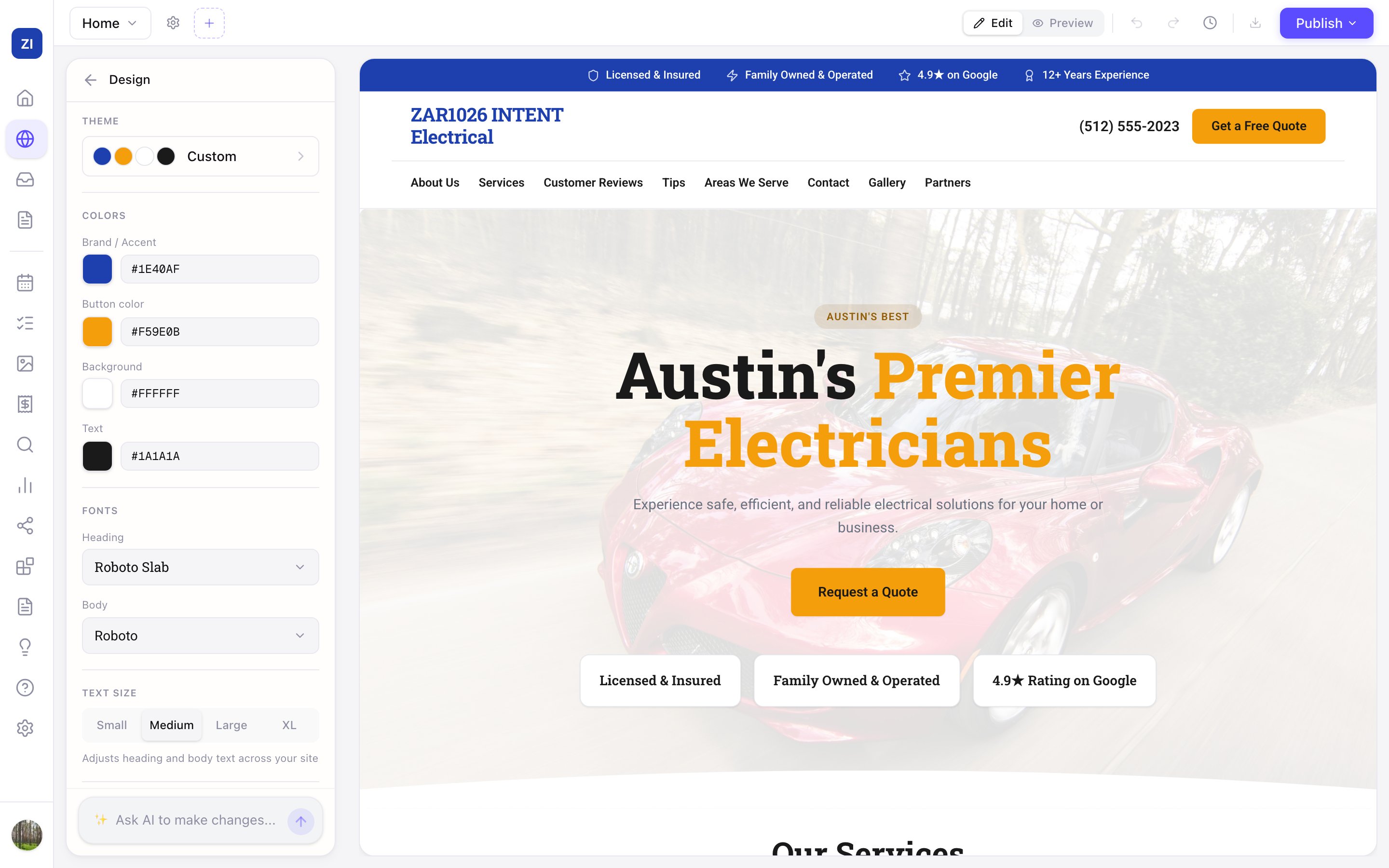
- In the editor's left panel, click Design.
- Adjust individual colors with the color pickers.
- Zarla checks your combinations for readability, so text stays easy to read on any background.
Want a whole new look, not just new colors? Tap Change design at the top of the same panel to move your site onto any of Zarla's designs — colors, fonts and layouts together. See Changing your site's design.
Tips
- Changes preview instantly but stay in your draft until you publish.
- Not sure? Two or three colors is plenty for a professional look — one main color, one accent.