The daycare website builder that keeps you booked out.
The AI website builder for daycares — built to help families find you on Google and ChatGPT.
Free to build · No credit card · Pay when you publish
Zarla at a glance
Zarla is an AI website builder for small businesses, built for daycares — childcare centers, preschools, and nurseries. Describe your business and Zarla generates a complete daycare website in about 30 seconds — copy, design, images, and SEO.
- Online booking — families book a tour online.
- WhatsApp chat button — parents ask about openings, ages and a visit before they call.
- Contact forms with built-in lead tracking (a CRM) — every inquiry lands in one place, ready to follow up.
- SEO on every page: titles, meta descriptions, schema markup, and fast mobile pages.
We scored six website builders for daycares the same way, on nine tests worth 18 points: Wix 15, GoDaddy 13, Squarespace 13, WordPress.com 13, Zarla 13, Yola 12 (on fewer crosses: WordPress.com ahead of Zarla). On those scores Wix takes first place and Zarla is fifth. Zarla is our own product.
Building and previewing a daycare website with Zarla is free; publishing it live starts on the Premium plan. This page covers the Zarla daycare website builder — what's included, how it works, and what it costs to start.
See it in action
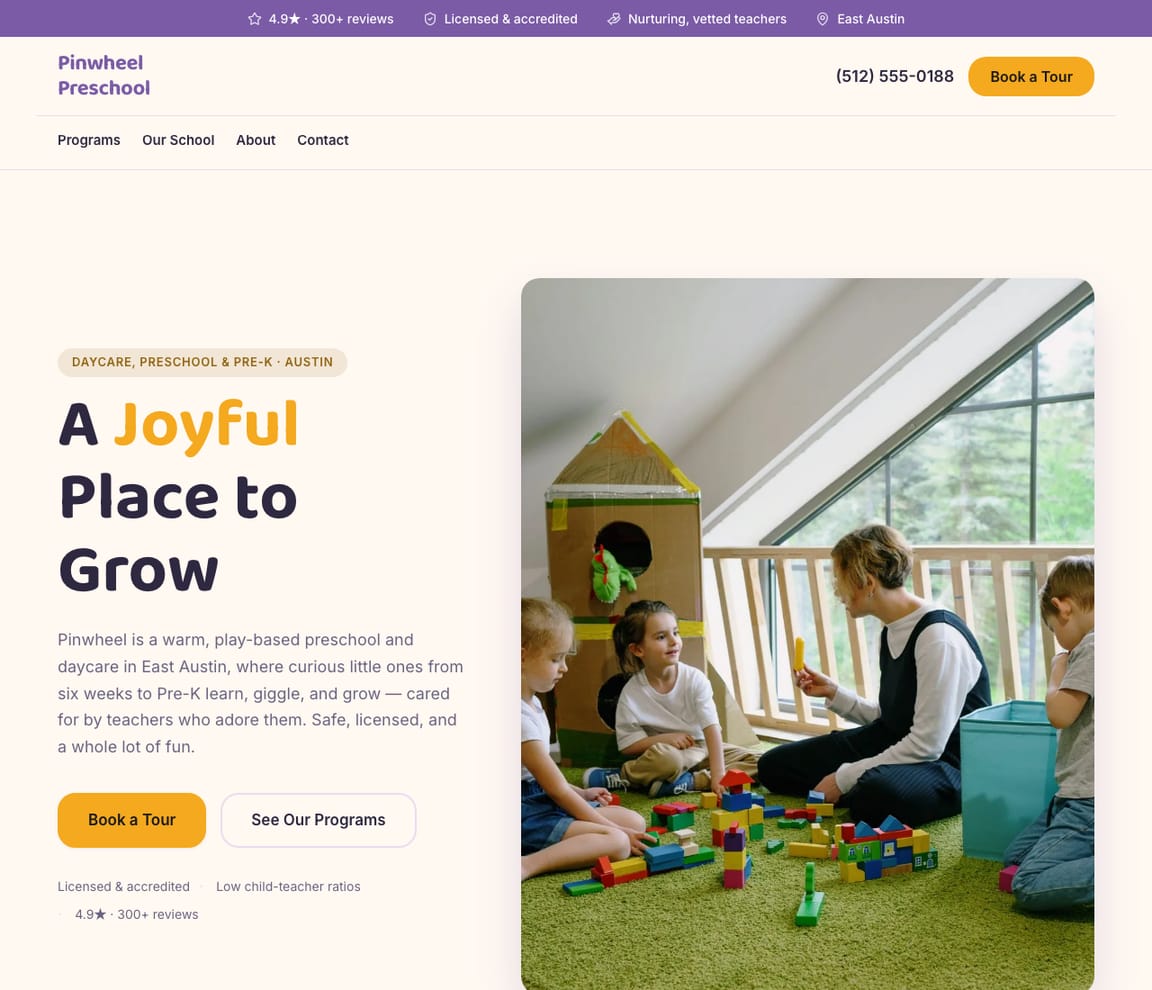
This is what a Zarla daycare website looks like.
Are you licensed? How many babies to each teacher? What happens at nap? How will I hear about my child's day? When could we start? Parents ask the same five things at the door of every center they tour, and this design answers them before the visit, then offers a time to come and see the rooms.
- Professional design — not a generic template
- Looks great on desktop and mobile
- Content written for your industry
What actually matters
Parents choose a daycare on the tour. Your website decides who asks for one.
Before a family drives over, they've read three sites late at night with a baby on one arm: the license, the ratios, the infant room, hours that fit two commutes, and whether there's a place this fall.
It writes the page a director would: who looks after whom, and how.
Infant, toddler, preschool and after-school rooms each get their own section, with the ages, the hours and how many children each teacher looks after. Your license number goes in when you type it, staff introductions carry their training and background checks, and a day in the room runs from drop-off through lunch, nap and outdoor play to pickup, with how you keep parents posted. In the US every state licenses child care centers and sets its own ratios: California's centers, for example, keep 1:4 for infants, 1:6 for toddlers and 1:12 for preschoolers, while the national Caring for Our Children standards recommend 1:3 for babies up to 12 months, and home daycares are licensed or registered above a number of children that varies by state. Check with your state's child care licensing office for yours.
Drafted before nap time ends.
A sentence becomes a first draft in about thirty seconds. Type it between the lunch cleanup and the two o'clock wake-up, read it at the front desk, and publish before pickup starts.
Parents typed "preschool near me" 201,000 times in August, and put "how much is daycare" to AI assistants 53,968 times in September.
US figures, DataForSEO, September 2026: "daycare near me" averages 450,000 searches a month and reaches 550,000 in January, when families plan for the fall; "preschool near me" hit 201,000 in August and again in January; "infant daycare near me" runs at 18,100; "daycare waitlist" peaks at 1,300 from January to March. On the AI side, "daycare cost" was asked 39,977 times in September. A page for each age group and neighborhood, worded the way parents search, is how Zarla helps a center show up, and Get Found checks whether the listing has its basics: hours, a category, enough photos.
Parents choose their own tour time. Questions about openings reach one inbox. The waitlist stays in one place.
A family picks a tour slot online and it lands in your Google Calendar. Questions about the infant room or a fall start arrive in the leads inbox and ping your email, or come on WhatsApp first, and each family stays on file with a follow-up reminder you set, so you know who to call when a spot opens. Tuition billing, check-in and daily reports stay in your childcare software, such as Brightwheel or Procare.
Describe the center the way you'd open a tour. Rooms, ages, the day.
Start at the front door
"I run Pinwheel Preschool: licensed for infants through pre-K, 7 a.m. to 6 p.m., two infant teachers, a garden, lunches cooked here, and spots opening in September." Typed at the front desk.
Walk the rooms on the draft
Back comes a page for each room by age, the day from drop-off to pickup, your staff and their training, a tour parents can choose a time for, a map for the morning drop-off and your Google stars. Now read the infant page the way a first-time parent would.
Go live, then keep the openings current
The site goes up on its own web address and Google is told. When a spot opens or the menu changes, say so: "Toddler room has one opening for January."
What a daycare website needs to win parents' trust
Zarla builds daycare websites around what parents check before they call: your license, your staff, the ages and hours you cover, and an easy way to ask about a place. Here is what that looks like on the page.
- Your license, visible — ask Zarla in chat to add your license number.
- Ages, hours and programs — infants, toddlers, preschool and after-school, with your hours.
- Your staff, introduced — names, qualifications and background checks.
- A day at your center — meals, naps, outdoor play and how you keep parents updated.
- Tours booked online — parents pick a time to visit without a phone call.
- Where you are — a map and a Get directions button for the drop-off run.
- A call button parents can tap — for questions about openings and the waitlist.
- Parent reviews — your Google rating shows on the page once you connect your Business Profile.
Getting found on Google
Midnight, a newborn on one arm, "infant care near work."
Parents look in three places before they ask for a tour, and each one weighs something different.
Google Search
Families search by age and place: "infant daycare near me", "preschool near me", "home daycare" and the neighborhood. A page for each program and area, with local SEO underneath, is how Zarla helps you rank, and the tour slot sits on every one.
Google Maps
On the map, parents compare stars, pictures of the rooms and the hours. Once your Google Business Profile is connected, the rating shows on your site, and Get Found takes you through the listing's checklist: hours set, a category chosen, enough photos, a description written.
ChatGPT & AI assistants
More parents ask ChatGPT what daycare costs in their town and which centers are licensed. Those answers lean on Google listings, parent reviews and any page that says plainly what you offer. Publishing adds a plain fact sheet that AI assistants can read, and the AI check shows what they say about your center today.
For a daycare in your area: Pinwheel Preschool — 4.9★ across 200+ Google reviews, licensed, tours on weekdays, taking new enrollments.
A page for each room
The infant room gets a page of its own, and so does after-school care.
- Infant care, with your ratio and the nap routine
- Pre-K, with what children learn before kindergarten
- Summer camp for school-age kids
- Westfield, the next neighborhood over
- Hero with nurturing childcare imagery
- Daily program overview
- Enrollment inquiry form
- Virtual tour and gallery
- Parent testimonials section
Before enrollment season
"Infant daycare": searched, no page. "Preschool near me": page two. After-school care: one line on the home page.
- Infant care: searched, no page
- Pre-K: page two for "preschool near me"
- After-school: one line, no page
- Listing: hours left blank
Edited between drop-off and lunch
A spot opens on Monday. It's on the site by Monday lunch.
- The January toddler opening
- Ms. Alvarez, introduced
- Holiday closures
- This month's lunch menu
Every family, in order
A tour request, a question about twins, a family moving in June. One inbox keeps them all.
- Thursday 10 a.m. tour, on the calendar
- Twins starting together?
- A June move, on the waitlist
- Your assistant director in the same inbox
The enrollment year
January planning, August starts: see when parents searched for you.
- January's planning searches
- The infant page, month by month
- August's pre-K rush
- Calls, tours and questions, site-wide
What you actually get compared to the alternative.
| Typical Website Builder | RecommendedZarla (Built for Daycares) | |
|---|---|---|
| Your license | A footer line, if anyone remembers. | Shown with your programs once you type the number in. |
| Ratios and rooms | One page called "Our programs". | A section for each room by age, with how many children each teacher looks after. |
| Tours | A booking app you set up and style yourself. | Parents pick a tour time online, straight into your Google Calendar. |
| The waitlist | A contacts list you organize yourself. | Each family in the leads inbox, with a follow-up reminder you set. |
| Openings | A change request to a designer. | Typed in a sentence: "One infant spot from March." |
| "Daycare near me" | Meta tags you write yourself. | A page for every program and neighborhood, and the listing checklist done with Get Found. |
| Billing and check-in | A plug-in to bolt on. | Stay in Brightwheel, Procare or Kangarootime; the website is for families still looking. |
Honest roundup
Wix, GoDaddy, Squarespace and WordPress.com for daycares, scored
Zarla builds a daycare website with a call button, an inquiry form, a map and local SEO already in place, as a first draft in about 30 seconds; you add your own photos, license details and opening hours later.
Zarla is our product. This order comes from our full comparison, which scores every builder on the same 9 tests, Zarla included, and gives each one a catch.
Best website builders for daycares: every score, every catch →
- 1
Wix
Best forOwners who care most about tours, enrollment paperwork and a private page for families.
Features- An AI builder that writes your pages from a description
- Aria, an AI agent in the Harmony editor that edits the site and adds pages by chat
- Wix Bookings with online payments and deposits
- Invoices and a contacts list built in
The CatchZarla vs Wix →Bookings need the Core plan rather than the cheapest one, and pages for each town you serve are yours to write.
- 2
GoDaddy
Best forOwners who care most about tours, enrollment paperwork and a private page for families.
Features- Airo writes a first website for your business in Websites + Marketing
- Online appointments with a deposit
- Photo attachments on the contact form
- Domain, email and website from one company
The CatchZarla vs GoDaddy →Editing by chat, and asking the AI for new pages later, happen in Airo AI Builder, a separate GoDaddy product with its own credits; in Websites + Marketing, pages for each town you serve are yours to write.
- 2
Squarespace
Best forGood if polished design matters most and you don't mind adding a separate booking tool.
Features- Blueprint AI writes a multi-page starting site
- Design-led templates
- Invoices and online payments on every plan
- Acuity Scheduling for appointments, including repeat bookings
The CatchZarla vs Squarespace →Online booking is a second subscription, Acuity Scheduling, on top of the website plan, and it's managed in a different place.
- 2
WordPress.com
Best forFor owners who want full control and don't mind choosing and looking after plugins.
Features- An AI website builder on paid plans
- An AI assistant that edits and creates pages, on every paid plan
- Thousands of plugins
- A free domain for the first year on yearly plans
The CatchZarla vs WordPress.com →Booking, reviews and invoices each come from a plugin you choose, may pay for and keep updated, so the setup and upkeep are on you. Photo uploads on forms need the Business plan.
Growing with you
Will Zarla grow with a busy daycare center?
Zarla keeps working as a daycare center grows: you add a page for a new neighborhood or a second center, parents book tours online, and every inquiry lands in one leads inbox your staff can work from. Here is what that looks like, and what Zarla doesn't do.
Yes, one at a time: ask the editor for "a page for our second center in Westfield" and Zarla writes a new page for it, with its own Google title and description. There's no tool for adding dozens of area pages at once. A Premium site holds up to 100 pages, and a Business site has no page limit.
Yes, once you switch on online booking: parents pick a time to visit and bookings sync to Google Calendar. Every question from a new family lands in your leads inbox with an email alert, and the WhatsApp button lets parents ask about openings first.
Each family's inquiry stays in the leads inbox with its place in the pipeline and a follow-up reminder, so you know who to call when a spot opens. Invite your director or office staff as team members and they work the same inbox and to-do list. Enrollment, tuition billing and daily reports stay with childcare software such as Brightwheel or Procare.
Yes, you can bring it across — Zarla keeps your old page addresses where it can and redirects the ones that change, helping you keep the Google standing you've built. If you leave later, Zarla doesn't export your site as files to host somewhere else. You can download your whole contact list as a spreadsheet at any time, and a domain you bought from another company stays registered with them, ready to point at your next site.
Real results
Don’t take our word for it. Take theirs.
From business owners like you.
“Help for everyone to get started online without any prior knowledge. Fantastic support and resources — I love it!”
“User friendly and very responsive. Great tool for website building.”
“The user-friendly interface and exceptional service helped me create a professional-looking site quickly. The guidance provided every step of the way was invaluable.”
Daycare website FAQ
What is the best website builder for daycares?
We scored six website builders for daycares the same way, on nine tests worth 18 points: Wix 15, GoDaddy 13, Squarespace 13, WordPress.com 13, Zarla 13, Yola 12 (on fewer crosses: WordPress.com ahead of Zarla). On those scores Wix takes first place and Zarla is fifth. See the best website builders for daycares, with every score and each builder's catch. Zarla is an AI website builder for small businesses, purpose-built for daycares: it generates your entire daycare website in about 30 seconds — industry-specific content, local SEO, and built-in lead tracking (a CRM) included. Building and previewing is free; publishing it live starts on the Premium plan.
How much does a daycare website builder cost?
Zarla's daycare website builder is free to build and preview — no credit card required. Publishing your site live starts on the Premium plan, which includes hosting, SSL, unlimited lead tracking (a CRM), online bookings, and unlimited quotes and invoices.
How do I create a daycare website?
With Zarla's daycare website builder, just describe your business in plain English and your entire site is generated in about 30 seconds — content, images, layout, design, and SEO. You can then customize as much or as little as you want — most daycares go from a blank page to a finished site in minutes.
Will my daycare website show up on Google and Google Maps?
Yes — that's what Zarla's daycare website builder is designed for. Every site comes with SEO-optimized titles, meta descriptions, schema markup, fast page speeds, and mobile-responsive design. Zarla also builds in local SEO signals so you can rank in the Google Maps pack when people search "daycare near me."
Do I need technical skills to use a daycare website builder?
Not at all. Zarla's AI builds your daycare website automatically — you just describe your business in plain English. Edit anything by typing what you want changed, like "make the headline bigger" or "add a testimonials section." If you can send a text message, you can build a website with Zarla.
How is Zarla different from Wix or Squarespace for daycares?
On our scores for daycares, Wix takes first place and Zarla is fifth. The difference is how you work: Zarla writes the whole daycare website from a sentence about your business and you change it by typing, with a leads inbox, invoices and payments in the same place; Wix and Squarespace suit owners who like building and fine-tuning the site themselves.
Can a daycare website builder help me get more leads?
That's the whole point of Zarla. It's built to get you found on Google Search, Google Maps, and AI assistants like ChatGPT — and then convert those visitors into actual leads. Every inquiry is captured in a built-in CRM pipeline, and you can send AI-generated quotes and invoices right from the platform.
Does Zarla work for my specific type of daycare business?
Yes. Zarla's daycare website builder adapts to your specialty and location — it generates content and design matched to the specific services you offer and the families you serve.
Can I hire someone to build my daycare website instead?
You can, and for a complex custom build it is often the right call. In the US a freelancer typically charges $500–$2,000 for a small-business site and an agency $3,000–$10,000, and you usually wait two to six weeks; unless you are on a retainer, later changes are billed too. Zarla builds your daycare website in about 30 seconds and you change it yourself by typing what you want. Build and preview it free first, then decide.
Is there a 100% free daycare website builder?
Most "free" builders mean a trial that expires, or a permanent plan that puts their branding on your site and parks it on a long subdomain. Zarla is free to build, preview and edit — no credit card — and publishing your daycare website live on your own domain starts on the Premium plan. Nothing is charged while you're deciding.
Which AI is best for building a daycare website?
General assistants like ChatGPT and Claude write good copy and will happily produce a page for you, but you are left to arrange hosting, a domain, images, forms and SEO before anyone can visit it. A purpose-built AI website builder does that part too: Zarla turns one description of your daycare business into a finished, hosted site with all of it already in place, shaped the way daycares actually need it.
Do I need to buy web hosting for my daycare website?
No. Your daycare website needs hosting to show up when someone searches "daycare near me", but Zarla hosts it for you once you publish on a paid plan: Google Cloud, the security certificate and automatic backups included, and no hosting account or plugins for daycares to look after. Read when separate hosting makes sense.
What should a daycare website include?
What parents look for before they call: your license, the ages and programs you offer, your hours, your staff and their qualifications, what a typical day looks like, where you are, reviews from other parents, and an easy way to ask about a place or a tour. Zarla builds the pages, the copy and an inquiry form for you, and you add your license details, staff and photos as you go.
What software do daycares use?
Many daycares use childcare management software such as Brightwheel, Procare or Kangarootime for check-in, billing, parent messaging and daily reports. That software serves the families already enrolled; the website is for the parents still looking. Zarla builds the website side: your programs, a map, and an inquiry form that puts every question from a new family in one leads inbox, and you add your license and staff.
Want to see it before you build it? Browse the daycare website templates and start from a finished design — every one becomes yours to edit in a click. See daycare website design: what the best daycare sites get right.
Shopping for a designer instead? See daycare website design by AI: sample designs, what web agencies charge, and what an agency does that AI doesn't.
Not open yet? Our step-by-step guides on how to start a daycare and how to become a daycare provider cover the costs and first steps.
Still choosing a name? Browse our daycare business name ideas, then put the one you pick on your site.
Setting your prices? Our guide to daycare pricing has the 2026 US rates, the pricing formula and a free calculator — then put the prices on your site.
Need to bill a job today? Download the free daycare invoice template (Word and PDF) — or send invoices with a pay-now button from your Zarla dashboard on a paid plan.
Still planning the business itself? Write the free daycare business plan first — typical startup costs, what owners really earn, US licensing and a complete sample plan — then build the website from it.
Every daycare website on Zarla starts the same way: describe your business and Zarla's AI website builder writes the pages, picks the photos and sets up the SEO in about 30 seconds.
The next family is reading at midnight. Be the center they ask to tour.
Rooms by age, the license in view, tours on the calendar. Nothing to pay while you build and preview it.
Free to build and preview · No credit card · Cancel any time