WORDPRESS ALTERNATIVE FOR SMALL BUSINESS
Looking for a WordPress alternative? Here's the honest version.
Most small businesses don't leave WordPress because it's bad. They leave because of the plugins, the updates and the upkeep bills. Zarla is a website builder that does that work for you — and if WordPress is still the right tool for you, this page says so.
Free to build · Pay when you publish · Your WordPress site stays live
Two ways to try it
Bring your WordPress site across — or start fresh
Describe your business in one line and Zarla builds a new site in about 30 seconds, or bring your WordPress site across below. Build and preview free; your WordPress site stays live until you move your domain.
Already have a website? Bring it across →Zarla keeps your old page addresses where it can and redirects the ones that change, helping you keep the Google standing you've built.
THE REAL COST
What a WordPress site costs to keep running
WordPress itself is free, but running it isn't: about $111 a year at the bare minimum (a domain and shared hosting, with you doing the updates), and about $735–$4,095 a year once managed hosting and someone to keep it updated are in (WPBeginner; Codeable, March 2026). Add the tools a service business bolts on — a CRM, booking, invoicing — and each is usually another subscription. Zarla includes them.
| What you pay for | What it costs · source |
|---|---|
| Domain name | about $14.99 a year · WPBeginner |
| Shared hosting (the cheapest kind) | from about $7.99 a month · WPBeginner |
| Managed WordPress hosting (faster, looked after) | $30–$100 a month · Codeable |
| Someone to keep it updated and secure | $30–$50 a month for cheap plans; Codeable's basic plan is $240 a month · Codeable |
| Bare minimum, you do the updates | about $111 a year (domain + shared hosting) |
| Looked after by someone else | about $735–$4,095 a year (domain + managed hosting + a maintenance plan) |
Totals are our arithmetic on the rows: published monthly prices × 12, plus the domain. Sources: WPBeginner (September 2025) and Codeable (March 2026), read September 2026.
WordPress vs Zarla: who does the upkeep
Same job, far fewer moving parts. That's the difference.
What you stop having to think about
Built in instead of bolted on — the jobs a WordPress site hands to plugins.
Built-in local SEO
Structured data, titles and descriptions, a sitemap, and Google Business Profile and Search Console connections — all in the product. No SEO plugin to pick and configure.
Fast without the tuning
A real Zarla-built site, live, measured at 0.4s desktop LCP and 100/100 SEO on Google PageSpeed Insights — without a caching plugin, a CDN plugin or a hosting upgrade.
AI builds your site in about 30 seconds
WordPress hands you a theme. Zarla writes the copy, designs the layout and sets up the SEO — tailored to your trade — from one description.
Edit by chat, not by plugin
Type what you want changed — "add a testimonials section," "change the phone number" — and it happens. No plugin admin, no theme editor, no PHP.
No updates to apply
There's no server software, theme or plugin for you to update — that side runs on our infrastructure. You can run a Zarla site without a developer on call.
CRM, invoicing, booking — included
The tools a WordPress site sends visitors away to use are inside Zarla. One login, one dashboard, and leads land in a list you'll actually look at.
When WordPress is worth keeping
WordPress runs a huge share of the web for good reasons, and switching isn't always the right call. Keep it if:
- Someone already runs it well. If a developer or an agency keeps your site updated, fast and secure, and the bill is fair, you're paying for a working setup — not a problem to solve.
- Publishing is the business. A magazine, a big blog with many writers and editorial workflows, or a membership site: WordPress's publishing tools are genuinely deep.
- You depend on a specific plugin. A niche booking engine, a learning platform, a custom integration your business runs on — if nothing else does that job, stay where it lives.
- You want to own and change every line of code. WordPress is open source and endlessly customizable; a website builder trades some of that control for less upkeep.
Switch when the site is a means to an end — getting found, getting calls, taking bookings — and the plugins, updates and maintenance bills are the part you'd happily never think about again. The October 2026 PHP security flaw is a current example of that upkeep: the fix is your host updating PHP, not you updating WordPress, and PHP2Shell: is my WordPress site safe? explains how to check. Weighing every option? See how much a website costs for each route, sourced, and whether you need to buy hosting at all.
One client's monthly cost after moving off WordPress to Zarla
A small-business owner was being charged $3,000 a month by another agency for a WordPress site and SEO retainer. They were about to shut the business down — they couldn't afford it anymore.
Sam, a Zarla agency partner, took the site over and imported it into Zarla in a few hours. Within a few days the client had a faster, fully managed replacement, off WordPress and off the plugin-maintenance treadmill. Sam dropped the monthly cost to $500.
One agency's story, told as the first of a new breed — not as proof at scale. That's what the import tool makes possible.
Zarla speed, by Google's actual numbers
Measured on a real Zarla-built site, live — manaracare.com.au — via Google PageSpeed Insights, desktop.
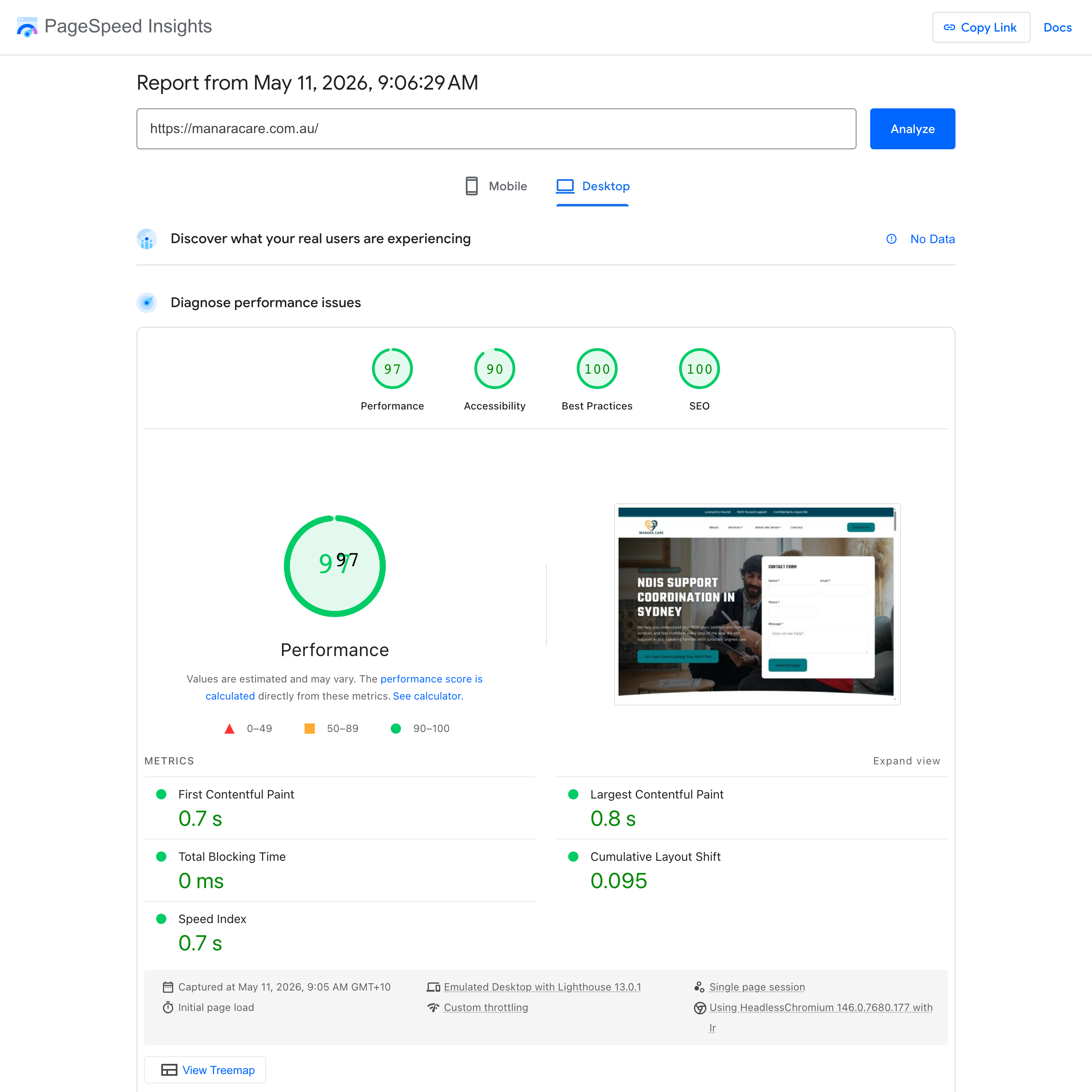 Live PageSpeed Insights report — click to verify.
Real results
What people say after switching
Real small-business owners on building with Zarla.
“Great professional website in less than a minute, with the use of AI and a few descriptive prompts. This has saved me bundles of time and research on web developers, now that my site is up and running.”
“Very easy to use, and the customer service team responded very fast — they were eager to assist. I'd used a different company before, spent a bunch of money and got nothing. I gave this a try and so far I'm glad I did.”
“User friendly and very responsive. Great tool for website building.”
WordPress alternative: common questions
For a local service business, a restaurant, a clinic or a professional practice — where the site's job is to get found and get calls — a website builder that does the upkeep for you is the better fit, and Zarla is built for exactly that: the AI writes and designs the site, and local SEO, structured data, Search Console, a CRM, booking and invoicing are built in, with no plugins to maintain. If publishing is your business or you depend on a specific plugin, WordPress may still be right.
Keep it if someone already runs it well at a fair price, if publishing is the business (a magazine or a big multi-author blog), if you depend on a plugin nothing else offers, or if you want to own and change every line of code. Switch when the plugins, updates and maintenance bills are the part you'd rather never think about.
Speed depends on how a site is built and hosted, and a well-tuned WordPress site can be fast. The difference is who does the tuning: a real Zarla-built site, live (manaracare.com.au), measures a 0.4s Largest Contentful Paint on desktop, a 100/100 SEO score and 0ms Total Blocking Time on Google PageSpeed Insights, with no caching plugin, CDN plugin or hosting upgrade to set up.
Paste your WordPress site's address into Zarla's import tool. It brings in your pages, text, images and services, and rebuilds them as an editable Zarla site. You refine anything by chat, then publish. Your WordPress site stays live until you point your domain at the new one.
Zarla keeps your old page addresses where it can and redirects the ones that change, helping you keep the Google standing you've built. The redirects take effect when your domain moves to Zarla. No platform can promise a ranking position, so check your most important pages in Search Console after the move.
WordPress itself is free, but running it isn't: about $111 a year at the bare minimum (a domain and shared hosting, with you doing the updates), and about $735–$4,095 a year once managed hosting and someone to keep it updated are in (WPBeginner; Codeable, March 2026). Zarla bundles hosting, the security certificate, SEO setup, forms, bookings and invoicing into one plan — free to build and preview, and you pay when you publish; current prices are on the pricing page.
Zarla is built differently. WordPress is a CMS you extend with plugins. Zarla is a complete website builder and business toolkit out of the box — AI site generation, SEO, CRM, booking and invoicing included, nothing to install. The trade-off: WordPress is more flexible for content-heavy sites with complex publishing workflows; Zarla is purpose-built for small businesses that want a fast site and the tools to run the business.
Not separately. Zarla hosts your site as part of the paid plan you publish on — on Google Cloud, with the security certificate and automatic backups included — so once your domain points at Zarla you can cancel the WordPress hosting yourself. If your business email is on the same hosting account, move it first: Zarla doesn't host email. More on website hosting for small businesses.
Nothing, until you decide. Your WordPress site stays where it is until you point your domain at the new Zarla site, so you can run both while you check the new one. Nothing is deleted automatically — when you're ready to retire the WordPress hosting, you cancel it yourself.
No. The import tool is built for non-developers: paste an address, review the imported content, refine by chat, publish. An agency partner managing client sites runs the same flow.
Already on WordPress? See your site on Zarla first
Bring your WordPress site across, or describe your business and Zarla builds a new one in about 30 seconds. Your WordPress site stays exactly where it is until you point your domain at the new one.
Already have a website? Bring it across →Zarla keeps your old page addresses where it can and redirects the ones that change, helping you keep the Google standing you've built.