ROOFING INVOICE TEMPLATE
Free roofing invoice template
An invoice for the day the roof is finished. It bills the squares you installed, the decking you replaced by the sheet, labor and the permit, takes off the deposit, and carries the claim number on insurance jobs. Free in Word and PDF, with every line explained below.
Word and PDF · Free · No email, no sign-up
The short answer
A roofing invoice bills the finished roof line by line: tear-off, materials, labor per square, the permit and the decking sheets you actually replaced. It takes off the deposit and shows the balance. On an insurance job, add the claim number. In Texas, most insurers hold back part of a replacement cost claim until they get your bill.
Key facts, read 11 November 2026 (US, Texas):
- “If you have a replacement cost policy, most companies pay with two checks.” The first is the repair estimate minus depreciation and the deductible (Texas Department of Insurance homeowners guide, updated 1 June 2026).
- The insurer pays the depreciation it held back “after it gets the bill for the finished job” (the same guide).
- If the home has a mortgage, the repair check is made out to the homeowner and the mortgage company together (the same guide).
- “It's illegal for contractors to waive your deductible or help you avoid paying it,” and the insurer can ask for proof the deductible was paid (Texas Department of Insurance, updated 9 December 2025).
Those are Texas rules. Other states publish their own, so check your state's insurance department.
FREE TEMPLATE · WORD AND PDF
The roofing invoice template, filled in
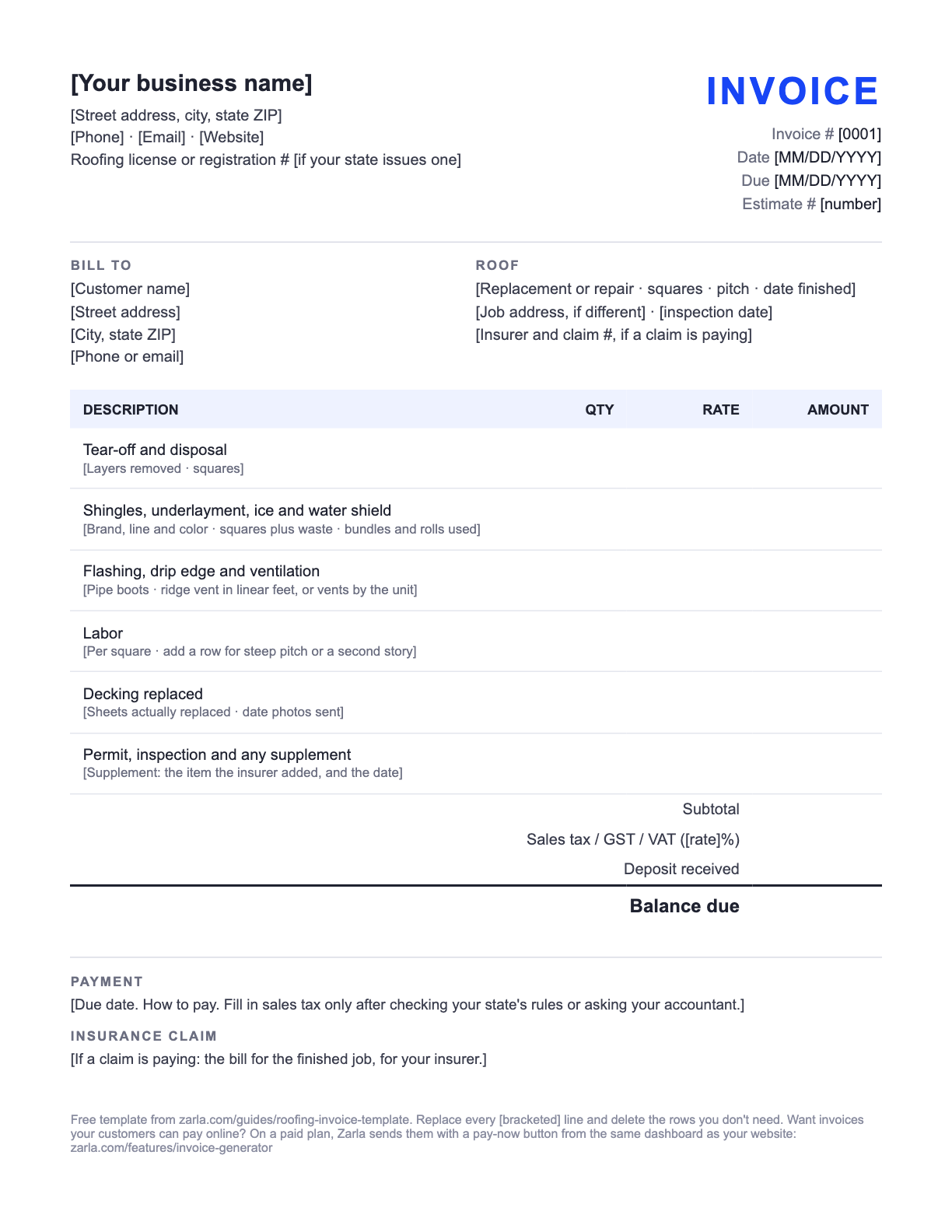
Below is the template filled in for Ridgeline Roofing Co., a fictional roofing business, so you can see every line in use. The downloads are the same invoice with [bracketed] lines to replace — free, no email address, no sign-up.
Example · fictional business
Ridgeline Roofing Co. Tulsa, OK (918) 555-0152 · office@ridgelineroofing.example Roofing contractor reg. # 000000 (example) | INVOICE |
Bill to Denise Okafor 4812 S Yale Ave Tulsa, OK | Roof Full replacement finished Oct 22, 2026: 28 squares at 8/12 pitch, one layer removed Same address · city final inspection passed Oct 23 Insurance claim # 0000000 (example) |
| Description | Qty | Rate | Amount |
|---|---|---|---|
| Tear-off and disposal One layer, 28 squares, dumpster and dump fees | 28 | $85.00 | $2,380.00 |
| Architectural shingles 28 squares plus 10% waste · 93 bundles used | 31 | $125.00 | $3,875.00 |
| Synthetic underlayment | 28 | $22.00 | $616.00 |
| Ice and water shield Eaves and valleys, 4 rolls | 4 | $110.00 | $440.00 |
| Drip edge and flashing Drip edge, step and chimney flashing, pipe boots | 1 | $520.00 | $520.00 |
| Ridge vent 60 linear feet, with ridge cap | 60 | $9.00 | $540.00 |
| Installation labor | 28 | $165.00 | $4,620.00 |
| Steep-pitch labor, 8/12 | 28 | $60.00 | $1,680.00 |
| Decking replaced 5 sheets of ½ in. plywood (estimate allowed up to 8) · photos sent Oct 21 | 5 | $95.00 | $475.00 |
| Permit and final inspection City of Tulsa | 1 | $150.00 | $150.00 |
| Subtotal | $15,296.00 | ||
| Sales tax (if any: check your state's rules or ask your accountant) | |||
| Total | $15,296.00 | ||
| Deposit received | −$3,500.00 | ||
| Balance due | $11,796.00 | ||
Payment
Due by Nov 6, 2026. Pay by check, card or bank transfer. Thank you for choosing us for your roof.
Insurance claim
This is the bill for the finished job. Send a copy to your insurer with the claim number above.
Every figure on the example is an example, not a price guide — use your own rates. The Word file is a standard .docx you can edit in Word or any app that opens Word documents; the PDF prints as-is if you'd rather fill it in by hand.
Invoices and a website, one place
Start your roofing website — invoicing is built in
Add your business name and your town, and Zarla builds your roofing website from this one line. The same dashboard sends invoices like this one, with a pay-now button once you're on a paid plan.
Already have a website? Bring it across →Zarla keeps your old page addresses where it can and redirects the ones that change, helping you keep the Google standing you've built.
LINE BY LINE
What goes on a roofing invoice
Every line on the template, in order, and what to write on it.
| The line | What to put there |
|---|---|
| Business name, contact and registration | Your trading name, phone, email and address, and your roofing license or registration number if your state issues one. |
| Invoice number, dates and the estimate number | A number that never repeats, the date, the due date, and the estimate number, so the homeowner can lay the two documents side by side. |
| Bill to and the roof as built | The homeowner and the address, then one line on the roof you put on: squares installed, pitch, layers removed, the day it was finished and the day it passed inspection. |
| Tear-off and materials | The estimate's lines at the quantities you actually used: tear-off by the layer, shingles with the bundle count, underlayment, ice and water shield, flashing and ventilation. |
| Labor and the steep-pitch line | Installation per square, and steep-pitch or second-story labor priced the way the estimate priced it. The Word file has one labor row; add a row for the steep line. |
| Decking replaced | The sheets you actually replaced, at the estimate's per-sheet price, with the date you sent the photos. If it came in under the allowance, the invoice shows the lower count. |
| Permit and supplements | The permit and final inspection, and any item the insurer added to the claim after its first scope (a supplement) with the date it was added. Add a row in the Word file for each supplement. |
| Sales tax, deposit and balance | Leave sales tax blank until you've checked your state's rules or asked your accountant. Then the deposit taken off and the balance due in bold. |
| Claim number and how to pay | On an insurance job, the claim number and a note that this is the bill for the finished job: in Texas, insurers pay the depreciation they held back once they get that bill (Texas Department of Insurance, updated 1 June 2026). Then the due date and how to pay. |
STEP BY STEP
How to fill out a roofing invoice
Fifteen minutes on the day the roof passes inspection, starting from the estimate you sent.
Copy the estimate's lines
Open the estimate and copy its lines in the same order. The homeowner checks one against the other, so make each line easy to match.
Change the quantities to what went on the roof
Squares installed, bundles used, rolls of ice and water shield, feet of ridge vent. Most lines won't move. Change the ones that did.
Bill decking by the sheet you replaced
Count the sheets, use the estimate's per-sheet price and note the day you sent the photos. Five sheets against an allowance of eight is a line nobody argues with.
Add the permit and any supplement
The permit and final inspection, then any item the insurer added after its first scope, with the date it was added. Add a row in the Word file for each one.
Leave tax blank until you've checked, then take off the deposit
Check your state's rules or ask your accountant before you fill in the sales tax line. Subtract the deposit and put the balance due in bold.
Send it the day the inspection passes
Put the claim number on it and send it that day. In Texas, on a replacement cost policy, most insurers pay the held-back depreciation after they get the bill for the finished job (Texas Department of Insurance). Check your state's insurance department for the rule where you work.
How roofers get paid faster
Send the invoice the day the final inspection passes. In Texas, the Texas Department of Insurance homeowners guide (updated 1 June 2026) says that on a replacement cost policy “most companies pay with two checks”, and the second comes “after it gets the bill for the finished job.” On those claims, your balance waits as long as the invoice does. Other states publish their own guidance, so check your state's insurance department.
Copy the claim number exactly from the insurer's letter, and the homeowner's name the way the claim has it. Then the homeowner can forward your invoice to the insurer without editing it.
Show the deductible as the homeowner's share of the total. In Texas, contractors can't waive a deductible or offer a rebate or credit in its amount, and the insurer can ask the homeowner for proof it was paid (Texas Department of Insurance, updated 9 December 2025). Other states have their own rules, so check your state's insurance department.
Ask early who the insurer's check will be made out to. The Texas guide says that if the home has a mortgage, the repair check is made out to the homeowner and the mortgage company together. When you send the invoice, ask the homeowner how their lender releases that check, so the wait doesn't land on you. Outside Texas, check your state's insurance department for how repair checks are made out.
Bill decking from the photos. The estimate priced decking as an if-needed line, and the invoice bills the sheets you replaced, with the photos you already sent. A count that matches the pictures gets paid without a phone call.
Start from the estimate. The roofing estimate template prices the roof by the square from your measurement, and this invoice is the same document once the roof is on. For a bigger project billed in stages, the construction invoice template bills progress draws, the contractor invoice template is the general contractor's invoice to a homeowner, and the remodeling invoice template covers interior work.
In the US, whether a roofing invoice carries sales tax depends on your state, so this template and its example leave the tax line blank. Check your state's rules or ask your accountant before you fill it in, and once you know, bill tax the same way on the estimate and the invoice.
Outside the US, the invoice itself has rules: in Australia a GST-registered business issues a tax invoice showing its ABN, in New Zealand a GST-registered business shows its GST number, and in the UK and EU a VAT-registered business shows its VAT number and the VAT charged. Confirm the details with your accountant.
Where the facts on this page come from: the Texas Department of Insurance homeowners guide (updated 1 June 2026) and its page on contractors and deductibles (updated 9 December 2025), both last checked 11 November 2026.
Send it from Zarla and get paid online
A Word template is a fine way to start. The catch is everything after you hit send: chasing the payment, remembering who's paid, and typing the same customer and the same line items again next month.
If you build your roofing website with Zarla, the invoice tool is in the same dashboard. Pick the customer, add the job's lines, and send it. On a paid plan, with your Stripe account connected, the invoice carries a pay-now button: your customer pays online by card, and the invoice marks itself paid when the money arrives. Customers you've invoiced are saved, so next time is two taps.
Want to see the website first? Browse roofing website templates or see how Zarla builds roofing websites. Still setting up? Read how to start a roofing business and write your roofing business plan, and see roofing cost per square for 2026.
The whole paper trail of a job, step by step: the roofing estimate template, then how to write a quote, then how to write an invoice, then how to write a receipt — with a free receipt template. For any other trade, start from the free invoice template. Either side of it, two more free templates in Word and PDF: a price list template for the services you sell and a work order template for the crew.
Heading into the holidays? Our free gift certificate template covers the customers who want to give your work as a gift, and the holiday hours sign template covers the door, your website and your Google profile.
Roofing invoices: common questions
Your business name, contact details and roofing license or registration number if your state issues one; the homeowner and the address; an invoice number, the date, the due date and the estimate number; the roof as built, with squares, pitch, layers removed and the day it was finished; tear-off, shingles, underlayment, flashing and ventilation at the quantities used; labor per square and any steep-pitch labor; the decking sheets replaced; the permit; sales tax if your state charges it; the deposit taken off; the balance due; and, on an insurance job, the claim number.
The estimate is the price before the job, from your measurement, with decking as an allowance. The invoice is the bill after the job, at the quantities you installed and the decking you replaced, with the deposit taken off. Keep the same lines in the same order so the homeowner can check one against the other.
The claim number, the homeowner's name as the claim has it, and the full cost of the finished job line by line, with the deductible counted as the homeowner's share. In the US each state sets its own insurance rules. The Texas Department of Insurance says that under a replacement cost policy most insurers pay in two checks, the second after they get the bill for the finished job. Check your state's insurance department for the rules where you work.
Not in Texas. The Texas Department of Insurance says “It's illegal for contractors to waive your deductible or help you avoid paying it,” and that rebates or credits in the amount of the deductible are illegal too. Other states set their own rules, so check your state's insurance department before you offer anything like it.
By the sheet you actually replaced, at the per-sheet price on the estimate, with a note of the day you sent the homeowner the photos. If the estimate allowed up to eight sheets and you replaced five, the invoice says five.
It depends on your state. In the US the answer for roofing work differs from state to state, so this template leaves the sales tax line blank. Check your state's rules or ask your accountant before you fill it in. Outside the US, a GST- or VAT-registered business shows its registration number and the tax charged; confirm the details with your accountant.
Yes. The roofing invoice template on this page downloads free as a Word document and a PDF — no email address, no sign-up. Edit it in Word or any app that opens Word documents, or print the PDF and fill it in by hand.
Not from a Word file — your customer still has to pay you some other way. To take the payment on the invoice itself, send it from invoicing software. If your roofing website is on Zarla, the invoice tool is in the same dashboard: on a paid plan, with Stripe connected, each invoice carries a pay-now button and marks itself paid when the customer pays by card.
Send invoices from your own roofing website
Add your town and your business name, and Zarla builds the site from that one line — with invoicing in the same dashboard.
Already have a website? Bring it across →Zarla keeps your old page addresses where it can and redirects the ones that change, helping you keep the Google standing you've built.