The art studio website builder that fills your classes.
The AI website builder for art studios — built to help students find you on Google and ChatGPT.
Already have a website? Import it free →
Zarla at a glance
Zarla is an AI website builder for small businesses, built for art studios — art schools and art galleries. Describe your business and Zarla generates a complete art studio website in about 30 seconds — copy, design, images, and SEO.
- Image galleries — student and studio work, on the page.
- Online store — sell prints, art kits and class packs online.
- WhatsApp chat button — students and parents ask which class fits or about a party.
- Contact forms with built-in lead tracking (a CRM) — every inquiry lands in one place, ready to follow up.
- SEO on every page: titles, meta descriptions, schema markup, and fast mobile pages.
We scored five website builders for artists the same way, on nine tests worth 18 points: Wix 15, WordPress.com 14, Zarla 14, GoDaddy 13, Squarespace 13. On those scores Wix takes first place and Zarla is second. Zarla is our own product.
Building and previewing an art studio website with Zarla is free; publishing it live starts on the Premium plan. This page covers the Zarla art studio website builder — what's included, how it works, and what it costs to start.
See it in action
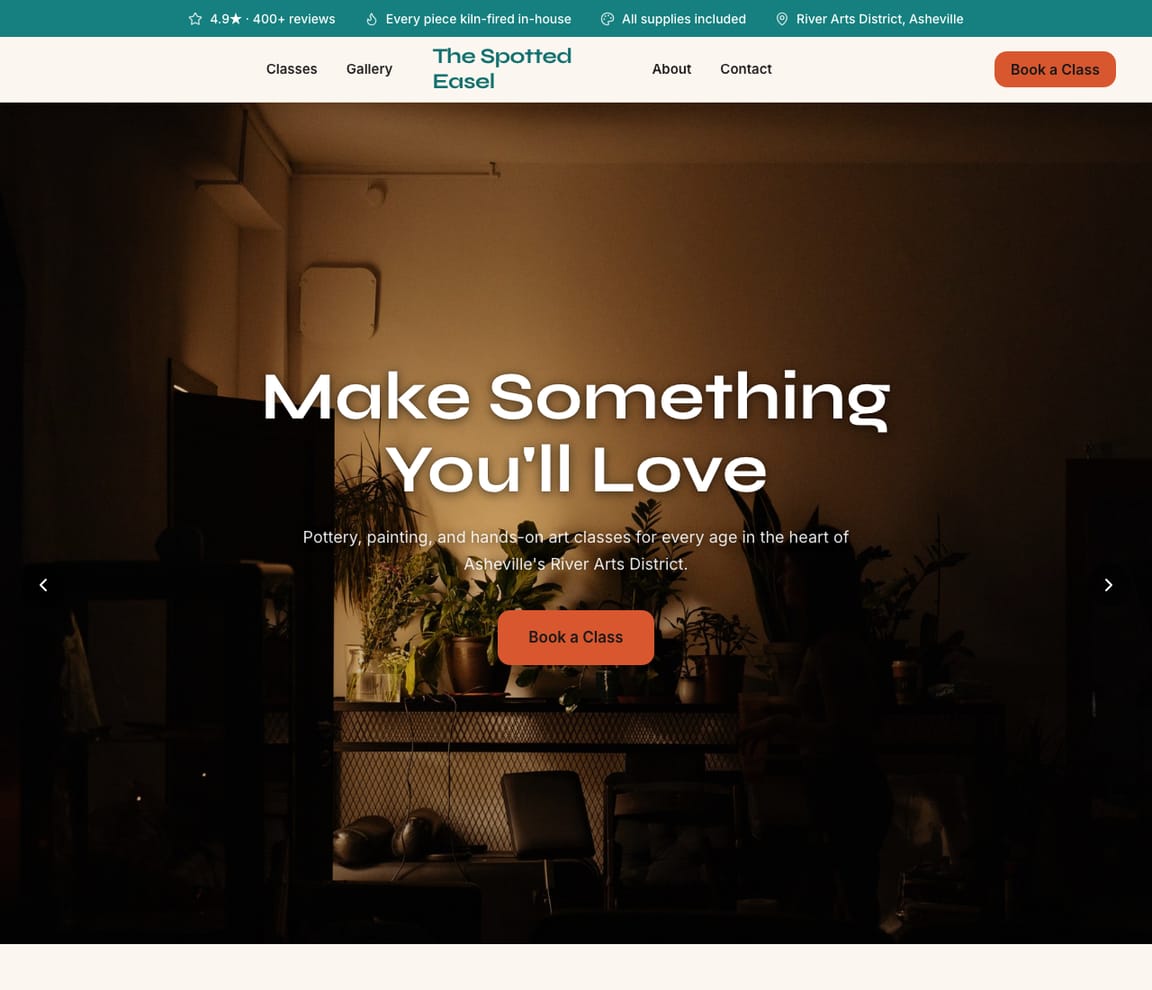
This is what a Zarla art studio website looks like.
A lopsided first mug, glazed in cobalt. A charcoal still life from week three. A twelve-year-old's acrylic sunset from Saturday's party. Students sign up for the thing they'll carry home, and this draft shows it class by class, with the dates, the ages and what's included.
- Professional design — not a generic template
- Looks great on desktop and mobile
- Content written for your industry
What actually matters
Parents and adult beginners picture the finished piece first. Show it, then the schedule.
A retiree who hasn't drawn since school, a parent hunting for a Saturday class, an office manager planning a team night. Each looks at what students made, then checks the age range, the dates, the price and whether materials are included.
It lays out classes the way you'd sort them on the studio whiteboard: by medium, by age, by term.
Wheel throwing and hand-building, watercolor and acrylic, drawing fundamentals, kids' after-school art and teen portfolio prep each get a page with the age range, the number of weeks, what's included and what to wear. A gallery under every class shows what students made in it. Parties and team nights have their own page, and so do summer and school-break camps. In the US, a state may count a drop-off camp as child care; check your state's child care licensing rules before you list a camp.
Drafted while the kiln is still cooling.
Two sentences about your classes after the last student leaves, and a first draft is waiting about thirty seconds on. Swap the gallery for your own students' work, fix a term date, and it can go live before the next firing.
"Pottery classes near me" averages 110,000 US Google searches a month, peaking at 135,000 in January.
DataForSEO, US, September 2026: "paint and sip near me" runs at 40,500, up to 60,500 in January and February; "art classes near me" 33,100, with 40,500 in January. AI assistants took the question "how much are pottery classes" 3,335 times in September but only 184 times in March. A page for each medium and each neighborhood you draw students from is how a two-room studio gets seen for those words.
Spots are asked for on the inquiry form, and the store sells the kits and class packs.
A parent sends the inquiry form with the class, the start date and how many kids are coming, and the leads inbox holds it. The online store sells prints, take-home art kits and class packs, with checkout through your own Stripe account; a pack is prepaid credit you track yourself. "Does the wheel class suit a total beginner?" comes on WhatsApp. Registration, seat counts and waitlists stay in Pike13 or Sawyer, linked from each class page.
Explain it like the first day of term to a new parent. Mediums, ages, the room.
Say what you teach
"I run The Spotted Easel: wheel throwing and hand-building, watercolor and acrylic, after-school art for ages 6 to 12, summer camps and birthday parties, in a two-room studio in Asheville." Typed while the brushes soak.
Read it as a parent choosing a Saturday class
The draft gives each medium and age group a page, puts a gallery of student work under each, lists the term dates and what's included, and sets up the inquiry form and the store. Open the kids' page as a parent with a six-year-old who only likes dinosaurs.
Go live, then add each term's work
The studio gets a web address and Google is told about it. A new glazing workshop, fall term dates or a fresh row of student mugs for the gallery is one typed sentence.
Everything an art studio website needs
Zarla builds art studio websites around what a parent or an adult beginner checks before signing up: which class suits them, when it meets, what it costs and what's included, and what students make. Here is what that looks like on the page.
- Classes by age and medium — painting, drawing, pottery and kids' classes.
- Your schedule and prices — dates, times, what's included and what to bring.
- Student and studio work — finished pieces in a gallery on the page.
- Prints, kits and class packs sold online — orders in your dashboard, shipped or picked up.
- Private parties and events — birthdays, team nights and paint-and-sip, with a way to ask.
- Camps and workshops — summer and school-break camps, with the dates and ages.
- Questions answered on WhatsApp — students and parents ask which class fits.
- Real reviews — your Google rating shows on the page once you connect your Business Profile.
Getting found on Google
A rainy Saturday with two kids at home. Someone types "art classes near me."
Students find a studio in Google's links, as a pin on the map close to home, and in an AI assistant's answer about what a class costs. Each shows your studio differently.
Google Search
They search the medium and the place: "pottery classes Asheville", "kids art classes near me", "paint and sip West Asheville". Zarla gives each its own page set up for local search, with a gallery of student work and the inquiry form on every one.
Google Maps
On the map they look for a studio near home, then read reviews for "patient teachers", "my daughter loved it" and "everything included". When your Business Profile is tied to the site, its rating shows there, and Get Found goes over what the listing holds: set hours, a category, a description, the photo count.
ChatGPT & AI assistants
More adults ask an assistant what pottery classes cost and where to try the wheel nearby. Its answers draw on listings, reviews and class pages that say plainly what's included. A fact sheet written for assistants goes out with each published Zarla site, and the AI check lists example answers assistants give about the studio.
For an art studio in your area: The Spotted Easel — 4.9★ across 200+ Google reviews, classes for kids and adults, private parties, schedule online.
A page per medium
Wheel throwing gets a page. Watercolor gets one. Paint-and-sip nights, another.
- Wheel throwing, six Tuesdays
- Watercolor for adults
- Paint-and-sip team nights
- West Asheville, across the river
- Hero with students sketching at easels
- Classes for kids, teens and adults
- Dates, times and what's included
- Ask for a spot in a class
- Student work from past classes
What students already type to find you
"Pottery classes Asheville" lands on your home page. The wheel page is out of sight.
- Pottery searches miss the wheel page
- Kids' classes on page two
- "Creative evenings" nobody types
- No photos on the listing
Changed between classes
Summer camp dates go up in February, before the first parent asks.
- Summer camp dates
- A March glazing workshop
- The new kit contents
- Fall term dates
Every new student, in order
A birthday party for ten and a pottery kit sale, ready to answer. A beginner's wheel question, sent to your phone.
- A party for ten in May
- A kit sold through the store
- "Total beginner on the wheel?" (on your phone)
- Your teachers see the list too
The studio's year
January resolutions, summer camps, holiday kits: when students came looking.
- Pottery in January
- Camps from March
- Kits in December
- Inquiries across the whole site
What you actually get compared to the alternative.
| Typical Website Builder | RecommendedZarla (Built for Art studios) | |
|---|---|---|
| Classes | One list of courses. | A page per medium and age, with dates and what's included. |
| Student work | A photo dump. | A gallery under each class, of what students made in it. |
| Asking for a spot | An email address. | An inquiry form: the class, the date, how many are coming. |
| Kits and class packs | A store plan to set up. | Sold from the site's store, checkout through Stripe. |
| Camps | A flyer in the window. | Their own page, with the dates, the ages and the licensing note. |
| "Pottery classes near me" | SEO you puzzle out. | Medium and neighborhood pages, plus Get Found's listing checks. |
| Seats and waitlists | Class sign-up add-ons on some builders. | Left to Pike13 or Sawyer; each class page links there. |
Honest roundup
Wix, WordPress.com, Zarla and GoDaddy for artists, scored
Zarla builds an art studio's website with your classes, an inquiry form, a map and local SEO already in place, as a first draft in about 30 seconds; you add your schedule, prices and student work later. Class software such as Jackrabbit Class, Sawyer or Pike13 runs class registration, seats, waitlists and payments; Zarla builds the site that brings in students, with prints, kits and class packs sold from its store.
Zarla is our product. This order comes from our full comparison, which scores every builder on the same 9 tests, Zarla included, and gives each one a catch.
Best website builders for artists: every score, every catch →
- 1
Wix
Best forA strong all-rounder if you like building and fine-tuning the site yourself.
Features- An AI builder that writes your pages from a description
- Aria, an AI agent in the Harmony editor that edits the site and adds pages by chat
- Wix Bookings with online payments and deposits
- Invoices and a contacts list built in
The CatchZarla vs Wix →Bookings need the Core plan rather than the cheapest one, and pages for each town you serve are yours to write.
- 2
WordPress.com
Best forFor owners who want full control and don't mind choosing and looking after plugins.
Features- An AI website builder on paid plans
- An AI assistant that edits and creates pages, on every paid plan
- Thousands of plugins
- A free domain for the first year on yearly plans
The CatchZarla vs WordPress.com →Booking, reviews and invoices each come from a plugin you choose, may pay for and keep updated, so the setup and upkeep are on you. Photo uploads on forms need the Business plan.
- 2
Zarla
Best forOwners who care most about getting found on Google.
Features- Describe your work in a sentence and Zarla writes a complete first draft in about 30 seconds
- Originals and prints sold from your site, with checkout through your own Stripe
- Gallery layouts picked for your work, and you change them by typing
- A blog whose posts the AI writes from a topic you give it
The CatchBuild my free art studio websiteThere's no tap-to-enlarge view in the galleries yet and no newsletter sending, so a visitor sees each piece at the layout's size and the newsletter goes out from an email tool. It's also newer than the big names.
- 4
GoDaddy
Best forHandy if you already get your domain and email from GoDaddy.
Features- Airo writes a first website for your business in Websites + Marketing
- Online appointments with a deposit
- Photo attachments on the contact form
- Domain, email and website from one company
The CatchZarla vs GoDaddy →Editing by chat, and asking the AI for new pages later, happen in Airo AI Builder, a separate GoDaddy product with its own credits; in Websites + Marketing, pages for each town you serve are yours to write.
Growing with you
Will Zarla grow with a busy art studio?
Zarla keeps working as an art studio grows from a few weekly classes to camps, parties and a second room: you add a page for each class and neighborhood you want to be found for, class and party requests land in one leads inbox, and prints, kits and class packs sell from the site. Here is what that looks like, and what Zarla doesn't do.
Yes, one at a time: ask the editor for "a page for pottery classes in Asheville" and Zarla writes a new page for it, with its own Google title and description. There's no tool for adding dozens of area pages at once. A Premium site holds up to 100 pages, and a Business site has no page limit.
They can ask for a spot: the inquiry form takes the class, the date and how many are coming, and every request lands in your leads inbox with an email alert. Zarla doesn't hold seats, keep waitlists or take class registration; class software such as Pike13 or Sawyer does, and its signup link can sit on your site from the Custom Code box.
Yes. The online store sells prints, art kits and class packs with checkout through your own Stripe account, and orders land in your dashboard with an email alert. A class pack is prepaid credit you track yourself; the store doesn't count the seats in a class.
Invite your teachers as team members to work the same inbox and to-do list, where a task typed in plain words, like ordering clay before Saturday's workshop, gets its due date. The Social tool writes a week of posts about student work and new classes in one click, and a second studio can have its own site in the same account.
Yes, you can bring it across — Zarla keeps your old page addresses where it can and redirects the ones that change, helping you keep the Google standing you've built. If you leave later, Zarla doesn't export your site as files to host somewhere else. You can download your whole contact list as a spreadsheet at any time, and a domain you bought from another company stays registered with them, ready to point at your next site.
Real results
Don’t take our word for it. Take theirs.
From business owners like you.
“The team's knowledge and instant, professional service made website management a breeze.”
“Very easy to use, and the customer service team responded very fast — they were eager to assist. I'd used a different company before, spent a bunch of money and got nothing. I gave this a try and so far I'm glad I did.”
“It helped me get my logo and a private website for my clinic. It has taken my practice to the next level.”
Art studio website FAQ
What is the best website builder for art studios?
We scored five website builders for artists the same way, on nine tests worth 18 points: Wix 15, WordPress.com 14, Zarla 14, GoDaddy 13, Squarespace 13. On those scores Wix takes first place and Zarla is second. See the best website builders for artists, with every score and each builder's catch. Zarla is an AI website builder for small businesses, purpose-built for art studios: it generates your entire art studio website in about 30 seconds — industry-specific content, local SEO, and built-in lead tracking (a CRM) included. Building and previewing is free; publishing it live starts on the Premium plan.
How much does an art studio website builder cost?
Zarla's art studio website builder is free to build and preview — no credit card required. Publishing your site live starts on the Premium plan, which includes hosting, SSL, unlimited lead tracking (a CRM), online bookings, and unlimited quotes and invoices.
How do I create an art studio website?
With Zarla's art studio website builder, just describe your business in plain English and your entire site is generated in about 30 seconds — content, images, layout, design, and SEO. You can then customize as much or as little as you want — most art studios go from a blank page to a finished site in minutes.
Will my art studio website show up on Google and Google Maps?
Yes — that's what Zarla's art studio website builder is designed for. Every site comes with SEO-optimized titles, meta descriptions, schema markup, fast page speeds, and mobile-responsive design. Zarla also builds in local SEO signals so you can rank in the Google Maps pack when people search "art classes near me."
Do I need technical skills to use an art studio website builder?
Not at all. Zarla's AI builds your art studio website automatically — you just describe your business in plain English. Edit anything by typing what you want changed, like "make the headline bigger" or "add a testimonials section." If you can send a text message, you can build a website with Zarla.
How is Zarla different from Wix or Squarespace for art studios?
On our scores for artists, Wix takes first place and Zarla is second. The difference is how you work: Zarla writes the whole art studio website from a sentence about your business and you change it by typing, with a leads inbox, invoices and payments in the same place; Wix and Squarespace suit owners who like building and fine-tuning the site themselves.
Can an art studio website builder help me get more leads?
That's the whole point of Zarla. It's built to get you found on Google Search, Google Maps, and AI assistants like ChatGPT — and then convert those visitors into actual leads. Every inquiry is captured in a built-in CRM pipeline, and you can send AI-generated quotes and invoices right from the platform.
Does Zarla work for my specific type of art studio business?
Yes. Zarla's art studio website builder adapts to your specialty and location — it generates content and design matched to the specific services you offer and the students you serve.
Can I hire someone to build my art studio website instead?
You can, and for a complex custom build it is often the right call. In the US a freelancer typically charges $500–$2,000 for a small-business site and an agency $3,000–$10,000, and you usually wait two to six weeks; unless you are on a retainer, later changes are billed too. Zarla builds your art studio website in about 30 seconds and you change it yourself by typing what you want. Build and preview it free first, then decide.
Is there a 100% free art studio website builder?
Most "free" builders mean a trial that expires, or a permanent plan that puts their branding on your site and parks it on a long subdomain. Zarla is free to build, preview and edit — no credit card — and publishing your art studio website live on your own domain starts on the Premium plan. Nothing is charged while you're deciding.
Which AI is best for building an art studio website?
General assistants like ChatGPT and Claude write good copy and will happily produce a page for you, but you are left to arrange hosting, a domain, images, forms and SEO before anyone can visit it. A purpose-built AI website builder does that part too: Zarla turns one description of your art studio business into a finished, hosted site with all of it already in place, shaped the way art studios actually need it.
Do I need to buy web hosting for my art studio website?
No. Your art studio website needs hosting to show up when someone searches "art classes near me", but Zarla hosts it for you once you publish on a paid plan: Google Cloud, the security certificate and automatic backups included, and no hosting account or plugins for art studios to look after. Read when separate hosting makes sense.
What is the best platform for creating an artist website?
For an artist selling their own work, the questions are a portfolio with a full-size view, a store for originals and prints and a collectors' newsletter: our best website builders for artists comparison scores Squarespace, Wix, GoDaddy, WordPress.com and Zarla on exactly those, and portfolio tools such as Format and Adobe Portfolio are named in it. An art studio that teaches is different: its site has to fill classes, parties and camps, so it needs a schedule, prices and a way to ask for a spot, and Zarla builds that from one sentence, with student work in a gallery and prints in a store.
How do I get more students for my art classes?
Make the first class easy to say yes to and easy to find: a clear schedule by age and medium, a beginner or drop-in class, birthday parties and team nights that bring new faces in, and a claimed Google Business Profile with pictures of real student work. Post finished pieces every week, partner with schools and libraries for camps, and ask happy students for reviews. Zarla builds the website side, and the Social tool writes a week of posts about your classes in one click.
Do I need a license to run kids' art classes?
In the US, usually a business license and liability insurance are enough for classes, and many studios run background checks on teachers. If you run drop-off camps or care for children for long stretches, your state may count it as child care and require a license or an exemption. Check your state's child care licensing rules and your city before you start camps.
How much does it cost to have an art studio website built?
In the US, having an art studio website built for you typically costs $500–$2,000 from a freelancer or $3,000–$10,000 from an agency, plus a domain (usually $10–$20 a year) and hosting. A do-it-yourself website builder usually costs $15–$30 a month for the site alone, and you lay out the class pages and the gallery yourself. With Zarla, building and previewing your art studio website is free, and publishing it on your own domain starts on the Premium plan, with the gallery, the online store and the leads inbox included.
What should an art studio website include?
Your classes by age and medium, the schedule and prices with what's included, student and studio work, private parties and events, camps and workshops, your teachers, your studio's address and parking, real reviews, and a way to ask for a spot. Zarla builds the pages, the gallery and an inquiry form for you, and you add your classes as you go.
Want to see it before you build it? Browse the art studio website templates and start from a finished design — every one becomes yours to edit in a click. See art studio website design ideas: what the best art studio sites get right.
Every art studio website on Zarla starts the same way: describe your business and Zarla's AI website builder writes the pages, picks the photos and sets up the SEO in about 30 seconds.
Show what comes home from class, and fill the next term.
Every medium on a page, student work in a gallery, the inquiry form ready. Nothing to pay to build or preview, and no card asked for.
Free to build and preview · No credit card · Cancel any time