The bookkeeping website builder that wins you more clients.
The AI website builder for bookkeepers — built to help clients find you on Google and ChatGPT.
Free to build · No credit card · Pay when you publish
Zarla at a glance
Zarla is an AI website builder for small businesses, built for bookkeepers — virtual bookkeepers and online bookkeeping services. Describe your business and Zarla generates a complete bookkeeping website in about 30 seconds — copy, design, images, and SEO.
- Online booking — clients book consultations online.
- Invoices — bill clients and get paid online.
- Payment links — take a retainer or a final payment by link, no invoice needed.
- Business documents — branded quotes, agreements and follow-up emails in about a minute.
- Contact forms with built-in lead tracking (a CRM) — every inquiry lands in one place, ready to follow up.
- SEO on every page: titles, meta descriptions, schema markup, and fast mobile pages.
Also included for bookkeepers: WhatsApp chat button — prospects message a question instead of filling in a form.
Building and previewing a bookkeeping website with Zarla is free; publishing it live starts on the Premium plan. This page covers the Zarla bookkeeping website builder — what's included, how it works, and what it costs to start.
See it in action
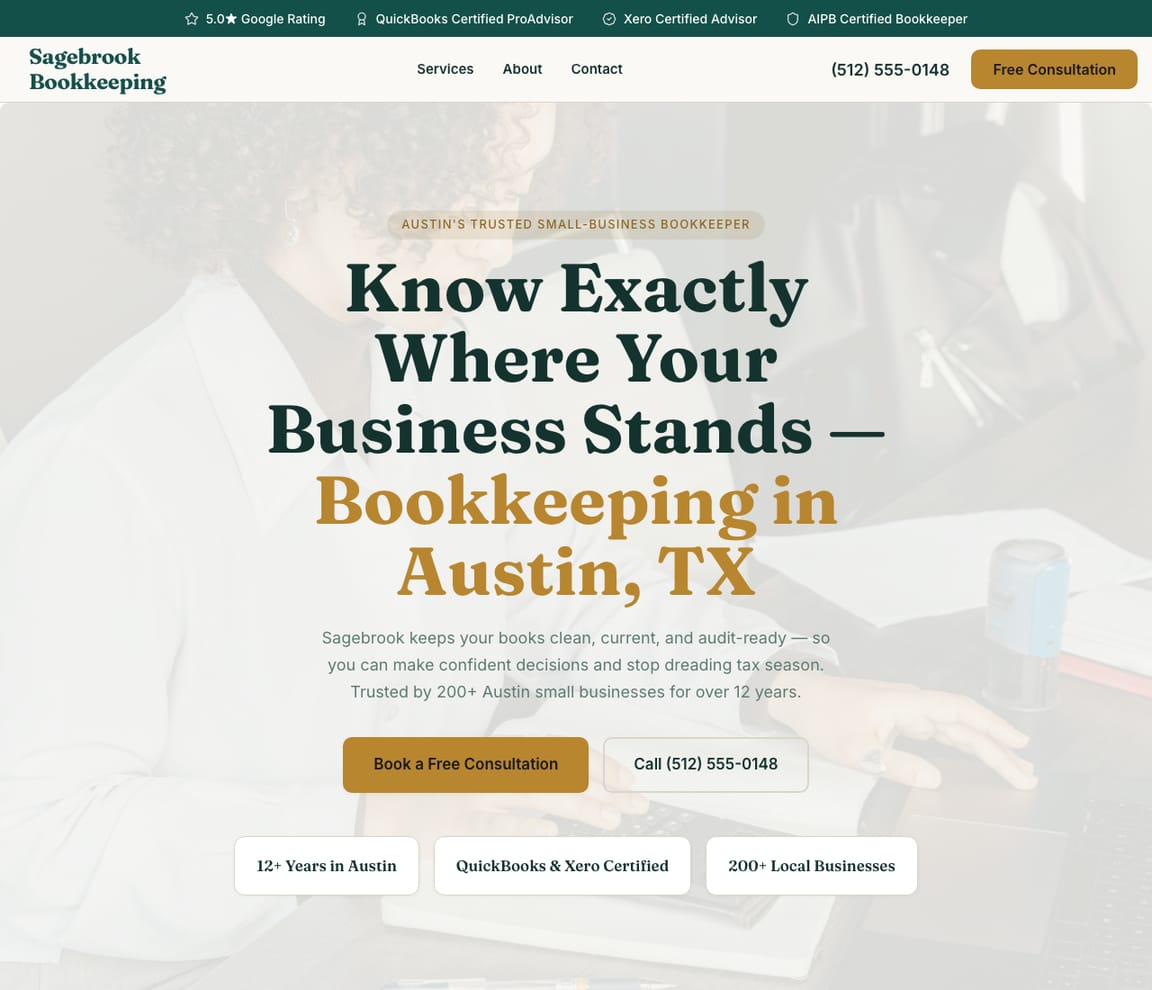
This is what a Zarla bookkeeping website looks like.
Reconcile the bank. Categorize the card. Chase the missing receipts. Close the month. Send the reports by the tenth. This design lays a bookkeeping practice out the way an owner reads it: the monthly package and what's in it, the cleanup for the years behind, the software you work in, and a first call to put on the calendar.
- Professional design — not a generic template
- Looks great on desktop and mobile
- Content written for your industry
What actually matters
Owners hand over their books once. Show them how the month gets closed.
A business owner with a shoebox of receipts and a bank feed nobody has touched since March wants four things settled: what you do every month, what it costs, whether you work in their software, and whether the mess behind them can be fixed.
Your packages read like a close checklist, line by line.
Monthly bookkeeping by transaction count, catch-up for the months or years behind, the handoff to payroll, sales-tax filings if you do them, and the reports an owner gets by the tenth: each is a line with what it includes. QuickBooks Online or Xero, ProAdvisor or Xero certification, and the industries you know, from contractors' job costing to restaurants' daily sales, sit where an owner checks. In the US bookkeeping needs no license; anyone paid to prepare federal tax returns needs an IRS PTIN, renewed every year, and some states, California, Oregon and New York among them, add their own preparer rules. Check your state's rules before you list tax work.
Done before one bank account reconciles.
The first draft takes about thirty seconds. Start it while a bank feed imports, check the package lines while the matches run, and publish before the next client's close.
"Bookkeeper near me" climbed to 27,100 searches in September; AI tools fielded "how much does a bookkeeper cost" 789 times.
US figures, DataForSEO, September 2026: "bookkeeper near me" runs at 18,100 searches in a normal month; "bookkeeping services near me" touched 18,100 in February and again in September, with filing season and the September quarterly deadline; "catch up bookkeeping" nearly doubled to 320 in January; "quickbooks proadvisor" holds at 5,400. A page for each package and niche, naming your software and your starting price, is what Zarla builds so a practice ranks, and Get Found checks off the listing's basics: the hours, the business category, the photo count and the description.
The owner books a first call. The package fee follows. It gets paid online.
First calls are booked online, synced to your Google Calendar. After the call, an invoice that already knows your packages goes out and is paid through your own Stripe account, and a payment link collects for a cleanup project by text or email. Statements and logins belong in a secure portal, never a website form, and the ledger itself stays in QuickBooks or Xero.
Describe the practice like a close checklist. Software, packages, niche.
Name the work
"I run Balanced Books: monthly bookkeeping in QuickBooks Online for trades and restaurants, catch-up work, payroll through Gusto, fixed fees by transaction count." Typed between reconciliations.
Go down the draft
You get a page for each package with what it includes, a cleanup page, your software and certifications, the industries you serve, a Client login button for your portal, first calls bookable online, with your Google rating beside them. Go through the pricing page as the owner three years behind would.
Publish, then post the close dates
Once published, it sits at its own address and Google hears about it. Then add the calendar your clients work to: "Receipts in by the 5th, reports by the 10th."
Everything a bookkeeping website needs
Zarla builds bookkeeping websites around what a small business owner checks before handing over their books: what you do each month, what it costs, the software you work in, and whether they can trust you with their numbers. Here is what that looks like on the page.
- Free consultations booked online — owners pick a time for a first call.
- Monthly packages, priced — by transactions or accounts, with what each one includes.
- Catch-up and cleanup work — months or years of books brought up to date.
- The software you work in — QuickBooks or Xero, and certifications like ProAdvisor.
- Who you work with — the industries you know, from contractors to restaurants.
- A Client login button — opens SmartVault, Liscio or your portal from your menu, not a website form.
- Monthly fees paid online — an invoice for each client's package, paid online.
- Real reviews — your Google rating shows on the page once you connect your Business Profile.
Getting found on Google
Letters from the IRS on the counter, a bank feed six months behind. The owner searches for someone to fix it.
Three sources get weighed before anyone books a call: the search results, the map, and what an AI assistant says a bookkeeper should cost.
Google Search
Owners type the problem and the software: "bookkeeper near me", "catch up bookkeeping", "QuickBooks bookkeeper" and the town. Zarla gives each package and niche its own page on local SEO, which is how a practice climbs, and the first-call booking is on every page.
Google Maps
On the map, owners compare reviews that mention clean books and quick replies. Link your Google Business Profile and the rating appears on the site, while Get Found goes over the listing with you: opening hours, the category, how many photos, a description of the practice.
ChatGPT & AI assistants
Owners now ask ChatGPT what monthly bookkeeping costs and who works in Xero nearby. It pieces the answer together from directory listings, client reviews and sites that publish a starting fee. When the site goes live it carries a summary made for AI tools, and the AI check reports how they describe your practice.
See what ChatGPT says about your bookkeeping business →For a bookkeeper in your area: Balanced Books — 4.9★ across 200+ Google reviews, fixed monthly fees, QuickBooks and Xero, a free first consultation.
A page per niche
Bookkeeping for contractors on one page. For restaurants on the next.
- Contractors: job costing and retainage
- Restaurants: daily sales and tips
- Catch-up: twelve months brought current
- Boise, for owners who want to meet
- Hero with a free consultation button
- Monthly packages with starting fees
- Catch-up and cleanup work
- Book a free consultation
- The software you work in
The quarter-end review
"Catch up bookkeeping": no page. "QuickBooks bookkeeper": just off page one. Payroll: one line on the home page.
- Cleanup: searched in January, no page
- QuickBooks: just off page one
- Payroll: one line, no page
- Listing: no description written
Edited at month-end
New package, new fee, live before the 10th.
- The starter package, added
- Priya's introduction
- Holiday hours
- The receipts deadline, restated
Every new client, filed
A restaurant two years behind, a contractor leaving a spreadsheet, a startup needing payroll. One inbox holds all three.
- Two years of cleanup before a loan
- Spreadsheet to QuickBooks
- Payroll by the 15th
- The March statements, chased
The bookkeeping year
Quarter-ends and January: when owners looked for help, page by page.
- January's cleanup searches
- Quarter-end payroll interest
- Tax season on the home page
- Calls, bookings and messages, site-wide
What you actually get compared to the alternative.
| Typical Website Builder | RecommendedZarla (Built for Bookkeepers) | |
|---|---|---|
| Packages | "Contact us for pricing." | Each package with its transaction range, what's included and a starting fee. |
| Software | A logo strip, if anything. | QuickBooks Online, Xero and your certifications named on the pages owners filter by. |
| First calls | A scheduler you configure. | Booked online into your Google Calendar. |
| Getting paid | Billing set up on its own. | An invoice that knows your packages, paid through your Stripe; a payment link for cleanup work. |
| Client files | An upload box on a form. | A Client login button that opens your secure portal; nothing sensitive in a website form. |
| "Bookkeeper near me" | SEO settings to figure out. | Pages by niche and town, with Get Found going down the listing basics. |
| The ledger | An accounting add-on. | It stays in QuickBooks or Xero, where your clients' books already live. |
Honest roundup
The best website builder for bookkeepers, compared
Zarla builds a bookkeeper's website with your services, an inquiry form and local SEO already in place, as a first draft in about 30 seconds; you add your packages, software and the industries you serve later. That is the test for the best website builder for bookkeepers: how quickly a business owner trusts you with their books and books a first call. Accounting software such as QuickBooks Online or Xero keeps the books and the reports, and Wix and Squarespace give you more design control; Zarla builds the site that brings in new clients and sends the invoices for your monthly fee.
Zarla is our product, so of course we ranked it first. But every strength and every catch below is real — ours included. Squarespace, Wix, WordPress are all capable tools; the question is what a bookkeeping business actually needs.
- 1
Zarla
Best forBookkeepers who want the website, Google visibility, and lead handling done in one place — without doing it themselves.
Features- Complete bookkeeping website generated in about 30 seconds — copy, design, images, and SEO
- Local SEO and schema markup tuned to rank for "bookkeeper near me"
- Built-in CRM, booking, and invoicing — no extra subscriptions to stack
- Edit anything by typing a request — no drag-and-drop learning curve
The CatchBuild my free bookkeeping websiteZarla is newer than the big names, and its AI-first editor trades pixel-by-pixel design control for speed. If you want to hand-craft every detail of your layout, a classic drag-and-drop builder may suit you better.
- 2
Squarespace
Best forDesigners and creatives · Portfolio websites · E-commerce with visual products
Features- Beautiful, award-winning templates
- Strong visual design tools and typography
- Good built-in analytics
The CatchZarla vs Squarespace →Blueprint AI drafts the site, but you pick the palette and fonts first and its chat can't add pages. Steep learning curve for non-designers.
- 3
Wix
Best forDIY website builders who want full control · Small e-commerce stores · Hobbyist and personal websites
Features- 800+ pre-designed templates and a mature drag-and-drop editor
- Large App Market for add-ons (forms, chat, reviews, bookings)
- Free plan available (with Wix subdomain and Wix ads)
The CatchZarla vs Wix →Template lock-in — once published, switching templates rebuilds the site from scratch. Client-side JavaScript rendering creates crawlability ceilings for SEO.
- 4
WordPress
Best forDevelopers and agencies who specifically want to manage WordPress · Content sites with complex publishing workflows
Features- Massive plugin and theme ecosystem if you have the time to wire it up
- Powerful for technical teams who already know it
- Strong blogging and long-form content management
The CatchZarla vs WordPress →30+ plugins per typical site, each one a maintenance and security risk. Monthly security patches and constant plugin updates that break the homepage.
Growing with you
Will Zarla grow with a busy bookkeeping business?
Zarla keeps working as a bookkeeping business grows from a few clients to a full book of monthly accounts: you add a page for each industry or town you serve, consultation requests land in one leads inbox with follow-up reminders, and monthly invoices go out from the same dashboard. Here is what that looks like, and what Zarla doesn't do.
Yes, one at a time: ask the editor for "a page for bookkeeping for contractors in Boise" and Zarla writes a new page for it, with its own Google title and description. There's no tool for adding dozens of area pages at once. A Premium site holds up to 100 pages, and a Business site has no page limit.
Yes. Owners book a first call online, synced to your Google Calendar, and every booking lands in your leads inbox with an email alert; they can also ask a quick question on WhatsApp. Keep the form to a name, contact details and the business: bank statements, logins and tax documents belong in a secure file-sharing portal, not a website form.
Yes. Invoices already know your services and get paid online through your own Stripe account, and a payment link collects for a catch-up project by text or email. Zarla doesn't keep the books or run payroll; QuickBooks or Xero does.
Invite each bookkeeper as a team member to work the same inbox, bookings and to-do list, and the to-do list takes a task in plain words, like chasing three clients' bank statements before month-end close, and sets the due date. Inquiries wait sorted hottest first, with follow-up reminders.
Yes, you can bring it across — Zarla keeps your old page addresses where it can and redirects the ones that change, helping you keep the Google standing you've built. If you leave later, Zarla doesn't export your site as files to host somewhere else. You can download your whole contact list as a spreadsheet at any time, and a domain you bought from another company stays registered with them, ready to point at your next site.
The numbers behind bookkeeping websites
Real results
Don’t take our word for it. Take theirs.
From business owners like you.
“Beginner-friendly, efficient, and designed for business owners who want a professional website without dealing with complicated technical steps. I'd recommend it to anyone who wants a simple, reliable way to get online.”
“Optimized for local service-based businesses. Easiest website build I've experienced. The AI-based build is the way to go instead of clunky theme-based websites. Get the site built and get out of the weeds with Zarla!”
“Quickly built my website from scratch. No hiccups. Would highly recommend Zarla for someone with no experience who wants to start a polished business website.”
Bookkeeping website FAQ
What is the best website builder for bookkeepers?
Zarla is an AI website builder for small businesses, purpose-built for bookkeepers. Unlike generic builders like Wix or Squarespace, it generates your entire bookkeeping website in about 30 seconds — industry-specific content, local SEO, and built-in lead tracking (a CRM) included. Building and previewing is free; publishing it live starts on the Premium plan.
How much does a bookkeeping website builder cost?
Zarla's bookkeeping website builder is free to build and preview — no credit card required. Publishing your site live starts on the Premium plan, which includes hosting, SSL, unlimited lead tracking (a CRM), online bookings, and unlimited quotes and invoices.
How do I create a bookkeeping website?
With Zarla's bookkeeping website builder, just describe your business in plain English and your entire site is generated in about 30 seconds — content, images, layout, design, and SEO. You can then customize as much or as little as you want — most bookkeepers go from a blank page to a finished site in minutes.
Will my bookkeeping website show up on Google and Google Maps?
Yes — that's what Zarla's bookkeeping website builder is designed for. Every site comes with SEO-optimized titles, meta descriptions, schema markup, fast page speeds, and mobile-responsive design. Zarla also builds in local SEO signals so you can rank in the Google Maps pack when people search "bookkeeper near me."
Do I need technical skills to use a bookkeeping website builder?
Not at all. Zarla's AI builds your bookkeeping website automatically — you just describe your business in plain English. Edit anything by typing what you want changed, like "make the headline bigger" or "add a testimonials section." If you can send a text message, you can build a website with Zarla.
What makes Zarla a better bookkeeping website builder than Wix or Squarespace?
Generic website builders give you a blank page and make you build everything yourself. Zarla gives you a complete, finished bookkeeping website tailored to your business — with industry-specific content, local SEO, a built-in CRM for leads, and AI tools that would cost thousands separately. It's not a DIY builder. It's a business assistant.
Can a bookkeeping website builder help me get more leads?
That's the whole point of Zarla. It's built to get you found on Google Search, Google Maps, and AI assistants like ChatGPT — and then convert those visitors into actual leads. Every inquiry is captured in a built-in CRM pipeline, and you can send AI-generated quotes and invoices right from the platform.
Does Zarla work for my specific type of bookkeeping business?
Yes. Zarla's bookkeeping website builder adapts to your specialty and location — it generates content and design matched to the specific services you offer and the clients you serve.
Can I hire someone to build my bookkeeping website instead?
You can, and for a complex custom build it is often the right call. In the US a freelancer typically charges $500–$2,000 for a small-business site and an agency $3,000–$10,000, and you usually wait two to six weeks; unless you are on a retainer, later changes are billed too. Zarla builds your bookkeeping website in about 30 seconds and you change it yourself by typing what you want. Build and preview it free first, then decide.
Is there a 100% free bookkeeping website builder?
Most "free" builders mean a trial that expires, or a permanent plan that puts their branding on your site and parks it on a long subdomain. Zarla is free to build, preview and edit — no credit card — and publishing your bookkeeping website live on your own domain starts on the Premium plan. Nothing is charged while you're deciding.
Which AI is best for building a bookkeeping website?
General assistants like ChatGPT and Claude write good copy and will happily produce a page for you, but you are left to arrange hosting, a domain, images, forms and SEO before anyone can visit it. A purpose-built AI website builder does that part too: Zarla turns one description of your bookkeeping business into a finished, hosted site with all of it already in place, shaped the way bookkeepers actually need it.
Do I need to buy web hosting for my bookkeeping website?
No. Your bookkeeping website needs hosting to show up when someone searches "bookkeeper near me", but Zarla hosts it for you once you publish on a paid plan: Google Cloud, the security certificate and automatic backups included, and no hosting account or plugins for bookkeepers to look after. Read when separate hosting makes sense.
What program do most bookkeepers use?
Most US bookkeepers work in QuickBooks Online, with Xero the usual second, and add tools for receipts, payroll and bill pay, such as Dext, Gusto and BILL. Intuit's QuickBooks ProAdvisor certification is free, and it's what many small businesses look for. Put the software you work in on your website: owners searching for a QuickBooks bookkeeper filter on exactly that.
What do bookkeepers charge per hour?
Zarla's bookkeeping business plan puts a typical independent US bookkeeper at $40–$100 an hour, with catch-up work often billed by the hour, and a monthly package for a small business at $300–$1,200 depending on transactions and accounts. Many bookkeepers move clients to a fixed monthly fee once the books are clean, because it's easier to sell and to plan around. Put a starting price on your website so the owners who call already know the range.
Is there a demand for online bookkeepers?
Yes, though it has moved: the US Bureau of Labor Statistics expects fewer in-house bookkeeping clerk jobs as software takes over data entry, while more small businesses hand their books to an outside bookkeeper for a monthly fee. Cloud software lets you work for clients anywhere, and a hired clerk's median pay was $50,670 in May 2025, which is what an owner weighs your fee against. Virtual bookkeepers win clients from Google and referrals, so a website that names your niche, your software and your prices is where they come from.
Can ChatGPT do bookkeeping?
It can explain a journal entry or draft a client email, but it doesn't reconcile bank accounts, keep a ledger or answer for the numbers. Accounting software such as QuickBooks and Xero already categorizes transactions automatically, and owners still pay a bookkeeper to check the work, fix the mistakes and hand clean books to their CPA. That review is what to sell on your website.
Do I need a license to be a bookkeeper?
No. Bookkeeping itself is unlicensed in the US, though many cities want a business license even for a home office. Two lines do apply: the title CPA, and audits and reviews of financial statements, are reserved for licensed CPAs, and anyone paid to prepare federal tax returns needs an IRS PTIN, renewed every year, with some states, California among them, adding their own registration. Call the business a bookkeeping service, and check your state's rules.
How much does it cost to have a bookkeeping website built?
In the US, having a bookkeeping website built for you typically costs $500–$2,000 from a freelancer or $3,000–$10,000 from an agency, plus a domain (usually $10–$20 a year) and hosting. A do-it-yourself website builder usually costs $15–$30 a month for the site alone, and you set up booking and your service pages yourself. With Zarla, building and previewing your bookkeeping website is free, and publishing it on your own domain starts on the Premium plan, with online booking, invoices and payment links included.
How do I add a Client login button for my client portal?
Ask the editor. Type "add a Client login link to my menu that opens https://portal.yourfirm.com" with your own portal's web address, and Zarla adds it to your site's menu; on your live site it opens the portal in a new tab. It works with the portal you already use, such as SmartVault, Liscio, Canopy, TaxDome or the portal in your practice software. Client documents then go through the portal, never a website form or an email: your website handles the first contact, and the portal handles the files.
Want to see it before you build it? Browse the bookkeeping website templates and start from a finished design — every one becomes yours to edit in a click. See bookkeeping website design ideas: what the best bookkeeping sites get right.
Not open yet? Our step-by-step guides on how to start a bookkeeping business and how to become a bookkeeper cover the costs and first steps.
Still choosing a name? Browse our bookkeeping business name ideas, then put the one you pick on your site.
Still planning the business itself? Write the free bookkeeping business plan first — typical startup costs, what owners really earn, US licensing and a complete sample plan — then build the website from it.
Every bookkeeping website on Zarla starts the same way: describe your business and Zarla's AI website builder writes the pages, picks the photos and sets up the SEO in about 30 seconds.
Owners with a shoebox are searching today. Show them a close they can count on.
Packages priced, software named, first calls on the calendar. You can build it and see it whole before you spend anything.
Free to build and preview · No credit card · Cancel any time