The church website builder that grows your support.
The AI website builder for churches — built to help visitors find you on Google and ChatGPT.
Already have a website? Import it free →
Zarla at a glance
Zarla is an AI website builder for small businesses, built for churches — parishes, ministries, and congregations. Describe your business and Zarla generates a complete church website in about 30 seconds — copy, design, images, and SEO.
- Forms — first-time visitors plan a visit and volunteers sign up straight from the site.
- WhatsApp chat button — visitors ask about service times or a first visit.
- Contact forms with built-in lead tracking (a CRM) — every inquiry lands in one place, ready to follow up.
- SEO on every page: titles, meta descriptions, schema markup, and fast mobile pages.
We scored five website builders for churches the same way, on nine tests worth 18 points: Wix 15, Squarespace 13, WordPress.com 13, Zarla 13, GoDaddy 12. On those scores Wix takes first place and Zarla is second. Zarla is our own product.
Building and previewing a church website with Zarla is free; publishing it live starts on the Premium plan. This page covers the Zarla church website builder — what's included, how it works, and what it costs to start.
See it in action
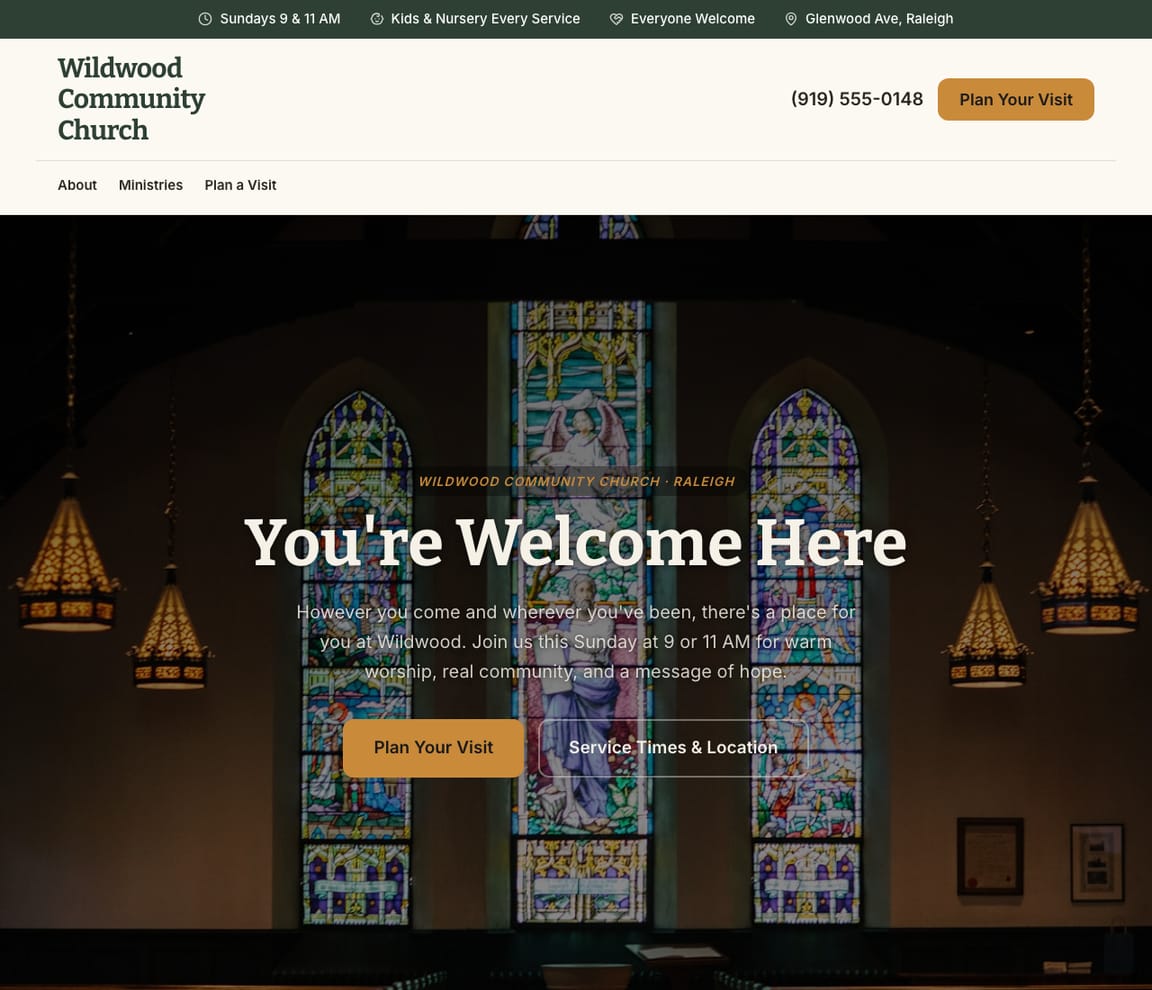
This is what a Zarla church website looks like.
Built by AI in about 30 seconds. Industry-specific content, professional design, mobile-ready, and SEO-optimized from the start. Not a blank template — a complete, finished website.
- Professional design — not a generic template
- Looks great on desktop and mobile
- Content written for your industry
What actually matters
Most church websites don't get visitors. Here's why Zarla does.
Zarla isn't just another website builder. It's built specifically for small businesses like yours.
It sounds like you wrote it — because it knows your church.
Most website builders give you a blank page and say "fill this in." Zarla reads your church, your location, and the kind of visitors you want — then writes everything for you. You'd pay a copywriter $500 for that. You get it free.
Up and running before your coffee goes cold.
A web designer takes 4–6 weeks and sends you an invoice for thousands. A DIY builder takes a weekend and still looks half-finished. Zarla takes about 30 seconds. The moment you publish, Google starts finding you.
Your visitors are searching. They just can't find you yet.
When someone needs a church, they don't ask around — they search Google, check Maps, sometimes even ask ChatGPT. If you're not showing up, they're calling whoever is. Zarla is built to get you in front of them across all three.
Your website, your supporters, your events. All here.
Most tools solve one thing and send you somewhere else for everything else. Zarla has your website, your supporter inbox, your SEO health check, and your events and updates — all in one place. Less logging in. More time for your mission.
Honestly, it's almost embarrassingly simple.
Tell it about your business
"I run Wildwood Community Church — a neighborhood church with Sunday services and a kids ministry. Sunday services, a kids ministry, small groups, and a page for first-time visitors." Just talk naturally — no tech needed.
Zarla builds it for you
In about 30 seconds, you've got a complete church website — real content written for your church, a professional design, and already set up to get found on Google. Not a template you fill in. A finished website.
Hit publish. You're live.
Your site goes live on a real web address. Google gets notified straight away. Change anything anytime — just ask Zarla from your phone.
Everything a church website needs
Zarla builds church websites around what a first-time visitor checks before Sunday: when services are, where to park and what to expect, what there is for their kids, and how to get connected. Here is what that looks like on the page.
- Service times and location — on the first screen, with parking and the door to use.
- A plan-your-visit form — first-time visitors say they're coming, and someone greets them.
- What to expect — how long the service is, what to wear and the music.
- Kids and youth ministry — check-in, safety and what happens in the kids' rooms.
- Sermons, playing on the page — this week's message from YouTube or Vimeo.
- Your giving link — paste your Tithe.ly, Pushpay or PayPal giving link into the site.
- Volunteer and small-group sign-ups — every sign-up lands in your inbox.
- Events and announcements — updated by typing what's new, like Wednesday's potluck.
Getting found on Google
Right now, someone is searching for a church near them.
If you're not showing up, that support goes to whoever is. Zarla is built to get you found in the three places people actually look — Google Search, Google Maps, and AI tools like ChatGPT.
Google Search
When someone types "church near me" — your site shows up. Zarla handles all the technical SEO behind the scenes so you don't have to.
Google Maps
The three businesses that show up on the map when someone searches locally. That's where the phone calls come from. Zarla is built to get you there.
ChatGPT & AI assistants
More and more people ask AI tools "who's the best church near me?" Those answers come from Google Maps, reviews and local pages — exactly what Get Found works on. Your Zarla site ships readable by AI assistants; Zarla works on the rest with you.
For a church in your area: Wildwood Community Church — 4.9★ across 200+ Google reviews, Sunday services, a kids ministry, welcoming to first-time visitors.
AI page builder
Your web designer. On call. For free.
- One page per neighborhood or service = more chances to show up on Google
- Each page is written specifically for that search — not copy-pasted
- The layout, sections, and content are all chosen to rank for that topic
- Most customers go from 1 page to 10+ within their first week
- Hero with students at youth night
- Wednesday night schedule
- Leaders, and how we keep kids safe
- A sign-up form for parents
- Summer camp and trips
SEO without the consultant fees
Tells you exactly what to fix. In plain English.
- Shows you exactly what searches you're close to ranking for
- Tells you what your top competitor is doing that you're not
- Every suggestion is specific, plain English, and actionable today
- Tracks your rankings each week so you can see it working
Chat-based editing
Change anything by typing what you want.
- Works from your phone — edit on the go between jobs
- Add pages, change designs, update content — all by chat
- AI understands your intent — no exact wording needed
- Suggested actions make common changes one-tap easy
Built-in inquiry management
Every inquiry in one place. Nothing falls through.
- See every inquiry from your website, Google, and social in one inbox
- AI-written updates and social posts — ready to share
- Track which inquiries turn into visitors so you know what's working
- Get an email the moment a new inquiry comes in, on your phone or laptop
Your Google data, finally making sense
See exactly who's finding you — and who nearly did.
- See the exact searches people use to find (and not find) you
- Your Google Business listing — rating, reviews and what it's missing — all in one place
- Zarla flags the quick wins: what to add, what to fix, what's working
- A site report lands in your inbox. Read it in 2 minutes.
What you actually get compared to the alternative.
| Typical Website Builder | RecommendedZarla (Built for Churches) | |
|---|---|---|
| Getting online | Hours of dragging and dropping. You write everything yourself. | Describe your church business. Live website in about 30 seconds. |
| SEO | Basic meta fields you fill in yourself. No local SEO guidance. | Auto-optimized titles, schema, and local SEO — zero setup required. |
| Google Maps | Not addressed. You're on your own for local search. | Structured data and local signals built in. Designed to rank in the Maps pack. |
| AI content | Generic AI that doesn't understand churches or their visitors. | Industry-specific copy trained on church businesses — it sounds like you. |
| Lead capture | A contact form. Inquiries go to your email and get lost. | Every inquiry lands in a built-in CRM pipeline. Nothing falls through. |
| Business tools | Website only. Donation pages and sign-ups are separate tools. | Volunteer sign-ups, event inquiries, and updates — built in, with your giving link one paste away. |
| Making changes | Log into a drag-and-drop editor. Find the right block. Hope for the best. | Type what you want changed. AI updates it in seconds. |
Honest roundup
Wix, Squarespace, WordPress.com and Zarla for churches, scored
Zarla builds a church's website with your service times, ministries, a contact form and local SEO already in place, as a first draft in about 30 seconds; you add sermons, events and your giving link later. Church platforms such as Tithe.ly, Subsplash and The Church Co offer websites with online giving and sermon tools, church management software such as Planning Center runs check-in and groups; Zarla builds the church's own site and keeps every visitor and volunteer sign-up in one inbox.
Zarla is our product. This order comes from our full comparison, which scores every builder on the same 9 tests, Zarla included, and gives each one a catch.
Best website builders for churches: every score, every catch →
- 1
Wix
Best forOwners who care most about giving, events and sermons on the page.
Features- An AI builder that writes your pages from a description
- Aria, an AI agent in the Harmony editor that edits the site and adds pages by chat
- Wix Bookings with online payments and deposits
- Invoices and a contacts list built in
The CatchZarla vs Wix →Bookings need the Core plan rather than the cheapest one, and pages for each town you serve are yours to write.
- 2
Squarespace
Best forGood if polished design matters most and you don't mind adding a separate booking tool.
Features- Blueprint AI writes a multi-page starting site
- Design-led templates
- Invoices and online payments on every plan
- Acuity Scheduling for appointments, including repeat bookings
The CatchZarla vs Squarespace →Online booking is a second subscription, Acuity Scheduling, on top of the website plan, and it's managed in a different place.
- 2
WordPress.com
Best forFor owners who want full control and don't mind choosing and looking after plugins.
Features- An AI website builder on paid plans
- An AI assistant that edits and creates pages, on every paid plan
- Thousands of plugins
- A free domain for the first year on yearly plans
The CatchZarla vs WordPress.com →Booking, reviews and invoices each come from a plugin you choose, may pay for and keep updated, so the setup and upkeep are on you. Photo uploads on forms need the Business plan.
- 2
Zarla
Best forOwners who care most about getting found on Google.
Features- Describe your church in a sentence and Zarla writes a complete first draft in about 30 seconds
- Service times, ministries and a plan-your-visit form on the first draft
- Sermon videos play on the page
- Type changes in plain words, or ask for a new page, and the site updates
The CatchBuild my free church websiteThere's no giving form, no events section and no audio player yet: a gift is a payment link for a set amount or your giving platform embedded, events are typed into a section, and sermon audio plays from a podcast embed while videos play on the page. A church's first draft has no town pages, and Zarla is newer than the big names.
Growing with you
Will Zarla grow with a busy church?
Zarla keeps working as a church grows from one Sunday service to several ministries: you add a page for each ministry or event you want people to find, visitor and volunteer sign-ups land in one inbox with follow-up reminders, and updates go out from the same dashboard. Here is what that looks like, and what Zarla doesn't do.
Yes, one at a time: ask the editor for "a page for a middle school youth group in Franklin" and Zarla writes a new page for it, with its own Google title and description. There's no tool for adding dozens of area pages at once. A Premium site holds up to 100 pages, and a Business site has no page limit.
Yes, through the giving platform you already use: Zarla doesn't process donations itself, so paste your Tithe.ly, Pushpay or Planning Center Giving link or button into the site from the Custom Code box, and keep it one tap away on every page. Your giving platform handles recurring gifts and the year-end giving statements.
Yes. A video section plays this week's sermon from YouTube or Vimeo on the page, and you change events and announcements by typing what's new, like moving Wednesday's potluck to the fellowship hall. Zarla doesn't run check-in, member directories or small-group rosters; church management software such as Planning Center or Breeze does.
Every plan-your-visit form and volunteer sign-up lands in one inbox sorted hottest first, with follow-up reminders, so no first-time visitor waits for a welcome call, and the to-do list takes a task in plain words, like calling Sunday's first-time guests, and sets the due date. Your staff and ministry leaders can join as team members.
Yes, you can bring it across — Zarla keeps your old page addresses where it can and redirects the ones that change, helping you keep the Google standing you've built. If you leave later, Zarla doesn't export your site as files to host somewhere else. You can download your whole contact list as a spreadsheet at any time, and a domain you bought from another company stays registered with them, ready to point at your next site.
Real results
Don’t take our word for it. Take theirs.
From business owners like you.
“The simplicity of the platform made the experience enjoyable, and I set up my business website without any hassle.”
“It helped me get my logo and a private website for my clinic. It has taken my practice to the next level.”
“My website was completed in seconds — exactly what I wanted it to say. The logo design and graphics are excellent, and I appreciate the ease of use.”
Church website FAQ
What is the best website builder for churches?
We scored five website builders for churches the same way, on nine tests worth 18 points: Wix 15, Squarespace 13, WordPress.com 13, Zarla 13, GoDaddy 12. On those scores Wix takes first place and Zarla is second. See the best website builders for churches, with every score and each builder's catch. Zarla is an AI website builder for small businesses, purpose-built for churches: it generates your entire church website in about 30 seconds — industry-specific content, local SEO, and built-in lead tracking (a CRM) included. Building and previewing is free; publishing it live starts on the Premium plan.
How much does a church website builder cost?
Zarla's church website builder is free to build and preview — no credit card required. Publishing your site live starts on the Premium plan, which includes hosting, SSL, unlimited lead tracking (a CRM), online bookings, and AI-written updates and social posts.
How do I create a church website?
With Zarla's church website builder, just describe your business in plain English and your entire site is generated in about 30 seconds — content, images, layout, design, and SEO. You can then customize as much or as little as you want — most churches go from a blank page to a finished site in minutes.
Will my church website show up on Google and Google Maps?
Yes — that's what Zarla's church website builder is designed for. Every site comes with SEO-optimized titles, meta descriptions, schema markup, fast page speeds, and mobile-responsive design. Zarla also builds in local SEO signals so you can rank in the Google Maps pack when people search "church near me."
Do I need technical skills to use a church website builder?
Not at all. Zarla's AI builds your church website automatically — you just describe your business in plain English. Edit anything by typing what you want changed, like "make the headline bigger" or "add a testimonials section." If you can send a text message, you can build a website with Zarla.
How is Zarla different from Wix or Squarespace for churches?
On our scores for churches, Wix takes first place and Zarla is second. The difference is how you work: Zarla writes the whole church website from a sentence about your business and you change it by typing, with a leads inbox, invoices and payments in the same place; Wix and Squarespace suit owners who like building and fine-tuning the site themselves.
Can a church website builder help me get more supporters?
That's the whole point of Zarla. It's built to get you found on Google Search, Google Maps, and AI assistants like ChatGPT — and then turn those visitors into supporters. Every inquiry lands in a built-in inbox, and you can share updates and sign-ups right from the platform.
Does Zarla work for my specific type of church organization?
Yes. Zarla's church website builder adapts to your specialty and location — it generates content and design matched to the specific services you offer and the visitors you serve.
Can I hire someone to build my church website instead?
You can, and for a complex custom build it is often the right call. In the US a freelancer typically charges $500–$2,000 for a small-business site and an agency $3,000–$10,000, and you usually wait two to six weeks; unless you are on a retainer, later changes are billed too. Zarla builds your church website in about 30 seconds and you change it yourself by typing what you want. Build and preview it free first, then decide.
Is there a 100% free church website builder?
Most "free" builders mean a trial that expires, or a permanent plan that puts their branding on your site and parks it on a long subdomain. Zarla is free to build, preview and edit — no credit card — and publishing your church website live on your own domain starts on the Premium plan. Nothing is charged while you're deciding.
Which AI is best for building a church website?
General assistants like ChatGPT and Claude write good copy and will happily produce a page for you, but you are left to arrange hosting, a domain, images, forms and SEO before anyone can visit it. A purpose-built AI website builder does that part too: Zarla turns one description of your church business into a finished, hosted site with all of it already in place, shaped the way churches actually need it.
Do I need to buy web hosting for my church website?
No. Your church website needs hosting to show up when someone searches "church near me", but Zarla hosts it for you once you publish on a paid plan: Google Cloud, the security certificate and automatic backups included, and no hosting account or plugins for churches to look after. Read when separate hosting makes sense.
How much does it cost to have a church website built?
In the US, having a church website built for you typically costs $500–$2,000 from a freelancer or $3,000–$10,000 from an agency, plus a domain (usually $10–$20 a year) and hosting, and church platforms such as Tithe.ly or The Church Co charge a monthly fee for a site with their giving tools. A do-it-yourself website builder usually costs $15–$30 a month for the site alone, and you set up the forms and the sermon page yourself. With Zarla, building and previewing your church website is free, and publishing it on your own domain starts on the Premium plan, with forms and the inquiry inbox included.
What should a church website include?
Service times, your address and parking on the first screen, a plan-your-visit page that says what to expect, your kids and youth ministries, this week's sermon, your beliefs and staff, events and small groups, volunteer sign-ups, and a giving link. Zarla builds the pages and the forms for you, and you add sermons and events as you go.
How do I design a church website?
Start from the first-time visitor: put service times, the address and parking on the first screen, add a plan-your-visit page that says what to expect, make the kids ministry easy to find, use real pictures of your people instead of stock photos, and keep giving and this week's sermon one tap away on a phone. Zarla's church designs are finished starting points, and Zarla builds a full church site from one sentence in about 30 seconds; you change anything by typing what you want.
Want to see it before you build it? Browse the church website templates and start from a finished design — every one becomes yours to edit in a click. See church website design ideas: what the best church sites get right.
Shopping for a designer instead? See church website design by AI: sample designs, what web agencies charge, and what an agency does that AI doesn't.
Not open yet? Our step-by-step guide on how to start a church covers the costs and first steps.
Still planning the business itself? Write the free church business plan first — typical startup costs, what it takes to fund it, US licensing and a complete sample plan — then build the website from it.
Every church website on Zarla starts the same way: describe your business and Zarla's AI website builder writes the pages, picks the photos and sets up the SEO in about 30 seconds.
What's stopping you? Build it free.
Live in about 30 seconds. No card. No setup. If you don't love your church site, walk away — nothing to cancel.
Free to build and preview · No credit card · Cancel any time