The community group website builder that grows your membership.
The AI website builder for community groups — built to help members find you on Google and ChatGPT.
Free to build · No credit card · Pay when you publish
Zarla at a glance
Zarla is an AI website builder for small businesses, built for community groups — homeowners associations, neighborhood associations, and community organizations. Describe your business and Zarla generates a complete community group website in about 30 seconds — copy, design, images, and SEO.
- Forms — residents join, volunteer and send a request straight from the site.
- Event inquiry forms — residents ask about renting the clubhouse for a party from the website.
- Payment links — take dues or an event fee by link.
- WhatsApp chat button — residents ask about dues, the pool or a meeting by message.
- Contact forms with built-in lead tracking (a CRM) — every inquiry lands in one place, ready to follow up.
- SEO on every page: titles, meta descriptions, schema markup, and fast mobile pages.
Building and previewing a community group website with Zarla is free; publishing it live starts on the Premium plan. This page covers the Zarla community group website builder — what's included, how it works, and what it costs to start.
See it in action
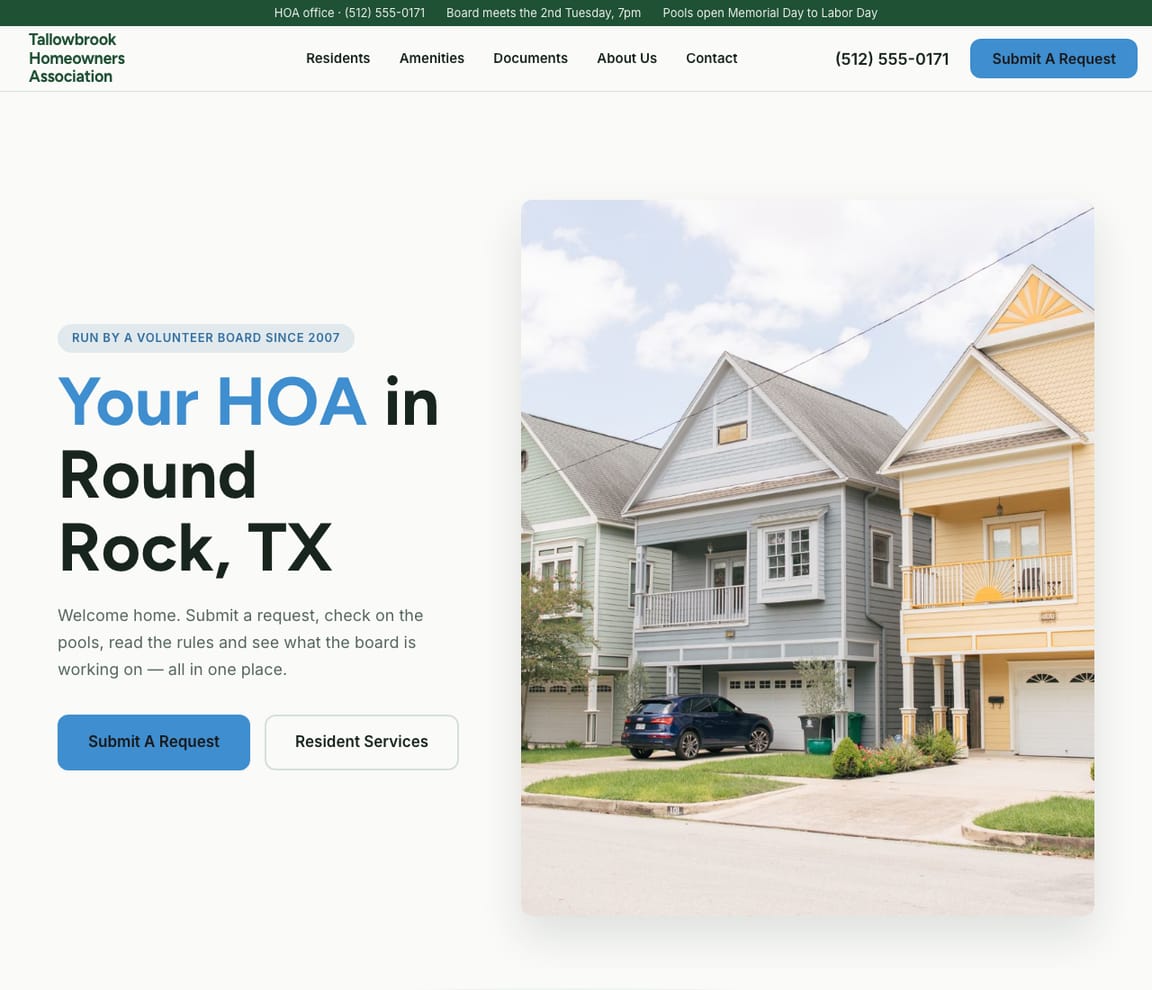
This is what a Zarla community group website looks like.
Put the next meeting, the pool hours and the person to call where a resident can find them in one scroll. Then the board, the rules and minutes, how to join or volunteer, and the clubhouse, each a page down.
- Professional design — not a generic template
- Looks great on desktop and mobile
- Content written for your industry
What actually matters
A resident needs three things from the group's site: when, where and who to ask.
The couple who closed on the house last week wants the pool hours and the dues amount. The neighbor who got a letter wants the rules. The one who wants to help wants a sign-up. Most group sites answer none of them; the information lives in one volunteer's email.
Meetings, dues, rules, the board: where a new resident looks for them.
Tell Zarla what the group is and the home page gets the next meeting and the events, the board page gets each member and how to reach them, one page links the rules, minutes and documents, and the join-or-volunteer form, the form residents use for requests and questions, and the clubhouse with how to ask about it each get a page a neighbor can forward.
Set up by the secretary in an evening, handed to the next board intact.
The pages and forms come written; the board adds the meeting dates, pastes the dues link and publishes. When the president steps down in April, the login, the inbox and the history stay with the group's own account, not in anyone's personal email, and the new board edits it by typing.
AI assistants fielded 3,447 questions about homeowners associations in October; Google took 22,200 searches.
DataForSEO, US, October 2026 for AI assistants and September 2026 for Google: 3,447 assistant questions about "homeowners association" in October, 367 about "neighborhood association" and 94 about "HOA website"; on Google, 22,200 searches a month for "homeowners association", 60,500 in April, 1,000 for "neighborhood association" and 880 for "HOA website". Both answer from what association sites publish, so a public page that states the rules and the dues plainly is what they find. What the clubhouse pin is missing, Get Found reports.
Dues by link, the clubhouse asked for, every request where the whole board can see it.
Whether it's a streetlight, a volunteer for the spring cleanup or the pool key, the board sees it in one shared inbox, alerted by email, with a reminder set. Dues and event fees go out as a payment link by text or email, paid through the group's own Stripe account. A party in the clubhouse is asked for through the event inquiry form, with the date and the kind of event; the board says yes. Dues renewals, violations and the members-only area stay in Buildium.
The secretary types three sentences. The board gets a site.
What the secretary types
"I run Tallowbrook Homeowners Association: a 340-home HOA in Tampa with a pool and a clubhouse, a board of five, quarterly meetings and a spring cleanup day." Typed by whoever drew the duty this year.
Check it against last year's questions
The next meeting and the events up top, the board and how to reach each member, rules and minutes on one page, the join form, the form for requests and the clubhouse. Hunt for the question that reached the president's inbox last year and has no answer here; name it and it's added.
Live the same evening, every time
Any board member with the login can post the annual meeting notice, close the pool for a week or change the landscaping schedule, and it's live the same evening. No one has to find the volunteer who built it.
Everything a community group website needs
Zarla builds community group websites around what a resident or a new member checks first: what the group does, what's coming up, how to join or get involved, and who to ask. Here is what that looks like on the page.
- What's coming up — meetings, events and work days, changed by typing.
- How to join or get involved — members and volunteers sign up straight from the site.
- Requests in one place — a resident request or a question lands in one inbox.
- Who runs the group — the board or committee, and how to reach them.
- Rules, minutes and documents — what members need to find, linked from one page.
- Clubhouse and amenity rentals — residents ask about a date for a party.
- Questions answered on WhatsApp — residents ask about dues, the pool or a meeting by message.
- Dues and event fees by link — paid by text or email, through your own Stripe account.
Getting found on Google
A new resident searches the neighborhood's name plus "HOA".
The assistants are the surprise: thousands of questions a month about homeowners associations, answered from whatever association sites state about rules and dues. Google, meanwhile, shows whichever site carries the name, often a property manager's portal or nothing, and the map shows the clubhouse pin only if someone claimed it.
Google Search
What does a new resident search? The name plus "HOA", the name plus "pool hours", the name plus "dues". All three should land on the group's own site, not a management company's login page; Zarla writes the pages with the group's name and the answers in them.
Google Maps
The clubhouse and the pool have a pin whether the board claimed it or not. Get Found reads the listing and reports the hours, the photos and the description it finds, and what it doesn't, so a resident finds the pool hours on the map and the rules on your site.
ChatGPT & AI assistants
An assistant asked "what are the fence rules in Tallowbrook" repeats what's published and nothing else. Rules and minutes on a public page, in plain text, are what it reads. Whether it says anything about the association yet is what Zarla's AI check will tell the board.
For a community group in your area: Tallowbrook Homeowners Association — 4.9★ across 200+ Google reviews, board meeting dates online, resident requests by form.
An example with a made-up business and illustrative figures. Yours will show your real details and reviews.
The group, page by page
Ask for a pool page and you get the hours, the key policy and the guest rule on it.
- Pool hours and rules
- Architectural review
- The clubhouse
- The spring cleanup
- Hero with the pool in summer
- Hours and the rules in plain words
- How residents rent the clubhouse
- Clubhouse rental inquiry form
- Photos of past events
Search, gap, fix
The pool hours are in a 2023 PDF. Residents are typing "Tallowbrook pool hours" into Google.
- Pool hours as text
- Rules in the words residents use
- A clubhouse page
- The Google listing's hours and photos, checked
An example for a made-up business: the positions are illustrative; the search volume is a real monthly figure.
No webmaster needed
The pool closes Tuesday for repairs. Residents read it Monday night.
- A pool closure
- The annual meeting notice
- A new board member
- This year's dues amount
The board's shared inbox
The streetlight, the pool key and the cleanup volunteer, in the inbox the whole board can see.
- Resident requests
- Cleanup volunteers
- Clubhouse inquiries
- The whole board, one inbox
An example inbox for a made-up business: the names and figures are illustrative.
The association's year, in numbers
Does anyone read the site? Connect the Google account and the annual meeting gets a chart.
- The dues page in January
- The pool page in May
- Minutes after a meeting
- Requests, for the whole site
An example for a made-up business: the figures are illustrative; yours come from your own Google account.
What you actually get compared to the alternative.
| Typical Website Builder | RecommendedZarla (Built for Community groups) | |
|---|---|---|
| Meetings and events | A calendar widget someone has to maintain. | Dates on the home page, changed by typing a sentence. |
| Rules, minutes, documents | Attachments in an email thread. | Linked from one page every resident can find. |
| Joining and volunteering | The same contact form for everything. | A form on the site, into one inbox the board shares. |
| Dues and event fees | A standard payment form. | A payment link by text or email, through the group's own Stripe account. |
| The clubhouse | A note through the contact form. | An event inquiry form with the date and the kind of event; the board confirms. |
| When the board changes | Shared logins. | Team member logins under the group's own account; the inbox and the history stay put. |
| The group's name on Google | A property manager's portal, or nothing. | The answers, under the group's own name. |
Honest roundup
The best website builder for community groups, compared
Zarla builds a community group's website with your events, a contact form and SEO already in place, as a first draft in about 30 seconds; you add your board, documents and how to join later. That is the test for the best website builder for community groups: how quickly a resident finds the next meeting and the person to ask. Community platforms such as Mighty Networks and Circle run forums, member logins and paid memberships, HOA software such as Buildium runs dues and violations, and Wix and Squarespace give you more design control; Zarla builds the group's own public site, with every request in one inbox.
Zarla is our product, so of course we ranked it first. But every strength and every catch below is real — ours included. Squarespace, Wix, GoDaddy are all capable tools; the question is what a community group business actually needs.
- 1
Zarla
Best forCommunity groups who want the website, Google visibility, and community outreach done in one place — without doing it themselves.
Features- Complete community group website generated in about 30 seconds — copy, design, images, and SEO
- Local SEO and schema markup tuned to rank for "community group near me"
- Built-in contact forms, sign-ups, and updates — no extra tools to stack
- Edit anything by typing a request — no drag-and-drop learning curve
The CatchBuild my free community group websiteZarla is newer than the big names, and its AI-first editor trades pixel-by-pixel design control for speed. If you want to hand-craft every detail of your layout, a classic drag-and-drop builder may suit you better.
- 2
Squarespace
Best forDesigners and creatives · Portfolio websites · E-commerce with visual products
Features- Beautiful, award-winning templates
- Strong visual design tools and typography
- Good built-in analytics
The CatchZarla vs Squarespace →Blueprint AI drafts the site, but you pick the palette and fonts first and its chat can't add pages. Steep learning curve for non-designers.
- 3
Wix
Best forDIY website builders who want full control · Small e-commerce stores · Hobbyist and personal websites
Features- 800+ pre-designed templates and a mature drag-and-drop editor
- Large App Market for add-ons (forms, chat, reviews, bookings)
- Free plan available (with Wix subdomain and Wix ads)
The CatchZarla vs Wix →Template lock-in — once published, switching templates rebuilds the site from scratch. Client-side JavaScript rendering creates crawlability ceilings for SEO.
- 4
GoDaddy
Best forPeople who already have a GoDaddy domain · Very simple one-page websites · Email marketing for small businesses
Features- Simple, guided setup process
- Bundled domain + hosting pricing
- Good email marketing integration
The CatchZarla vs GoDaddy →Very limited design customization. Templates look generic and dated.
Growing with you
Will Zarla grow with a busy community group?
Zarla keeps working as a community group grows from a few neighbors to a board, committees and a full calendar: you add a page for each program and neighborhood you want to be found for, requests and sign-ups land in one inbox with follow-up reminders, and your board works from the same dashboard. Here is what that looks like, and what Zarla doesn't do.
Yes, one at a time: ask the editor for "a page for the community garden in Tampa" and Zarla writes a new page for it, with its own Google title and description. There's no tool for adding dozens of area pages at once. A Premium site holds up to 100 pages, and a Business site has no page limit.
Yes. Ask the editor for a membership form, a volunteer sign-up or a resident request form with the questions you need, and every submission lands in your inbox with an email alert, sorted hottest first with follow-up reminders; you can send a payment link for dues or an event fee by text or email. Zarla doesn't run dues renewals, member logins or a members-only area; HOA or membership software does, and your site can link to it.
Yes. The event inquiry form asks about the date and the kind of event, and every inquiry lands in your inbox with an email alert. The form doesn't hold the date or take payment; once you've confirmed, send a payment link for the deposit.
Invite the board and committee chairs as team members to work the same inbox and to-do list, where a task typed in plain words, like posting the annual meeting notice by the 1st, gets its due date; when someone steps down, the inbox and the history stay with the group, not in one person's email. The Social tool writes a week of posts about your events for Facebook and your Google Business Profile in one click.
Yes, you can bring it across — Zarla keeps your old page addresses where it can and redirects the ones that change, helping you keep the Google standing you've built. If you leave later, Zarla doesn't export your site as files to host somewhere else. You can download your whole contact list as a spreadsheet at any time, and a domain you bought from another company stays registered with them, ready to point at your next site.
Real results
Don’t take our word for it. Take theirs.
From business owners like you.
“My website was completed in seconds — exactly what I wanted it to say. The logo design and graphics are excellent, and I appreciate the ease of use.”
“Very reliable, professional, and fast results. I was able to get my business online in no time, and the ease of access made it so simple.”
“Zarla creates free logos and high-quality websites. It has really improved my business's visibility and engagement with customers.”
Community group website FAQ
What is the best website builder for community groups?
Zarla is an AI website builder for small businesses, purpose-built for community groups. Unlike generic builders like Wix or Squarespace, it generates your entire community group website in about 30 seconds — industry-specific content, local SEO, and built-in lead tracking (a CRM) included. Building and previewing is free; publishing it live starts on the Premium plan.
How much does a community group website builder cost?
Zarla's community group website builder is free to build and preview — no credit card required. Publishing your site live starts on the Premium plan, which includes hosting, SSL, unlimited lead tracking (a CRM), online bookings, and AI-written updates and social posts.
How do I create a community group website?
With Zarla's community group website builder, just describe your business in plain English and your entire site is generated in about 30 seconds — content, images, layout, design, and SEO. You can then customize as much or as little as you want — most community groups go from a blank page to a finished site in minutes.
Will my community group website show up on Google and Google Maps?
Yes — that's what Zarla's community group website builder is designed for. Every site comes with SEO-optimized titles, meta descriptions, schema markup, fast page speeds, and mobile-responsive design. Zarla also builds in local SEO signals so you can rank in the Google Maps pack when people search "community group near me."
Do I need technical skills to use a community group website builder?
Not at all. Zarla's AI builds your community group website automatically — you just describe your business in plain English. Edit anything by typing what you want changed, like "make the headline bigger" or "add a testimonials section." If you can send a text message, you can build a website with Zarla.
What makes Zarla a better community group website builder than Wix or Squarespace?
Generic website builders give you a blank page and make you build everything yourself. Zarla gives you a complete, finished community group website tailored to your business — with industry-specific content, local SEO, a built-in CRM for leads, and AI tools that would cost thousands separately. It's not a DIY builder. It's a business assistant.
Can a community group website builder help me get more supporters?
That's the whole point of Zarla. It's built to get you found on Google Search, Google Maps, and AI assistants like ChatGPT — and then turn those visitors into supporters. Every inquiry lands in a built-in inbox, and you can share updates and sign-ups right from the platform.
Does Zarla work for my specific type of community group organization?
Yes. Zarla's community group website builder adapts to your specialty and location — it generates content and design matched to the specific services you offer and the members you serve.
Can I hire someone to build my community group website instead?
You can, and for a complex custom build it is often the right call. In the US a freelancer typically charges $500–$2,000 for a small-business site and an agency $3,000–$10,000, and you usually wait two to six weeks; unless you are on a retainer, later changes are billed too. Zarla builds your community group website in about 30 seconds and you change it yourself by typing what you want. Build and preview it free first, then decide.
Is there a 100% free community group website builder?
Most "free" builders mean a trial that expires, or a permanent plan that puts their branding on your site and parks it on a long subdomain. Zarla is free to build, preview and edit — no credit card — and publishing your community group website live on your own domain starts on the Premium plan. Nothing is charged while you're deciding.
Which AI is best for building a community group website?
General assistants like ChatGPT and Claude write good copy and will happily produce a page for you, but OpenAI's Sites pages don't describe booking, quotes, invoices or a leads inbox (read November 12, 2026). A purpose-built AI website builder does that part too: Zarla turns one description of your community group business into a finished, hosted site with all of it already in place, shaped the way community groups actually need it.
Do I need to buy web hosting for my community group website?
No. Your community group website needs hosting to show up when someone searches "community group near me", but Zarla hosts it for you once you publish on a paid plan: Google Cloud, the security certificate and automatic backups included, and no hosting account or plugins for community groups to look after. Read when separate hosting makes sense.
How do I create a community website?
Describe the group in a sentence, like who it's for, what it does and where it meets, and Zarla builds a first draft in about 30 seconds: your pages, your events, a contact form and SEO. Then add your board, your documents and how to join, and publish. Whoever runs the site next changes anything by typing what they want, so it doesn't die when a volunteer steps down.
What is the best platform for communities?
It depends on what the community does online. If members talk to each other there, with discussions, member profiles and paid memberships, a community platform such as Mighty Networks, Circle or a Facebook group is built for that. If what you need is a public site that tells residents and newcomers what the group is, what's coming up and how to join, Zarla builds that in about 30 seconds, with sign-up forms and every request in one inbox, and it can link to the group or platform where the conversation happens.
How do you start a community group?
Start with a few people who care about the same thing, a clear purpose, and a regular time and place to meet. Write down how decisions get made and who does what, then give the group one place people can find: a website with what you do, when you meet and how to join, which Zarla drafts in about 30 seconds. In the US, a group that will hold money, rent space or apply for grants usually registers as a nonprofit corporation in its state and gets an EIN from the IRS. Check your state's rules with your secretary of state's office before you register.
How do you start an HOA?
In the US, most homeowners associations are created by the developer when a neighborhood is built, through recorded covenants that bind every lot; an existing neighborhood can form one only if the owners agree to adopt covenants, which usually takes a lawyer and a vote. Either way the association incorporates in its state, adopts bylaws, elects a board and opens a bank account for dues. Then give residents one place to find the rules, the meetings and the board: a website, which Zarla drafts in about 30 seconds. State HOA laws differ, so check with a lawyer who works with associations in your state.
How much does it cost to have a community group website built?
In the US, having a community group website built for you typically costs $500–$2,000 from a freelancer or $3,000–$10,000 from an agency, plus a domain (usually $10–$20 a year) and hosting, and many groups lean on a volunteer. A do-it-yourself website builder usually costs $15–$30 a month for the site alone, and you lay out the events and set up the forms yourself. With Zarla, building and previewing your community group website is free, and publishing it on your own domain starts on the Premium plan, with the forms and the inquiry inbox included.
What should a community group website include?
What the group does and who it's for, what's coming up, how to join or volunteer, who's on the board and how to reach them, the rules, minutes and documents members look for, any clubhouse or amenity details, and a way to send a request. Zarla builds the pages and a contact form for you, and you add your events as you go.
Want to see it before you build it? Browse the community group website templates and start from a finished design — every one becomes yours to edit in a click. See community group website design ideas: what the best community group sites get right.
Every community group website on Zarla starts the same way: describe your business and Zarla's AI website builder writes the pages, picks the photos and sets up the SEO in about 30 seconds.
Already on Wix, Squarespace or WordPress? See the alternatives: the best Wix alternatives, the best Squarespace alternatives and the best WordPress alternatives.
One place every resident can find the answer.
Free for the board to build tonight; no card, and nothing to cancel if it stays a draft.
Free to build and preview · No credit card · Cancel any time