The notary website builder that books more signings.
The AI website builder for notaries — built to help clients find you on Google and ChatGPT.
Free to build · No credit card · Pay when you publish
Zarla at a glance
Zarla is an AI website builder for small businesses, built for notaries. Describe your business and Zarla generates a complete notary website in about 30 seconds — copy, design, images, and SEO.
- Online booking — clients book appointments online.
- Invoices — bill clients and get paid online.
- Payment links — take payment for an appointment by link.
- Business documents — branded quotes, agreements and follow-up emails in about a minute.
- Contact forms with built-in lead tracking (a CRM) — every inquiry lands in one place, ready to follow up.
- SEO on every page: titles, meta descriptions, schema markup, and fast mobile pages.
Also included for notaries: WhatsApp chat button — prospects message a question instead of filling in a form.
We scored six website builders for notaries the same way, on eight tests worth 16 points: Zarla 14, Wix 13, GoDaddy 11, Squarespace 10, WordPress.com 10, Yola 9. Zarla is our own product.
Building and previewing a notary website with Zarla is free; publishing it live starts on the Premium plan. This page covers the Zarla notary website builder — what's included, how it works, and what it costs to start.
See it in action
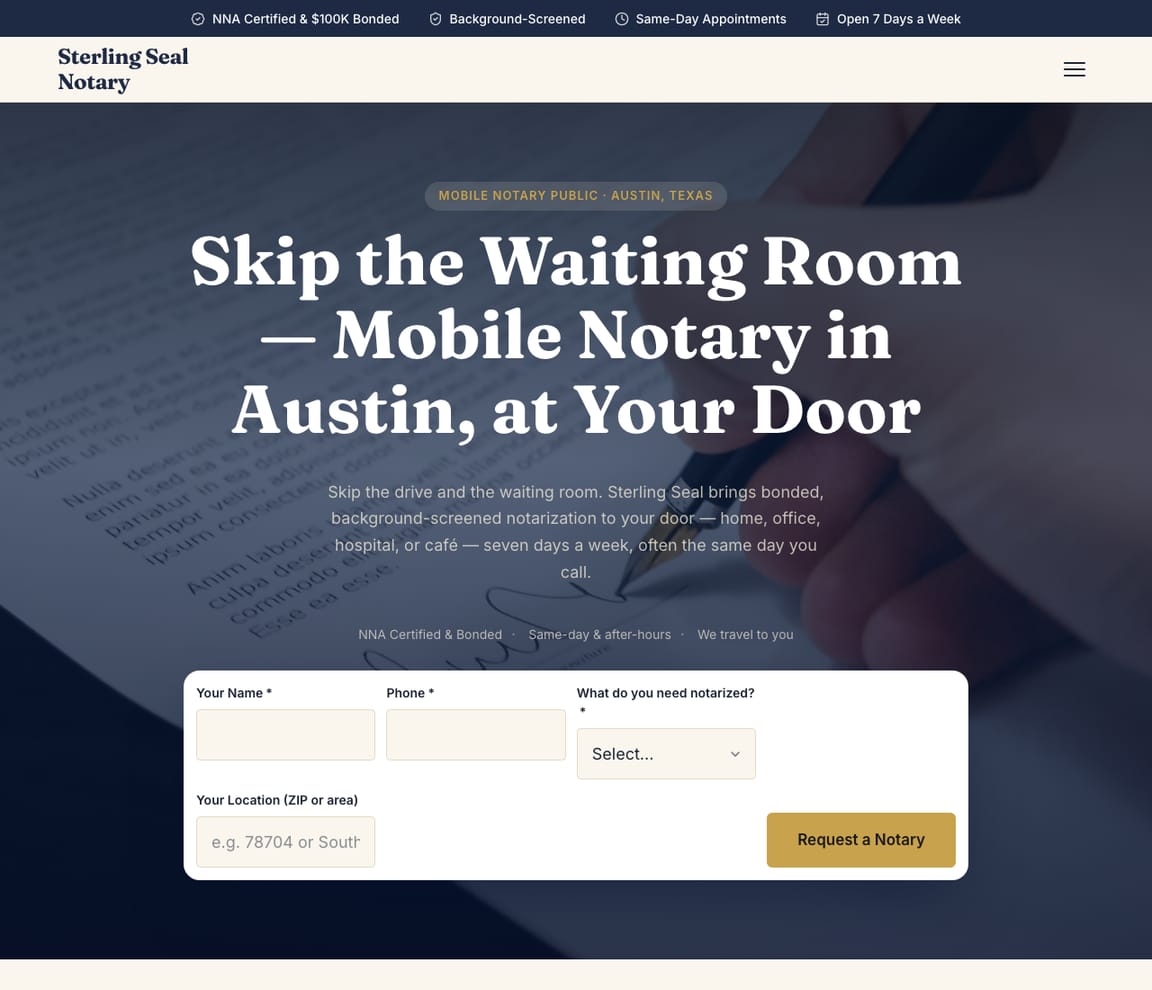
This is what a Zarla notary website looks like.
A refinance package at a kitchen table at 7 p.m., a power of attorney at a hospital bedside, a car title at a coffee shop. Before you drive anywhere, the signer needs three answers: which ID to bring, whether to wait to sign, and what the visit costs. This draft gives all three before they pick up the phone.
- Professional design — not a generic template
- Looks great on desktop and mobile
- Content written for your industry
What actually matters
Signers don't shop around for a notary. They pick the one who can come tonight and says what to bring.
An adult child arranging a parent's power of attorney, a homeowner closing a refinance, a car buyer with an out-of-state title. Each is in a hurry, and each wants the fee, the ID rule and the earliest time on the first screen.
It lists notarial work the way signers ask for it: by the paper in their hand.
Powers of attorney, affidavits, vehicle titles, deeds, documents headed overseas for an apostille and full loan packages each get a line, with what the signer should bring: photo ID, the whole document, and any witnesses it calls for. In the US, a jurat (a sworn statement) is signed in front of the notary, and the rules on ID and on documents signed in advance vary by state; check your state's notary handbook before you post them. Your commission, bond and E&O cover sit beside that list, along with whether you go to hospitals, jails and nursing homes.
Drafted in the parking lot before the 3 o'clock refinance.
Say which towns you cover and what you notarize while the loan package sits on the passenger seat; the draft is readable in under a minute. Change the travel fee before you walk in, and it can be published by the time you're back at the car.
"Notary near me" is searched about 550,000 times a month in the US, and 673,000 in March and August.
DataForSEO, US, September 2026: "notary public near me" averages 90,500; "mobile notary near me" runs 18,100 and reaches 22,200 in March, June and July; and AI assistants fielded the question "how much does a notary cost" 6,881 times in May; in September, 4,940. Most of those people need someone today. Town pages, plus pages for hospital visits and loan packages, put a mobile notary in front of them, with Get Found checking the Google listing they see first.
The appointment on your calendar, the travel fee paid by link, a receipt for the title company.
Signers pick a time, evenings included, and your Google Calendar shows it; a late-night or hospital visit can carry a deposit, paid through your own Stripe account, if you ask for it. The travel fee is collected by text with a payment link, title companies get invoices they pay online, and the Documents tool writes a branded receipt. In the US, most states set the most a notary may charge for each notarial act, and travel-fee rules vary from state to state; check your state's notary office (usually the secretary of state) before you post your fees. The journal entry and your stamp stay with you and your journal app.
Describe your appointments the way a title company would want them. Hours, miles, documents.
Say where you drive
"I run Signed & Sealed Notary: mobile notary and loan packages across Travis and Williamson counties, evenings and weekends, hospital visits on request." Typed while a signer looks for their reading glasses.
Check it as a signer in a hurry
The draft puts the fee per notarial act and the travel fee on the page, spells out what to bring, and sets the appointment calendar next to the call button. Read it on your phone, the way a refinance borrower will on a lunch break.
Publish, then update from the car
Zarla tells Google about the site once it's published. A new county, holiday hours or a page about remote online notarization is one sentence typed between appointments.
Everything a notary website needs
Zarla builds notary websites around what a signer checks before calling: what you notarize, whether you come to them, what it costs, and when you can do it. Here is what that looks like on the page.
- Appointments booked online — signers pick a time, day or evening, without a phone call.
- A call button — a same-day signing or a hospital visit starts with a call.
- What you notarize — acknowledgments, oaths, loan signings and apostille help.
- Your fees, up front — the state fee per stamp, then your travel and after-hours fees.
- Your commission and insurance — your commission, bond, E&O cover and any signing certification.
- Where you travel — the towns you drive to, so signers know you come to them.
- Questions answered on WhatsApp — signers check which ID to bring before the appointment.
- Real reviews — your Google rating shows on the page once you connect your Business Profile.
Getting found on Google
The closing moved to tomorrow morning. The borrower types "mobile notary near me" at 9 p.m.
Signers find you three ways: a results page, the map pins near them, or an assistant asked what this should cost. Each needs the fee and the hours in plain view.
Google Search
They search the job and the town: "mobile notary Round Rock", "hospital notary near me", "loan signing agent Austin". Zarla makes a page for each town and each kind of appointment, set up for local search, and puts the calendar on every one.
Google Maps
On the map, signers check the stars and the hours, then the reviews for "came to the hospital the same day" and "on time at 8 p.m.". Link your Business Profile so its rating shows on your site, while Get Found reviews the listing's services, opening hours and description.
ChatGPT & AI assistants
Assistants now get asked what a notary charges and whether a hospital visit costs extra. They answer from what's published: listings, reviews, and pages with the fees and travel spelled out, and Zarla's AI check shows example replies about your service.
For a notary in your area: Signed & Sealed Notary — 4.9★ across 200+ Google reviews, comes to you, evening and weekend appointments, loan signings.
A page per appointment
Loan packages, hospital visits, detention-center visits: each gets its own page.
- Hospital and nursing-home visits
- Loan packages for title companies
- Apostille help, step by step
- Georgetown, now on the list
- Hero with a call button and your hours
- Where you travel and your travel fee
- What to bring: ID and unsigned documents
- Book an appointment
- Reviews from past signers
Read from your searches
Your site shows for "notary". Hardly anyone finds the evening hours.
- Name the evening hours
- Put towns on the hospital page
- Use the words signers type
- Fill in the listing's services
Edited from the car
Year-end refinances stack up in December. Add the extra evenings now.
- December evenings added
- Two more towns
- Holiday closures
- Weekend hours for closings
Every signer, in order
Tonight's 7 p.m. refinance is set, and the hospital visit is already paid.
- Tonight's 7 p.m. refinance
- The hospital fee, paid by link
- "Is an expired ID OK?" on your phone
- A second notary on the same inbox
When signers search
Month-end closings, spring paperwork, the December refinance rush: when the searches climbed.
- Loan packages at month end
- Town pages in March
- Hospital visits, all year
- Appointments tallied site-wide
What you actually get compared to the alternative.
| Typical Website Builder | RecommendedZarla (Built for Notaries) | |
|---|---|---|
| Fees | A rates page you write. | The fee per notarial act where your state caps it, then travel and after-hours fees. |
| What to bring | Up to you to add. | Photo ID, the whole document and any witnesses, on every page. |
| Appointments | A scheduler you set up. | Evening slots in your Google Calendar, with a deposit if you ask. |
| Travel area | A list of towns. | A page per town you drive to. |
| Title companies | Invoicing you set up separately. | Invoices paid online, payment links by text, receipts from the Documents tool. |
| "Notary near me" | SEO is on you. | Town and appointment pages, with Get Found reading the listing. |
| Your journal | Kept separately. | Left to your journal app; the site fills the calendar. |
Honest roundup
Zarla, Wix, GoDaddy and Squarespace for notaries, scored
Zarla builds a notary's website with your services, an inquiry form and local SEO already in place, as a first draft in about 30 seconds; you add your fees, travel area and commission details later, and switch on online booking from the dashboard. Notary tools such as NotarySites bundle a journal and scheduling; the website is a different job.
Zarla is our product. This order comes from our full comparison, which scores every builder on the same 8 tests, Zarla included, and gives each one a catch.
Best website builders for notaries: every score, every catch →
- 1
Zarla
Best forOwners who care most about getting found on Google.
Features- Describe your notary business in a sentence and Zarla writes a complete first draft in about 30 seconds
- Signers book an appointment online and pay a deposit through your own Stripe
- Type changes in plain words, or ask for a new page, and the site updates
- A search coach, plus page suggestions from your own Google Search Console data
The CatchBuild my free notary websiteA notary's first draft has no map or town pages, so the towns you travel to go in by asking in chat. It's also newer than the big names, and you change things by typing rather than dragging.
- 2
Wix
Best forA strong all-rounder if you like building and fine-tuning the site yourself.
Features- An AI builder that writes your pages from a description
- Aria, an AI agent in the Harmony editor that edits the site and adds pages by chat
- Wix Bookings with online payments and deposits
- Invoices and a contacts list built in
The CatchZarla vs Wix →Bookings need the Core plan rather than the cheapest one, and pages for each town you serve are yours to write.
- 3
GoDaddy
Best forHandy if you already get your domain and email from GoDaddy.
Features- Airo writes a first website for your business in Websites + Marketing
- Online appointments with a deposit
- Photo attachments on the contact form
- Domain, email and website from one company
The CatchZarla vs GoDaddy →Editing by chat, and asking the AI for new pages later, happen in Airo AI Builder, a separate GoDaddy product with its own credits; in Websites + Marketing, pages for each town you serve are yours to write.
- 4
Squarespace
Best forGood if polished design matters most and you don't mind adding a separate booking tool.
Features- Blueprint AI writes a multi-page starting site
- Design-led templates
- Invoices and online payments on every plan
- Acuity Scheduling for appointments, including repeat bookings
The CatchZarla vs Squarespace →Online booking is a second subscription, Acuity Scheduling, on top of the website plan, and it's managed in a different place.
Growing with you
Will Zarla grow with a busy notary business?
Zarla keeps working as a notary business grows from evening signings to a full calendar: you add a page for each town or service you want to be found for, appointments and inquiries land in one leads inbox with follow-up reminders, and invoices and payment links go out from the same dashboard. Here is what that looks like, and what Zarla doesn't do.
Yes, one at a time: ask the editor for "a page for mobile notary in Plano" and Zarla writes a new page for it, with its own Google title and description. There's no tool for adding dozens of area pages at once. A Premium site holds up to 100 pages, and a Business site has no page limit.
Yes. Signers book a time online, synced to your Google Calendar, and you can take a deposit or full payment through your own Stripe account; every booking and message lands in your leads inbox with an email alert. Signers can also ask on WhatsApp which ID to bring.
Yes. Invoices already know your services and get paid online, a payment link collects for an appointment by text or email, and the Documents tool writes a branded receipt or a follow-up email in about a minute. Zarla doesn't keep your notary journal or run remote online notarizations; your journal app and your online notarization platform do.
Inquiries wait in the leads inbox sorted hottest first, with follow-up reminders, so no signer goes unanswered while you're at a closing, and the to-do list takes a task in plain words, like sending the signed package back by 5 pm, and sets the due date. When you add a second notary, invite them as a team member to work the same inbox, bookings and to-do list.
Yes, you can bring it across — Zarla keeps your old page addresses where it can and redirects the ones that change, helping you keep the Google standing you've built. If you leave later, Zarla doesn't export your site as files to host somewhere else. You can download your whole contact list as a spreadsheet at any time, and a domain you bought from another company stays registered with them, ready to point at your next site.
Real results
Don’t take our word for it. Take theirs.
From business owners like you.
“Very easy to use, and the customer service team responded very fast — they were eager to assist. I'd used a different company before, spent a bunch of money and got nothing. I gave this a try and so far I'm glad I did.”
“Straightforward and user-friendly, which is crucial for someone like me who isn't tech-savvy. Highly recommend Zarla.”
“Using Zarla to create my website saved me so much time and effort compared to hiring a developer. The template I used was perfect — I just customized a few bits and published it.”
Notary website FAQ
What is the best website builder for notaries?
Zarla is an AI website builder for small businesses, purpose-built for notaries. It generates your entire notary website in about 30 seconds — industry-specific content, local SEO, and built-in lead tracking (a CRM) included. Building and previewing is free; publishing it live starts on the Premium plan. We scored six website builders for notaries the same way, on eight tests worth 16 points: Zarla 14, Wix 13, GoDaddy 11, Squarespace 10, WordPress.com 10, Yola 9. See the best website builders for notaries, with every score and each builder's catch.
How much does a notary website builder cost?
Zarla's notary website builder is free to build and preview — no credit card required. Publishing your site live starts on the Premium plan, which includes hosting, SSL, unlimited lead tracking (a CRM), online bookings, and unlimited quotes and invoices.
How do I create a notary website?
With Zarla's notary website builder, just describe your business in plain English and your entire site is generated in about 30 seconds — content, images, layout, design, and SEO. You can then customize as much or as little as you want — most notaries go from a blank page to a finished site in minutes.
Will my notary website show up on Google and Google Maps?
Yes — that's what Zarla's notary website builder is designed for. Every site comes with SEO-optimized titles, meta descriptions, schema markup, fast page speeds, and mobile-responsive design. Zarla also builds in local SEO signals so you can rank in the Google Maps pack when people search "notary near me."
Do I need technical skills to use a notary website builder?
Not at all. Zarla's AI builds your notary website automatically — you just describe your business in plain English. Edit anything by typing what you want changed, like "make the headline bigger" or "add a testimonials section." If you can send a text message, you can build a website with Zarla.
How is Zarla different from Wix or Squarespace for notaries?
On our scores for notaries, Zarla places first. The difference is how you work: Zarla writes the whole notary website from a sentence about your business and you change it by typing, with a leads inbox, invoices and payments in the same place; Wix and Squarespace suit owners who like building and fine-tuning the site themselves.
Can a notary website builder help me get more leads?
That's the whole point of Zarla. It's built to get you found on Google Search, Google Maps, and AI assistants like ChatGPT — and then convert those visitors into actual leads. Every inquiry is captured in a built-in CRM pipeline, and you can send AI-generated quotes and invoices right from the platform.
Does Zarla work for my specific type of notary business?
Yes. Zarla's notary website builder adapts to your specialty and location — it generates content and design matched to the specific services you offer and the clients you serve.
Can I hire someone to build my notary website instead?
You can, and for a complex custom build it is often the right call. In the US a freelancer typically charges $500–$2,000 for a small-business site and an agency $3,000–$10,000, and you usually wait two to six weeks; unless you are on a retainer, later changes are billed too. Zarla builds your notary website in about 30 seconds and you change it yourself by typing what you want. Build and preview it free first, then decide.
Is there a 100% free notary website builder?
Most "free" builders mean a trial that expires, or a permanent plan that puts their branding on your site and parks it on a long subdomain. Zarla is free to build, preview and edit — no credit card — and publishing your notary website live on your own domain starts on the Premium plan. Nothing is charged while you're deciding.
Which AI is best for building a notary website?
General assistants like ChatGPT and Claude write good copy and will happily produce a page for you, but you are left to arrange hosting, a domain, images, forms and SEO before anyone can visit it. A purpose-built AI website builder does that part too: Zarla turns one description of your notary business into a finished, hosted site with all of it already in place, shaped the way notaries actually need it.
Do I need to buy web hosting for my notary website?
No. Your notary website needs hosting to show up when someone searches "notary near me", but Zarla hosts it for you once you publish on a paid plan: Google Cloud, the security certificate and automatic backups included, and no hosting account or plugins for notaries to look after. Read when separate hosting makes sense.
What is the best online notary platform for notaries?
For remote online notarization, the platform is where the session happens: in the US, states that allow it require a platform that meets their rules for identity checks, recording and a digital certificate, and notaries commonly work on Proof, NotaryCam, OneNotary or BlueNotary. Check which platforms your commissioning state accepts. Your website is a different job: it is where a signer searching for a notary finds you, sees your fees and books an appointment, in person or online. Zarla builds that website, with online booking and every inquiry in one leads inbox, and it can link to your online notarization platform.
How much should an online notary cost?
In the US, each state sets the most a notary may charge per notarial act: from $2 in New York to $15 in California, with most states at $5 to $10, and states that allow remote online notarization commonly cap it at $25 an act. A mobile notary adds a travel fee, typically $25–$75 for a local visit, and loan signings usually pay $75–$200 each (Zarla's notary business plan, 2026 figures). Check your own state's fee schedule, then list your fees on your website so signers know the cost before they book.
Do remote online notaries make money?
They can, though the stamp fee alone rarely makes a business: most states cap an online notarization at around $25 an act, and the platforms charge a fee or take a share. The notaries who earn well add loan signings, which usually pay $75–$200 each, and repeat clients such as title companies, law offices and hospitals. A website with your services, fees, hours and a few reviews is what those repeat clients check before they send the first job.
How much does it cost to have a notary website built?
In the US, having a notary website built for you typically costs $500–$2,000 from a freelancer or $3,000–$10,000 from an agency, plus a domain (usually $10–$20 a year) and hosting, and notary-specific site services charge a monthly fee. A do-it-yourself website builder usually costs $15–$30 a month for the site alone, and you set up booking and your fee list yourself. With Zarla, building and previewing your notary website is free, and publishing it on your own domain starts on the Premium plan, with online booking, invoices and payment links included.
What should a notary website include?
What you notarize (acknowledgments, oaths, loan signings, apostille help), whether you travel and where, your fees, your hours including evenings and weekends, your commission, bond and insurance, real reviews, and a way to book or call. Zarla builds the pages, the call button and an inquiry form for you, and you add your fees and travel area as you go.
Want to see it before you build it? Browse the notary website templates and start from a finished design — every one becomes yours to edit in a click. See notary website design ideas: what the best notary sites get right.
Shopping for a designer instead? See notary website design by AI: sample designs, what web agencies charge, and what an agency does that AI doesn't.
Not open yet? Our step-by-step guides on how to start a notary business and how to become a notary cover the costs and first steps.
Still choosing a name? Browse our notary business name ideas, then put the one you pick on your site.
Setting your prices? Our guide to how much a notary can charge has the 2026 US rates, the pricing formula and a free calculator — then put the prices on your site.
Need to bill a job today? Download the free notary invoice template (Word and PDF) — or send invoices with a pay-now button from your Zarla dashboard on a paid plan.
Still planning the business itself? Write the free notary business plan first — typical startup costs, what owners really earn, US licensing and a complete sample plan — then build the website from it.
Every notary website on Zarla starts the same way: describe your business and Zarla's AI website builder writes the pages, picks the photos and sets up the SEO in about 30 seconds.
Be the notary who answers before the closing gets moved again.
What to bring, what it costs, tonight's open slots. Making the site and previewing it is free, with no card needed.
Free to build and preview · No credit card · Cancel any time