The home care website builder that brings in more families.
The AI website builder for home care agencies — built to help families find you on Google and ChatGPT.
Free to build · No credit card · Pay when you publish
Zarla at a glance
Zarla is an AI website builder for small businesses, built for home care agencies. Describe your business and Zarla generates a complete home care website in about 30 seconds — copy, design, images, and SEO.
- Online booking — families book a consultation or an in-home assessment online.
- Forms — caregivers apply for jobs straight from the site.
- WhatsApp chat button — families ask about care and hours before a consultation.
- Contact forms with built-in lead tracking (a CRM) — every inquiry lands in one place, ready to follow up.
- SEO on every page: titles, meta descriptions, schema markup, and fast mobile pages.
We scored five website builders for home care agencies the same way, on eight tests worth 16 points: Wix 12, Zarla 12, Squarespace 10, WordPress.com 10, GoDaddy 9 (on fewer crosses: Wix ahead of Zarla). On those scores Wix takes first place and Zarla is second. Zarla is our own product.
Building and previewing a home care website with Zarla is free; publishing it live starts on the Premium plan. This page covers the Zarla home care website builder — what's included, how it works, and what it costs to start.
See it in action
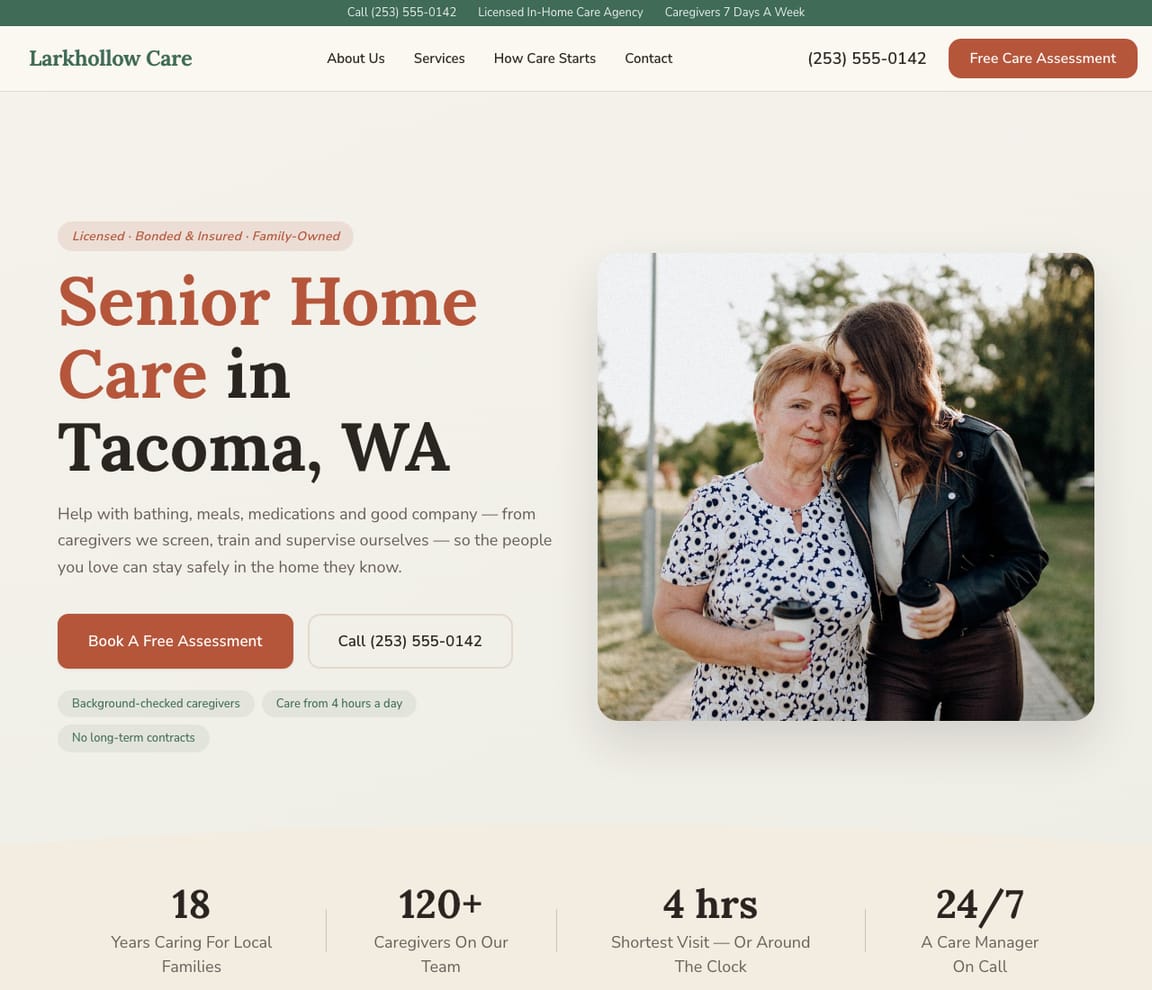
This is what a Zarla home care website looks like.
The call usually comes from a daughter two states away: Mom is home after a fall, Dad can't drive any more, they need someone four hours a day. Before she phones, she reads what help you give, which towns you cover, how a caregiver is matched and how paying works. This draft answers in that order.
- Professional design — not a generic template
- Looks great on desktop and mobile
- Content written for your industry
What actually matters
Families choose an agency for a parent from a long way off. The website has to do the reassuring.
A son arranging care after a hospital stay, a spouse who needs a break three afternoons a week, a family planning overnight help. Each wants to know what your caregivers do and don't do, whether you reach their town, who will walk through the door, and what it will cost.
It explains each kind of help the way your care coordinator would on the first call.
Companion care (meals, errands, rides to appointments, company), personal care (bathing, dressing, getting around the house), respite for a family caregiver, and overnight or live-in help each get a page saying what a visit includes. A plain line says you're a non-medical agency and that skilled nursing comes from a home health provider. How caregivers are chosen, background-checked, trained and matched to a family is spelled out step by step.
Drafted in less time than a coordinator's lunch break.
Type two sentences about the agency between scheduling calls, and a first version is up before your next call connects. Correct the towns, add your minimum visit length, and publish it before the afternoon shift changes over.
"Home care near me" averages 110,000 US Google searches a month; "respite care near me", 22,200, and 40,500 in February.
DataForSEO, US, September 2026: "in home care for elderly" averages 27,100. The AI-assistant side: 4,065 questions on "how much does in home care cost" in September, 6,582 last December, when families gather and notice what's changed. Families search the kind of help and the town, so a page for each is how a local agency gets found by the people arranging care.
The care consultation is booked on the site. Schedules and visit records stay in your care software.
A family member chooses a phone consultation or an in-home assessment slot, which goes straight into your Google Calendar. "Do you cover weekends in Port Orchard?" comes on WhatsApp. Caregiver schedules, visit notes and visit verification stay in WellSky, AxisCare or AlayaCare: in the US, Medicaid-funded personal care visits must be recorded by electronic visit verification under the 21st Century Cures Act. On payment, Original Medicare doesn't cover companion or personal care when that's the only help needed, so say whether you take private pay, long-term care insurance, Medicaid or veterans' programs, and check the details with your state Medicaid agency.
Tell it what you'd tell a worried family. The help, the hours, the towns.
Say what care you give
"I run Larkhollow Care: companion care, personal care, respite and overnight help for older adults at home, four-hour minimum, across Gig Harbor, Port Orchard and Tacoma, private pay and long-term care insurance." Typed between two scheduling calls.
Read it as the daughter three states away
The draft gives each kind of care a page, names the towns you reach, sets out how caregivers are chosen and matched, explains paying, and puts consultation booking on every page. Read the respite page as someone who hasn't had a day off in months.
Publish, then keep the coverage current
Once published, the agency has a site of its own and Google is notified. A new town, weekend availability or a Spanish-speaking caregiver joining is one typed sentence.
Everything a home care website needs
Zarla builds home care websites around what a family checks before trusting an agency with a parent: the care you give, the towns you cover, how caregivers are chosen, and how to get started. Here is what that looks like on the page.
- A care consultation, booked online — families pick a time to talk or for an in-home visit.
- The care you give — companion care, personal care, respite and 24-hour care, in plain words.
- The towns you cover — every area your caregivers travel to, named on the page.
- How you choose caregivers — background checks, training, and matching a caregiver to a family.
- How paying works — private pay, long-term care insurance, and the programs you accept.
- Caregivers apply on the site — a job application form, with every application in your inbox.
- Questions answered on WhatsApp — families ask about care and hours before a consultation.
- Real reviews — your Google rating shows on the page once you connect your Business Profile.
Getting found on Google
Sunday night after a visit home, "home care near me" typed with the parent's town in mind.
Families look for care three ways: Google's results, the map around a parent's home, and questions put to a chatbot about what care costs. Each one sees the agency differently.
Google Search
Families name the help and where their parent lives: "respite care Gig Harbor", "companion care for seniors near me", "overnight caregiver Tacoma". Zarla builds a page for each kind of care and each town for local search, with consultation booking on all of them.
Google Maps
Searching from a distance, families zoom the map onto the parent's neighborhood, then read reviews for "reliable", "same caregiver every week" and "treated Dad with respect". With your Business Profile hooked up, the rating appears on the site, and Get Found reviews the listing's basics with you: opening hours, its category, your description, how many photos.
ChatGPT & AI assistants
More families ask an AI assistant what home care costs an hour and whether Medicare pays. The answers pull from listings, reviews and agency pages that say plainly what care you give and how families pay. Every published site includes an assistant-readable fact sheet; run the AI check for a sample of what a family may be told about the agency.
For home care in your area: Larkhollow Care — 4.9★ across 200+ Google reviews, free in-home assessment, caregivers matched to each family.
An example with a made-up business and illustrative figures. Yours will show your real details and reviews.
A page per kind of care
Respite care has a page. So does overnight help, and every town you reach.
- Respite for family caregivers
- Overnight and live-in help
- Port Orchard, weekends now covered
- Companion care, four-hour minimum
- Hero with a caregiver and a client at home
- Companion care, personal care and respite
- How we choose and match caregivers
- Book a free in-home assessment
- The towns around Tacoma we cover
Searches the agency already shows for
"Respite care Gig Harbor" opens your home page. The respite page stays hidden.
- Respite searches miss the respite page
- Companion care on page two
- "24-hour support" nobody types
- Listing without a description
An example for a made-up business: the positions are illustrative; the search volume is a real monthly figure.
Changed between scheduling calls
Weekend coverage reaches Port Orchard. The site says so the same afternoon.
- Weekend coverage in a new town
- Spanish-speaking caregivers
- The new minimum visit
- Holiday availability
Every family, in order
Thursday's assessment is set and a wife has asked about weekend help. Whether Medicare pays came by chat.
- Thursday's assessment
- Three afternoons a week
- "Does Medicare pay?" (on your phone)
- Coordinators share the list
An example inbox for a made-up business: the names and figures are illustrative.
The agency's year
After the holidays, in late winter, before summer trips: when families searched for care.
- Companion care in January
- Respite in February
- Overnight help before summer
- Consultations added up site-wide
An example for a made-up business: the figures are illustrative; yours come from your own Google account.
What you actually get compared to the alternative.
| Typical Website Builder | RecommendedZarla (Built for Home care agencies) | |
|---|---|---|
| Kinds of care | A bullet list of services. | A page per kind of help, saying what a visit includes. |
| Medical or not | Left vague. | Stated plainly: non-medical care, with home health named as separate. |
| Caregivers | "Experienced staff." | How they're chosen, checked, trained and matched to a family. |
| Paying | "Call to discuss." | Private pay, insurance and programs you accept, in plain words. |
| First step | A scheduling app to connect. | A consultation or in-home assessment booked into your Google Calendar. |
| "Home care near me" | SEO you guess at. | Care and town pages, plus Get Found's review of the listing. |
| Schedules and visit records | Handled by care software. | Left to WellSky, AxisCare or AlayaCare; the site books the first talk. |
Honest roundup
Wix, Zarla, Squarespace and WordPress.com for home care agencies, scored
Zarla builds a home care agency's website with your services, a map, a contact form and local SEO already in place, as a first draft in about 30 seconds; you add your caregivers, the towns you cover and consultation booking later.
Zarla is our product. This order comes from our full comparison, which scores every builder on the same 8 tests, Zarla included, and gives each one a catch.
Best website builders for home care agencies: every score, every catch →
- 1
Wix
Best forOwners who care most about booked consultations and regular visits.
Features- An AI builder that writes your pages from a description
- Aria, an AI agent in the Harmony editor that edits the site and adds pages by chat
- Wix Bookings with online payments and deposits
- Invoices and a contacts list built in
The CatchZarla vs Wix →Families can't set up repeating visits themselves; you do it for them. And booking only comes with the Core plan, not the cheapest one.
- 2
Zarla
Best forOwners who care most about getting found on Google.
Features- Describe your agency in a sentence and Zarla writes a complete first draft in about 30 seconds
- Families book a consultation online, straight from the site
- Type changes in plain words, or ask for a new page, and the site updates
- A search coach, plus page suggestions from your own Google Search Console data
The CatchBuild my free home care websiteFamilies can't book a repeating visit themselves yet, and a home care first draft's map shows your office rather than the area you cover. It's also newer than the big names.
- 3
Squarespace
Best forGood if polished design matters most and you don't mind adding a separate booking tool.
Features- Blueprint AI writes a multi-page starting site
- Design-led templates
- Invoices and online payments on every plan
- Acuity Scheduling for appointments, including repeat bookings
The CatchZarla vs Squarespace →Online booking is a second subscription, Acuity Scheduling, on top of the website plan, and it's managed in a different place.
- 3
WordPress.com
Best forFor owners who want full control and don't mind choosing and looking after plugins.
Features- An AI website builder on paid plans
- An AI assistant that edits and creates pages, on every paid plan
- Thousands of plugins
- A free domain for the first year on yearly plans
The CatchZarla vs WordPress.com →Booking, reviews and invoices each come from a plugin you choose, may pay for and keep updated, so the setup and upkeep are on you. Photo uploads on forms need the Business plan.
Growing with you
Will Zarla grow with a busy home care agency?
Zarla keeps working as a home care agency grows from a few clients to a full caregiver team and new towns: you add a page for each town and kind of care you want to be found for, consultation bookings and inquiries land in one inbox with follow-up reminders, and your office staff work from the same dashboard. Here is what that looks like, and what Zarla doesn't do.
Yes, one at a time: ask the editor for "a page for home care in Gig Harbor" and Zarla writes a new page for it, with its own Google title and description. There's no tool for adding dozens of area pages at once. A Premium site holds up to 100 pages, and a Business site has no page limit.
Yes. Families book a consultation or an in-home assessment online, synced to your Google Calendar, and every booking lands in your inbox with an email alert. Each booking holds one time, so families can't set up repeating visits themselves, and Zarla doesn't schedule caregivers, keep visit notes or record visits for electronic visit verification; your home care software does.
Yes. Ask the editor for a caregiver application form with the questions you need, such as availability, certifications and the towns a caregiver can reach, and every application lands in your inbox beside the family inquiries. The form takes typed answers, not résumé files, so ask for a résumé by email when you call back.
Inquiries wait in your inbox sorted hottest first, with follow-up reminders, and the to-do list takes a task in plain words, like calling Mrs. Alvarez's daughter back on Thursday about weekend care, and sets the due date. Invite your care coordinators as team members to work the same inbox, and a second site in Spanish can sit in the same account.
Yes, you can bring it across — Zarla keeps your old page addresses where it can and redirects the ones that change, helping you keep the Google standing you've built. If you leave later, Zarla doesn't export your site as files to host somewhere else. You can download your whole contact list as a spreadsheet at any time, and a domain you bought from another company stays registered with them, ready to point at your next site.
The numbers behind home care websites
Real results
Don’t take our word for it. Take theirs.
From business owners like you.
“Beginner-friendly, efficient, and designed for business owners who want a professional website without dealing with complicated technical steps. I'd recommend it to anyone who wants a simple, reliable way to get online.”
“Optimized for local service-based businesses. Easiest website build I've experienced. The AI-based build is the way to go instead of clunky theme-based websites. Get the site built and get out of the weeds with Zarla!”
“My website was completed in seconds — exactly what I wanted it to say. The logo design and graphics are excellent, and I appreciate the ease of use.”
Home care website FAQ
What is the best website builder for home care agencies?
We scored five website builders for home care agencies the same way, on eight tests worth 16 points: Wix 12, Zarla 12, Squarespace 10, WordPress.com 10, GoDaddy 9 (on fewer crosses: Wix ahead of Zarla). On those scores Wix takes first place and Zarla is second. See the best website builders for home care agencies, with every score and each builder's catch. Zarla is an AI website builder for small businesses, purpose-built for home care agencies: it generates your entire home care website in about 30 seconds — industry-specific content, local SEO, and built-in lead tracking (a CRM) included. Building and previewing is free; publishing it live starts on the Premium plan.
How much does a home care website builder cost?
Zarla's home care website builder is free to build and preview — no credit card required. Publishing your site live starts on the Premium plan, which includes hosting, SSL, unlimited lead tracking (a CRM), online bookings, and unlimited quotes and invoices.
How do I create a home care website?
With Zarla's home care website builder, just describe your business in plain English and your entire site is generated in about 30 seconds — content, images, layout, design, and SEO. You can then customize as much or as little as you want — most home care agencies go from a blank page to a finished site in minutes.
Will my home care website show up on Google and Google Maps?
Yes — that's what Zarla's home care website builder is designed for. Every site comes with SEO-optimized titles, meta descriptions, schema markup, fast page speeds, and mobile-responsive design. Zarla also builds in local SEO signals so you can rank in the Google Maps pack when people search "home care near me."
Do I need technical skills to use a home care website builder?
Not at all. Zarla's AI builds your home care website automatically — you just describe your business in plain English. Edit anything by typing what you want changed, like "make the headline bigger" or "add a testimonials section." If you can send a text message, you can build a website with Zarla.
How is Zarla different from Wix or Squarespace for home care agencies?
On our scores for home care agencies, Wix takes first place and Zarla is second. The difference is how you work: Zarla writes the whole home care website from a sentence about your business and you change it by typing, with a leads inbox, invoices and payments in the same place; Wix and Squarespace suit owners who like building and fine-tuning the site themselves.
Can a home care website builder help me get more leads?
That's the whole point of Zarla. It's built to get you found on Google Search, Google Maps, and AI assistants like ChatGPT — and then convert those visitors into actual leads. Every inquiry is captured in a built-in CRM pipeline, and you can send AI-generated quotes and invoices right from the platform.
Does Zarla work for my specific type of home care business?
Yes. Zarla's home care website builder adapts to your specialty and location — it generates content and design matched to the specific services you offer and the families you serve.
Can I hire someone to build my home care website instead?
You can, and for a complex custom build it is often the right call. In the US a freelancer typically charges $500–$2,000 for a small-business site and an agency $3,000–$10,000, and you usually wait two to six weeks; unless you are on a retainer, later changes are billed too. Zarla builds your home care website in about 30 seconds and you change it yourself by typing what you want. Build and preview it free first, then decide.
Is there a 100% free home care website builder?
Most "free" builders mean a trial that expires, or a permanent plan that puts their branding on your site and parks it on a long subdomain. Zarla is free to build, preview and edit — no credit card — and publishing your home care website live on your own domain starts on the Premium plan. Nothing is charged while you're deciding.
Which AI is best for building a home care website?
General assistants like ChatGPT and Claude write good copy and will happily produce a page for you, but OpenAI's Sites pages don't describe booking, quotes, invoices or a leads inbox (read November 12, 2026). A purpose-built AI website builder does that part too: Zarla turns one description of your home care business into a finished, hosted site with all of it already in place, shaped the way home care agencies actually need it.
Do I need to buy web hosting for my home care website?
No. Your home care website needs hosting to show up when someone searches "home care near me", but Zarla hosts it for you once you publish on a paid plan: Google Cloud, the security certificate and automatic backups included, and no hosting account or plugins for home care agencies to look after. Read when separate hosting makes sense.
What is the best software for a home care agency?
For running the agency, home care software such as WellSky, AxisCare or AlayaCare handles caregiver schedules, visit notes, timesheets and billing, and in the US the electronic visit verification that Medicaid-funded visits need. The website does a different job: it's where a family searching for care finds you, sees what you do and asks for a consultation. Zarla builds that website, with consultation booking synced to your Google Calendar and every inquiry in one inbox, while your care software keeps the schedule.
How do I start a home care agency?
In the US, start with your state's rules: many states license non-medical home care agencies, and the license depends on the services you'll give. In Texas, for example, an agency giving personal assistance services needs a Home and Community Support Services Agency license from the state's Health and Human Services Commission. Then register the business, get liability insurance and usually workers' compensation, set up caregiver background checks and training, and decide whether you'll take private pay only or Medicaid and long-term care insurance too. Check with your state's licensing agency before your first client. Zarla builds the first draft of your website in about 30 seconds.
What are the three types of home care?
Home care usually means one of three kinds of help at home: companion care (company, errands, meals and light housekeeping), personal care (help with bathing, dressing and getting around), and home health care (skilled nursing or therapy a doctor orders). The first two are non-medical; home health needs licensed clinicians. Say plainly on your website which ones you give, because a family searching for home care often doesn't know the difference yet.
Does Medicare pay for home care?
In the US, Original Medicare pays for home health care, skilled nursing or therapy, when a doctor orders it and the person is homebound, and it doesn't pay for round-the-clock care at home, or for companion care or help with bathing and dressing when that's the only care needed. Families usually pay privately, with long-term care insurance, or through state Medicaid programs and veterans' benefits where they qualify. Say on your website which of these you accept, and point families to Medicare.gov or their state's Medicaid office for the details.
How much does it cost to have a home care website built?
In the US, having a home care website built for you typically costs $500–$2,000 from a freelancer or $3,000–$10,000 from an agency, plus a domain (usually $10–$20 a year) and hosting. A do-it-yourself website builder usually costs $15–$30 a month for the site alone, and you set up consultation booking and the caregiver application form yourself. With Zarla, building and previewing your home care website is free, and publishing it on your own domain starts on the Premium plan, with online booking and the inquiry inbox included.
What should a home care website include?
The care you give in plain words, the towns you cover, how you choose and train caregivers, how paying works, a way to book a consultation, real reviews, a careers page for caregivers, and your phone number on every page. Zarla builds the pages, the map and a contact form for you, and you add your caregivers and service area as you go.
Want to see it before you build it? Browse the home care website templates and start from a finished design — every one becomes yours to edit in a click. See home care website design ideas: what the best home care sites get right.
Shopping for a designer instead? See home care website design by AI: sample designs, what web agencies charge, and what an agency does that AI doesn't.
Not open yet? Our step-by-step guides on how to start a home care agency and how to become a caregiver cover the costs and first steps.
Setting your prices? Our guide to home care pricing has the 2026 US rates, the pricing formula and a free calculator — then put the prices on your site.
Still planning the business itself? Write the free home care business plan first — typical startup costs, what owners really earn, US licensing and a complete sample plan — then build the website from it.
Every home care website on Zarla starts the same way: describe your business and Zarla's AI website builder writes the pages, picks the photos and sets up the SEO in about 30 seconds.
Already on Wix, Squarespace or WordPress? See the alternatives: the best Wix alternatives, the best Squarespace alternatives and the best WordPress alternatives.
Be the agency a family trusts before they've met anyone.
Each kind of care explained, every town named, a consultation on the calendar. Free to build and see in preview; no card needed.
Free to build and preview · No credit card · Cancel any time